
Video trend

Fridge POV AI Video: Framing Guide

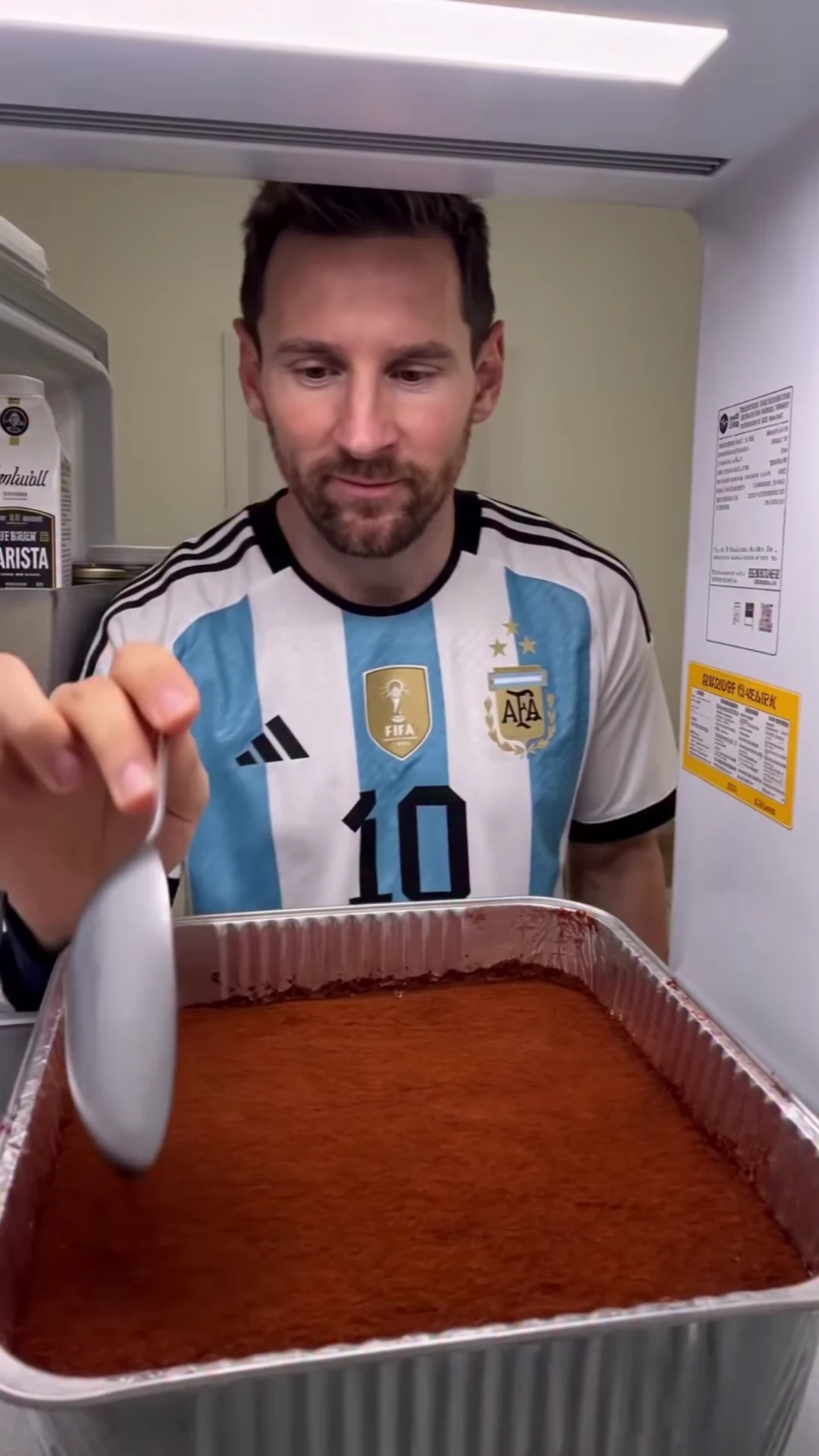
The refrigerator viewpoint works because the food is close to the camera and the character is behind it. A face-only crop loses the spoon’s destination; a food-only crop loses the reaction and return.

Final video
24.75 seconds
Your input
1 photo
Quality
720p
REFERENCE RECREATION24.75 SEC / 9 / 16
Midnight Fridge SnackSource: @bidjou.mohamed.ai · 3 AM fridge check AI reel

Keep the four useful parts of the frame

01

Start with the complete portrait view

The supplied source is 1080 by 1920, a 9:16 portrait composition. A foil dessert tray occupies much of the lower frame; the character’s head and upper body appear above it. Refrigerator structure and packages define the sides and top. Keep this full composition as your starting point before making any optional crop in an editor.

02

Follow the spoon’s entire path

Pause at a scoop and at a bite. A usable crop needs to show where the spoon enters the tray and where it reaches the mouth. If a tighter crop keeps the face but removes the tray edge, viewers lose part of the physical joke. If it favors the tray but cuts the forehead or chin, the character becomes harder to recognize. Compare both moments before settling on a crop.

03

Leave space for the door movement

Around seconds 7–9, the character turns and the door sweeps across the view before reopening. This is an intentional visual interruption. Keeping only the centered face region can hide the departure and make the return feel like a jump. Review the moving door as well as the opening frame; avoid deciding the whole crop from the poster alone.

04

Choose text placement from the actual frame

The lower region is busy with the dessert and spoon, while the middle contains the face and hand movement. The bright upper fridge edge can reduce white-text contrast. Look for a short, uncluttered area in the downloaded video and use a small contrasting text background if needed. There is no verified universal pixel safe zone for this scene; app overlays and your export can change what is visible.

05

If you need a different canvas

For a square or wider publishing layout, place the portrait clip inside the new canvas rather than immediately cutting away its top or bottom. Inspect any padding or background treatment for distraction. The fixed trend itself produces portrait output; a square canvas or added background is a later editorial choice, not a separate framing control in the generator.

06

Compare three moments before exporting

Check an early spoonful, the door interruption and a later scoop from the emptier tray. Keep the person recognizable, the food action readable and the text clear at all three. Use the supplied reference linked in the creator attribution to plan the composition, then review the same moments in your own result.

Explore the Midnight Fridge Snack trend

How to make it

Choose the roles you want to change. Add a photo for each selected role.

Midnight snacker in the Midnight Fridge Snack source video
Midnight snacker
  1. 01

    Choose the midnight snacker

    Upload one photo with a clear face, visible hair and the clothing you want in the scene. Avoid hands, utensils or other objects covering the face.

  2. 02

    Review quality and price

    Choose 480p, 720p or 1080p and review the displayed credit quote. It includes the complete video and the photo and scene preparation used for your character.

  3. 03

    Watch every bite

    Review the spoon-to-mouth contact, door reopening and character consistency before downloading and sharing your portrait MP4 with sound.

01

The camera stays in the fridge

The dessert tray fills the foreground while your character eats behind it. The template follows the source viewpoint, spoon movements and brief door obstruction.

02

Your character and outfit

A single clear photo supplies the snacker's appearance and clothing. Choose an unobstructed face with the hairstyle and upper-body outfit you want to use.

03

The complete snack sequence

Keep the full 24.75-second reference, including the door movement and return to the tray. The final portrait MP4 retains the source soundtrack.

04

An attributed AI source

The preview is @bidjou.mohamed.ai's AI reel, captioned as a 3 AM fridge check. It is a source reference, not a generated Oakgen result or real footage of the person named in its caption.

Photo tips

  • One character per photo
  • Keep the face and hair unobstructed
  • Include the outfit you want
  • Avoid a spoon or hand over the mouth
  • Review the return after the door moves

Questions & answers

What is the Midnight Fridge Snack trend?

It is a fixed fridge-camera scene where one character eats dessert straight from a foil tray, briefly moves the fridge door and returns for more. Midnight Fridge Snack is Oakgen's descriptive name for the supplied 3 AM fridge check reference.

Is this the Messi fridge meme?

The reference creator captions the AI reel with Messi and a 3 AM fridge check. That describes the supplied AI depiction; it is not verified real footage. In Oakgen, your uploaded photo chooses the replacement character.

How many photos do I need?

One. The photo casts the single snacker throughout the clip, including the turn and reappearance after the fridge door moves. The tray and refrigerator are part of the fixed scene.

Will the source football shirt stay?

The template uses the character's outfit from your uploaded photo. Include the clothing you want to see; the source football shirt is not a required costume.

How long is the video?

The complete output is 24.75 seconds in portrait 9:16 format. It includes the source ending rather than stopping at the first bite or door movement.

Does it keep the original sound?

Yes. The final video retains the reference soundtrack. You do not need to record a voice, and this fixed template does not offer soundtrack replacement.

Can I change the food or scene with a prompt?

This template lets you choose the character photo and output resolution. The dessert tray, fridge viewpoint and action sequence are already configured.

Is the preview an Oakgen-generated example?

No. It is the attributed source AI reel. Generated likeness, spoon contact and chewing can vary; inspect your result before sharing.

How much does it cost?

5,020 credits per 720p video. The quote includes one character preparation, three scene references and the full video. Review the selected resolution's quote before generating.
Ideas for your next video

Plan a story, keep your character recognizable, and make the finished clip your own.

Explore the video trend playbook →

Make your Midnight Fridge Snack video

Upload 1 photo. Everything else is set.

Make this video