ChatGPT
 Claude
How to make a video with AI, in four steps: pick a route, prepare one input, generate a short draft, then add sound and trim it in an editor. The route depends on what you already have. A sentence goes to text to video. A picture goes to photo to video. A face that has to speak goes to a talking photo or avatar tool. A script goes to a narrated video built from a voiceover and a few short clips.
Going into 2027, one generation can be the whole video. Kling says Kling 4.0 generates clips of 3 to 30 seconds, and ByteDance says Seedance 2.5 makes up to 30 seconds per generation. Google Flow limits Gemini Omni 1.2 Flash to 10 seconds on a free account and 15 seconds on a Google AI plan. For longer videos, ByteDance says Seedance 2.5 supports multiple rounds of extension, Flow lets Google AI subscribers extend Omni Flash 1.2 videos, and an editor can join several clips. We read those pages on November 19, 2026. Oakgen is our product, and it is one option in this guide, not the answer to every route.
Make your first AI video
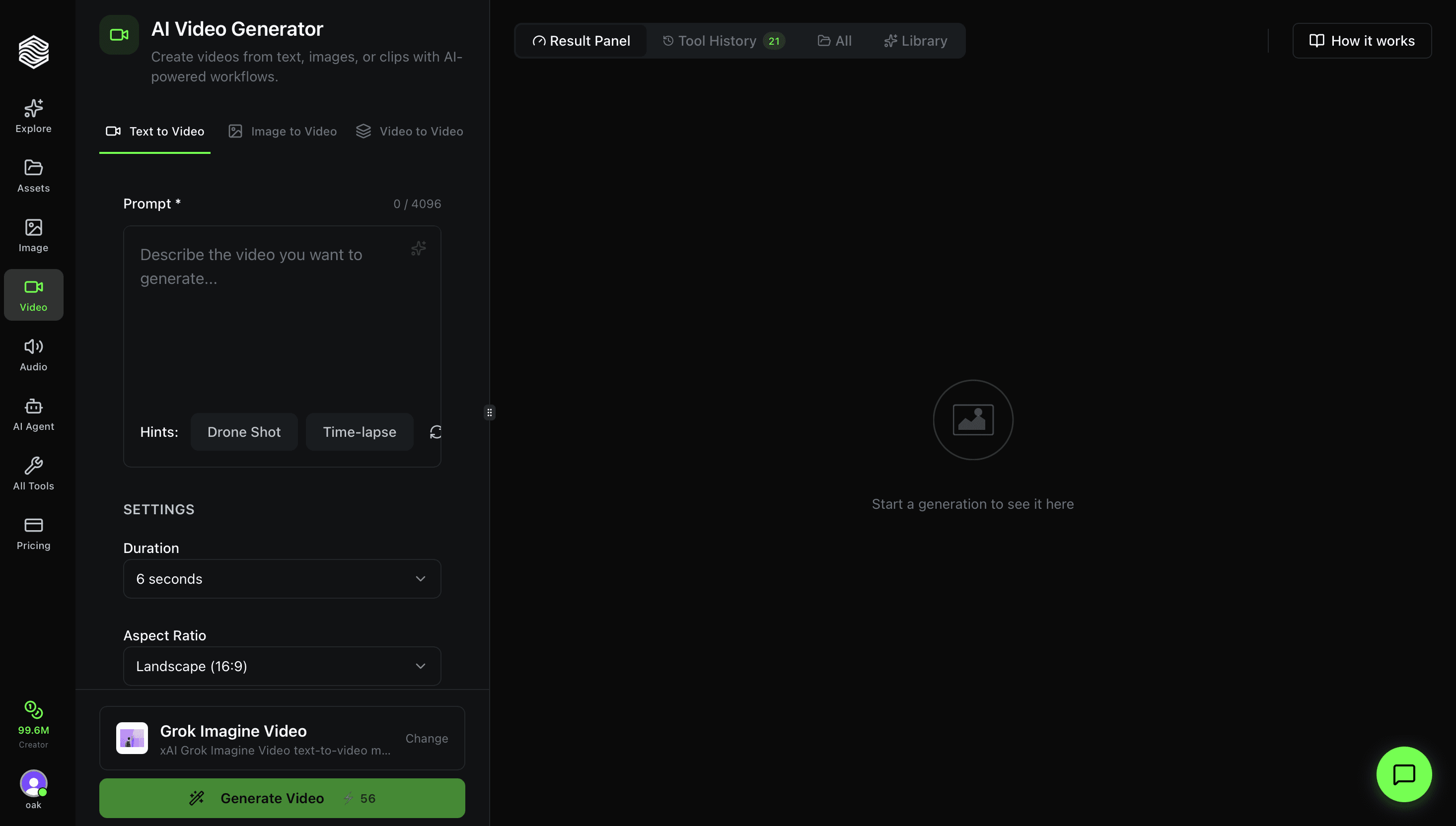
Text, photo and reference modes on several video models, with the credit cost shown before you generate.
Which route should you pick to make your first AI video?
Pick the route by your starting material, not by the model everyone is talking about.

| Route | You start with | Pick it when | Tools that do it (November 2026) | Main catch |
|---|---|---|---|---|
| 1. Text to video | A sentence or a short paragraph | You have an idea and no footage | Kling 4.0, Seedance 2.5, Gemini Omni 1.2 Flash, Runway Gen-4.5, Wan 3.0 | You get what the model imagines, not a specific person or product |
| 2. Photo to video | One picture | The look is right and only needs motion | The same models, with an image or frame input, such as Wan image to video | Big movements can distort faces, hands and logos |
| 3. Talking photo or avatar | A portrait plus a script or audio | Someone has to speak to camera | HeyGen, Oakgen Talking Photo | You need consent for any real face or voice |
| 4. Script to narrated video | A script | Explainers, lists, faceless channels | ElevenLabs for voice, a video model for shots, CapCut to assemble | It has the most steps, and the edit decides the quality |
If you cannot decide, start with photo to video. A picture fixes the look before you spend anything on motion, so the first result is easier to judge.
For a click-by-click walkthrough of our own generator, read how to use the AI video generator on Oakgen. For what AI can and cannot do across a whole production, see can AI make and edit videos.
How we checked this
Every limit, plan and price below was read on the vendor's own pricing, help or model page on November 19, 2026, and is linked where it appears. Prices are US list prices. Where a Black Friday offer was live, we say so. We did not run generations for this post, and the cost figures are our arithmetic on published rates.
What AI can make videos going into 2027?
Five video models and one avatar tool do the generating as of November 2026, and a voice tool and an editor finish the job. The table gives each maker's own figures. Oakgen is not in it because it runs several of these models rather than making one.
| Tool | Longest single clip, per the maker | What is free | Entry paid plan, list price |
|---|---|---|---|
| Kling 4.0 | 3 to 30 seconds | A free tier. Watermark removal, 1080p and commercial use are subscriber benefits | Standard, 660 credits a month. The page shows $10 as a crossed-out reference price beside a one-time offer of $6.50 a month for three months, then $8.80 a month |
| Seedance 2.5 | Up to 30 seconds, with sound | Dreamina has a free option. The credit amount is not stated | Dreamina Basic, $15 a month, 1,575 credits |
| Gemini Omni 1.2 Flash in Google Flow | 10 seconds free, 15 seconds on a Google AI plan | 50 Flow credits a day | Google AI Plus, $4.99 a month, 200 extra Flow credits |
| Runway Gen-4.5 | 2 to 10 seconds per generation, at 12 credits per second | 125 one-time credits for selected models. Gen-4.5 needs Standard or higher | Standard, $15 a month billed monthly, 625 credits |
| Wan 3.0 | "Native 30s". Videos of 10 to 30 seconds are a paid feature | Daily check-in credits. The amount is not stated | Pro, $10 a month billed monthly, 300 credits |
| HeyGen, avatar video | 1 minute on Free, 30 minutes on Creator | 3 watermarked videos a month | Creator, $29 a month, 600 credits |
Two things the table cannot show:
- Models and apps are different things. Seedance 2.5 is a model, and Dreamina is one app that sells it. Runway's pricing page also lists Kling 4.0 and Seedance 2.5, and HeyGen's Pro plan lists Seedance 2.5.
- Older tutorials name tools that are gone or going. OpenAI's help center says the Sora web and app experiences were discontinued on April 26, 2026. Google Flow Help says Veo 3.1 Fast and Veo 3.1 Quality will be retired on December 5, 2026.
Route 1: How do you make an AI video from a text prompt?
Write one short paragraph that names the subject, the action, the place, the camera and the sound, then generate a short draft before the full clip.
- Decide the shape and length first. Vertical 9:16 for Shorts, Reels and TikTok, horizontal 16:9 for YouTube and websites. Then check whether one clip can carry the length. Google's November 5, 2026 launch post says Gemini Omni 1.2 Flash takes a duration from 3 to 15 seconds in one-second steps. In Flow, anything over 10 seconds needs a Google AI plan.
- Split the idea into beats. Kling's own Kling 4.0 guide tells creators to "Break the 30 Seconds Into Story Beats". Three beats of about ten seconds suit most short videos.
- Write the prompt in a fixed order. Subject, action, setting, camera, light, sound. One action per beat.
- Draft cheap. Test the idea at the lowest resolution and a short length. Google Flow Help says Omni at 360p runs "at one-third the credit cost of 720p".
- Change one thing per retake. If the camera is wrong, fix only the camera line.
Here is a worked prompt for a 30-second teaser for a ceramics shop:
Vertical 9:16, 30 seconds, three beats. 0 to 10 seconds: wet clay spins on a potter's wheel in a small sunlit studio, hands shaping a mug, slow push-in, sound of the wheel. 10 to 20 seconds: the finished mug comes out of a kiln, glaze glowing, camera tilts up, soft crackle. 20 to 30 seconds: the mug sits on a wooden table as coffee is poured, steam rising, static close-up, quiet room tone.
In Kling 4.0 or Seedance 2.5 that is one prompt. ByteDance says a Seedance 2.5 prompt can control the narrative, camera and rhythm "for a specific time frame". On a free Google Flow account it becomes three prompts, one per beat, joined in an editor.
On Oakgen, the AI video generator offers text mode on both models. Our Kling 4.0 guide and Seedance 2.5 model page go deeper on each.
Route 2: How do you make a video with AI from a picture?
Upload one clear picture and describe only what should move. The picture already carries the subject, the style and the light, so the prompt covers motion and camera only.
- Choose the picture. The subject should be sharp and fully in frame. Crop it to the final shape first, so the model does not have to invent the edges.
- Write a motion prompt. One movement for the subject, one move for the camera, and a pace. Do not describe what is already visible.
- Keep the motion small. Slow, small movements leave the model less room to redraw faces, hands, printed text and logos.
- Set the ending if you need one. Google Flow calls this Frames to Video. Kling says Kling 4.0 accepts up to 10 keyframes along the clip.
A motion prompt for a product photo of that mug:
The camera pushes in slowly. Steam rises from the mug. Sunlight shifts across the table. Nothing else moves.
The last sentence tells the model to leave the product alone.
If the picture shows a real person, get their explicit consent first. Oakgen's acceptable use policy requires it for any identifiable likeness. For more methods, see how to animate a photo with AI and how to put yourself in an AI video.
Write a motion prompt for your photo
A free browser tool with no signup. Generating the video itself still needs an account and credits.
Route 3: How do you make a talking photo or avatar video?
Give the tool a front-facing portrait and either a script or an audio file, and it returns that face speaking with matched lip movement. Use this route when someone has to talk to camera. There are two kinds of tool.
Avatar platforms. You type a script and choose a presenter. HeyGen's pricing page lists 500+ ready-made presenters on its Free plan, plus one Custom Video Avatar. Creator, at $29 a month, exports in 1080p and removes the HeyGen branding.
Talking photo tools. These take one portrait and one audio track. Oakgen's Talking Photo works this way, with VEED Fabric 1.0 and InfiniteTalk among its lip-sync models. Our Talking Photo walkthrough shows the screen.
The steps are the same on both:
- Pick the portrait. Front-facing, evenly lit, mouth closed, nothing covering the lips.
- Write a short script. Thirty seconds is roughly 55 to 66 words in the planning example from our voiceover timing guide. Read yours aloud with a timer.
- Choose the voice. Use a stock voice or record yourself.
- Test the first sentence. Check the lip sync on a short run before you generate the full script.
A talking photo of a real person needs that person's explicit consent, for their face and for their voice. Clone only your own voice, or another person's with their explicit permission.
Route 4: How do you make a video with AI voice over from a script?
Make the voice first, then cut the pictures to it. A narrated video is a voiceover, a series of short clips or images, captions and quiet music.
- Write for the ear. Short sentences, one idea each, then time it aloud.
- Generate the voiceover. ElevenLabs' pricing page gives about 1 credit per character as the approximate text to speech rate, with lower rates for some models in API use. Its Free plan includes 10,000 credits a month, which its plan table equates to about 10 minutes of speech.
- Mark the beats. Plan a new picture every 3 to 6 seconds, which is roughly five to ten shots for 30 seconds.
- Make each shot. Use Route 1 or Route 2 and keep every clip short and silent. Short clips cost less.
- Assemble. Put the voice on the timeline first, lay the shots over it, then add captions and quiet music. CapCut's free plan lists templates and basic editing tools.
The ElevenLabs Help Center says the free plan "does not include a commercial license" and that free content must be attributed to ElevenLabs when published. All paid plans include a commercial license, provided you are not using Beta Services. Content made with Beta Services cannot be used commercially.
Those rules are on ElevenLabs' publishing page. On Oakgen the whole route runs from one account. Voice and audio has ElevenLabs V4 speech, the music generator has Eleven Music and the instrumental Lyria 3.5, and Compose is a timeline editor for video, images, audio and captions. For sizes and lengths on each platform, see how to make AI content for social media.
Generate the voiceover first
Text to speech, sound effects and voice tools on the same credit balance as your video clips.
What does a finished 30-second AI video cost?
Between nothing and about $9 of plan credits per take at November 2026 list prices, depending on the route. This worksheet turns each vendor's published rate into the cost of 30 finished seconds. The last column is our arithmetic.
| Route | Tool and plan, list price | Rate the vendor publishes | What 30 seconds uses | Share of the month |
|---|---|---|---|---|
| Text or photo to video | Google Flow, no subscription | Gemini Omni 1.2 Flash: 1 credit per second at 360p, 3 at 720p. 50 credits a day. 10 seconds per clip | 30 credits at 360p, 90 at 720p | One day of free credits at 360p, two days at 720p |
| Text or photo to video | Runway Standard, $15 a month | Gen-4.5: 12 credits per second, 2 to 10 seconds per clip. 625 credits a month | 360 credits, as three 10-second clips | 58%, about $8.64 |
| Text to video in an editor | CapCut Pro, $19.99 a month | "up to 240s at 720p" with Seedance 2.0 Mini | 30 of 240 seconds | 12.5%, about $2.50 |
| Talking avatar | HeyGen Creator, $29 a month | Avatar 6 Turbo: 20 credits per minute at 720p or 1080p. 600 credits a month | 10 credits | 1.7%, about $0.48 |
| Voiceover | ElevenLabs Starter, $6 a month | About 1 credit per character for speech, varying by model. 30,000 credits, shared by every included tool | About 500 credits for a 500-character script, at 1 credit per character | 1.7%, about $0.10 |
How to read it:
- Multiply by your retakes. If each shot takes three attempts, the generation rows triple.
- You still pay for the month. The dollar figures show how much of a plan one video consumes, not what your card is charged.
- Two vendors are missing on purpose. Kling's membership page and Dreamina's pricing page list plan credits but not the credits per clip.
- Longer clips can cost more per second. On a Google AI plan, Google Flow Help prices seconds 11 to 15 of a Gemini Omni 1.2 Flash clip at 6 credits each at 720p, double the rate of the first ten.
For plan-by-plan comparisons at fixed budgets, see the best AI creative tools by budget.
How to make a video with AI free
You can make a first test video for nothing. Google Flow is the clearest free route, because it is the only tool here whose page states a daily free allowance as a number. Here is what $0 gets you as of November 2026.
- Google Flow: 50 Flow credits every day, which is one 10-second Gemini Omni 1.2 Flash clip at 720p with 20 credits left. Google Flow Help warns that "roughly 2 PM to 5 PM UTC, you may not be able to generate videos without a subscription".
- HeyGen Free: 3 watermarked videos a month, up to 1 minute each. The HeyGen Help Center says the number is 1 to 3 depending on your region.
- Runway Free: 125 one-time credits for selected models, which Runway says change often. Its Gen-4.5 guide lists Standard or higher as the plan requirement, so the free credits do not cover Gen-4.5.
- Kling, Wan and Dreamina: each has a free tier, and each lists watermark removal as a paid benefit. See the pages for Kling, Wan and Dreamina.
- Oakgen: no free plan, no signup credits and no trial. Generating needs a paid plan and credits.
Check each free plan's license before using its output for client work. Runway places no noncommercial restriction on its Free plan, which watermarks generated videos (usage rights). Kling lists commercial use as a subscriber benefit, and ElevenLabs' free plan has no commercial license. Which AI tools allow commercial use compares the terms plan by plan.
Which tool should you use for your first AI video?
Choose by the job, then by the budget.
- Use Google Flow if your budget is zero and 10-second clips at 720p are enough to learn on.
- Use Kling 4.0 or Seedance 2.5 if you want a full 30-second scene from one generation, or you have many references. Kling says Kling 4.0 takes up to 15 combined reference assets. ByteDance says Seedance 2.5 takes up to 30 images, 10 video clips and 10 audio clips.
- Use HeyGen if the video is a presenter talking for minutes, or it has to be translated. HeyGen's paid plans list 175+ languages and dialects and videos up to 30 minutes.
- Use ElevenLabs or CapCut directly if a voiceover, or an edit of footage you already have, is the whole job.
- Use Oakgen if one video needs several of these steps and you would rather run them from one account and one credit balance than hold three subscriptions.
Where does Oakgen fit, and where does it not?
Oakgen fits when a video needs more than one kind of generation. It does not fit when you need a free tier or a specialist. Where it fits:
- One account for every route. Image, video, voice, music and chat models draw on one credit balance. The generator shows the credit cost before you run it, and credits for a failed generation are returned automatically.
- Several video models. The AI video generator includes Seedance 2.5, Kling 4.0 (listed as Kling V4, with its own model page), Gemini Omni Flash, MiniMax H3 and Grok Imagine Video.
- Commercial use. Eligible outputs can be used commercially under Oakgen's Terms and provider terms. Our commercial use guide explains the conditions.
Where another tool is the better choice:
- Zero budget. Oakgen has no free plan, signup credits or trial. Learn on Google Flow's daily credits or HeyGen's Free plan.
- Studio avatars and translation. HeyGen is built for presenter video. Oakgen offers talking photo and lip-sync, not HeyGen avatars. See our HeyGen alternatives page.
- Editing real footage or voice only. Compose is a timeline editor, but a dedicated editor such as CapCut, or Runway for post-production, does more. ElevenLabs' own product goes deeper than the ElevenLabs models inside Oakgen.
- Models we do not carry. Runway Gen-4.5, Wan 3.0 and Veo are not on Oakgen, and Oakgen does not post to YouTube or TikTok for you.
Current plan prices are on the pricing page. If video is one part of a wider plan, how to make content with AI covers images, voice and music alongside it.
Run all four routes from one account
Video models, talking photo, voice and music on one credit balance. Oakgen has no free plan.
Frequently asked questions
How do I make a video with AI as a beginner?
Pick a route by what you already have. A sentence goes to text to video, a picture goes to photo to video, a face that must speak goes to a talking photo or avatar tool, and a script goes to a narrated video. Then prepare that one input, generate a short low-resolution draft, fix one thing at a time, make the final clip, and add sound and captions in an editor.
Can I make a video with AI for free?
Yes, for a first test. As of November 2026, Google Flow gives every account 50 Flow credits a day and HeyGen's Free plan allows up to 3 watermarked videos a month, depending on region. Free plans usually add a watermark or leave out commercial use. Oakgen has no free plan, signup credits or trial.
Can AI turn a photo into a video?
Yes. Photo to video, also called image to video, takes one picture and a short motion prompt and returns a clip that starts from that picture. Kling 4.0, Seedance 2.5, Google Flow, Runway Gen-4.5 and Wan all accept a picture as input. Describe only what should move, and get consent before animating a photo of a real person.
How long can one AI-generated video clip be?
As of November 2026, Kling 4.0 and Seedance 2.5 make up to 30 seconds per generation, Runway Gen-4.5 makes 2 to 10 seconds, and Google Flow limits Gemini Omni 1.2 Flash to 10 seconds free or 15 seconds on a Google AI plan. For longer videos, models that support it can extend a shot, such as Seedance 2.5, and an editor can join several clips.
How do I make a video with AI voice over?
Write a short script, generate the voiceover first, then cut the pictures to the voice. Time the script aloud, make one short clip or image for each beat, place the voice on the editor timeline, add the shots, captions and quiet music, and export.
What AI can make videos right now?
Going into 2027, the video models named on their makers' pages are Kling 4.0, Seedance 2.5, Google's Gemini Omni 1.2 Flash, Runway Gen-4.5 and Wan 3.0. HeyGen makes avatar videos, ElevenLabs makes voiceovers and CapCut edits the result. OpenAI's Sora is not an option: OpenAI discontinued the Sora app on April 26, 2026 and the Sora API on September 24, 2026.
How much does a 30-second AI video cost?
It depends on the route. At November 2026 list prices, three 10-second Runway Gen-4.5 clips use 360 of the 625 monthly credits on the $15 Standard plan, and 30 seconds of HeyGen Avatar 6 Turbo uses 10 of the 600 credits on the $29 Creator plan. Retakes multiply those numbers.
Sources
- Kling AI, Inside Kling 4.0: A Complete Guide to AI Video Creation, Sep 30 2026 (read 2026-11-19)
- Kling AI, Membership plans (read 2026-11-19)
- ByteDance Seed, One-take Creation, Flexible Referencing: Introducing Seedance 2.5, Jul 31 2026 (read 2026-11-19)
- Dreamina, Seedance plans and pricing (read 2026-11-19)
- Google Flow Help, Learn about Google Flow models and supported features (read 2026-11-19)
- Google Flow Help, Manage your Google Flow credits (read 2026-11-19)
- Google, Flow plans and included features (read 2026-11-19)
- Google, Gemini Omni 1.2 Flash: Fast and cost-effective with longer clips, Nov 5 2026 (read 2026-11-19)
- Runway, Pricing (read 2026-11-19)
- Runway Help Center, Free plan details (read 2026-11-19)
- Runway Help Center, Creating with Gen-4.5 (read 2026-11-19)
- Wan, Wan 3.0 home page (read 2026-11-19)
- Wan, Membership plans (read 2026-11-19)
- HeyGen, Pricing (read 2026-11-19)
- HeyGen Help Center, How to Use Credits on HeyGen (read 2026-11-19)
- ElevenLabs, Pricing (read 2026-11-19)
- ElevenLabs Help Center, Can I publish the content I generate on the platform? (read 2026-11-19)
- CapCut, Pricing (read 2026-11-19)
- OpenAI Help Center, What to know about the Sora discontinuation (read 2026-11-19)