ChatGPT
 Claude
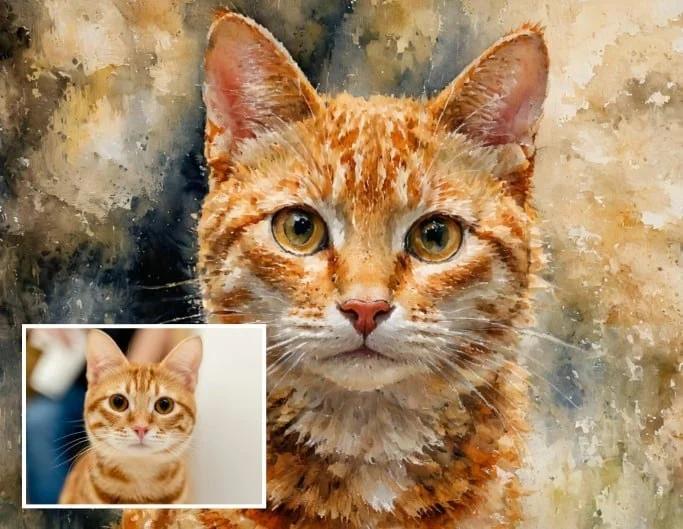
If you want a painting of your dog, choose the photo where you can recognize the outline of its ears, even from across the room. A painterly treatment changes fine details such as the texture of fur. A good outline gives you something to keep when that happens.
Start with the Oil Painting filter if you want a portrait with brushwork and shadows. Use the original photo again for every style you compare. If you feed one finished painting into the next filter, you are comparing two edits at once.
Pick the treatment by what you want to keep
| What matters in the source | A good first treatment | Where to look in the result |
|---|---|---|
| A familiar face, pet or still life | Oil painting | Check the edges of the face or object where light meets shadow. |
| Afternoon light across trees or water | Impressionist painting | Squint at the whole scene. The patches of sun and shade should still read separately. |
| Movement in clouds or a night sky | Starry painting effect | Look for a clear horizon beneath the swirling strokes. A busy foreground can swallow it. |
| A flat graphic for a wall or a party invite | Pop art | Try Pastel Pop or Monochrome on the same crop. Check whether the subject separates from the background. |
Watercolor usually calls for a different review. Pale areas can disappear against white paper. If your final piece will hang on a wall, read the watercolor print guide before enlarging the file.
Make one comparison you can actually use
Imagine a photo of a red bicycle against an ivy-covered wall. Look at the triangle in the frame and the space between the two wheels. In an oil treatment, check whether you can follow the frame past the ivy. In an impressionist pass, the leaves can become strokes of color as long as the bicycle still reads. If both wheels disappear into the wall at postcard size, use a closer crop with less ivy.
For a more angular version, open Cubism and start with Light (Recognizable). Heavy (Abstract) makes sense when the color and composition matter more than the bicycle. If you prefer large outlined areas of color, try Stained Glass on a photo with a simple subject. Thin spokes and tiny lettering are poor candidates for broad glass shapes.
Judge the image where it will be used
For a phone avatar, shrink the candidate until it is about the size of the avatar you actually see on screen. For a print, view a section at the planned print size and check it from your normal viewing distance. Look for brush marks cutting across a pupil, a building that has lost a window, or invented lettering on a sign. A viewer might forgive a simplified leaf and still notice a missing front tooth in a family portrait.
Keep the original and the selected painting together. If the first result nearly works, change the crop or switch the treatment before writing a longer prompt.
Frequently asked questions
Which photo works well as an oil painting?
Pick a clear subject with visible light and shadow. A side-lit face, a pet against a plain wall or a still life with a single light source gives you recognizable shapes to compare after the brushwork changes the detail.
How do I keep a photo recognizable in an abstract style?
Choose a crop with a strong silhouette. With Cubism, start at Light (Recognizable). Look at the result at thumbnail size and check one feature you care about before increasing abstraction.