ChatGPT
 Claude

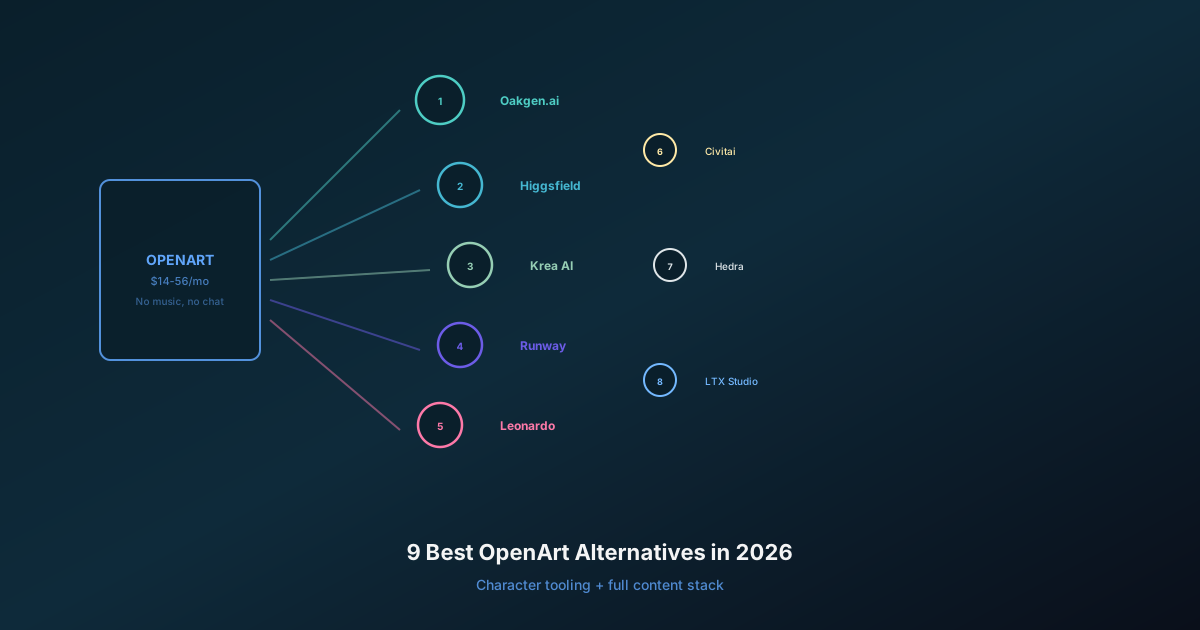
The best OpenArt alternatives in November 2026 are Krea for realtime image work and LoRA training, Runway for video editing, Artlist for credit-free generation on a listed set of models on annual plans, Magnific for stock assets plus upscaling, and Oakgen for image, video, voice and music on one credit balance. Higgsfield and Leonardo round out the list.
The question most people get wrong is commercial use. OpenArt's $14 Starter plan does not include it. OpenArt's Help Center says "Commercial use is available on the Plus plan and above", and Plus lists at $34 a month. Several alternatives include commercial use on their cheapest paid plan, which changes the real comparison.
Every number below was read on the vendor's own page on November 19, 2026. Prices are monthly list prices, not Black Friday prices.
How do the best OpenArt alternatives compare in November 2026?
The table puts each tool's cheapest paid plan next to the cheapest plan whose own page grants commercial use, at monthly list prices.
| Tool | Best for | Cheapest paid plan | Cheapest plan with commercial use | Free option | Do plan credits roll over? |
|---|---|---|---|---|---|
| OpenArt (reference) | One recurring character, Director films; Pro and Wonder are eligible for select-model Unlimited promotions, so confirm an active offer and expect possible slower queues at high activity (Help Center) | Starter, $14, 4,000 credits | Plus, $34 | 40 trial credits, 7 days | No (add-ons do) |
| Krea | Realtime image work, LoRA training | Basic, $9, 5,000 units | Basic, $9 | 100 units a day | No |
| Higgsfield | Many video models, own camera tools | Starter, $19, 270 credits | Starter, $19 | Free plan, no monthly credits | No |
| Runway | Video generation and editing | Standard, $15, 625 credits | Free (no non-commercial restriction) | 125 one-time credits | Only on Max (1 month) |
| Artlist | Credit-free short clips and images on listed models: AI Core, $287.88/year, for Unlimited; unpublished daily thresholds apply (guide) | AI Starter, $19.99, 16,500 credits | AI Starter, $19.99 | Free samples | Not stated |
| Magnific | Stock assets plus image upscaling | Premium, $20, 20,000 credits | Premium, $20 | 20 images a day | Annual credits last 1 year |
| Leonardo | High-volume image work | Essential, $12, 8,500 tokens | Free (licence, Leonardo also holds rights) | 150 tokens a day | Token bank on paid plans |
| Oakgen (our product) | Image, video, voice and music on one balance | See pricing page | No plan line: eligible outputs, under Oakgen's Terms | None | No (add-ons never expire) |
"Not stated" means the vendor's page did not say, not that the answer is no.
See current Oakgen plans
One credit balance for image, video, voice and music, with the cost shown before each generation.
Who this is for
This guide is for people who pay for OpenArt, or nearly did:
- A creator on Starter who just learned Starter does not cover client or ad work.
- A small studio that uses OpenArt more for video than for characters.
- Someone who wants one subscription for images, video, voice and music.
If your whole job is one AI character across hundreds of scenes, read "When should you stay on OpenArt?" first. You may not need to switch.
What changed at OpenArt going into 2027?
OpenArt's monthly list prices are the same as in the 2026 edition of this guide. The free start changed, and this edition reads each plan card in more detail.
- Same four prices. OpenArt's pricing page on November 19, 2026 listed Starter at $14 (4,000 credits), Plus at $34 (12,000), Pro at $56 (24,000) and Wonder at $240 (106,000), billed monthly.
- Director and MCP on every plan. Each plan card lists "Access to Director" and "Access to OpenArt MCP". Director makes multi-scene films; MCP lets an AI agent such as Claude or ChatGPT generate on your account. Our comparison of Krea Agent, OpenArt Director and Higgsfield Supercomputer covers Director in depth.
- A 40-credit trial. OpenArt's FAQ says new accounts "receive 40 trial credits to try any premium features and advanced models within 7-day trial period."
- Commercial use from Plus. The pricing page lists "Commercial use rights" on Plus, Pro and Wonder, not Starter.
- Newer models. The site menu names Seedance 2.5, Kling 4.0, GPT Image 2.6, Nano Banana 2.1 and Seedream 5.5.
- Character caps per plan. Plans range from "Up to ~13 consistent characters" on Starter to "~353" on Wonder.
Plan credits "do not carry over to the next month", per the pricing page FAQ. Add-on credits ($15 a month for 5,000, Plus and above) do roll over, per the Help Center.
OpenArt's Black Friday banner offers up to 40% off the first year of annual plans. Its pricing page FAQ says promotional discounts "apply only to the first billing period" and that a plan renews "at the then-current list price". Krea and Higgsfield also show Black Friday prices, and Higgsfield's monthly Plus and Ultra cards say they renew at $59 and $129. Every price in this guide is the list price.
Which OpenArt alternatives are worth paying for?
These seven are in no ranked order. Oakgen is our product, so weigh its entry with that in mind.
Krea: the realtime and LoRA pick
Krea is the closest match for OpenArt's image-and-training side, and it costs less to get commercial rights. Krea's pricing page on November 19, 2026 listed Basic at $9 a month for 5,000 compute units, with a commercial license and LoRA training on up to 50 images. Its FAQ says Basic, Pro, Max, Business and Enterprise "include a commercial license"; the Free plan is not on that list.
Krea's free plan gives 100 units a day. The site leads with Krea 3, Krea Agent and realtime generation that renders as you draw. Pro shows a list price of $42 a month for 20,000 units. Monthly units on Basic, Pro and Max "do not roll over", and top-up packs "are valid for 90 days". Our Krea 3 guide covers the new model.
- Choose it for: fast visual iteration, style training, cheap commercial rights.
- Skip it if: you want a character builder with per-plan character slots like OpenArt's.
Higgsfield: many video models, short unlimited windows
Higgsfield suits people who use OpenArt mainly for video. Higgsfield's pricing page on November 19, 2026 listed Starter at $19 for 270 credits a month, with Plus at a $59 list price (1,200 credits) and Ultra at $129 (3,000 credits). Commercial use is "Included" on Starter, Plus and Ultra and "Not included" on Free.
The free plan has "limited access to selected AI models, no monthly credits, and one generation at a time." Plus and Ultra add "Unlimited models for 7 days" on image models such as Nano Banana Pro and GPT Image 2.6 at 2K. Higgsfield's fine print says unlimited and free generations "work only on higgsfield.ai", and "Subscription credits do not roll over and expire at the end of each credit cycle." Our Higgsfield pricing guide breaks the credits down, and which video plans are still unlimited covers the time limits.
- Choose it for: a long video model list and commercial rights from the first paid tier.
- Skip it if: you need many generations, since 270 credits a month is small.
Runway: the video editing pick
Runway is the pick when you edit video as much as you generate it. Runway's pricing page on November 19, 2026 listed Standard at $15 a month for 625 credits, which the page puts at "52s of Gen-4.5". Pro is $35 for 2,250 credits and Max is $95 for 9,500. The model list includes Gen-4.5, Aleph 2.0, Kling 4.0 and Seedance 2.5.
Runway's rights are the simplest here. Runway's usage rights page says content you create "is yours to use without any non-commercial restrictions from us", and it makes no exception for the Free plan. The Free plan gives 125 one-time credits. Monthly credits on Standard and Pro "don't roll over"; Max rolls over up to one month. If you are moving off Sora as well, see our Sora 2 replacements.
- Choose it for: editing real footage, in-house video models, clear rights.
- Skip it if: you mostly make images and want character slots or model training, which Runway's plan cards do not list.
Artlist: credit-free runs on a fixed model list
Artlist is new to this list, and it answers a different question: what if most generations did not use credits at all? Artlist's AI pricing page on November 19, 2026 listed AI Starter at $19.99 a month for 16,500 credits and up to 3 members, AI Core at $39.99 for 40,000 credits, and AI Pro at $99.99 for 120,000. Each of the three AI plan cards says "License covers commercial use."
On yearly billing, AI Core adds "Unlimited Generations" on named models; Artlist's pricing guide puts that plan at $287.88 a year. Monthly plans get none: Artlist's Help Center says "For monthly subscription plans, and yearly plans below 40,000 credits, all model generations require credits."
Artlist's own pages disagree on the list. The AI Core plan card names ten models, including Nano Banana 2.1, Seedream 5.5, Gemini Omni 1.2 Flash, Wan 3.0 and MiniMax H3 Max. The Help Center table for 40,000 credits lists seven, caps every video at 5 seconds and 720p or lower, and caps images at 1K or 2K. It leaves out Nano Banana 2.1 and MiniMax H3 Max, which the pricing guide does list.
AI Core includes 700 fast generations a month and 4 at a time; after that, generations "simply process at a standard speed." Artlist's terms (section 14.19) add "daily usage thresholds" without publishing the numbers. Unlimited is "for human use only", does not work through the Artlist Agent, and "MCP usage is credit-based."
- Choose it for: heavy use of the listed models at their capped settings on an annual plan, with music and voice in the same plan.
- Skip it if: you want to pay monthly, need longer or sharper clips, or your model and settings do not show in the live Unlimited toggle.
Magnific: stock assets, upscaling and training in one plan
Magnific is the company formerly called Freepik, and it fits people who need stock assets and upscaling next to generation. Magnific's pricing page on November 19, 2026 listed Premium at $20 a month, Plus at $45 and Pro at $110. Magnific's plan docs give Premium 20,000 credits a month. Training a character costs 3,000 credits on every paid plan.
The free plan gives "Up to 20 AI image generations per day with the in-house model", but the docs say it is "for personal use only and requires attribution." Commercial use starts at Premium. Relax mode, which runs many image models without credits, is on Plus and Pro only. On annual billing, credits are "valid for 1 year, no monthly resets." Our Magnific rebrand explainer and Magnific alternatives go deeper.
- Choose it for: a stock library, upscaling and character training under one license.
- Skip it if: you want to buy extra credits on Premium; the docs say you "must be a Plus or Pro user", although the Premium pricing card lists top-ups, so check at checkout.
Oakgen: image, video, voice and music on one balance
Oakgen is our product. It is a multi-model studio where one credit balance pays for image, video, voice, music and chat, and the generator shows the credit cost before you submit. Credits for a failed generation go back to your balance automatically.
Models available today include Kling V4 and Seedance 2.5 for video, Nano Banana 2.1 and GPT Image 2.5 Sunburst and Flare for images, ElevenLabs V4 for voice, and Eleven Music and Lyria 3.5 for music.
For characters, AI Influencers creates a reusable character from a description or a photo you have permission to use, then brings its face and voice into photos, videos and trends. It works from references, with no training. For stories, Micro Drama makes a vertical series from a story, a locked cast and a storyboard. We compare it with OpenArt's Director in OpenArt Director vs Oakgen Micro Drama.
Oakgen has no free plan, no signup credits and no trial. Current plan prices are on the pricing page. Monthly plan credits reset at renewal; add-on credits never expire. Eligible outputs can be used commercially under Oakgen's Terms and provider terms; our commercial use guide explains the conditions.
- Choose it for: one account across formats and workflows such as Micro Drama.
- Skip it if: you need a free plan, LoRA training or realtime generation.
Leonardo: daily free tokens and trained models
Leonardo suits high-volume image work with a free daily allowance. Leonardo's pricing page on November 19, 2026 listed Essential at $12 a month for 8,500 fast tokens, Premium at $30 for 25,000 and Ultimate at $60 for 60,000. Essential allows 10 personal AI model trainings a month. Free gives 150 fast tokens a day.
Leonardo's rights split by plan. On Free, "Leonardo.Ai holds rights to use, reproduce, modify, and distribute any images you create", while you get "a non-exclusive, royalty-free licence" for commercial use. On paid plans, the page says "you retain full ownership" of images you generate. Premium adds unlimited relaxed generation, but only on a listed set of image models (Leonardo's own plus FLUX Dev and FLUX Schnell); the page says third-party models such as Nano Banana, Kling and Seedance are not eligible.
- Choose it for: daily free tokens and per-plan model training.
- Skip it if: your main models are ones like Nano Banana, Kling or Seedance, which always use tokens and are not on the Free plan.
For hands-on training, Civitai's memberships run from Bronze at $10 a month (3 private models) to Gold at $50 (100 private models). Its membership page did not state commercial terms, so check each model's license before paid use.
Build a character you can reuse
Create an AI influencer from a description or a permitted photo, then use its face and voice across images and video.
Where is the commercial-rights floor on each tool?
This table shows the cheapest monthly plan on each tool whose own page grants commercial use, and what the free option allows, at list prices as of November 19, 2026.
| Tool | Commercial-rights floor | Monthly list price | What the vendor's page says | Free output |
|---|---|---|---|---|
| OpenArt | Plus | $34 | "Commercial use is available on the Plus plan and above" | Non-commercial, video watermark |
| Krea | Basic | $9 | Basic and up "include a commercial license" | Not on the commercial list |
| Higgsfield | Starter | $19 | Commercial use "Included" from Starter | "Not included" |
| Runway | Free | $0 | "without any non-commercial restrictions from us" | Covered by the same page |
| Artlist | AI Starter | $19.99 | "License covers commercial use" | Not stated |
| Magnific | Premium | $20 | Commercial use from Premium | Personal use, attribution required |
| Leonardo | Free (licence) or Essential (ownership) | $0 or $12 | Free: Leonardo "holds rights" too; paid: "you retain full ownership" | Licence only |
| Oakgen | Not tied to a plan | See pricing | Eligible outputs, under Oakgen's Terms and provider terms | No free plan |
A vendor license covers the vendor's restrictions, not other people's rights: a face, a logo or a song you upload still needs its own permission. The gap is widest on OpenArt, at $34 for Plus against $9 for Krea Basic or $19 for Higgsfield Starter.
Which OpenArt alternative should you pick?
Start from the job. Most of these tools sell the same third-party models, so plan rules decide more.
- Use Krea if you iterate visually, want LoRA training and need commercial rights for under $10 a month.
- Use Runway if you edit existing footage or want Runway's own Gen-4.5 and Aleph 2.0 models.
- Use Artlist AI Core if capped settings (5-second clips at 720p or lower, 1K or 2K images) are enough, you can pay annually and you need music and voice too. The yearly plan card and the Help Center table list different models, so compare the two and confirm the exact settings in the live Unlimited toggle.
- Use Magnific if you need stock photos and video, upscaling and character training under one license.
- Use Higgsfield if you want a long video model list and commercial use from $19, and can live with 270 credits.
- Use Leonardo if you want a daily free allowance and make most images on the models in its relaxed list.
- Use Oakgen if you make image, video, voice and music for the same projects and want one balance, with the cost shown before each run.
- Stay on OpenArt if one consistent character, Director films or 3D worlds are the core of your work.
Run video, voice and music from one balance
Kling V4, Seedance 2.5, ElevenLabs V4 and Eleven Music in one studio, with credits returned when a generation fails.
When should you stay on OpenArt?
Stay if your output is one character in many scenes, such as a mascot, an AI influencer or a series lead. OpenArt's site menu lists Character Builder, Director and 3D World together, and its plans cap consistent characters from about 13 on Starter to about 353 on Wonder. OpenArt's FAQ also says model training "comes with subscription plans", which Oakgen does not offer.
OpenArt has its own Unlimited too. Its Help Center says Pro and Wonder are eligible on select models during promotion periods named on the pricing page, and that high-activity accounts may move to a slower queue. The plan cards we read on November 19 named no Unlimited models, only Black Friday model discounts, so check before you count on it.
The bad deal is Starter for paid work, because it carries no commercial rights. If agents are why you are on OpenArt, see our OpenArt MCP alternatives.
What mistakes do people make when switching from OpenArt?
Most come from comparing headline prices instead of plan rules.
- Reading the old FAQ. OpenArt's FAQ page still says "You can use any image you created for commercial purposes." Its Help Center and pricing page say Plus and above. Go by the stricter, plan-level wording.
- Comparing credits across vendors. OpenArt credits, Krea units and Runway credits are different units. Compare the cost of the clip or image you actually make, on the same model and settings.
- Budgeting on sale prices. Black Friday prices renew at list price, as the warning above explains.
- Assuming unlimited means everything. OpenArt, Artlist, Higgsfield and Leonardo limit unlimited use to listed models, settings, queues or time windows. Higgsfield's applies only on its website, and Artlist's needs a yearly plan from 40,000 credits.
- Letting credits expire. OpenArt, Krea, Higgsfield and Runway Standard and Pro reset plan credits each cycle. Buy smaller and top up.
- Forgetting the inputs. No vendor license clears a real person's face or voice. That needs the person's consent.
Where Oakgen fits and where it does not
Oakgen fits when one project needs several formats: a Nano Banana 2.1 still, a Kling V4 clip, an ElevenLabs V4 voiceover and an Eleven Music track, all from one balance. It also fits teams that work through AI agents, since its MCP endpoint lets ChatGPT, Claude and Cursor get a quote and generate on the same account.
It does not fit four cases:
- Zero budget. Oakgen has no free plan or trial. Krea, Leonardo and Runway have free starts.
- Realtime ideation. Oakgen generates asynchronously. Krea is stronger for drawing and seeing results live.
- Custom trained models. Oakgen offers no LoRA training or community models. OpenArt, Krea, Leonardo and Civitai do.
- Editing real footage. Runway is stronger for post-production timeline editing.
For a broader view of image models, see our best AI image generators by use case and Nano Banana 2 and 2.1 alternatives. For a direct match-up, there is Oakgen vs OpenArt.
How we checked this
On November 19, 2026 we read each vendor's own pricing, help or FAQ pages, listed in the sources, and printed list prices. This article involved no generations, so nothing here describes output quality. Oakgen facts come from Oakgen's own pages and Terms.
Pick a plan that fits your mix
Current Oakgen plan prices and what each includes are on the pricing page.
Frequently asked questions
What is the best OpenArt alternative in 2027?
It depends on the job. As of November 19, 2026, Krea is the pick for realtime image work and LoRA training from $9 a month, Runway for video editing, Artlist AI Core on annual billing for credit-free short clips and images on a listed set of models, and Magnific for stock plus upscaling. Oakgen fits people who want image, video, voice and music on one credit balance. For one recurring character, OpenArt itself is still hard to beat.
How much does OpenArt cost in November 2026?
OpenArt's pricing page on November 19, 2026 listed Starter at $14 a month for 4,000 credits, Plus at $34 for 12,000, Pro at $56 for 24,000 and Wonder at $240 for 106,000, billed monthly. A Black Friday sale cuts the first year of annual plans by up to 40%, but renewals bill at the list price, so budget on the monthly figures.
Can I use OpenArt images commercially on the Starter plan?
No. OpenArt's Help Center, read on November 19, 2026, says all plans can use creations for non-commercial purposes and that commercial use is available on the Plus plan and above. The pricing page lists commercial use rights only on Plus, Pro and Wonder. An older OpenArt FAQ page still says any image you create can be used commercially, so go by the Help Center and pricing page.
Is OpenArt free?
Only as a short trial. OpenArt's FAQ, read on November 19, 2026, says new accounts receive 40 trial credits to use within a 7-day trial period. The Help Center says free users cannot remove the watermark from videos, and free use is non-commercial. More credits come only with a paid plan, since the Help Center says extra credits cannot be bought without a subscription.
Which OpenArt alternative has a real free plan?
As of November 19, 2026, Krea gives 100 compute units a day, Leonardo 150 fast tokens a day, Magnific up to 20 image generations a day with its in-house model, and Runway 125 one-time credits that do not expire. Krea lists its commercial license on paid plans only, and Magnific says free output is for personal use. Oakgen has no free plan, no signup credits and no trial.
Does Oakgen have a character builder like OpenArt?
Not a builder with training. Oakgen's AI Influencers feature creates a reusable character from a description or a photo you have permission to use, then brings its face and voice into photos, videos and trends. It works from references, with no model training, and Oakgen offers no LoRA training or community models. If you need trained character models, OpenArt, Krea or Civitai go further.
Did you test these OpenArt alternatives yourselves?
No. We did not run generations for this article and make no claims about output quality. Every price, plan name, limit and policy comes from the vendor's own pricing, help or FAQ pages, read on November 19, 2026. Oakgen facts come from Oakgen's own product pages and terms. Oakgen is our product, and the article says where other tools are the better choice.
Sources
- OpenArt, Pricing (read 2026-11-19)
- OpenArt, Help Center (read 2026-11-19)
- OpenArt, FAQ (read 2026-11-19)
- Krea, Pricing (read 2026-11-19)
- Higgsfield, Pricing plans (read 2026-11-19)
- Runway, Pricing (read 2026-11-19)
- Runway Help Center, Usage rights (read 2026-11-19)
- Artlist, AI plan pricing (read 2026-11-19)
- Artlist Help Center, Understanding Unlimited models (read 2026-11-19)
- Artlist Blog, AI pricing: plans, credits and Unlimited models (read 2026-11-19)
- Artlist, Terms of Use, section 14.19 (read 2026-11-19)
- Magnific (formerly Freepik), Pricing plans (read 2026-11-19)
- Magnific Docs, Plans and pricing (read 2026-11-19)
- Leonardo.Ai, Pricing (read 2026-11-19)
- Civitai, Memberships (read 2026-11-19)