ChatGPT
 Claude
The best Luma alternatives in November 2026 depend on which part of Luma you would be replacing. Luma is no longer just Dream Machine. It is an agent workspace, Luma Agents, that runs its own Ray3.2 video model next to Seedance 2.5, Kling 4.0 and other models, and it now plugs into Claude and ChatGPT through an MCP connector.
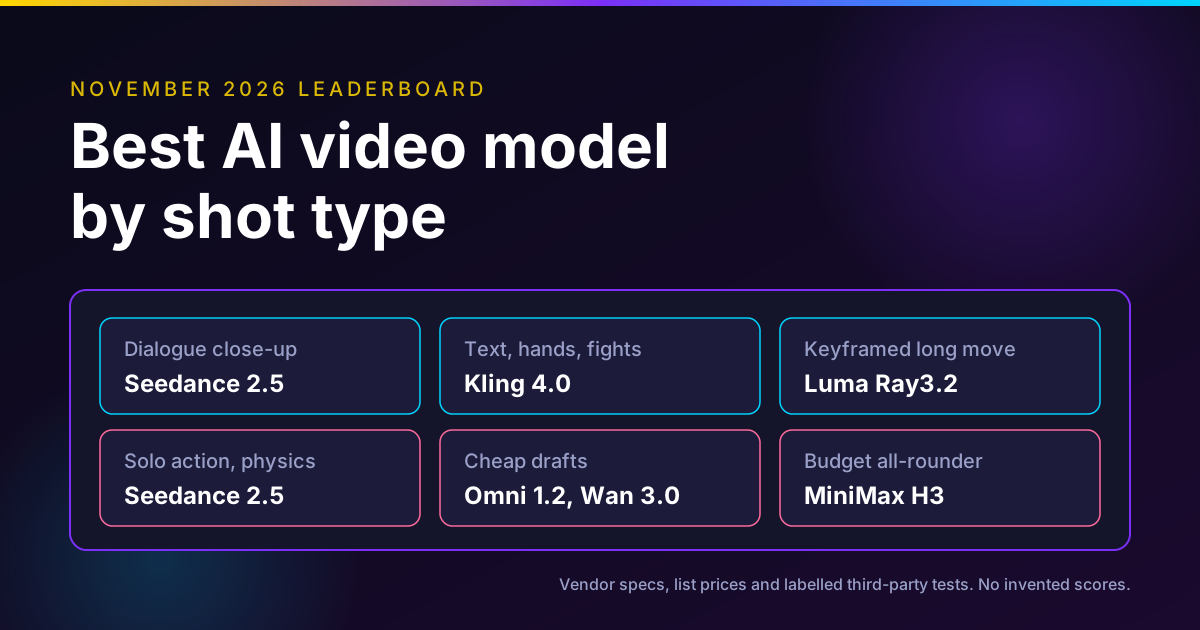
Short version, as of November 13, 2026: for editing footage you already shot, use Runway Aleph 2.0. For long single takes, use Kling 4.0 or Seedance 2.5. For a free start, use Google Flow. For cheap volume on many third-party models, look at Higgsfield or Krea. Keep Luma if you need HDR and 16-bit EXR out of the generator. Oakgen, our product, fits when you want several of those models plus short edits in one credit balance, but it does not offer Ray3.2.
Compare video models on one brief
Oakgen is our product. It runs Seedance 2.5, Kling 4.0, MiniMax H3 and other video models from one credit balance, so you can test the same shot across them.
Luma alternatives at a glance
Prices are list prices from each vendor's own page, read on November 13, 2026. Credits are not comparable across vendors, so the cost column gives the closest like-for-like number we could compute.
| Tool | Best for | Strength | Weakness | Cost note (Nov 13, 2026) | Edits real footage? |
|---|---|---|---|---|---|
| Luma (Ray3.2) | HDR and EXR delivery, keyframed shots | Up to 16 keyframes, 16-bit EXR | Text and image to video stop at 10 s | Plus $30/mo, 10,000 credits; 1080p is 400 credits per 5 s | Yes, Modify Video V2 up to 20 s at 24 fps |
| Runway (Aleph 2.0) | Editing existing clips | Edits up to 30 s at 1080p across cuts | Credits run out fast on Aleph | Pro $35/mo, 2,250 credits; Aleph is 140 credits per 5 s | Yes |
| Kling 4.0 | Long single takes, references | 3 to 30 s in one pass, 10 keyframes | Our pricing check of Kling's own site failed | See Kling's site; Runway lists it at 89 credits per 5 s at 1080p until Nov 30 | Yes, up to 5 clips, 30 s total |
| Google Flow (Omni 1.2 Flash) | Free tests and quick edits | 50 free credits a day | Free tier capped at 10 s, peak-hour limits | Free; 720p is 3 credits per second | Yes, video-to-video editing |
| Higgsfield | Volume on many models | Big model menu, Seedance 2.5 4K outside the US | Plans and "unlimited" terms change often | Plus $35/mo yearly on sale, 1,200 credits | Some models, such as Grok Video Edit |
| Krea | Image plus video in one tool | Free daily units, all video models on Pro | Video counts per plan are small | Pro $35/mo, 20,000 units, about 65 Seedance 2.5 videos | Some models, such as Kling o3 Edit |
| Oakgen | Several models, one balance | Seedance 2.5, Kling 4.0 edit | No Ray3.2, no HDR or EXR | 10 s Seedance 2.5 at 720p quoted at 1,599 credits | Yes, Kling 4.0, Kling O3 Pro, Grok edits |
Disclosure: Oakgen is our product. We include it because it is relevant to this decision, and we say plainly below where Luma and the other tools are stronger.
What Luma is in November 2026
If you last used Luma in 2025, three things changed.
Dream Machine became Luma Agents. Luma launched Luma Agents on March 5, 2026, as TechCrunch reported, built on its Uni-1 model. Luma's own Dream Machine page says new users start in Luma Agents, existing users can still reach Dream Machine, and old boards do not move over automatically. The workspace is a board of assets where an agent plans and calls models for you.
Ray3.2 is the in-house video model. Luma announced Ray3.2 on June 9, 2026 with an API. The Ray page lists four modes: text to video, image to video, Modify Video and Reframe. Vendor claims from that page:
- Up to 16 keyframes inside one clip.
- 360p, 540p, 720p and 1080p output.
- Text and image to video in 5 or 10 second clips.
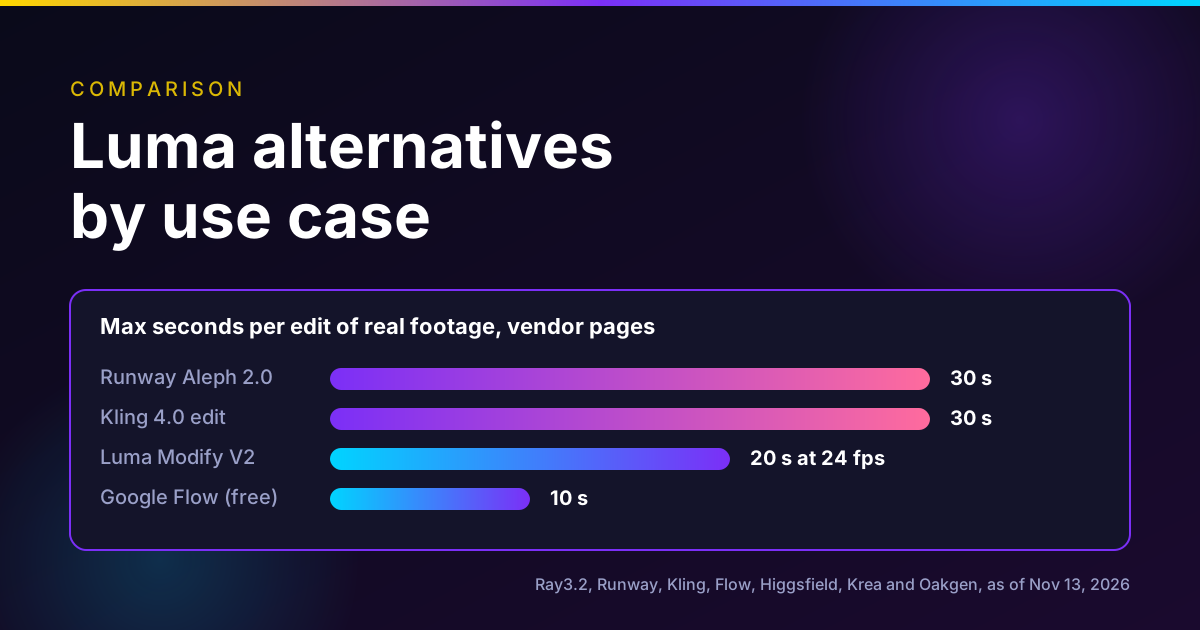
- Modify Video up to 20 seconds at 24 fps, 15 at 30 fps, 7 at 60 fps.
- Native 16-bit HDR and EXR export in ACES2065-1.
- Face tracking for up to 8 faces.
Luma's own FAQ also lists where Modify Video struggles: heavy camera shake, very fast action, blurry or dark footage, crowded scenes and hidden faces.
Luma now runs other labs' models. The pricing page prices Seedance 2.5, Kling 4.0, MiniMax H3, Gemini Omni Flash and several image models next to Ray3.2. That matters for this decision. If you mostly use Seedance 2.5 inside Luma, you are paying Luma's credit rate for a model that other platforms also sell.
Relight Studio, mini-apps and the MCP connector
Luma's October 27 mini-apps post lists eight one-click tools: Face Swap, Camera Angles, Light Transfer, Relight Studio, Virtual Try-On, Background Swap, Ad Variants and Product Shots. Relight Studio is a virtual light rig with up to four lights, each with type, color, brightness, beam width and shadow softness, and it returns two takes per run. It works on stills. That is easy to miss in social posts that show it next to video.
On November 3, Luma launched an MCP connector for Claude and ChatGPT. It runs Luma Agents and the preset workflows from inside the chat, and each generation uses your Luma credits. The MCP page lists "Which plans include it?" as an FAQ, but we could not read an answer on the page, so check before you rely on it.
What Luma costs
From Luma's pricing page on November 13, 2026:
| Plan | Monthly | Yearly | Credits per month | Agents usage |
|---|---|---|---|---|
| Plus | $30 | $300 | 10,000 | Base |
| Pro | $90 | $900 | 40,000 | 4x |
| Ultra | $300 | $3,000 | 150,000 | 15x |
| Team, Enterprise | Quote | Quote | Shared | Not listed |
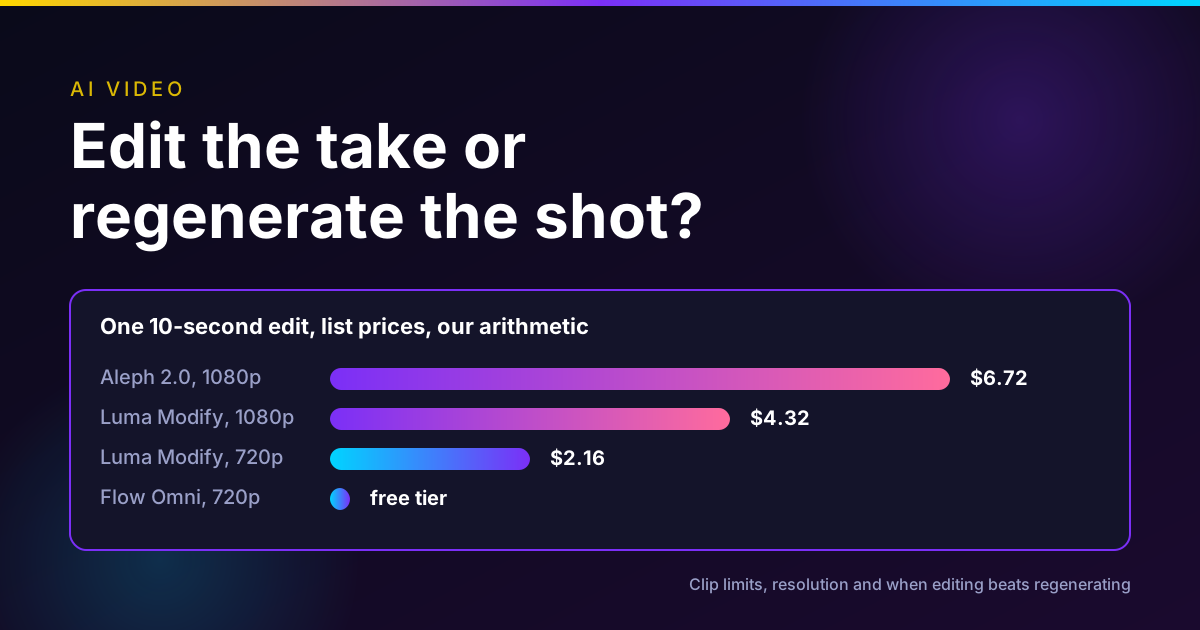
Ray3.2 costs 20, 50, 100 or 400 credits per 5 seconds at 360p, 540p, 720p and 1080p for text or image to video. Modify Video costs 36, 48, 72 or 144 credits per second at the same four sizes. HDR is 2x and HDR plus EXR is 3x. In our arithmetic at the Plus monthly rate ($0.003 a credit), a 5-second 1080p Ray3.2 clip is $1.20, and a 10-second 1080p Modify Video job is $4.32 before HDR.
How we checked
On November 13, 2026 we opened each vendor's own pricing page, model page, launch post or changelog for every number in this post. We used Firecrawl, Exa, Perplexity, Parallel Search and the built-in search, and treated news and blog sites only as pointers. Where a vendor page and a third-party page disagreed, we kept the vendor page.
We did not run generations or quality tests on any of these tools. Every capability here is a vendor claim unless we say otherwise. Oakgen claims come from Oakgen's model configuration and a live price quote from Oakgen's API on the same day. One check failed: Kling's membership page did not load for our scraper, so we give no Kling subscription prices.
Luma alternatives by use case
The mistake is choosing the tool before choosing the job. Here are the six jobs people most often use Luma for, and what we would use instead.
Editing footage you already have: Runway Aleph 2.0
Runway launched Aleph 2.0 with Edit Studio on May 21, 2026. Runway says it edits clips up to 30 seconds at 1080p, applies one edit across multiple shots, and lets you preview the change on a single frame before it renders the whole clip. It is on all paid Runway plans on the desktop web app.
That 30-second ceiling is the practical difference from Luma. Modify Video V2 reaches 20 seconds only at 24 fps and 7 seconds at 60 fps, while Aleph 2.0 states 30 seconds. On Runway's pricing page, Aleph 2.0 costs 140 credits per 5 seconds, and Pro is $35 a month with 2,250 credits. In our arithmetic, a 30-second Aleph edit is 840 credits, about $13 at the Pro monthly rate.
Where Luma is still better: if the edited shot has to go to a colorist as HDR or EXR, Luma states those formats on Ray3.2, and Aleph 2.0's product page does not. Our Runway alternatives guide covers the reverse question.
Long single takes and heavy references: Kling 4.0 or Seedance 2.5
Ray3.2 text and image to video stop at 10 seconds. Two models now go to 30.
Kling's release note says Kling 4.0 became available to everyone on October 15, 2026, with 3 to 30 second generation, up to 10 keyframes and up to 15 reference assets: 10 images, 5 videos with 30 seconds combined, and 7 elements. Its edit mode takes up to 5 clips, each 3 to 30 seconds, with 30 seconds combined. Kuaishou's release repeats those figures.
ByteDance's Seedance 2.5 tutorial on BytePlus lists 4 to 30 second output and up to 50 references: 30 images, 10 videos and 10 audio clips. It also notes that the API does not accept reference images or videos with real human faces, and points to a separate portrait workflow.
Our Kling 4.0 vs Seedance 2.5 comparison and Kling alternatives guide go deeper on which to pick.
Free tests and quick edits: Google Flow
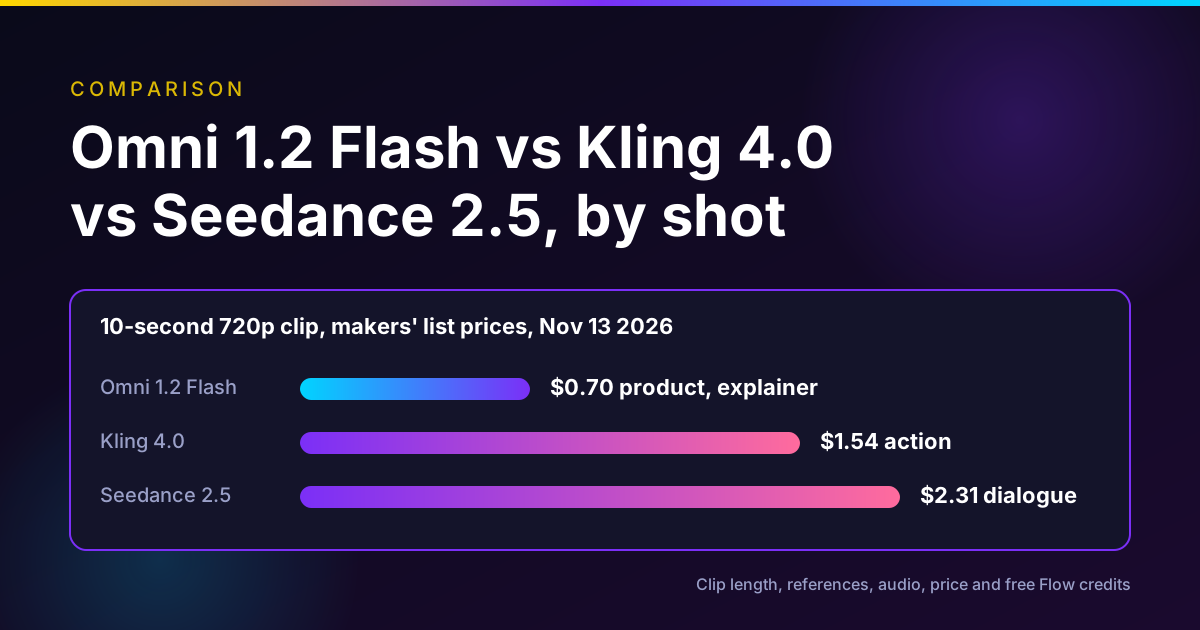
Google Flow's plans page lists a free tier with 50 daily Flow credits, Omni 1.2 Flash up to 10 seconds, Veo 3.1 Lite, an agent and video-to-video editing. Google's credits help page prices Omni Flash 1.2 generation or editing at 1 credit per second at 360p and 3 credits per second at 720p. So a free account can make five 10-second 360p clips a day, or one 10-second 720p clip with credit left over.
The limits are real. Clips of 11 to 15 seconds, extension and upscaling need Google AI Plus or higher. Unused daily credits do not roll over, and Google says free users may not be able to generate video from about 2 to 5 PM UTC.
On November 12, Google added five Flow Tools. One of them, Pocket Studio, takes phone footage and generates extra camera angles while keeping the actor's performance, per Google. That overlaps with Luma's Camera Angles idea, applied to video. Our Google Flow tools explainer has the full list.
Volume across many models: Higgsfield
Higgsfield's pricing page on November 13 showed an 11.11 sale ending November 15, with yearly-billed prices of $19 for Starter (270 credits a month), $35 for Plus (1,200 credits, down from $59) and $65 for Ultra (3,000 credits, down from $129). Its own table lists Seedance 2.5 at 35 credits per 5 seconds at 720p and Kling 4.0 at 16.25 credits per 5 seconds at 1080p.
Higgsfield's changelog says Seedance 2.5 on Higgsfield generates in 4K from November 11 and Seedance 2.5 Flash arrived on November 12, both marked "currently not available in the US". Read the terms on any "unlimited" offer before you buy. Our Higgsfield alternatives guide covers the plan details.
Image and video in one subscription: Krea
Krea's pricing page lists a free tier of 100 units a day, Basic at $9 a month (5,000 units, about 16 Seedance 2.5 videos), Pro at $35 (20,000 units, about 65 Seedance 2.5 videos) and Max at $105 (60,000 units). Its model table includes Kling 4.0, Kling o3 Edit and Luma's own UNI-1 image model. Krea makes sense if most of your work is images and you need some video. See our Krea alternatives guide.
Several models and short edits in one balance: Oakgen
Oakgen does not offer Ray3.2, Modify Video, Relight Studio or Luma's HDR and EXR output. Its older Luma reframe model is retired. If those are why you use Luma, stay on Luma.
What Oakgen does offer, per its model configuration on November 13, 2026:
- Seedance 2.5 in text, image and reference modes, 4 to 30 seconds, 480p to 1080p. The reference mode takes up to 30 images, 10 videos and 10 audio files. Oakgen's API quoted 1,599 credits for a 10-second 720p clip.
- Kling 4.0 with a video edit mode, 3 to 30 seconds, at 720p or 1080p.
- Gemini Omni Flash edit, which takes clips from about 3 to 30 seconds.
- Kling O3 Pro edit for clips of 3 to 15 seconds, and Grok Imagine Video edit for clips up to 8 seconds.
- MiniMax H3 Max, in text, image and reference modes.
This is a reasonable Luma alternative if your Luma use is mostly "generate a clip with Seedance or Kling, then fix one thing". It is not one if you need keyframed HDR shots for a grade.
Run Seedance 2.5 and Kling 4.0 side by side
Oakgen is our product. Pick a model, check the exact credit price on the Generate button, then try the same brief on another model without changing tools.
Where Luma is still the better choice
Be honest about what you would lose by leaving.
HDR and EXR from the generator. We did not find 16-bit EXR output from video generation stated on the product pages of the alternatives above. Runway's pricing page lists HDR, ProRes and image sequences on its Max plan, so check that if Runway is your shortlist.
Keyframes on an edit. Ray3.2 Modify Video accepts up to 16 keyframes inside the clip, per Luma. Aleph 2.0 previews one edited frame. If you need to steer an edit at several points in time, Luma has the finer control.
Stills relighting with a light rig. Relight Studio is a direct-control tool. Most competitors relight with a prompt.
An agent that runs inside Claude or ChatGPT on the same credits. Runway lists an MCP on its Pro and Max plans, and Higgsfield and Krea have their own, so this is no longer unique. But Luma's preset workflows inside the chat are a tidy fit for ad variants.
A decision framework
Use this in order. Stop at the first line that matches your job.
- You need HDR or EXR for a colorist. Stay on Luma Ray3.2.
- You are editing a real clip longer than 20 seconds. Use Runway Aleph 2.0, or Kling 4.0's edit mode.
- You want one continuous 20 to 30 second generated shot. Use Kling 4.0 or Seedance 2.5.
- You have no budget yet. Start on Google Flow's free tier and accept the 10-second cap.
- You make many short clips across models. Compare Higgsfield, Krea and Oakgen on the exact model and resolution you use, not on the headline credit count.
Common mistakes when leaving Luma
Comparing credits across vendors. A Luma credit, a Runway credit, a Krea unit and an Oakgen credit buy different things. Convert to dollars per finished second at your real resolution.
Assuming Relight Studio works on video. As Luma describes it today, it relights stills. For video lighting changes, use Modify Video or an editing model.
Ignoring the frame-rate rule on Modify Video. A 60 fps phone clip gets 7 seconds, not 20. Conform to 24 fps first if you want the longer limit.
Uploading real faces to Seedance 2.5 through the API. BytePlus says the API rejects reference images or videos with real human faces and offers a separate portrait route. Platforms that resell the model may handle this differently.
Paying for a model twice. If you mostly run Seedance 2.5 or Kling 4.0 inside Luma, price the same model on its other hosts before you renew.
What I would do
If I were a small ad team on Luma Plus today, I would keep Luma only for the shots that need HDR or keyframes. I would move routine edits of real footage to Aleph 2.0, test long takes on Kling 4.0 and Seedance 2.5, and use Flow's free tier for rough ideas. Then I would compare one month of real usage in dollars per kept second before I cancel anything.
Price your next shot before you commit
Oakgen is our product. The Generate button shows the credit price for every model and setting, so you can compare a Seedance 2.5 or Kling 4.0 clip against what you pay on Luma.
Frequently asked questions
What is Luma AI now?
As of November 13, 2026, Luma is an agent workspace called Luma Agents. It replaced Dream Machine for new users, runs Luma's own Ray3.2 video model and Uni models beside third-party models such as Seedance 2.5 and Kling 4.0, and connects to Claude and ChatGPT through an MCP connector that Luma announced on November 3, 2026.
How much does Luma cost?
Luma's pricing page lists Plus at $30 a month with 10,000 credits, Pro at $90 with 40,000 credits and 4x Luma Agents usage, and Ultra at $300 with 150,000 credits and 15x Agents usage. Team and Enterprise are by quote. Ray3.2 costs 100 credits for 5 seconds at 720p and 400 credits for 5 seconds at 1080p, with HDR at 2x and HDR plus EXR at 3x.
What is the best Luma alternative for editing real footage?
For editing footage you already shot, Runway Aleph 2.0 is the closest match. Runway says it edits clips up to 30 seconds at 1080p, across multiple shots, and it costs 140 credits per 5 seconds on Runway's pricing page. Luma's own Modify Video V2 runs up to 20 seconds at 24 fps, so Aleph 2.0 is the pick when your clip is longer.
Is there a free Luma alternative?
Google Flow is the most generous free option we verified. Every account gets 50 Flow credits a day, and Omni 1.2 Flash can generate or edit clips up to 10 seconds at 1 credit per second at 360p or 3 credits per second at 720p. Unused daily credits do not roll over, and free users may be blocked during peak hours.
Does Oakgen offer Luma's Ray3.2 model?
No. Oakgen does not offer Ray3.2, Luma Modify Video or Relight Studio, and its older Luma reframe model is retired. Oakgen offers Seedance 2.5, Kling 4.0 with a video edit mode, MiniMax H3 and Grok Imagine Video, so it is an alternative for generation and short edits, not a Luma replacement for HDR or EXR delivery.
Can I use Luma inside Claude or ChatGPT?
Yes. Luma announced its MCP connector for Claude and ChatGPT on November 3, 2026. It runs Luma Agents and preset workflows such as product shots, camera angles, background swap and Relight Studio from the chat, and every generation uses your Luma credits. Luma's MCP page does not state which plans include it.
Which Luma alternative is best for long clips?
Kling 4.0 and Seedance 2.5 both generate up to 30 seconds in one pass, per Kling's October 15 launch notes and ByteDance's Seedance 2.5 documentation. Ray3.2 text and image to video stop at 10 seconds per clip on Luma's own model page, so for a single continuous 20 to 30 second shot those two are the stronger picks.
Is Relight Studio for video?
Not as Luma describes it today. Luma's Relight Studio page and its October 27 mini-apps post describe relighting a still image with a virtual rig of up to four lights and two takes per run. For relighting video, use Ray3.2 Modify Video or Runway Aleph 2.0, both of which accept lighting changes in the prompt.
Further reading
For the bigger shift behind this list, read our guide to AI video editing vs generation. If you want to plan camera moves before you generate, see the Blender, Claude and Seedance camera blocking workflow.
Sources
- Luma, Connect Luma to ChatGPT and Claude, Nov 3 2026 (read 2026-11-13)
- Luma, Plans and Pricing, undated page (read 2026-11-13)
- Luma, Ray3.2 model page and FAQ, undated page (read 2026-11-13)
- Luma, Introducing Ray3.2 Model and API, Jun 9 2026 (read 2026-11-13)
- Luma, Dream Machine Has Evolved Into Luma Agents, undated page (read 2026-11-13)
- Luma, Luma Mini-Apps: One-Click Tools Inside Luma Agents, Oct 27 2026 (read 2026-11-13)
- Luma, Using AI to Relight the Photo You Already Have (Relight Studio), undated page (read 2026-11-13)
- TechCrunch, Luma launches creative AI agents, Mar 5 2026 (read 2026-11-13)
- Runway, Introducing Aleph 2.0 and Edit Studio, May 21 2026 (read 2026-11-13)
- Runway, Pricing, undated page (read 2026-11-13)
- Kling AI, Meet All-New Kling 4.0 release note, Oct 2026 (read 2026-11-13)
- Kuaishou Technology, Kling AI Officially Launches Kling 4.0, Oct 16 2026 (read 2026-11-13)
- Google Flow, plans page, undated (read 2026-11-13)
- Google Flow Help, Manage your Google Flow credits, undated (read 2026-11-13)
- Google, 5 new Google Flow Tools designed by visual artists, Nov 12 2026 (read 2026-11-13)
- Higgsfield, Pricing, undated page (read 2026-11-13)
- Higgsfield, Changelog, entries of Nov 11 and Nov 12 2026 (read 2026-11-13)
- Krea, Pricing, undated page (read 2026-11-13)
- BytePlus ModelArk, Dreamina Seedance 2.5 tutorial, undated (read 2026-11-13)