ChatGPT
 Claude
AI video editing in late 2026 means changing footage you already have, not generating a new clip and hoping it matches. You keep the take, the motion and usually the sound, and you change one describable thing: a product color, a sign, the sky, the light or a person's outfit.
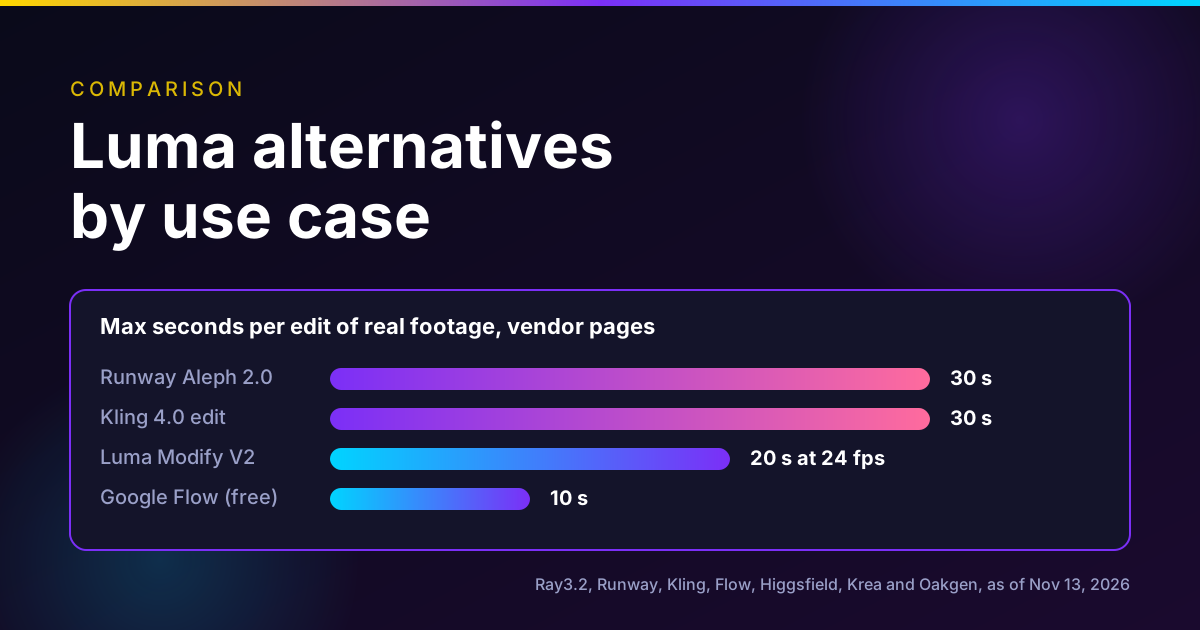
The short answer, as of November 13, 2026: edit when the performance and camera move are right and only a detail is wrong. Regenerate when the motion is wrong. For edits, Runway Aleph 2.0, Kling 4.0 and Seedance 2.5 accept up to 30 seconds per clip, Luma's Ray3.2 Modify Video reaches 20 seconds at 24 fps, and Google Flow edits up to 10 seconds for free. Higgsfield Miracle is announced but waitlist only. Oakgen, our product, offers Kling 4.0 editing for short clips, but not Aleph or Luma.
Edit a clip you already have
Oakgen is our product. Kling 4.0 Video Edit takes a 3 to 30 second clip and a text instruction, and shows the credit price before you run it.
AI video editors compared
Each row comes from the vendor's own page, read on November 13, 2026. "Max source" is how much footage one edit accepts.
| Tool | What it edits | Max source per edit | Output resolution | Price note | Access |
|---|---|---|---|---|---|
| Runway Aleph 2.0 | Objects, wardrobe, background, light, style, across cuts | 30 s | Up to 1080p | 140 credits per 5 s; Pro $35/mo for 2,250 credits | All paid Runway plans |
| Luma Ray3.2 Modify Video V2 | Look, set, wardrobe, light, keeps pose and faces | 20 s at 24 fps, 15 s at 30, 7 s at 60 | 360p to 1080p | 72 credits/s at 720p, 144 at 1080p; Plus $30 for 10,000 | Luma plans |
| Kling 4.0 edit | Subjects, background, expression, camera, style | Up to 5 clips, each 3 to 30 s, 30 s total | 720p or 1080p, per Runway's API docs | See Kling or a host such as Oakgen | Kling and hosts |
| Seedance 2.5 edit | Add, remove, replace; timestamp edits | 4 to 30 s, under 20 s recommended | 480p, 720p, 1080p | Luma lists Seedance 2.5 Modify at 94 credits/s at 720p | ModelArk and hosts |
| Gemini Omni 1.2 Flash (Google Flow) | Conversational edits | 10 s free, 15 s on paid plans | 360p, 720p | 1 credit/s at 360p, 3 at 720p | Free 50 credits a day |
| Viggle Remake | Recast people, swap objects, weather, light | About 12 s per render window | Up to 1280x736 | Open weights; your own GPU, or the Viggle app | Released Nov 4, 2026 |
| Higgsfield Miracle | Recolor, remove, add, text, background, grade (planned) | Not announced | Not announced | Not announced | Waitlist only |
| Adobe Premiere | Generative Remove of masked objects (beta) | Not stated | Your sequence | Adobe plans | Premiere 27.0 |
| Oakgen | Kling 4.0, Kling O3 Pro and Grok edits | 30 s on Kling 4.0, 15 s on O3 Pro, 8 s on Grok | Depends on model | Shown on the Generate button | Oakgen plans |
Disclosure: Oakgen is our product. We include it because it offers some of these editing models, and the rest of this post covers where the standalone tools are stronger.
Who this is for
You have footage, either shot on a phone, shot on set, or generated last week, and the client wants a change. "Make the sneakers red." "Lose the logo on the wall." "Can it be dusk?" "Swap the actor for our mascot." Before 2026, each of those meant a reshoot, a roto job or a fresh generation that never matched the cut. Now each one is a prompt against the clip you have. The question is which tool, and when the prompt is the wrong answer.
How we checked
On November 13, 2026 we opened the vendor's own page for every limit and price here: Runway's launch post and pricing page, Luma's Ray page, learning center guide and pricing page, Kling's release note, BytePlus's Seedance 2.5 documentation, Google's Flow help page, Higgsfield's Miracle page, Viggle's Hugging Face card and Adobe's blog and Premiere release notes. We used Firecrawl, Exa, Perplexity, Parallel Search and the built-in search, and kept news sites as pointers only.
We ran no edits and no quality comparisons. Every capability below is the vendor's claim. Dollar figures marked "in our arithmetic" are plan price divided by plan credits, times credits used. Oakgen details come from Oakgen's model configuration on the same date.
Two leads did not survive verification. We could not find a primary source for "editing nodes" in MiniMax H3 Max. MiniMax's own pricing page lists H3-Max as supporting image, video and audio references and bills input video at $0.143 a second at 768P, but that describes reference input, not an editing feature, so we left H3 Max out of the table.
The shift: from generating clips to editing takes
For two years the workflow was: prompt, generate, reject, regenerate. Every regeneration rolled the dice on the whole shot, so a perfect performance with one wrong prop was a lost take.
Editing models flip that. They read the source clip, find what the prompt refers to and change only that, keeping motion, timing and, in most cases, audio. Runway puts it plainly on its Aleph 2.0 page: describe a change and Aleph 2.0 "changes only that". Luma's Ray 3.2 video-to-video guide says the output duration always matches the source, up to 20 seconds, and there is no duration setting at all.
Two control styles have emerged:
- Prompt-only edits. You describe the change. Kling 4.0, Seedance 2.5 and Gemini Omni Flash work mainly this way.
- Edit-a-frame edits. You fix one frame in an image editor and the model carries it through the clip. Aleph 2.0 previews an edited frame before rendering. Luma's Modify Video accepts up to 16 keyframes. Viggle Remake takes one to four painted frames.
The frame-first style matters more than it sounds. You see the result before you pay for the whole clip.
The tools, one by one
Runway Aleph 2.0
Runway launched Aleph 2.0 with Edit Studio on May 21, 2026. Runway says it edits clips up to 30 seconds at 1080p, makes localized edits that preserve the rest of the frame, carries one edit across multiple cuts, and lets you preview the change as an image first. It is available on all paid plans in the desktop web app.
On Runway's pricing page, Aleph 2.0 costs 140 credits per 5 seconds, against 60 for Gen-4.5 generation. Pro is $35 a month for 2,250 credits. In our arithmetic, a 30-second edit is 840 credits, about $13 at that rate, and Pro covers about 80 seconds of Aleph editing a month.
Use it for: ad variants from one hero spot, seasonal versions, removing distractions across a multi-shot cut.
Luma Ray3.2 Modify Video V2
Luma's Ray page says Modify Video V2 keeps skeletal pose, gesture and the expressions of up to 8 faces, and keeps lip sync when face tracking is on. The length limit depends on frame rate: 20 seconds at 24 fps, 15 at 30 fps, 7 at 60 fps. Output runs 360p to 1080p, with optional HDR and 16-bit EXR.
Luma's pricing page lists Modify Video at 36, 48, 72 and 144 credits per second at 360p, 540p, 720p and 1080p, with HDR at 2x and HDR plus EXR at 3x. In our arithmetic at the Plus rate ($30 for 10,000 credits), a 10-second 1080p edit is 1,440 credits, about $4.32 before HDR.
Luma's own FAQ lists the failure cases: heavy camera shake, very fast action, blurry or dark footage, crowded scenes and hidden faces.
Use it for: restyling a performance you must keep, especially when the result goes to a colorist.
Kling 4.0 edit mode
Kling's release note says Kling 4.0 became available to everyone on October 15, 2026. Its edit mode accepts up to 5 input clips including one primary video, each 3 to 30 seconds, with 30 seconds combined. Kling says it makes targeted edits to expressions, body movement, camera position and movement, style and background "while keeping the rest of the scene stable".
The extra clips act as references for the edit, which helps when the change needs to match another shot.
Use it for: edits that need a reference, such as matching a product or character from another clip.
Seedance 2.5 edit task
ByteDance's Seedance 2.5 tutorial on BytePlus defines video editing as a reference task where the prompt contains an editing word such as add, remove, modify or replace. The source must be 4 to 30 seconds. The output keeps the source aspect ratio and duration, and you cannot set either. The prompt guide recommends sources within 20 seconds and 1 to 5 reference images for best stability. ModelArk lists output at 480p, 720p and 1080p.
One more limit: BytePlus says Seedance 2.5 does not accept reference images or videos containing real human faces through the API, and points to a separate portrait workflow.
Use it for: edits on generated footage, or on real footage without identifiable faces.
Gemini Omni 1.2 Flash in Google Flow
Google's Flow credits page lists "generate or edit videos up to 10s" for all users at 1 credit per second at 360p and 3 credits per second at 720p. Edits from 11 to 15 seconds are for Google AI Plus, Pro and Ultra subscribers. Everyone gets 50 credits a day, which do not roll over.
On November 12, Google also added Pocket Studio to Flow. Google says it turns phone footage into more polished shots by generating multiple camera angles from a single take while keeping the actor's performance.
Use it for: free tests of an edit idea before you pay for a longer tool.
Viggle Remake
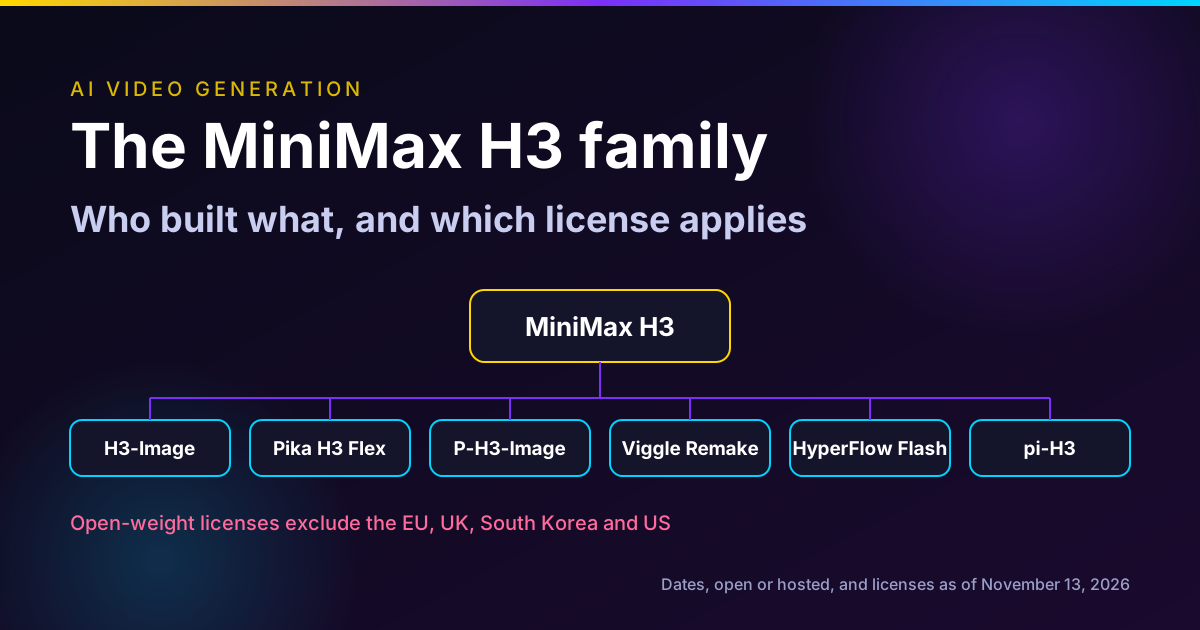
Viggle Remake is an open release of two LoRAs on MiniMax H3: swap recasts people and characters, and edit changes objects, background, weather or light. You paint one to four frames to define the change. The model card lists the limits directly: about 12 seconds per render, a 144 GB base model, one 80 GB GPU for the reference sampler at bf16, or quantized builds down to 12 GB in ComfyUI. The output keeps the source soundtrack, and a silent source gives a silent result. It also runs in the Viggle app with no setup.
Viggle's card also says the model cannot verify identity or consent, because identity comes from the frames you paint. Only use it on footage and people you have permission for.
Use it for: recasting a whole sequence on your own hardware, with an MCP server that splits long films into windows.
Higgsfield Miracle (waitlist only)
Higgsfield's Miracle page describes an editor for an existing clip, not a generator, with edits that show up "as the clip plays". As of November 13, 2026, the page says Miracle is in early testing with selected partners, takes an email for a waitlist, and lists the planned tools as recolor, remove and add, on-screen text, background swaps and grading. Higgsfield says formats, limits and performance numbers will come at launch. Nothing about its quality or speed can be checked yet.
Adobe Premiere
Adobe's November 10 post introduces Generative Remove in beta in Premiere: mask and track an object such as a boom mic or logo, click Remove, and Premiere fills the area. The same post says the Generative Media Tool generates video, sound effects, soundscapes and music on the timeline with Firefly or partner models from Google, Kling, Runway and Luma. Premiere's release notes for version 27.0 add that Generative Extend can now create missing frames when a transition needs more media than a clip has.
The generative tools here are mostly for filling gaps, not restyling a take. The advantage is that it all happens inside the cut.
Edit or regenerate: a decision framework
Use these questions in order.
- Is the motion or performance wrong? Regenerate. Every editor here keeps the source motion by design.
- Can you name the change in one sentence? "Make the jacket oxblood." If yes, edit. If you need a paragraph, you are probably asking for a new shot.
- How much of the frame changes? A prop, a sign or the sky is an edit. If more than about half the frame changes, regeneration is usually cleaner. That threshold is our rule of thumb, not a vendor figure.
- How long is the clip? Over 20 seconds, Luma's Modify Video is out. Over 10 seconds, Flow's free tier is out. Over 30 seconds, split at cuts.
- Are there real faces, and do you have consent? Seedance 2.5's API rejects real-face references. Viggle Remake will put any face anywhere. Treat both as a consent check, not a tool limit.
- Does it go to a colorist? Then you want HDR or EXR, which Luma states for Ray3.2.
This workflow can be run across several separate tools. If you want generation and short edits under one balance, Oakgen keeps Seedance 2.5 generation and Kling 4.0 editing in the same place.
Generate, then fix one thing
Oakgen is our product. Make a shot with Seedance 2.5, then send it to Kling 4.0 Video Edit when one detail needs to change.
Limits that catch people out
Frame rate decides Luma's length. A 60 fps phone clip gets 7 seconds. Conform to 24 fps first if the shot allows it.
Resolution stops at 1080p. Aleph 2.0 and Ray3.2 state 1080p, and Seedance 2.5 on ModelArk lists 1080p as its top output. For 4K, edit at 1080p and upscale, and check the upscale for texture artifacts.
Duration is not yours to set. Seedance 2.5 and Ray3.2 return a clip as long as the source. Trim before you edit, because you pay for every second.
Audio may or may not carry. Viggle Remake keeps the source track. Runway's developer docs say Aleph 2.0 returns the clip's own audio, and can also return ProRes or 10-bit files through the API. Seedance 2.5 generates sound by default. Check the audio before you send the cut.
Multi-cut clips behave differently. Aleph 2.0 says it applies an edit across cuts. Viggle's MCP server splits at cuts into windows. Other tools may treat a cut as part of one shot.
What it costs, side by side
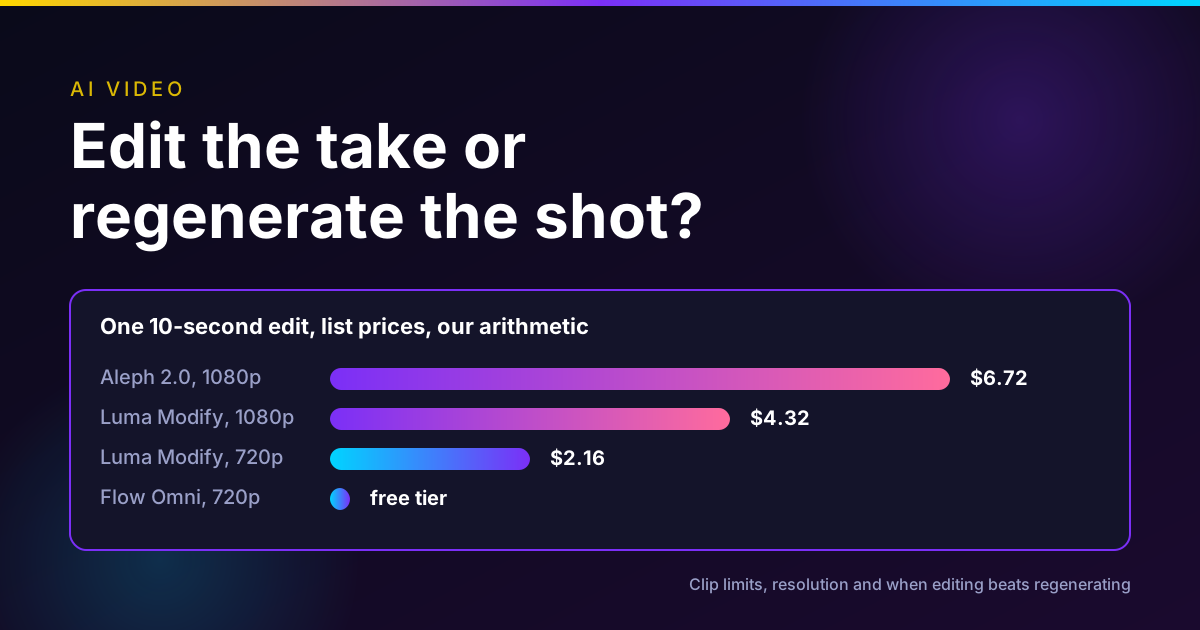
Worked examples for one 10-second edit, from each vendor's pricing page on November 13, 2026, using the cheapest monthly plan that includes the tool. These are our calculations, not vendor quotes.
| Tool | Setting | Credits used | Plan rate | About |
|---|---|---|---|---|
| Runway Aleph 2.0 | 1080p | 280 | Standard $15 for 625 credits | $6.72 |
| Luma Modify Video | 720p | 720 | Plus $30 for 10,000 credits | $2.16 |
| Luma Modify Video | 1080p | 1,440 | Plus $30 for 10,000 credits | $4.32 |
| Google Flow Omni 1.2 Flash | 720p | 30 | Free daily credits | $0 |
Kling 4.0 and Seedance 2.5 pricing varies by host, so price them where you will run them. On Oakgen, the Generate button shows the exact credit price before you start.
What I would do
For a brand team with one approved hero spot and a list of changes, I would edit, not regenerate. I would test the change on Flow's free tier first if it fits in 10 seconds, then run the final on Aleph 2.0 for anything up to 30 seconds with cuts, or on Luma when the shot needs keyframes or HDR. I would only regenerate the shots where the blocking itself is wrong. If camera blocking is the real problem, plan it before you generate, as in our Blender, Claude and Seedance camera blocking workflow.
For the tool-by-tool view of Luma's place in this, see our Luma alternatives guide. For editing as you go rather than after the fact, see our post on real-time AI video editing. For the Seedance side, our Seedance 2.5 guide covers its reference mode on Oakgen.
Keep the take, change the detail
Oakgen is our product. Upload a 3 to 30 second clip to Kling 4.0 Video Edit, describe one change and check the credit price before you generate.
Frequently asked questions
What is the difference between AI video editing and AI video generation?
Generation makes a new clip from a prompt, images or references. Editing takes a clip you already have and changes part of it, such as a product color, the background, the weather or the lighting, while keeping the motion, timing and usually the audio. Runway Aleph 2.0, Luma Modify Video, Kling 4.0's edit mode and Seedance 2.5's edit task all work this way.
Which AI video editor handles the longest clips?
Among the tools we verified on November 13, 2026, Runway Aleph 2.0, Kling 4.0 and Seedance 2.5 accept up to 30 seconds per edit. Luma's Ray3.2 Modify Video reaches 20 seconds at 24 fps, 15 at 30 fps and 7 at 60 fps. Gemini Omni 1.2 Flash in Google Flow edits up to 10 seconds on the free tier and 15 seconds for paid Google AI subscribers.
Can AI edit footage at 4K?
Not directly in the editors we checked. Aleph 2.0 and Ray3.2 Modify Video both state 1080p. Seedance 2.5's ModelArk documentation lists 480p, 720p and 1080p output. For 4K delivery you would edit at 1080p and upscale, which is a separate step with its own artifacts.
How much does AI video editing cost?
On vendor pricing pages read November 13, 2026: Runway Aleph 2.0 is 140 credits per 5 seconds, about $13 for a 30-second edit at the Pro monthly rate in our arithmetic. Luma Ray3.2 Modify Video is 72 credits per second at 720p and 144 at 1080p, so a 10-second 1080p edit is about $4.32 at the Plus monthly rate. Google Flow charges 3 credits per second at 720p for Omni 1.2 Flash, inside 50 free daily credits.
Is Higgsfield Miracle available?
No. As of November 13, 2026, Higgsfield's Miracle page says it is in early testing with selected partners and takes an email for a waitlist. Higgsfield has not published a price, release date, clip length or supported formats, so nothing about its real-world limits can be verified yet.
When should I regenerate instead of edit?
Regenerate when the motion, blocking or performance is wrong, because editors keep the source motion by design. Edit when the take works and only a describable element is wrong, such as a color, a prop, a sign, the sky or the light. If more than about half the frame needs to change, regeneration is usually the cleaner path.
Can I edit video with AI on Oakgen?
Yes, for short clips. Oakgen offers Kling 4.0 Video Edit for 3 to 30 second clips, Kling O3 Pro Video Edit for 3 to 15 seconds and Grok Imagine Video Edit for clips up to 8 seconds. It does not offer Runway Aleph 2.0, Luma Modify Video, Higgsfield Miracle or Viggle Remake.
Does Adobe Premiere edit footage with generative AI?
Partly. Adobe's November 10, 2026 post introduces Generative Remove in beta in Premiere, which removes a masked and tracked object such as a boom mic or logo. Premiere's Generative Media Tool generates new video, sound effects, soundscapes and music on the timeline with Firefly or partner models, and Generative Extend can now create missing frames for transitions.
Sources
- Runway, Introducing Aleph 2.0 and Edit Studio, May 21 2026 (read 2026-11-13)
- Runway, Aleph 2.0 product page, undated (read 2026-11-13)
- Runway, Pricing, undated page (read 2026-11-13)
- Luma, Ray3.2 model page and FAQ, undated (read 2026-11-13)
- Luma Learning Center, Ray 3.2 Video to Video, May 27 2026 (read 2026-11-13)
- Luma, Plans and Pricing, undated page (read 2026-11-13)
- Kling AI, Meet All-New Kling 4.0 release note, Oct 2026 (read 2026-11-13)
- BytePlus ModelArk, Dreamina Seedance 2.5 tutorial, undated (read 2026-11-13)
- BytePlus ModelArk, Dreamina Seedance 2.5 prompt guide, undated (read 2026-11-13)
- Google Flow Help, Manage your Google Flow credits, undated (read 2026-11-13)
- Google, 5 new Google Flow Tools designed by visual artists, Nov 12 2026 (read 2026-11-13)
- Higgsfield, Miracle waitlist page, undated (read 2026-11-13)
- Viggle, Viggle Remake model card on Hugging Face, Nov 4 2026 (read 2026-11-13)
- Adobe Blog, Explore new ways to create across Creative Cloud and Adobe Firefly, Nov 10 2026 (read 2026-11-13)
- Adobe Help, Premiere desktop release notes, Nov 10 2026 (read 2026-11-13)
- Runway Dev, How to edit and finish existing video with an API, Oct 22 2026 (read 2026-11-13)
- MiniMax API Docs, Pricing, undated (read 2026-11-13)