ChatGPT
 Claude
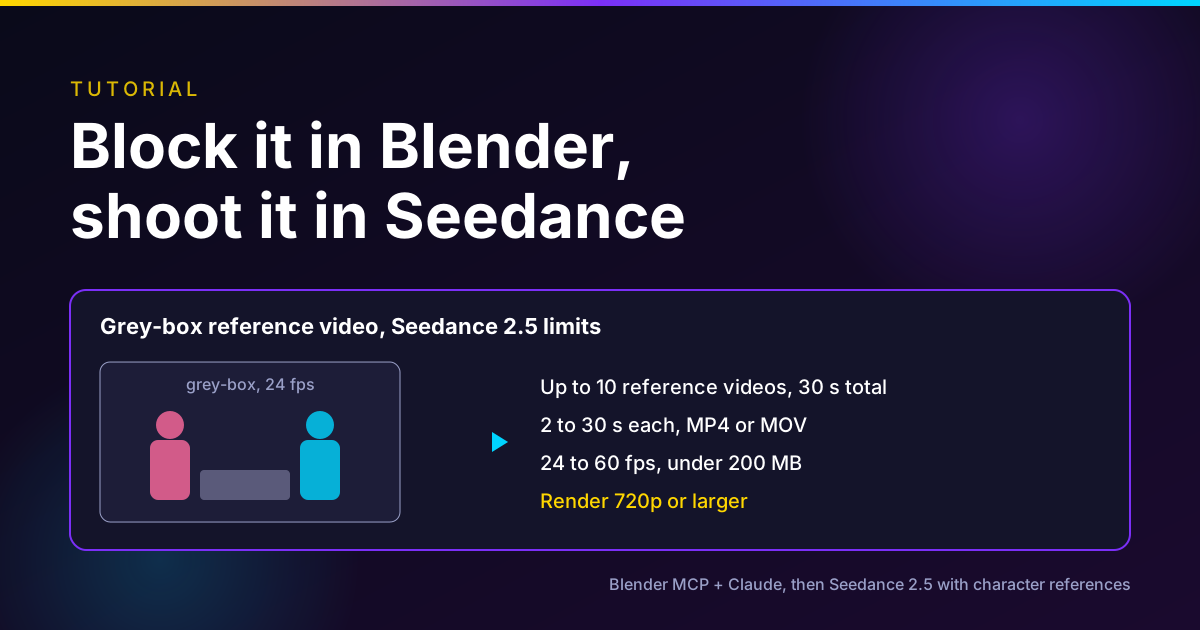
The fastest way to get the camera move you want from Seedance 2.5 is to stop describing it and show it. Block the scene and camera in Blender, have Claude build and render it through a Blender MCP, export a short grey-box video, then give that video to Seedance 2.5 as the motion and camera reference with your character images. Seedance copies the blocking and paints your characters and world on top.
This guide was inspired by APUROM's 97-second tutorial from November 8, 2026. We expand each step, check the Blender MCP install against Blender's and Claude's own pages, and check Seedance 2.5's reference-video limits against ByteDance's documentation, as of November 13, 2026. Oakgen, our product, runs Seedance 2.5 with reference videos, so you can do the last step there or anywhere else that hosts the model.
Have a grey-box ready?
Oakgen is our product. Seedance 2.5 Reference takes up to 10 reference videos and 30 images, and shows the credit price before you generate.
The workflow at a glance
| Step | Tool | What you do | Limit to respect |
|---|---|---|---|
| 1. Plan the shot | Notes | Length, aspect ratio, camera move, actions | Seedance 2.5 outputs 4 to 30 s at 24 fps |
| 2. Connect Claude to Blender | Blender connector or MCP for Blender | Install the add-on and the connector | Official add-on needs Blender 5.1+ |
| 3. Block the scene | Claude via MCP | Primitives or mannequins, camera path, timing | Keep it simple; Claude runs Python in your scene |
| 4. Render the grey-box | Blender | MP4 at 24 fps, 720p or 1080p | 407,696 to 8,295,044 pixels per frame |
| 5. Prepare character refs | Image tool | Front and side views, outfit, props | No real human faces on ByteDance's API |
| 6. Generate | Seedance 2.5 reference mode | @Video1 for camera and motion, @Image refs for look | Up to 10 videos, 30 s total, under 200 MB each |
| 7. Review and iterate | You | Compare against the grey-box | Change one variable per run |
Who this is for
You make short films, ads or social clips with AI video, and your shots keep coming back with the wrong camera. You asked for a slow push-in and got an orbit. You asked for the character to cross left to right and they walked at the lens. Prompting harder costs credits. A 10-second grey-box takes minutes to block and fixes the instruction at its source.
What the original tutorial does
APUROM's video is short, so here is the full sequence as it is spoken in the video's captions:
- Download and install Blender from blender.org.
- In the Claude desktop app, open Customize, then Connectors, search for Blender and install the connector.
- Open Blender's MCP page next to Blender and drag the install link into Blender twice: once to add the extension repository, once to install the add-on.
- In Blender, check Edit, Preferences, Add-ons that the MCP add-on is enabled with auto start on.
- In a new Claude chat, ask it to create the scene, specifying the duration, camera, character positions, actions and aspect ratio. Claude builds it in Blender and returns a video file. Ask for changes in plain language.
- Open Seedance 2.5, upload the video as the reference for camera and motion, add character references and generate.
The video does not name which platform it runs Seedance 2.5 on, and the description carries no sponsor or referral link. Everything below fills in the details the 97 seconds skip.
How we checked
On November 13, 2026 we read Blender's MCP server page and repository, Anthropic's Claude for Creative Work post and Claude Academy tutorial, the MCP for Blender README on GitHub, ByteDance's Seedance 2.5 launch post and BytePlus's Seedance 2.5 tutorial, video generation tutorial and prompt guide. We used Firecrawl, Exa, Perplexity, Parallel Search and the built-in search. We read the tutorial video's metadata and its auto-generated captions. Our usual video analysis tool was unavailable, so we did not review the video frame by frame.
We did not run this workflow end to end for this post, and we did not measure how closely Seedance follows a grey-box. Oakgen details come from Oakgen's model configuration and a live price quote from Oakgen's API on the same day.
Step 1: Plan the shot before you open Blender
Write four lines. The tutorial asks Claude for exactly these, and Seedance needs them too.
- Length. Seedance 2.5 outputs 4 to 30 seconds, per BytePlus's tutorial. Block the exact length you want.
- Aspect ratio. 16:9, 9:16, 1:1, 4:3, 3:4 or 21:9 are the ratios BytePlus lists. Set the Blender camera to the same ratio.
- Camera move. One move per shot is easier for the model to follow: push in, pull out, truck, orbit, crane.
- Actions. Who moves where, and when. Use seconds: "0 to 3 s she walks to the window, 3 to 6 s she turns."
Step 2: Pick and install a Blender MCP
Two Blender MCP servers are worth knowing. Both let Claude run Python inside your open Blender session.
| Official Blender connector | MCP for Blender (community) | |
|---|---|---|
| Maker | Blender developers, Blender Lab | ahujasid, not affiliated with Blender |
| Install in Claude | Claude Desktop, Customize, Connectors, search Blender | claude mcp add blender uvx mcp-for-blender, or a JSON entry in Claude Desktop |
| Blender version | 5.1 or newer, per blender.org | 3.0 or newer, per the README |
| Focus | Python API access, docs, explaining scenes | Building scenes, snapshots, asset imports |
| Source | GPL-3.0, on projects.blender.org | Open source on GitHub |
The official connector
Anthropic announced the Blender connector on April 28, 2026, built by the Blender developers. Claude Academy's tutorial says it works in Claude Desktop on any plan, including Free, but not in claude.ai in the browser, because Blender must run on the same machine. The steps match the tutorial video: add the connector in Customize, Connectors, then drag the install link from Blender's MCP server page into Blender twice.
One conflict to know about: Claude Academy lists Blender 4.2 or later, while Blender's own page and its v1.0.3 add-on link set Blender 5.1 as the minimum. Use 5.1 or newer.
Blender's page also carries a security warning: the server "will execute LLM generated code in Blender without any guards in place", and it recommends a virtual machine or a system without sensitive data. Take that seriously on a work laptop.
MCP for Blender (formerly blender-mcp)
The MCP for Blender README says the PyPI package was renamed from blender-mcp to mcp-for-blender, and old setups keep working. The manual route is three steps: install uv with its official installer, add the server to Claude (for Claude Code: claude mcp add blender uvx mcp-for-blender), then run uvx mcp-for-blender install-addon and enable "Interface: MCP for Blender" in Blender's add-ons.
For this workflow its useful extra is the look tool, which the README says returns views from the viewport, the camera or an animation strip of frames. That lets Claude check its own blocking before you render. Things to know before you install: execute_blender_code runs any Python, the README says to always save first, anonymous usage telemetry is on by default and can be turned off, and a BLENDER_MCP_SAFE_MODE=1 setting blocks risky scripts.
Step 3: Block the scene with Claude
Ask for grey-box only. No textures, no lighting design. Seedance will replace all of that. What matters is silhouettes, positions, timing and the camera.
A prompt that works well as a starting point:
Build a grey-box previs shot in the open Blender scene.
Shot: 8 seconds at 24 fps, 192 frames, 16:9. Set: flat floor, one wall with a window opening on the left, a table in the middle. Plain grey material on everything. Characters: two simple mannequins (capsule body, sphere head), about 1.75 m tall. A is red-tinted, B is blue-tinted so I can tell them apart. Action: 0 to 3 s, A walks from frame left to the table. 3 to 5 s, B stands up from a chair at the table. 5 to 8 s, they face each other. Camera: 35 mm lens, eye height. Starts wide on the doorway side, slow push-in that ends in a two-shot at 8 s. No cuts. Then show me the camera view at frames 1, 96 and 192 before you render anything.
Then review. Ask Claude to change one thing at a time: "make the push-in end 1 metre further back", "A should arrive at 2.5 s, not 3". Tinting the two mannequins differently helps you and Seedance tell them apart.
Step 4: Render the grey-box reference video
Ask Claude to render the camera view to an MP4 file. Make the file fit Seedance's input rules, from BytePlus's tutorial and video generation tutorial:
- Format: MP4 or MOV, video in H.264 or H.265.
- Length: 2 to 30 seconds per reference video for generation, and up to 10 reference videos with 30 seconds combined.
- Frame rate: 24 to 60 fps. Seedance 2.5 outputs at 24 fps, so render at 24.
- Size: each side 300 to 6,000 pixels, and width times height between 407,696 and 8,295,044. A 640 by 360 render is too small. 1280 by 720 and 1920 by 1080 both fit.
- File: under 200 MB.
A quick viewport-style render is enough. You want readable shapes and clean motion, not pretty light. Keep the background contrast high so the subjects read clearly.
Step 5: Prepare character and location references
Seedance 2.5 accepts up to 30 reference images in one request. For each character, a clean front view and a side view on a plain background usually do more than ten busy photos. Add one image for the location look if you want it.
ByteDance's prompt guide recommends naming references by upload order, such as Image 1 and Video 1, and binding each one explicitly in the prompt, not writing a name on the image itself. It also says 1 to 8 image subjects and reference videos of 5 to 10 seconds tend to be more stable.
Real faces. BytePlus says Seedance 2.5 does not accept reference images or videos containing real human faces through its API, and points to a separate portrait workflow. Use designed or generated characters. If you use a real person, get their consent and use a route that supports portraits.
Step 6: Generate in Seedance 2.5
ByteDance's Seedance 2.5 launch post says the model strengthened "clay render" referencing, where textureless 3D models set a scene's spatial structure, character poses, motion paths and camera angles. That is exactly a Blender grey-box. ByteDance's own example prompt reads: "Refer to @Clay Render 1 for camera movement, pacing, shot-size transitions, subject trajectory, and blocking." This is a vendor claim. We have not measured how closely the output follows the clay render.
Adapt that pattern:
Refer to @Video1 for camera movement, pacing, shot size, subject positions and blocking. Do not copy its grey materials or lighting. The red mannequin in @Video1 is the woman in @Image1 and @Image2. The blue mannequin is the man in @Image3 and @Image4. The room looks like @Image5: late afternoon light through the window, warm wood table, dust in the air. Cinematic, 35 mm, shallow depth of field, single continuous take, no cuts. 8 seconds.
Set the output length to match the grey-box, the aspect ratio to match the Blender camera, and start at 480p or 720p while you check the motion.
Where Oakgen fits
Oakgen runs Seedance 2.5 in a dedicated reference mode. Per Oakgen's model configuration on November 13, 2026, it takes up to 30 reference images, 10 reference videos and 10 audio files. Reference videos must be MP4 or MOV, 1.8 to 30.2 seconds long, 24 to 60 fps, 300 to 6,000 pixels per side and under 200 MB, with 30.2 seconds in total. You refer to uploads in order as @Image1, @Video1 and @Audio1. Output runs 4 to 30 seconds at 480p, 720p or 1080p.
Price works differently with a reference video. Oakgen bills 60 percent of the per-second rate, counted over the reference video's seconds plus the output seconds. Oakgen's API quoted 1,599 credits for a 10-second 720p Seedance 2.5 clip without references. In our arithmetic, the same clip with a 10-second grey-box comes to about 1,920 credits. The Generate button shows the exact figure before you run.
Two more things Oakgen does and does not do. Oakgen's MCP server works with Claude, so the same Claude session that built the grey-box can upload the render with Oakgen's upload_media tool and start the Seedance job, which needs a paid Oakgen plan. Oakgen does not offer a Blender add-on, and we have not verified how Oakgen's Seedance 2.5 route handles references that contain real faces, so stick to designed characters.
Turn the grey-box into the final shot
Oakgen is our product. Upload your Blender render as @Video1, add character images, and check the credit price on the Generate button before you run Seedance 2.5.
Step 7: Review against the grey-box
Put the grey-box and the generated clip side by side and check three things in order.
- Camera path. Does the move start and end where the grey-box does?
- Timing. Do the actions land on the same seconds?
- Identity. Are the right characters in the right places?
Fix the first failure only, then run again. If the camera is wrong, strengthen the camera line of the prompt or simplify the move in Blender. If identity is wrong, improve the character images before you touch the camera.
Common mistakes
Rendering too small. A 640 by 360 reference falls below Seedance 2.5's minimum pixel count on BytePlus. Render 720p or above.
Over-dressing the grey-box. Textures and lighting in the reference compete with your character images. Keep it grey and tell the model not to copy materials.
Mismatched aspect ratios. A 16:9 grey-box with a 9:16 output asks the model to reframe and follow the camera at the same time. Match them.
Too many moves in one shot. Push-in plus orbit plus crane in 8 seconds is hard for any model. Split it into shots.
Forgetting the reference counts in the bill. On Oakgen, and on hosts such as Luma that bill "generated plus reference" seconds, a long grey-box costs money. Trim it to the shot.
Running the MCP on a machine with sensitive files. Both Blender servers run AI-written Python. Blender recommends a VM or a clean system.
When this workflow is not worth it
If the shot is a static talking head, or the camera move is a simple push-in, a well-written prompt or a start and end frame is faster. See our guide to camera movement in AI video. If what you need is a character copying a real dancer's moves rather than a camera path, a motion transfer model such as the one in our Kling motion control guide is a better fit.
Grey-box blocking earns its time on shots with several characters, precise timing, or a camera move you have failed to prompt twice.
What I would do
I would start with one 8-second shot, not a sequence. Block it with the official connector if I only needed scene building through Python, or with MCP for Blender if I wanted Claude to check camera frames with its look tool. I would render at 1280 by 720 and 24 fps, run three Seedance drafts at 480p, keep the best, and only then render at 1080p. For more on organizing references, our Seedance 2.5 multimodal reference guide and how to use Seedance 2.5 cover the rest. If the shot is close and only one detail is wrong, editing may beat regenerating. Our post on AI video editing vs generation covers that choice.
Frequently asked questions
Which Blender MCP should I use with Claude?
Two exist. The official one is built by Blender's developers in Blender Lab and is listed as the Blender connector in Claude Desktop. Blender's page says it needs Blender 5.1 or newer. The community one, MCP for Blender by ahujasid (formerly blender-mcp), installs with uvx mcp-for-blender, supports Blender 3.0 or newer and adds tools such as viewport and camera snapshots. Both let Claude run Python inside Blender, so save your work first.
How long can a Seedance 2.5 reference video be?
BytePlus's Seedance 2.5 documentation allows up to 10 reference videos with a combined length of no more than 30 seconds. For generation tasks each video must be 2 to 30 seconds, and for editing tasks 4 to 30 seconds. Files must be MP4 or MOV, at 24 to 60 fps, under 200 MB, with each side between 300 and 6,000 pixels.
What resolution should I render the Blender grey-box at?
Render at least 720p. BytePlus requires the width times height of a Seedance 2.5 reference video to fall between 407,696 and 8,295,044 pixels, so a 640 by 360 render is too small, while 1280 by 720 and 1920 by 1080 both fit. Render at 24 fps, which matches Seedance 2.5's 24 fps output.
Can I use real people as Seedance 2.5 character references?
Not directly through ByteDance's API. BytePlus says Seedance 2.5 does not accept reference images or videos containing real human faces and offers a separate portrait workflow. Use designed or generated characters, and only use a real person's likeness with their consent and through a route that supports it.
Does Oakgen's Seedance 2.5 accept a reference video?
Yes. Seedance 2.5 Reference on Oakgen takes up to 30 images, 10 videos and 10 audio files. Reference videos must be MP4 or MOV, 1.8 to 30.2 seconds, 24 to 60 fps and under 200 MB, with 30.2 seconds total. When a reference video is attached, Oakgen bills 60 percent of the per-second rate over the reference seconds plus the output seconds.
Do I need to know Blender to use this workflow?
Not much. Claude writes and runs the Python that builds the scene, sets the camera and renders the clip. You need to install Blender and the add-on, check the camera view and judge whether the move is right. Knowing how to scrub the timeline and look through the camera helps.
Why use a grey-box reference instead of a text prompt?
Because a text prompt describes a camera move and a reference video shows it. ByteDance says Seedance 2.5 strengthened clay render referencing, where textureless 3D models set spatial structure, poses, motion paths and camera angles. That is a vendor claim, and we have not run our own test of how closely it follows a grey-box.
Who made the original Blender, Claude and Seedance tutorial?
The workflow in this guide was inspired by a 97-second YouTube tutorial from the channel APUROM, published November 8, 2026, titled Create AI Videos with Blender + Claude + Seedance 2.5 (Beginner Tutorial). It installs the Blender connector in Claude Desktop, has Claude build and render the scene, then uploads the render to Seedance 2.5 as the camera and motion reference.
Sources
- APUROM on YouTube, Create AI Videos with Blender + Claude + Seedance 2.5 (Beginner Tutorial), Nov 8 2026 (read 2026-11-13)
- Blender, MCP Server (Blender Lab), undated page (read 2026-11-13)
- Blender Projects, lab/blender_mcp repository, release v1.0.3 Sep 11 2026 (read 2026-11-13)
- Claude Academy, Using the Blender Connector in Claude, undated (read 2026-11-13)
- Anthropic, Claude for Creative Work, Apr 28 2026 (read 2026-11-13)
- ahujasid, MCP for Blender README on GitHub, undated (read 2026-11-13)
- ByteDance Seed, Introducing Seedance 2.5, Jul 31 2026 (read 2026-11-13)
- BytePlus ModelArk, Dreamina Seedance 2.5 tutorial, undated (read 2026-11-13)
- BytePlus ModelArk, Video generation tutorial, undated (read 2026-11-13)
- BytePlus ModelArk, Dreamina Seedance 2.5 prompt guide, undated (read 2026-11-13)