Oakgen.ai
The reliable way to make a Seedance 2.5 short film is to direct a sequence of purposeful shots, not ask for an entire movie in one prompt. Start with a one-sentence story, divide it into five to eight visual beats, lock the character and world with references, and write one prompt for each beat. Give every shot a beginning, change, and exit frame. Then edit the strongest generations into a complete scene.
This guide gives you the full workflow, a reusable prompt structure, and a worked short-film example. Review the Seedance 2.5 model page for current settings, availability, and generation controls.
If a shot does not change the character's situation, reveal information, or create a decision, it is probably B-roll. A short film needs cause and effect.
What Seedance 2.5 changes for filmmakers
Current Dreamina material presents Seedance 2.5 as a model for longer, reference-directed audiovisual generation. That matters because a filmmaker can describe a complete action inside one shot, direct the camera, supply visual references, and plan sound as part of the scene.
It does not remove the need for directing. More duration can create more drift. More references can create more contradictions. The advantage comes from giving the model a clear hierarchy:
- Story: what changes in the scene?
- Continuity: what must remain identical?
- Performance: what does the character do and feel?
- Camera: where is the viewer and how do they move?
- World: what light, weather, texture, and atmosphere surround the action?
- Sound: what should be heard, if audio is part of the chosen workflow?
Start with a story that fits the runtime
A useful short-film premise contains a person, a want, an obstacle, and a turn. You should be able to write it in one sentence.
During a citywide blackout, a bicycle courier follows a mysterious amber light through the rain and discovers that the package she carries is powering the last living tree.
That sentence creates a protagonist, movement, mystery, visual contrast, and an ending. It can be divided into six beats:
| Beat | Story job | Visual event |
|---|---|---|
| 1. Setup | Establish the broken world | A powerless city under heavy rain |
| 2. Trigger | Introduce the anomaly | The courier's package begins to glow |
| 3. Pursuit | Turn curiosity into action | She follows matching lights through alleys |
| 4. Obstacle | Add a cost | Floodwater blocks the direct route |
| 5. Choice | Reveal character | She abandons the bike and crosses on foot |
| 6. Payoff | Complete the idea | The package revives a tree in a dark greenhouse |
This is already more useful than “make a cinematic sci-fi short film.” Each generation now has one dramatic responsibility.
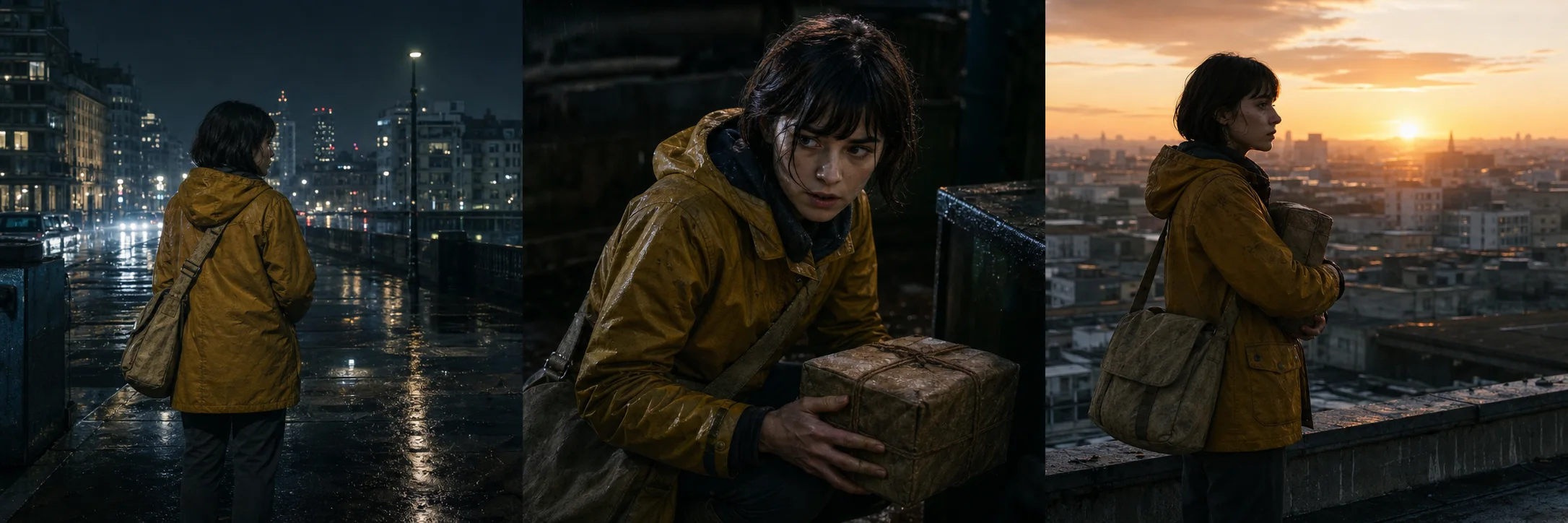
A storyboard should communicate continuity and change at once: the same character and world, but a different dramatic beat in every frame.
Build a continuity bible before prompting
Generative video follows what you specify. If the hero's jacket, hair, prop, and lighting are all described differently from shot to shot, the model has no stable production design to preserve.
Create a compact continuity bible:
PROTAGONIST
Mara, 27, angular face, short black bob, small scar through left eyebrow.
Mustard-yellow waterproof coat, charcoal trousers, worn black boots.
Carries a rectangular black courier case with one amber status light.

WORLD
Near-future coastal city during a power failure.
Wet concrete, practical emergency lights, restrained amber and cyan palette.
Rain is constant. Streets remain empty except where stated.

CAMERA LANGUAGE
Grounded live-action science fiction.
35mm and 50mm lenses, controlled handheld movement, natural motion blur.
No drone shots, impossible orbits, speed ramps, or glossy game-trailer staging.
Repeat the immutable details in every prompt. Do not copy the whole paragraph blindly. Include only the facts the current shot needs, but phrase identity details the same way.
For a deeper method, use the Seedance 2.5 character consistency guide.
The Seedance 2.5 short-film prompt formula
Use this order because it moves from story intent to execution:
SHOT PURPOSE: What changes or is revealed.
CONTINUITY: Exact character, wardrobe, prop, and environment facts.
OPENING FRAME: Composition and starting positions.
ACTION: One readable chain of physical events.
PERFORMANCE: Expression, pace, hesitation, reaction.
CAMERA: Framing, lens feeling, movement, focus behavior.
LIGHT AND TEXTURE: Motivated sources, weather, palette, material detail.
SOUND: Dialogue, effects, ambience, or silence.
ENDING FRAME: The image that hands the story to the next shot.
CONSTRAINTS: What must not change or appear.
Worked prompt: the discovery shot
SHOT PURPOSE: Mara discovers that her courier case contains a living source of light.

CONTINUITY: Mara is 27 with a short black bob and a small scar through her left eyebrow. She wears the same mustard waterproof coat, charcoal trousers, and worn black boots. The rectangular black courier case has one amber status light. Near-future coastal city, total blackout, heavy rain, wet concrete, restrained amber and cyan palette.

OPENING FRAME: Medium rear three-quarter shot at street level. Mara stands beneath a dead traffic signal, bicycle beside her, both hands on the courier case. Dark towers disappear into rain behind her.

ACTION: The case clicks once. Its amber indicator expands into a warm pulse beneath the lid. Mara freezes, looks down, slowly lifts one hand from the handle, and leans closer. The glow reflects across her wet sleeve and face. A matching amber light appears far down the alley behind her.

PERFORMANCE: Alert but controlled. Curiosity overtakes fear in one small breath and a slight narrowing of the eyes.

CAMERA: 50mm grounded live-action framing. Slow, stable push from medium shot to close-up. Shallow focus shifts from her eye to the glowing latch, then settles on the distant alley light over her shoulder. Natural motion blur only.

LIGHT AND TEXTURE: Rain is visible in backlight. Amber light is the motivated key; weak cyan emergency spill shapes the shadows. Real wet fabric, skin texture, subtle halation, no excessive lens flare.

SOUND: Dense rain, distant electrical hum, one mechanical click, then a low organic pulse. No dialogue and no music.

ENDING FRAME: Close profile of Mara with the glowing case below frame and the second amber light visible over her shoulder. Hold long enough to motivate the next shot.

CONSTRAINTS: Preserve face, coat, case geometry, rain direction, and palette. No text, logos, extra people, costume changes, fantasy particles, or camera orbit.
Direct action in beats, not adjectives
“Epic,” “cinematic,” and “emotional” describe your desired reaction. They do not tell the model what happens. Replace them with observable direction:
- Instead of “she is scared,” write “her hand stops above the latch; she listens before touching it.”
- Instead of “epic camera movement,” write “the camera tracks backward at walking speed while she pushes through the flooded corridor.”
- Instead of “dramatic lighting,” write “the case provides the only warm key light; cold lightning exposes the room for one frame.”
- Instead of “fast action,” write “she slips, catches the railing with her left hand, protects the case against her chest, and regains her footing.”
Specific direction makes the performance legible and gives you something objective to review.
Use references with one job each
Do not build a folder of attractive images and call it a reference pack. Label every input by function:
| Reference | Job | What to ignore |
|---|---|---|
| Character sheet | Face, hair, proportions | Background and pose |
| Wardrobe frame | Coat color and material | Model identity |
| Prop sheet | Case shape and amber light | Hands and environment |
| Location frame | Architecture and wet surfaces | People and signage |
| Motion clip | Camera pace and path | Subject appearance |
| Palette board | Amber/cyan relationship | Composition |
If two references disagree about the same thing, remove one or state the priority. The goal is not to reach the maximum input count. The goal is to reduce ambiguity.
Plan transitions before you generate
The final image of one shot should create the first question of the next. Use visual handoffs:
- Eyeline handoff: the character looks off-screen; the next shot reveals the object.
- Motion handoff: a hand reaches toward a latch; the next shot begins on the latch opening.
- Shape match: a circular bike wheel cuts to a circular greenhouse window.
- Color bridge: the amber case light fills frame and becomes sunrise through glass.
- Sound bridge: a mechanical pulse begins before the source is revealed.
This is how separate generated clips begin to feel intentionally edited.
Build the scene before you spend generations
Use Oakgen to develop the script, references, frames, voice, music, and video workflow in one creative workspace.
Review the film in four passes
Do not judge everything at once.
Pass 1: story without sound
Mute the film. Can you identify the protagonist, goal, obstacle, choice, and ending? If not, another effect will not fix it.
Pass 2: continuity
Check the face, hands, wardrobe closures, prop geometry, screen direction, weather, and lighting motivation. A small discontinuity becomes obvious at a cut.
Pass 3: motion and edit
Look for action that starts too early, shots that outstay their story job, and camera movement that competes with performance. Cut on decisions and physical changes.
Pass 4: sound
Every sound should locate us, clarify action, create anticipation, or reveal emotion. Remove generic trailer booms that do none of those things. Read the Seedance 2.5 audio and lip-sync guide when dialogue matters.
Common failures and practical fixes
| Problem | Likely cause | Fix |
|---|---|---|
| The clip feels like B-roll | No dramatic change | State the shot purpose and decision |
| The character changes | Conflicting or weak identity anchors | Use one canonical reference and repeat fixed traits |
| Action becomes unreadable | Too many events in one shot | Keep one chain of cause and effect |
| Camera feels artificial | Vague “cinematic” instruction | Define height, path, pace, framing, and stop point |
| The cut feels random | No planned exit frame | Describe the final composition explicitly |
| The world changes | Palette and light are not locked | Repeat motivated sources and environment constants |
A practical production order
- Write the one-sentence premise.
- Turn it into six story beats.
- Create the character, prop, and location references.
- Generate one representative frame per beat.
- Fix continuity before animating anything.
- Write one video prompt per approved frame.
- Generate the hardest action shot first to test feasibility.
- Produce the remaining shots around what works.
- Edit for story, then continuity, then sound.
- Export one clean master and create platform-specific crops afterward.
The Seedance 2.5 model page tracks current access status and lists the supported generation, editing, and extension controls.
Sources and further reading
- Dreamina: Seedance 2.5 prompt guide
- Oakgen: Seedance 2.5 complete guide
- Oakgen: Seedance 2.5 prompt guide
Frequently asked questions
Can Seedance 2.5 make a complete short film?
Seedance 2.5 can help create the individual scenes of a short film. A coherent film still requires a script, reference pack, shot plan, continuity checks, editing, and sound decisions.
How should I prompt a Seedance 2.5 short film?
Write one prompt per narrative beat. Lock the character and world first, then specify action, camera, lighting, sound, continuity, and the final frame for each shot.
How do I keep a character consistent?
Use one canonical character reference, repeat immutable identity details, limit wardrobe changes, and carry the approved final frame into the next shot when the workflow supports it.
Is Seedance 2.5 available on Oakgen?
Seedance 2.5 is integrated with Oakgen. Check the model page for current availability and supported workflows.