Marketing teams in 2026 face an impossible equation: content demand is exponential, but team sizes and budgets are flat. A single product launch requires social graphics, video ads, product photos, voiceovers, background music, and landing page assets. A creative agency charges $5,000-50,000/month for this work. An in-house designer handles maybe 20% of the volume you actually need.
AI creative tools break this equation. The same campaign assets that take an agency two weeks and $15,000 can be produced in-house in two days for under $100. Not rough drafts or placeholder content -- production-ready creative that performs at or above the level of traditionally produced assets.
This is not theoretical. Brands running AI-generated ad creative in 2026 report comparable or better performance metrics than agency-produced work, at 10-100x lower cost. The gap is closing fast, and the teams that adopt AI creative workflows now are building a structural cost advantage that compounds with every campaign.
Oakgen combines image models, video models, text-to-speech, voice cloning, and music generation in one platform. Marketing teams use it to produce entire campaign assets without switching between 5-6 different AI tools. One subscription, one interface, one credit system.
The Marketing Creative Crisis
The numbers tell the story. The average brand now posts 5-7 times per week across social platforms -- Instagram, TikTok, LinkedIn, X, Facebook. Each post needs unique visuals. A product launch adds email headers, landing page assets, press kit images, and paid ad creative on top of that organic cadence.
Video compounds the problem. Video ads outperform static images by 4-5x on engagement and conversion, but cost 10x more to produce traditionally. A 30-second video ad from an agency runs $2,000-10,000. Producing 10 variations for A/B testing means $20,000-100,000 -- before media spend even begins.
Meanwhile, platforms are shortening content lifecycles. A social post's effective lifespan is 24-48 hours. That $5,000 worth of creative assets is outdated by Thursday.
The math simply does not work at traditional production costs. Marketing teams need a 10x reduction in creative production cost and a 5x increase in speed. AI delivers both.
The Complete AI Marketing Toolkit
Here is how each marketing task maps to a specific AI tool category, with recommended models and where to find them on Oakgen. Credit costs vary by model and settings, and each tool shows the exact cost before you generate.
| Marketing Task | Tool Category | Recommended Model | Where on Oakgen |
|---|---|---|---|
| Social Graphics | Image Generation | GPT Image 1.5 | Image Generator |
| Product Photos | Image Generation | FLUX 2 Pro | Image Generator |
| Video Ads | Video Generation | Kling V3 Pro (Kling 3.0) | AI Video Generator |
| UGC-Style Ads | AI Avatar | VEED Fabric | Talking Photo |
| Ad Voiceover | Text-to-Speech | ElevenLabs | Audio |
| Background Music | Music Generation | Eleven Music | Music Generator |
| Thumbnails / Banners | Image Generation | GPT Image 2 or Recraft V3 | Image Generator |
| Blog Illustrations | Image Generation | Nano Banana 2 | Image Generator |
A complete campaign (10 social graphics, 3 video ads, voiceover for each, background music, and 5 banner variations) fits inside a single monthly credit balance. Video is the biggest line item, so check the per-clip cost in the AI Video Generator before you plan volume. Plans start at $9/month; see pricing for current credit amounts.
AI Image Generation for Marketing
Image generation is the fastest win for any marketing team. The workflow is simple: describe what you need, generate it, use it. No photoshoot, no stock library search, no designer queue.
Ad Creative
GPT Image 1.5 excels at rendering readable text within images, making it ideal for social ads, promotional banners, and any creative that combines photography with typography. Generate a product scene with a "50% Off" overlay in a single prompt instead of layering text in Photoshop.
Flux 2 Pro produces the most photorealistic output for product-focused creative. If your ad needs a product shot that looks like it came from a professional studio, start with FLUX 2 Pro in the Image Generator.
Social Graphics
Speed matters for social. Generate platform-specific dimensions in a single prompt:
- 1:1 for Instagram feed and Facebook
- 4:5 for Instagram portrait posts
- 16:9 for LinkedIn and Twitter/X
- 9:16 for Stories and Reels covers
A week's worth of Instagram content (7 posts, each with a unique AI-generated visual) can be drafted in a single sitting.
Product Photography
Reve Image 1.0 generates hyper-realistic product photos that rival traditional studio photography. Upload a product image and generate it in dozens of different settings -- white background for e-commerce, lifestyle context for social, dramatic lighting for premium positioning.
The Image Editor takes this further by editing existing product images with models like FLUX 2 Pro Edit, Nano Banana 2, and GPT Image. Change the background, adjust lighting, add seasonal elements, or place your product in a new context without regenerating from scratch.
For a deep dive into AI product photography workflows, see our AI product photography guide.
Brand Imagery and Design Assets
GPT Image 2 and Recraft V3 are the picks for text-heavy design assets on Oakgen. Branded graphics, infographics with readable labels, and social cards with headlines are where they earn their place. Always proofread generated text before publishing.
Nano Banana Pro and Leonardo suit creative, artistic campaign visuals, the kind of striking imagery that stops the scroll on social feeds. Try them for abstract brand campaigns, mood-driven visuals, and artistic product interpretations.
AI Video for Marketing
Video is where AI delivers the most dramatic cost savings. A single video ad that would cost thousands from a production company costs hundreds of credits on Oakgen, depending on the model and clip length.
Product Videos
Kling V3 Pro (Kling 3.0) produces premium 1080p product showcase videos with native audio, in any length from 3 to 15 seconds. Use image-to-video to animate existing product photos -- upload a static product shot and generate a cinematic reveal with camera movement, lighting shifts, and environmental context.
A single product launch can include:
- Hero video (15-second cinematic product reveal)
- Feature videos (5-second clips highlighting specific features)
- Lifestyle videos (product in real-world context)
- Unboxing-style animations
All generated from the same product image and visually consistent. Kling V3 Pro is billed per second, so short feature clips cost far less than the hero video.
Social Video Ads
Hailuo 2.3 Pro image-to-video is a dependable way to animate ad stills in volume. When you need 15 ad variations to A/B test hooks and visual treatments, generate the stills first, then animate the winners.
Kling V3 Pro and Kling 2.6 Pro add native audio in the same pass as the video, so scenes arrive with ambient sound and effects. Google's Veo 3.1 (not offered on Oakgen) is another audio-capable model you may see in comparisons; see our Veo vs Kling vs Wan comparison.
UGC-Style Ads
User-generated content ads drive 72% higher ROAS than polished brand creative. VEED Fabric generates talking-head testimonial-style content from a portrait and voice track. Combined with AI voiceover, you can produce dozens of UGC ad variations without hiring creators.
For a full walkthrough of the UGC ad workflow, see our guide on how to make a UGC ad in 10 minutes.
Explainer and Demo Videos
LTX 2.0 Pro (not offered on Oakgen) generates video in 2-4 seconds, which suits rapid iteration on visual aids, process diagrams, and explainer content. On Oakgen, Runway Gen 4 Turbo and Hailuo 2.3 Pro handle quick image-to-video drafts. Kling v3 Pro image-to-video keeps a series of explainer clips visually consistent when you start each clip from the same brand-styled image.
For more on video generation workflows, see our guide on how to create AI video in 5 minutes and our AI video for e-commerce guide.
AI Audio for Marketing
Audio production is often the bottleneck in marketing video workflows. Recording voiceover requires a quiet room, a decent microphone, and someone comfortable on camera or behind a mic. AI voiceover eliminates all of that.
Ad Voiceover
ElevenLabs on Oakgen offers three voice models: V3 (most expressive, 70+ languages), Multilingual V2 (29 languages), and Turbo V2.5 (faster and half the cost). A single ad script can be localized for global campaigns without hiring voice actors in each market.
ElevenLabs V3 and Multilingual V2 cost 26 credits per 1,000 characters, and Turbo V2.5 costs 13 credits per 1,000 characters. A short ad script is usually well under 1,000 characters, so even a campaign with 10 variations in 3 languages stays modest.
MiniMax Speech 2.8 HD generates speech in voices you have cloned on Oakgen, at 26 credits per 1,000 characters.
Podcast Production
Marketing podcasts benefit from AI voiceover for intros, ad reads, and segment transitions. Voice Cloning on Oakgen (powered by MiniMax) lets you create a consistent brand voice from a sample recording, then use it with MiniMax Speech 2.8 HD. The result is a voice that sounds the same across every episode, every ad read, and every promotional clip.
Multilingual Campaigns
The workflow for multilingual ad production:
- Write your ad script in English
- Translate to target languages (or use AI translation)
- Generate voiceover in each language using the same voice profile
- Match with your existing video creative
Generate the same 30-second ad in 10 languages in under 15 minutes. Traditional multilingual voiceover production takes 2-4 weeks and costs $5,000-15,000.
For detailed voice model comparisons and cloning capabilities, see our AI voice cloning and text-to-speech guide and our best AI text-to-speech tools ranking.
AI Music for Marketing
Music licensing is a hidden cost center for marketing teams. Royalty-free libraries charge $20-100 per track per project. Premium licensed music for commercial use runs $500-5,000 per track. And there is always the risk of licensing disputes.
AI-generated music eliminates all three problems. Every track is original, commercially licensed, and costs a fraction of traditional options.
Oakgen's Music Generator offers two models: Lyria 3 Pro and Eleven Music.
Jingles and Ad Music
Lyria 3 Pro is Google's music model. It supports lyrics as well as instrumental tracks, and it can take a reference image to guide the mood. Need a custom jingle with singing or a branded intro song? Describe the genre, tempo, instruments, and vocals, and generate a few options to choose from.
Background Music
Eleven Music generates instrumental tracks from a natural-language description, and you set the duration. It fits background beds for brand films, product launch videos, and any content that needs music under a voiceover.
Podcast and Video Intros
Either model works for podcast intros, video bumpers, and transition stings. Use Eleven Music for short instrumental stings and Lyria 3 Pro when you want a sung hook.
Every generated track is original. Check the current terms for commercial use before publishing. For more on music generation, see our AI music generation guide and our best AI music generators in 2026 ranking.
Start with one campaign. Pick your next product launch or social campaign and produce all assets with AI. Track the time and cost savings compared to your usual workflow. Most teams see 70-80% cost reduction and 5x faster turnaround on their first AI-produced campaign. That data makes the case for broader adoption internally.
ROI Framework: AI vs Traditional Creative Production
The cost comparison is not close. Here is a realistic monthly breakdown for a mid-market brand producing regular content.
Traditional creative production:
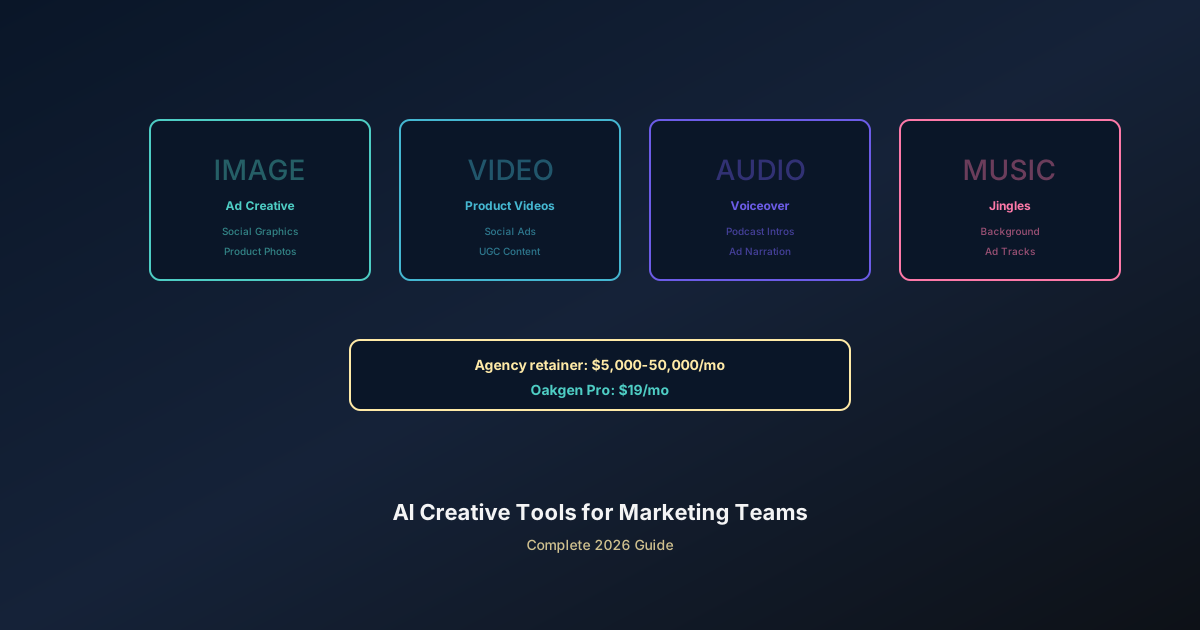
- Creative agency retainer: $10,000/month
- Stock footage and photography: $500/month
- Music licensing: $200/month
- Voiceover talent: $300/month
- Total: ~$11,000/month
AI-powered creative production:
- Oakgen Pro subscription: $19/month
- Additional credit packs for heavy usage: ~$50/month
- Team time for prompting, review, and editing: variable (but reduced)
- Total: ~$69/month in tool costs
Even accounting for internal team time spent prompting, reviewing, and editing AI output, the cost difference is 10-100x. A marketing coordinator spending 10 hours per week on AI creative production at $30/hour adds $1,200/month in labor. Total cost: ~$1,269/month versus ~$11,000/month. That is an 88% reduction.
The speed difference is equally significant. An agency delivers a campaign asset package in 2-3 weeks. AI creative production delivers the same volume in 2-3 days. That speed advantage compounds across the year -- more campaigns launched, more A/B tests run, more data collected, better creative performance over time.
The hidden ROI: faster iteration means better creative. When testing 20 thumbnail variations costs $2 instead of $2,000, you test more. When producing a video ad takes 10 minutes instead of 10 days, you test more. More testing means better performance data. Better data means higher ROAS. The cost savings are just the beginning.
Getting Your Marketing Team Started
Adopting AI creative tools does not require a massive organizational shift. Start small, prove the value, then scale.
Choose the Right Plan
Oakgen pricing is designed for teams at every scale:
- Basic plan -- $9/month with 2,000 credits across eligible creative tools.
- Pro ($19/month) -- 5,000 credits/month. Sufficient for small teams producing regular social content and occasional campaign assets.
- Ultimate ($29/month) -- 10,000 credits/month. Built for larger teams or brands with high-volume content needs.
See our Oakgen pricing explained post for a detailed breakdown of what each plan includes.
Team Workflow Tips
Build a shared prompt library. Document the prompts that produce your best results. Include brand-specific descriptors (lighting style, color palette, composition preferences) that should appear in every generation. A well-maintained prompt library turns AI creative production into a repeatable process that any team member can execute.
Establish brand guidelines for AI. Define the visual standards for AI-generated content. Acceptable styles, required aspect ratios, color palettes, typography rules, and quality thresholds. This prevents inconsistency when multiple team members generate content independently.
Designate a quality control step. AI output is fast but not always perfect on the first try. Build a review step into your workflow where someone with design judgment evaluates AI-generated assets before they go live. This catches the occasional artifact, awkward composition, or off-brand generation.
Track what you produce. Log every AI-generated asset -- the prompt used, the model selected, the credits spent, and the performance data once published. After a month, this log reveals which models work best for your brand, which prompt patterns produce the best results, and where your credits go.
The marketing teams winning in 2026 are not the ones with the biggest budgets. They are the ones producing and testing creative at the highest velocity. AI creative tools make that possible for teams of any size. Explore our state of AI creative tools in 2026 for a broader look at where the industry is heading.