A product photo shoot costs $2,000 to $10,000. Studio rental, photographer day rate, props, post-production, reshoots. For a DTC brand launching 20 SKUs, the photography line item alone can eat half the pre-launch budget before a single ad runs.
We generated the same quality for $2 in 10 minutes. Not a hypothetical. Not a cherry-picked result. A full set of white-background hero shots, lifestyle context images, and detail close-ups for a skincare product -- produced on Oakgen's image generator using Flux Pro at standard credit rates.
This guide breaks down the exact workflow, the exact prompts, and the exact math. If you sell on Amazon, Shopify, Etsy, or your own DTC site, this is the most cost-efficient upgrade available to your product listings in 2026.
The Math: Traditional Photo Shoot vs. AI
Before anything else, the numbers. These are real quotes from production studios in the US market as of Q1 2026, compared against actual Oakgen credit costs.
| Line Item | Traditional Studio | AI on Oakgen |
|---|---|---|
| Studio rental (half day) | $800 - $2,500 | $0 |
| Photographer (half day) | $400 - $1,500 | $0 |
| Props and styling | $150 - $600 | $0 (AI-generated scenes) |
| Post-production retouching (per image) | $15 - $50 | Included |
| Background removal (per image) | $5 - $15 | Included |
| Per-image generation cost | $25 - $150 | $0.05 - $0.30 |
| Turnaround time | 5 - 14 business days | 60 seconds per image |
| Revision rounds | $25 - $75 each | Re-generate at same cost |
| Total for 1 product (7 images) | $1,575 - $5,650 | $0.35 - $2.10 |
| Total for 20 products (7 images each) | $3,500 - $21,000 | $7 - $42 |
The per-image cost difference is not 50% or even 80%. It is 99%+. At scale -- 20 products, 7 images each, 140 total shots -- you are comparing four figures against single digits.
Oakgen credits convert at 260 credits per $1 USD. A Flux Pro generation at standard resolution costs 2-5 credits. At 4 variations per shot (to select the best), that is 8-20 credits per final image. For 7 images: 56-140 credits, or $0.22-$0.54. Even generating 4x variations of every shot for a 20-product catalog lands under $50. Check current rates on the pricing page.
The 10-Minute Workflow: Step by Step
Here is the exact process. No shortcuts, no skipped steps. This is what produces images that pass Amazon's automated quality checks and convert on Shopify product pages.
Step 1: Take a Reference Photo (2 Minutes)
Put your product on a white surface near a window. Take a photo with your phone. That is it.
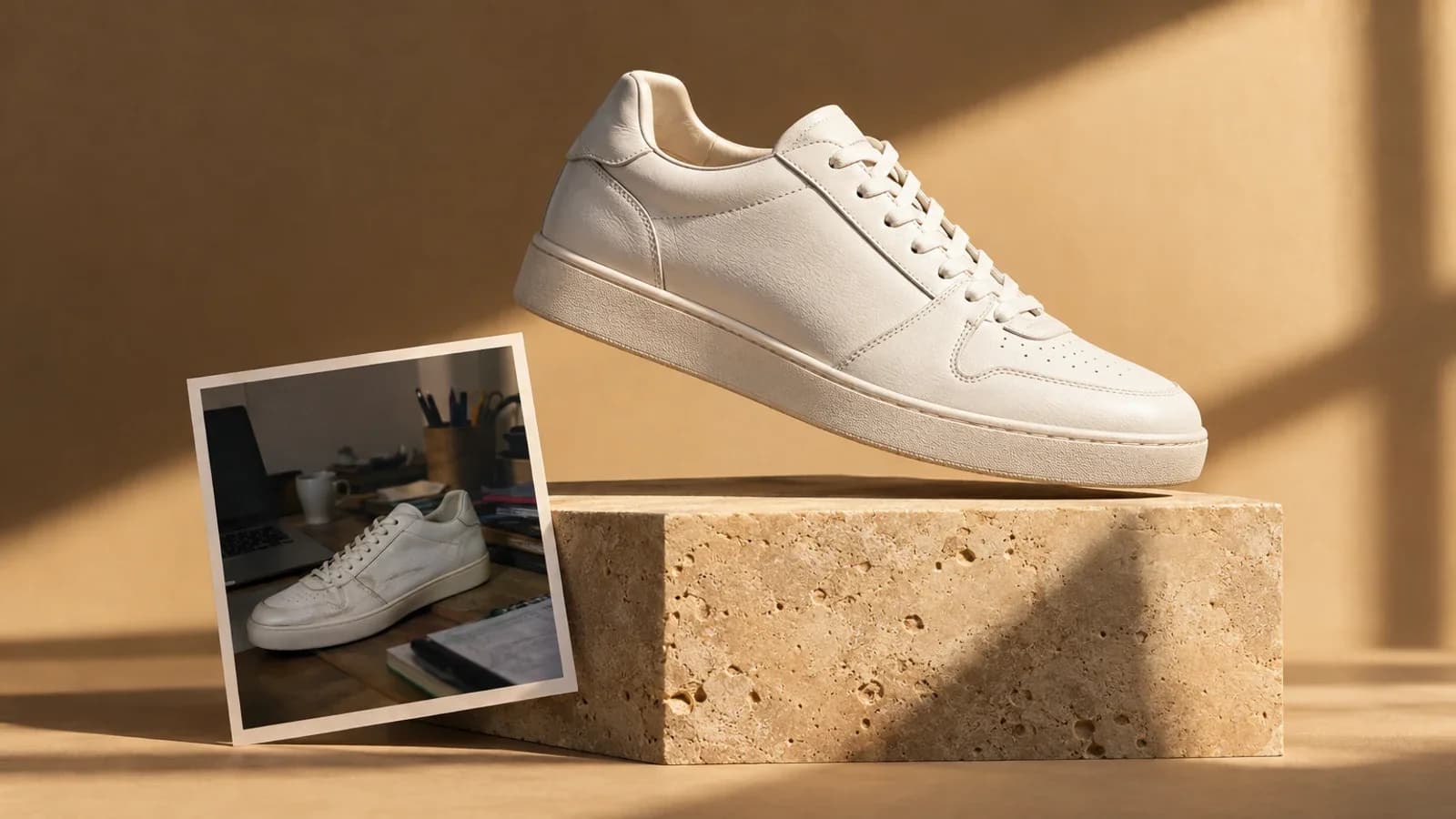
The reference photo does not need to be beautiful. It needs to be clear. The AI uses it to understand your product's shape, proportions, color, and surface material. Even lighting and a neutral background give the model the cleanest signal.
Diffused natural light (near a window, not direct sun). White or light gray surface. Product centered. No clutter in frame. Phone camera is fine -- you do not need a DSLR. Shoot from the angle you want your hero image at.
Step 2: Open the Image Generator (30 Seconds)
Navigate to Oakgen's image generator. Select Flux Pro as your model -- it produces the most consistent results for product photography. Set your output resolution to 1024x1024 for square marketplace images or 1024x1536 for vertical lifestyle shots.
Step 3: Generate Your Image Set (5 Minutes)
Every product listing needs multiple image types. Here are the exact prompts for each, using a skincare serum bottle as the example product.
Hero Shot (White Background)
Product photograph of a glass skincare serum bottle with gold dropper cap
on a pure white background. Professional studio lighting, soft diffused
shadows beneath the product. Product centered, filling 85% of the frame.
No text, no props, no watermarks. Commercial product photography.
Lifestyle Shot
Skincare serum bottle on a marble bathroom counter beside a small potted
succulent and a folded white linen towel. Soft morning light from a window
on the left. Shallow depth of field, product in sharp focus, background
gently blurred. Warm, clean, spa-like atmosphere. Editorial beauty
photography style.
Detail / Texture Close-Up
Extreme close-up of the gold dropper cap and glass neck of a skincare
serum bottle. Macro photography, shallow depth of field. Light refracting
through the amber serum inside the glass. Studio lighting with a single
soft highlight. Premium cosmetics photography.
In-Use / Application Shot
Woman's hand holding a skincare serum dropper, applying a single drop of
golden serum onto her fingertip. Blurred bathroom background. Soft natural
lighting. Focus on the dropper and the serum drop. Clean, editorial beauty
photography.
Generate 3-4 variations of each shot. Pick the best. Total generation time for a full 7-image set: about 5 minutes.
Step 4: Edit If Needed (2 Minutes)
Most generations are ready to use as-is. For the occasional image that needs a minor fix -- a shadow that is too harsh, a background element you want removed -- use the image editor to refine without regenerating from scratch.
For background removal specifically, Oakgen's background removal tool strips backgrounds to pure white (RGB 255,255,255) in one click, which is the exact spec Amazon requires for main images.
Step 5: Download and Upload to Your Store (30 Seconds)
Download at full resolution. Upload to Amazon Seller Central, Shopify Admin, Etsy, or wherever you sell. Done.
Prompt Templates by Product Type
The skincare example above follows a structure that works across categories. Here are ready-to-use prompts for three more product types.
Electronics (Wireless Earbuds)
Hero:
Product photograph of wireless earbuds in a matte black charging case on
a pure white background. Case open, revealing both earbuds. Professional
studio lighting with clean reflections on the glossy earbud surfaces.
Product centered, filling 85% of frame. Commercial electronics photography.
Lifestyle:
Wireless earbuds charging case on a minimalist oak desk beside a laptop
and a ceramic coffee mug. One earbud out of the case, placed on the desk.
Soft overhead natural light from a skylight. Clean, modern workspace
aesthetic. Product in sharp focus, background softly blurred.
In-Use:
Person wearing a single wireless earbud, photographed from a slight side
angle showing the earbud fit. Blurred urban background, outdoor daylight.
Focus on the ear and earbud. Lifestyle product photography, warm color
grade.
Fashion (Canvas Tote Bag)
Hero:
Product photograph of a natural canvas tote bag standing upright on a pure
white background. Bag slightly open to show interior depth. Soft studio
lighting with natural fabric shadows. No props. Product centered, filling
85% of frame. Commercial fashion accessories photography.
Lifestyle:
Canvas tote bag slung over the shoulder of a woman walking through a
sunlit farmers market. Bag filled with baguettes and wildflowers visible
at the top. Golden hour lighting, shallow depth of field. Aspirational
lifestyle photography, warm earth tones.
Flat Lay:
Flat lay photograph of a canvas tote bag on a light wood surface
surrounded by a notebook, sunglasses, a water bottle, and a small potted
plant. Overhead camera angle. Soft diffused lighting, no harsh shadows.
Clean editorial flat lay styling.
Home Goods (Ceramic Candle)
Hero:
Product photograph of a hand-poured ceramic candle in a speckled
stoneware vessel on a pure white background. Wick visible, unlit. Soft
studio lighting with gentle shadow beneath. Product centered, filling
85% of frame. Artisan home goods photography.
Lifestyle:
Ceramic candle on a rustic wooden nightstand beside an open book and a
pair of reading glasses. Warm evening light from a bedside lamp. Cozy
bedroom atmosphere, muted earth tones. Shallow depth of field, candle
in sharp focus. Editorial interior photography.
Detail:
Close-up of the speckled stoneware texture of a ceramic candle vessel.
Macro photography showing the hand-poured glaze detail and slight
irregularities that indicate handmade craftsmanship. Soft directional
lighting from the right. Artisan product detail photography.
Once you find prompts that work for your product category, save them as templates. Swap out the product description and keep everything else -- lighting direction, camera angle, scene description, photography style tags. This is how you generate 140 images in an hour instead of 14.
Where AI Product Photography Works Best
AI product photography in 2026 is not uniformly excellent across every scenario. Here is an honest breakdown of where it excels and where it has limits.
Strong Use Cases
White-background hero shots. This is where AI is essentially indistinguishable from studio photography. The model produces pixel-perfect white backgrounds every time, with consistent studio-quality lighting. Amazon main images, Shopify collection grids, Google Shopping -- all covered.
Lifestyle and context scenes. Placing a product on a marble counter, a rustic table, or an outdoor picnic blanket costs the same as a white background in AI. In traditional photography, a lifestyle shoot with set design runs $3,000-$8,000+. This is the single biggest cost arbitrage in AI product photography.
Catalog consistency. When you template your prompts, every product in your catalog gets identical lighting, angles, and styling. Studios struggle with this across multi-day shoots as conditions shift. AI delivers pixel-level consistency by default.
Seasonal and campaign refreshes. Holiday themes, summer collections, back-to-school -- traditionally require rebooking a studio and reshooting. With AI, you update the lifestyle prompt and regenerate your catalog in an afternoon.
Color variant images. If your product comes in 8 colors, a traditional shoot requires 8 separate setups. AI generates each variant from the same reference with only the color changed. Same angle, same lighting, same shadow. Perfectly consistent.
Current Limitations
Text on packaging. AI models still produce unreliable text rendering on labels and packaging. If your product's packaging copy is a selling point, composite a real photo of the label onto an AI-generated scene.
Extreme tactile detail. Fine leather grain, hand-stitched thread patterns, precious stone facets -- AI gets close but a macro lens on the real product still wins for these specific shots. The hybrid approach works: AI for 6 out of 7 listing images, one real macro detail shot.
Complex multi-product scenes. Arranging 5+ products in realistic spatial relationships is still tricky. Single products and 2-3 product compositions work reliably.
Amazon and Shopify Compliance
AI-generated images must meet the same platform specs as studio photos. Here are the requirements that matter.
Amazon Main Image Requirements
- Pure white background: RGB 255, 255, 255
- Product fills 85% or more of the frame
- No text overlays, watermarks, or borders
- Minimum 1000px on longest side (1600px+ recommended for zoom)
- JPEG, PNG, or TIFF format
AI handles all of these natively when you include the right prompt instructions. The "pure white background, product centered, filling 85% of the frame" language in the prompts above is specifically designed for Amazon compliance.
Shopify Best Practices
- Square aspect ratio (2048x2048) for consistent collection grids
- Consistent lighting and backgrounds across products
- Multiple angles: front, side, detail, lifestyle, in-use
- WebP or JPEG, under 20MB
Etsy and Pinterest
Both platforms favor lifestyle and styled imagery over clinical white backgrounds. AI excels here because generating a styled scene costs exactly the same as a plain background. Etsy flat-lays, Pinterest-optimized vertical lifestyle shots, seasonal styling -- all achievable with prompt changes alone.
Real Numbers: What We Actually Spent
To keep this concrete, here is the credit breakdown for a real generation session -- 7 images for a single skincare product, including variations.
| Image Type | Variations Generated | Credits Used | Cost (USD) |
|---|---|---|---|
| Hero (white bg) | 4 | 16 | $0.06 |
| Lifestyle (bathroom) | 4 | 16 | $0.06 |
| Lifestyle (vanity) | 4 | 16 | $0.06 |
| Detail close-up | 4 | 16 | $0.06 |
| In-use (application) | 4 | 20 | $0.08 |
| Flat lay | 4 | 16 | $0.06 |
| Scale comparison | 4 | 16 | $0.06 |
| Total | 28 | 116 | $0.45 |
Under fifty cents for a complete 7-image product listing. Multiply by 20 products: $9. Multiply by 50 products: $22.50. The cost is so low it is almost irrelevant compared to the time saved.
Advanced Techniques
Batch Processing for Large Catalogs
If you are launching 50+ SKUs, the efficient approach is to build a prompt template library (one template per image type), then run each product through the same 7-prompt sequence. Oakgen's text-to-image feature handles this cleanly -- same interface, same model, swap the product description in each prompt.
For brands with very large catalogs, the agent chat can help you iterate on prompts faster by refining descriptions conversationally before generating.
The Hybrid Approach
The most effective strategy for premium brands combines AI and traditional photography:
- AI for 80-90% of images: White backgrounds, lifestyle scenes, color variants, seasonal campaigns, A/B test variants
- Traditional for 10-20%: One or two macro detail shots showing real texture, stitching, or material quality
This hybrid cuts your studio spend by 80-90% while preserving authenticity for the images where it matters most.
A/B Testing Product Images
AI makes A/B testing product photography economically viable for the first time. Generate two lifestyle scenes for the same product -- say, a kitchen counter vs. an outdoor patio -- and split-test which converts better. At $0.06 per variation, you can test ten scene concepts for sixty cents. Traditional studios charge $75-$200 per additional setup.
Who This Works For
Amazon FBA sellers launching new products or refreshing existing listings. AI product photography cuts your per-SKU launch cost from hundreds of dollars to under a dollar. For sellers managing 100+ ASINs, the annual savings are five figures. See our ecommerce-specific tools for more.
Shopify and DTC brands running seasonal collections. Four catalog refreshes per year at $5,000-$15,000 each becomes four refreshes at $50-$150 each. The freed-up budget goes to ads, inventory, or product development.
Etsy sellers and small businesses who previously relied on smartphone photos because studio shoots were out of budget. AI product photography gives you studio-quality output at smartphone-photo prices. Check out our small business tools for the full toolkit.
Dropshippers and print-on-demand sellers who need product mockups before physical inventory exists. AI generates photorealistic product renders from text descriptions alone -- no physical sample required.
Getting Started on Oakgen
The fastest path from reading this to having professional product photos:
- Sign up at Oakgen and claim your free starting credits
- Take a clear reference photo of your product with your phone
- Open the image generator and select Flux Pro
- Paste one of the prompt templates above, swap in your product description
- Generate 3-4 variations, pick the best
- Download and upload to your marketplace listing
Your first complete product image set will take about 10 minutes. After you have your prompt templates dialed in, subsequent products take 5 minutes or less.
Generate Your First Product Photo in 60 Seconds
Using Photo Studio for Faster Results
For sellers who want an even more streamlined workflow, Oakgen's Photo Studio is purpose-built for product photography. Instead of writing prompts from scratch, you upload your reference image, select a background type (white, lifestyle, gradient, or custom), choose your lighting and angle, and generate. The Photo Studio handles the prompt engineering behind the scenes, which cuts generation time roughly in half for users who are not experienced prompt writers.
Photo Studio is particularly effective for batch workflows -- cycling through 20 products with the same background and lighting settings takes about 30 minutes, and the visual consistency across the catalog is automatic.
Frequently Asked Questions
Do Amazon and Shopify allow AI-generated product images?
Yes. As of May 2026, neither Amazon nor Shopify prohibits AI-generated product images. Amazon's image policy is standard-based -- pure white background, minimum resolution, product filling 85% of the frame -- not process-based. If your AI-generated images meet the published specs, they are accepted. The same applies to Shopify, Etsy, eBay, and Walmart Marketplace.
Will customers be able to tell my photos are AI-generated?
For standard ecommerce image types -- white-background hero shots, lifestyle scenes, flat lays -- current models like Flux Pro produce output that is indistinguishable from studio photography to the average shopper. The areas where AI images can look less convincing are extreme close-ups of complex textures (fine leather grain, woven fabrics) and readable text on packaging. For 90%+ of ecommerce photography needs, customers will not notice.
How does AI product photography handle color accuracy?
Color accuracy depends on your reference photo. If your reference image has accurate color (taken in neutral daylight or with a white-balanced phone camera), the AI preserves those colors reliably. For products where exact color matching is critical (fashion, cosmetics, paint), we recommend generating the image with AI and then doing a quick color calibration pass in any basic photo editor. The Imagen 4 Ultra model, reviewed here, is particularly strong on color fidelity.
Can I generate images for products I have not manufactured yet?
Yes. This is one of the highest-value applications of AI product photography. You can generate photorealistic product renders from text descriptions, concept sketches, or 3D mockups -- no physical sample needed. DTC brands use this for pre-launch landing pages, crowdfunding campaigns, and market validation before committing to a production run.
What is the best AI model for product photography on Oakgen?
Flux Pro delivers the most consistent results for clean product photography -- white backgrounds, accurate product rendering, natural shadows. For lifestyle scenes requiring complex environments, GPT-Image-1 and Imagen 4 Ultra are also strong. For the fastest generation at the lowest credit cost, Flux Schnell handles simple product shots well. The practical approach: test 2-3 models with your specific product and pick based on output quality. Our free AI image generators guide covers model strengths in detail.
How many credits does a full product catalog cost on Oakgen?
At 2-5 credits per generation on Flux Pro, a 7-image product listing with 4 variations per image costs 56-140 credits ($0.22-$0.54). A 20-product catalog: $4.40-$10.80. A 50-product catalog: $11-$27. Even generating 4x variations of every shot for a 100-product catalog stays under $55. These numbers include the "generate multiple, pick the best" workflow -- you are not paying for a single generation and hoping it works.
Earn 25% recurring on every referral.
Share Oakgen, get paid every month they stay.
Bottom Line
AI product photography is not a future possibility. It is a current production tool. The cost difference between a traditional photo shoot ($2,000-$10,000) and AI generation ($2-$50 for the same scope) is large enough to change how ecommerce businesses allocate their launch budgets.
The quality is there for 90%+ of ecommerce image types. The speed -- 10 minutes per product vs. 10 days -- makes A/B testing, seasonal refreshes, and large catalog launches economically viable for businesses that previously could not afford professional photography at all.
Start with one product. Generate a full 7-image set. Compare it against your existing listing photos. The results will make the decision for you.
What to Read Next
- Studio-Quality Photos With AI Photo Studio -- the complete guide to Oakgen's Photo Studio tool, including advanced background and lighting controls.
- Imagen 4 Ultra Review -- deep dive on the model with the strongest color fidelity and detail rendering for product shots.
- Best Free AI Image Generators in 2026 (Tested) -- model-by-model comparison to help you pick the right tool for your product category.