ChatGPT
 Claude
A good Sheru Bhai prompt for Gemini does two things in a fixed order: it protects your face first ("keep my face, skin tone and hair exactly the same") and only then adds the lion boss, described piece by piece: white three-piece suit, gold chain, gold watch, aviators. Upload a clear selfie in the Gemini app or at gemini.google.com, paste the prompt, send it, and fix the result with one short follow-up at a time.
This page has photo prompts tuned for Gemini, the follow-up messages that repair common mistakes, and a prompt that gets Gemini to write the video side of the trend.
Prefer one place for photo and video?
Use Nano Banana 2.1 or GPT Image 2.5 on Oakgen for the photo, then animate it. Price shown before you generate.
The four steps in Gemini
Guides that tested the trend in Gemini describe the same flow (Fzook, Sarkari Result Ind):
- Open the Gemini app or gemini.google.com and sign in with your Google account.
- Tap the plus button and upload one clear, front-facing photo of yourself.
- Paste a prompt from below and send it.
- Download the image. If something is off, reply with one change, not a new prompt.
Gemini's image editing runs on Google's Nano Banana models. One tester who ran 11 Sheru prompts with Nano Banana got 9 right on the first try and fixed the other 2 with one extra line each (Sheru Bhai AI).
The Sheru description to reuse
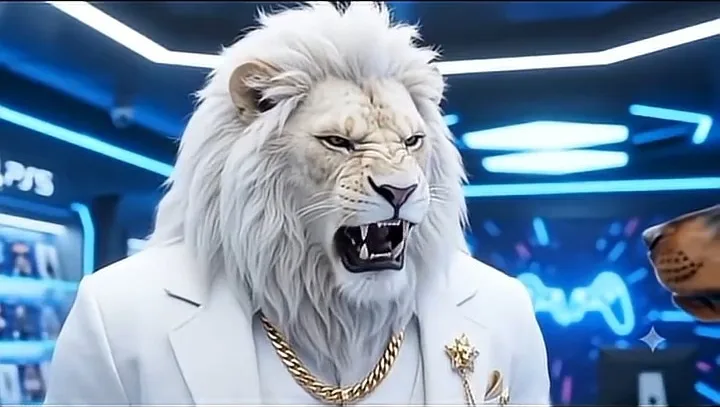
Paste this same sentence into every Gemini prompt so your Sheru doesn't change from photo to photo:
Sheru Bhai: a human-sized anthropomorphic lion man with a thick golden
mane, amber eyes, black aviator sunglasses, a tailored white three-piece
suit with a light grey waistcoat, a heavy gold chain, a gold wristwatch
and white leather shoes. Calm, confident boss expression.
Some creators use a white lion instead of a golden one. Pick one and stay with it; switching mane colour is the fastest way to make a series look like different characters.
Gemini photo prompts
1. Standing with Sheru Bhai
Use my uploaded photo for me. Keep my face, skin tone, hair, age, body
and clothes exactly the same, with no retouching.
Add Sheru Bhai standing beside me: [paste the Sheru description].
His head is the same size as mine, his shoulders level with mine, hands
in his trouser pockets. We both look at the camera.
Background: the steps of a marble palace at golden hour, a white luxury
car with no badge behind us.
One warm light from the left on both of us, soft shadows under our feet.
Realistic phone photo, vertical 9:16. No text, no logo, no watermark.
"Hands in pockets" is deliberate: when Sheru puts a paw on your shoulder, image models often bend it onto the far shoulder. Add the paw back later if you want it, as a separate follow-up.
2. Boss walk together
Keep my face, hair and clothes from the uploaded photo exactly the same.
Show me and Sheru Bhai ([paste the Sheru description]) walking side by
side toward the camera down a red carpet outside a palace hotel at night,
two bodyguards in black suits behind us, flashbulbs in the background.
Slight low angle, full body, vertical 9:16, realistic.
No text, no logos, no watermark.
3. Sheru on his own (no upload)
Create a photorealistic vertical 9:16 portrait of Sheru Bhai:
[paste the Sheru description]. He sits on a gold throne in a marble hall
with chandeliers, one hand on the armrest, looking into the camera.
Warm cinematic light, realistic fur and fabric. No text, no logo.
Keep this one: it becomes your reference image for videos. More scenes are in Sheru Bhai photo prompts, and family or friends versions are in the group photo prompt guide.
Follow-up messages that fix the result
Gemini keeps the conversation, so you can edit the last image instead of starting over. One change per message:
| What went wrong | Reply with |
|---|---|
| Your face changed | "Use my original photo again. Keep my face exactly as in that photo." |
| Sheru is too big | "Make Sheru's head the same size as mine." |
| Paw on the wrong shoulder | "Remove his hand from me; both his hands in his pockets." |
| Garbled sign or plate | "Remove all text, signs and number plates." |
| Looks pasted in | "Light us both from the same warm light on the left and add soft shadows under our feet." |
| Chain or glasses missing | "Add the heavy gold chain and black aviators back on Sheru." |
Getting Gemini to write video prompts
Gemini is also good at the writing half of a Sheru video. Paste this into a new chat:
Write a 30-second Sheru Bhai video as three 10-second scenes for a
video model. Sheru: [paste the Sheru description], deep calm funny
Hindi voice. Story: Sheru walks into a jewellery shop, the owner ignores
him because of his paws, then realises who he is.
For each scene give one standalone prompt: 9:16, realistic cinematic 3D,
the full Sheru description, the shop described the same way, a
second-by-second timeline, Roman Hinglish dialogue in quotes marked
"spoken in Hindi" (max 10 words per line), camera moves and sound.
End each prompt with: "Perfect Hindi lip-sync. No subtitles, no
on-screen text, no logos. Do not change Sheru's face or outfit."
Then paste the scene prompts into a video tool. The Hindi tutorials use Google Flow with Omni 1.2 Flash, 9:16, 720p, 10 seconds per scene (Manoj Dey). On Oakgen, Seedance 2.5 makes up to 30 seconds in one clip with a Generate audio switch for the Hindi lines (1,491 credits for 20 s at 480p as of 2026-11-26). The full process is in how to make a Sheru Bhai AI video, and the ChatGPT version of this workflow is in Sheru Bhai prompt for ChatGPT.
Upload only your own photo or one you have permission to use, never a child's or a celebrity's. Each tool handles uploads under its own privacy policy. Label realistic AI images as AI-made when you post them.
Frequently asked questions
How do I make a Sheru Bhai photo in Gemini?
Open the Gemini app or gemini.google.com, upload a clear photo of yourself with the plus button, paste a Sheru Bhai prompt that says to keep your face exactly the same, and send. Ask for one change at a time if the result needs fixing.
Which Gemini model makes the Sheru Bhai photo?
Image editing in Gemini runs on Google's Nano Banana image models. Oakgen also offers Nano Banana 2.1 in its image generator, from 14 credits per image as of 2026-11-26.
Can Gemini make the Sheru Bhai video too?
Gemini can write the story and video prompts. The Hindi tutorials then make the clips in Google Flow with the Omni 1.2 Flash model, 9:16, 720p and 10 seconds, and join them in an editor.
Why does Gemini change my face?
The prompt didn't protect it, or the photo was small, dark or a group shot. Start the prompt with 'Keep my face exactly the same' and use a sharp, front-facing photo of one person.