ChatGPT
 Claude

A Sheru Bhai group photo prompt has to do one thing a solo prompt doesn't: keep several real faces unchanged at once. The prompts below state the exact number of people, tell the model to keep every face, outfit and position as in your photo, and put Sheru Bhai in one fixed spot (the middle, or at one end) so nobody gets pushed out or replaced. Use a sharp photo of 2 to 6 people with every face large and lit.
Single-person guides tell you to avoid group photos because the AI "may swap the wrong person" (Sheru Bhai Video). That risk is real, and the wording below is built to reduce it.
Make your group photo with Sheru
Upload your group photo and a Sheru reference, paste a prompt, and see the price before you generate.
Before you start: pick the right photo
| Check | Why it matters |
|---|---|
| 2 to 6 people | More faces means smaller faces, and small faces drift |
| Every face toward the camera | Profiles and half-turned heads get redrawn |
| No sunglasses, masks or caps on people | The model may move the aviators off Sheru and onto you |
| Even light, no heavy filters | Filters make skin tone shift in the result |
| Space on one side or in the middle | Sheru needs room; otherwise he overlaps someone |
| Everyone agreed | It's their face too |
If you already made a Sheru portrait, attach it as a second image. It keeps his look the same across all your photos. Make one with the Sheru Bhai photo prompts.
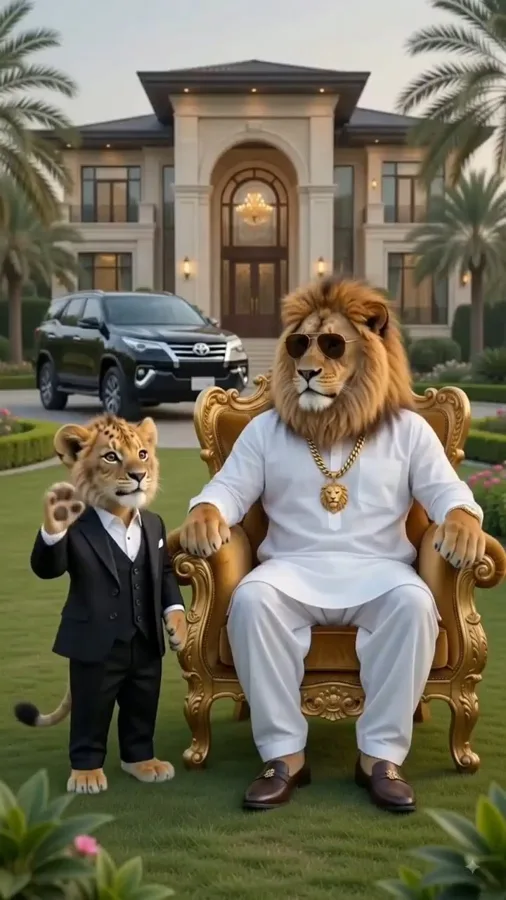
The Sheru line to paste into every prompt
Sheru Bhai: a human-sized anthropomorphic lion man with a thick golden
mane, amber eyes, black aviator sunglasses, a white three-piece suit,
light grey waistcoat, heavy gold chain, gold watch and white shoes.
Prompt 1: Friends' group photo
IMAGE 1 is a photo of my friends: exactly [4] people. Keep every
person's face, hair, skin tone, body, clothes and position exactly the
same. Do not add, remove or merge anyone.
IMAGE 2 is Sheru Bhai: keep his look exactly.
Add Sheru Bhai standing in the middle of the group, the same height as
the tallest person, one arm around the shoulders of the two people next
to him. Everyone smiles at the camera; Sheru gives a cool half-smile.
Background: a rooftop lounge at night with city lights.
One warm light from the front on everyone, soft shadows.
Realistic group photo, vertical 9:16. Exactly [5] figures in total.
No text, no logo, no watermark. Do not change anyone's face.
Replace the numbers in brackets with your own. Saying the total ("exactly 5 figures") is the simplest guard against the model inventing an extra person or dropping one.
Prompt 2: Family photo for a festival
IMAGE 1 is my family: exactly [5] people. Keep every face, hairstyle,
skin tone, outfit and the order they stand in exactly the same.
IMAGE 2 is Sheru Bhai: keep his look exactly.
Place Sheru Bhai at the right end of the row, standing like a family
friend, hands folded in front.
Background: a living room decorated with diyas, marigold garlands and a
rangoli on the floor, warm evening light.
Eye level, full faces visible, vertical 4:5.
Exactly [6] figures. No text, no logo. Do not change anyone's face.
Putting Sheru at one end, not in the middle, is safer for families: nobody gets pushed apart, and the elders stay in their places.
Prompt 3: Couple with Sheru Bhai
IMAGE 1 is a couple: exactly 2 people. Keep both faces, hair, skin
tones and outfits exactly the same, and keep them holding hands.
IMAGE 2 is Sheru Bhai: keep his look exactly.
Sheru Bhai stands one step behind them, slightly to the left, like a
proud elder brother, giving a thumbs-up.
Background: a palace garden with fountains at golden hour.
Both faces large and clearly visible, vertical 9:16, realistic.
Exactly 3 figures. No text, no logo, no watermark.
Prompt 4: Wedding stage
IMAGE 1 is a bride and groom on their wedding stage: exactly 2 people.
Keep their faces, jewellery, outfits and pose exactly the same.
IMAGE 2 is Sheru Bhai: keep his look exactly, but replace his
sunglasses with none so his eyes show.
Sheru Bhai stands beside the groom holding a big gift box wrapped in
gold paper with no writing. Flowers and fairy lights behind them.
Eye level, full faces visible, vertical 4:5, realistic wedding photo.
Exactly 3 figures. No text, no logo. Do not change the couple's faces.
Ask the couple first. A wedding photo is a keepsake, and not everyone will want a lion in it.
Prompt 5: College gang entry
IMAGE 1 is a group of college friends: exactly [4] people. Keep every
face, hairstyle and outfit exactly the same.
IMAGE 2 is Sheru Bhai: keep his look exactly.
Everyone walks toward the camera in a line through a college gate in
slow motion style, Sheru Bhai in the centre slightly ahead, sunglasses
on. Students blurred in the background.
Low angle, full body, vertical 9:16, cinematic and realistic.
Exactly [5] figures. No readable text on the gate. No logo.
After you generate: the face check
Look at the result zoomed in, one face at a time, before you share it:
- Count the figures. One extra or one missing means regenerate, not fix.
- Check each face against the original: eyes, nose, smile lines, glasses.
- Check hands. Arms around shoulders are where extra fingers appear.
- Check Sheru's size. His head should be about the size of the others' heads.
Then fix one thing per follow-up message:
| Problem | Follow-up |
|---|---|
| One person's face changed | "Keep the person on the far left exactly as in IMAGE 1." |
| Someone was removed | "There must be exactly [5] people from IMAGE 1. Add the missing person back in their original place." |
| Sheru too big | "Make Sheru's head the same size as the others' heads." |
| Sheru took someone's spot | "Keep everyone in their original order; put Sheru at the right end." |
| Odd hands | "Fix the hands: five fingers each, natural grip." |
A tester of Sheru photo prompts found that naming one light and asking for contact shadows stops Sheru from looking pasted in (Sheru Bhai AI). That matters even more in a group, where five people and a lion all need to share the same light.
Which model to use
On Oakgen, Nano Banana 2.1 (from 14 credits) and GPT Image 2.5 (from 21 credits) both take reference images; prices are as of 2026-11-26 and shown before you generate. Run the same prompt on both if faces matter a lot and keep the better result. For selfies, see the Gemini prompt guide; for wallpapers and profile pictures, see Sheru Bhai 4K wallpaper and DP.
Get everyone's okay before you upload a group photo, leave children out, and label the picture as AI-made when you post it.
Frequently asked questions
Can AI add Sheru Bhai to a group photo?
Yes. Upload the group photo plus, ideally, one Sheru reference image, and use a prompt that states how many people there are and tells the model to keep every face, outfit and position the same.
How many people can be in a Sheru group photo?
Two to six works best. Above that, faces get small and image models start changing them. For a big family, make two photos or crop the group.
Why did one of my friends' faces change?
Small or blurred faces are the first to drift. Use a sharp photo where every face is large and lit, say the exact number of people in the prompt, and ask for one fix at a time.
Do I need everyone's permission?
Yes. Everyone in the photo should agree before you upload it to an AI tool or post the result, and children's photos are best left out.