ChatGPT
 Claude
The best Sheru Bhai 4K wallpaper or DP is one you make yourself: generate it in 9:16 for a phone wallpaper or 1:1 for a profile picture, with an image model that outputs 4K, and you get a sharp picture nobody else has, with no watermark and no question about who owns it. On Oakgen, Nano Banana 2.1 has 1K, 2K and 4K output and 9:16, 1:1, 4:5 and 16:9 frames. It starts at 14 credits per image, and higher resolutions cost more; the exact price shows before you generate (as of 2026-11-26).
Below are ready prompts for wallpapers, lock screens and DPs, plus the sizes and crop rules that keep Sheru's face from being cut off.
Make your Sheru wallpaper
Pick 9:16 or 1:1, paste a prompt, choose 4K, and see the price before you generate.
Why make it instead of downloading it
Search "sheru bhai photo 4k" and you'll find wallpaper pages full of screenshots from other people's reels: low resolution, often watermarked, and made by a creator who never gave permission. Sheru Bhai himself has no owner; he is a look that many accounts make (Copy That Video). But each picture belongs to whoever made it. A wallpaper you generate is sharper, and it's yours.
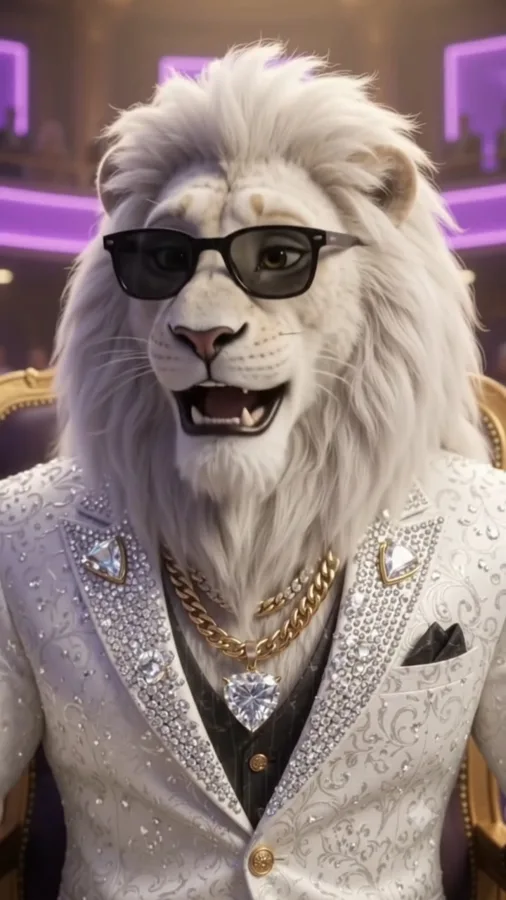
Sizes that fit
| Use | Aspect ratio | Pixels (HD) | Pixels (4K) | Keep in mind |
|---|---|---|---|---|
| Phone wallpaper | 9:16 | 1080 × 1920 | 2160 × 3840 | App icons cover the middle and bottom |
| Lock screen | 9:16 | 1080 × 1920 | 2160 × 3840 | The clock sits over the top third |
| WhatsApp / Instagram DP | 1:1 | 1080 × 1080 | 2160 × 2160 | Shown as a circle; face in the centre |
| Desktop wallpaper | 16:9 | 1920 × 1080 | 3840 × 2160 | Put Sheru to one side, leave room for icons |
| Status / Story | 9:16 | 1080 × 1920 | 2160 × 3840 | Top and bottom get covered by the app |
Generating in the right ratio matters more than the pixel count. Cropping a square DP out of a wide picture throws away most of the detail you paid for.
The Sheru description
Use the same lines every time so your wallpaper, DP and videos all show the same Sheru:
Sheru Bhai: an original anthropomorphic lion boss with a thick golden
mane, amber eyes, black aviator sunglasses, a white three-piece suit,
light grey waistcoat, heavy gold chain and gold wristwatch.
White-maned versions are popular too. Swap "golden mane" for "snow-white mane" if that's the Sheru you follow.
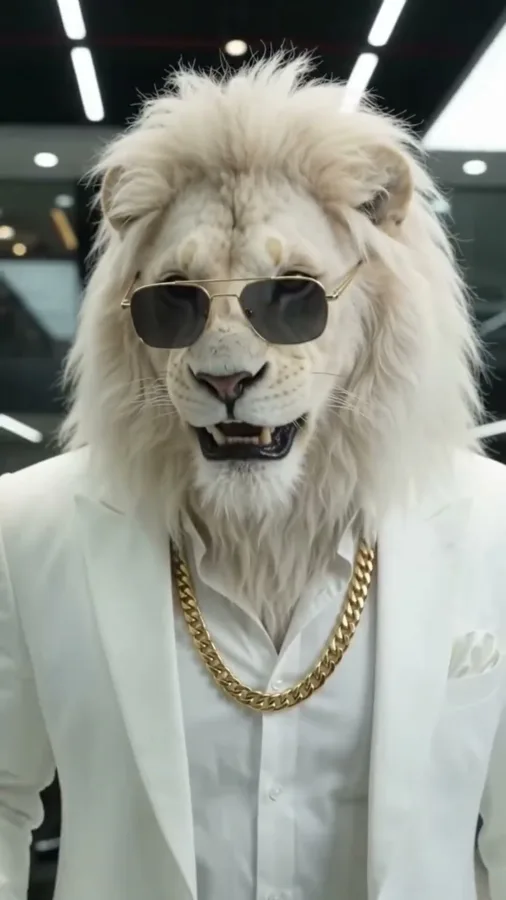
Wallpaper prompts (9:16)
1. Lock screen: Sheru with empty sky
Vertical 9:16, 4K, photorealistic. [paste the Sheru description].
He stands on the roof of a skyscraper at blue hour, seen from a low
angle, the city lights far below. Sheru fills the lower 60% of the
frame; the top third is clean dark-blue sky with no objects, for the
clock. Cinematic rim light on the mane. No text, no logo, no watermark.
The empty top third is the trick for lock screens: the clock covers that area anyway.
2. Home screen: gold throne room
Vertical 9:16, 4K, photorealistic. [paste the Sheru description].
He sits on a gold throne at the very top of the frame, small and
centred, in a vast marble hall with chandeliers. The lower half of the
image is a calm, dark marble floor with soft reflections.
Rich gold and deep black colours. No text, no logo.
Here the busy part sits at the top and the bottom stays calm, so your app icons stay readable.
3. Minimal dark wallpaper
Vertical 9:16, 4K. Close-up of [paste the Sheru description], only his
face, mane and sunglasses lit by a single warm light from the left,
the rest falling into pure black. Strong contrast, fine fur detail.
No text, no logo.
A single light on a black background makes the gold chain and sunglasses pop.
DP prompts (1:1)
4. Classic Sheru DP
Square 1:1, 4K, photorealistic. Head-and-shoulders portrait of
[paste the Sheru description], centred, looking straight into the
camera, sunglasses lowered so his eyes show. Plain deep-gold gradient
background. The whole mane fits inside the centre circle of the frame
with space around it. No text, no logo.
5. You and Sheru DP
Square 1:1. Use my uploaded photo: keep my face, hair and skin tone
exactly the same. Head-and-shoulders shot of me and Sheru Bhai
([paste the Sheru description]) side by side, heads close together,
both facing the camera and smiling. Both faces inside the centre circle
of the frame. Plain dark background. No text, no logo.
For more poses with your photo, see the Sheru Bhai photo prompts and the group photo prompt guide.
Make it sharp
- Pick 4K at generation. Choosing it in the model's settings gives more real detail than enlarging a small image later.
- Ask for fine detail. "Fine fur detail, sharp focus on the face" helps; "cinematic blur everywhere" doesn't.
- Keep text out. Image models still garble small letters, and text on a wallpaper fights the clock.
- Name every accessory. The model changes what you leave out: chain, watch, sunglasses, shoes.
- Check the crop before saving. Put the image on your lock screen and look at where the clock and icons land.
A tester of Sheru photo prompts found that naming one light direction and asking for contact shadows makes the picture look like one real photo instead of a collage (Sheru Bhai AI).
Where to make it
On Oakgen, use Nano Banana 2.1 and set resolution to 4K (from 14 credits at 1K; 4K costs more) or GPT Image 2.5 (from 21 credits) as of 2026-11-26. Keep your best portrait: it doubles as the reference image for your Sheru videos, so your DP and your reels show the same lion.
Make one 9:16 master image, then ask for a 1:1 "head-and-shoulders version of the same lion, same lighting" for your DP. A matching wallpaper and DP looks more deliberate than two random pictures.
Frequently asked questions
Where can I get a Sheru Bhai 4K wallpaper?
Make your own with an image model that outputs 4K. On Oakgen, Nano Banana 2.1 offers 1K, 2K and 4K output, from 14 credits per image at the lowest setting as of 2026-11-26. Downloading other creators' artwork and reposting it isn't yours to use.
What size is a phone wallpaper?
Generate in 9:16 portrait. That matches most phone screens; 1080 by 1920 pixels is full HD and 2160 by 3840 is 4K.
What size should a Sheru Bhai DP be?
Square, 1:1. WhatsApp and Instagram show profile pictures as a circle, so keep Sheru's face in the middle with space around the mane.
Can I put my own face in the Sheru wallpaper?
Yes. Attach your photo and use the 'with Sheru' prompt on this page, or the photo prompts guide. Use only your own photo or one you have permission to use.