ChatGPT
 Claude
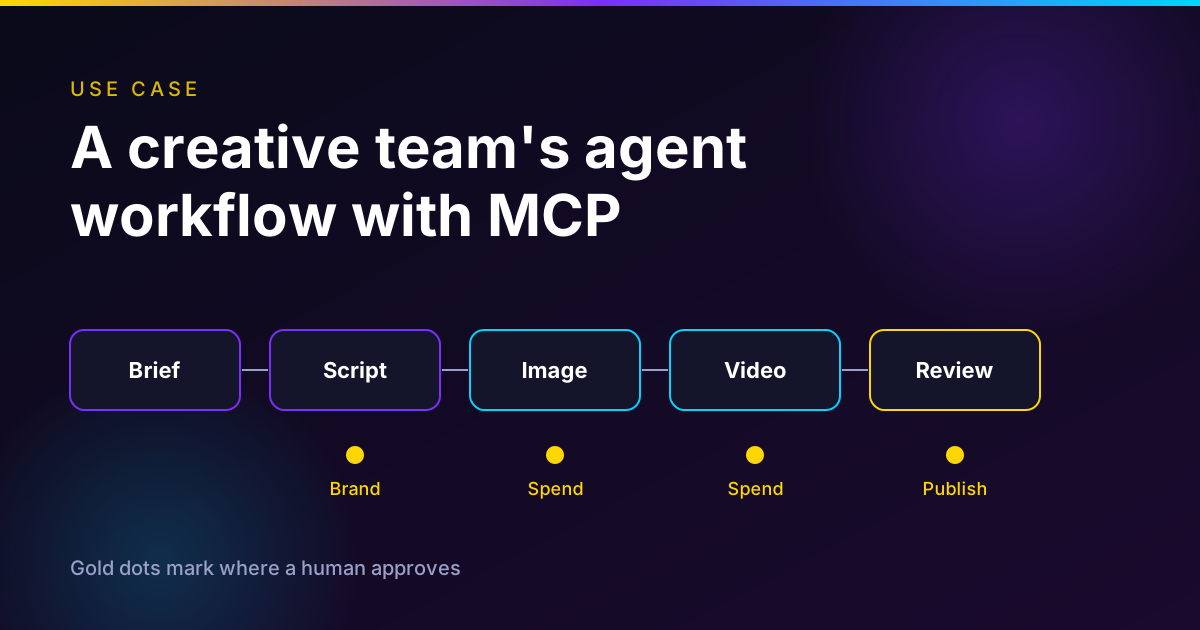
A small creative team should run an ad and social workflow as one orchestrator agent that owns the sequence, with the brief, script, image, video and review roles as prompts it calls. The orchestrator can do everything read-only or reversible, like looking up models, reading schemas, getting prices, polling and logging. People must approve three things. Spend, brand and publishing.
Keep a credit ledger in the orchestrator, because a per-call price ceiling is not a campaign budget. Plan for failure before the first paid call, because videos take minutes and retries can double-charge if you do them carelessly. The workflow map and pre-flight checklist below are written to be copied.
Disclosure. Oakgen is our product. The examples use its MCP server because we can verify its tools, and the pattern applies to any server that quotes prices before it spends.
Give your agent a server that quotes before it spends
Oakgen's MCP server lets an agent search models, read schemas, get an exact credit price and start jobs with a spend ceiling. Oakgen is our product.
The short version
| Role | Who does it | What it may touch | Human gate |
|---|---|---|---|
| Brief | Human writes, agent normalizes | Nothing external | Sign the brief, claims and budget |
| Script | Script prompt | Nothing external | Pick one script, check brand and claims |
| Image | Orchestrator calling the server | Spends credits | Approve the quote total |
| Video | Orchestrator calling the server | Spends credits, slowest step | Approve again if the quote grew |
| Review | Reviewer prompt, then a person | Reads outputs | Brand, rights, disclosure, publish |
Who this is for
You are two to six people making paid and organic social content. One person is the producer, one or two make the creative, and someone owns the ad account. You want an agent to do the repetitive work of looking up models, quoting, generating and tracking, without a surprise bill and without an AI clip going live unreviewed.
If you are an agency with many clients, read creative MCP workflows for marketing agencies as well. This post is the smaller, single-team version with the failure handling spelled out.
How I checked this
On November 12, 2026 I read the Oakgen MCP page, the tool reference and the generation contracts in the Oakgen codebase, then ran search_models, get_model_schema and get_pricing against the live server. Those calls spend nothing. I read the MCP tools specification and the YouTube and TikTok help pages for disclosure rules.
What I did not do. I did not run a full campaign through this workflow, and I report no customer results, because I have none to report. The budget table uses quotes from that day and labelled assumptions. TikTok's help page would not load directly, so I read its text through a search extract. I did not verify Meta's ad disclosure rules from a Meta policy page, so I do not state them.
What the MCP server gives you, and what it does not
Oakgen's public tool reference lists nine tools. Three find and price (search_models, get_model_schema, get_pricing), four create (upload_media, start_generation, get_generation_status, cancel_generation) and two cover your account (list_generations, get_account). Three of them change state or spend credits, upload_media, start_generation and cancel_generation.
Four limits shape the workflow.
- No writing tool. The server does not write scripts. Your host model, the chat or IDE agent you connect, writes the brief and script. That is why the brief and script roles below cost no credits.
- No assembly and no publishing. The repository gates Motion, Compose and media import behind server flags, and the public tool reference does not list them. Plan on cutting the edit in your own editor, then publishing from the ad platform by hand.
- Paid plan to generate. Starting a generation needs a paid plan. On a free account, start returns PLAN_REQUIRED and nothing is spent, while search, schemas, prices, status and history still work.
- Rate limits. The MCP page lists per-minute request and generation-start limits, and get_account reports your remaining start limits. Read the numbers on the live page, because I found the daily figure inconsistent between sources and will not repeat it here.
The server's own instructions give the order an agent should follow. Search, read the schema, get the price, tell the user the cost and wait for a yes, start with a ceiling and a new idempotency key, then poll status. Our guide to image generation MCP servers explains each of those steps, and Claude Code website images shows a narrower use.
Applying the orchestration patterns
I will not restate the patterns. Our orchestration patterns post covers cost and failure modes for each. Here is which one lands where.
A sequential skeleton. Brief, script, stills, clips, voice, review. Each step has an output you can check, so a pipeline with gates between steps is the cheapest shape that works. A step that keeps needing an earlier one is the signal to add a loop, not another agent.
Fan-out in one place. Four still variants for one scene share no context, so they can run in parallel. That is the only fan-out I would start with. Cap the count in code. For the decision to split at all, see single agent vs multi-agent.
One writer. Script, brand voice and shot list are one connected artifact. One agent writes them. A second, clean-context reviewer can score the result against a rubric, which is the one split that tends to pay off for creative work.
Human gates as pauses. Resuming after a human pause can replay earlier steps in some frameworks, so any side effect before the pause must be safe to repeat. For us that is the paid call. Store the idempotency key in run state before you ask for approval, and reuse it on resume.
A graph if you outgrow a script. If your process is stable, declare it as a graph and keep model calls only at the steps that need judgment. Most small teams do not need that on day one.
What the orchestrator owns, and what it must not
The orchestrator owns state. That means the brief, the approved script, the shot list, quotes, the keys, a run log and the ledger. It owns sequencing and polling. It owns retry bookkeeping up to a cap. It never approves its own spend above the human-approved line, never edits the brief, and never decides that a clip is on brand.
The MCP specification points the same way. The 2026-07-28 tools page says there should always be a human in the loop with the ability to deny tool invocations. The 2025-11-25 page adds that clients should prompt for confirmation on sensitive operations, show tool inputs before calling the server, and log tool usage for audit. The spec uses SHOULD for the client side, so it is your workflow that makes it real. On the server side it says servers must rate limit tool invocations.
A practical note on credentials. Oakgen's personal key form offers three scopes, models:read, generations:read and generations:write. If a research or review helper only needs to look things up, give it a key without the write scope. Only the orchestrator holds the spending scope. See our MCP security checklist for creative teams for revocation and storage, and MCP server supply chain risk before you add any third-party server to this workflow.
The workflow map
This is the asset to copy. Step, owner, tool, approval, and the cost control that applies.
| Step | Owner | Tool | Approval needed | Cost control |
|---|---|---|---|---|
| 1. Brief | Human, then brief prompt tidies it | None, host model | Producer signs claims, audience, budget | Budget line set here |
| 2. Script and hooks | Script prompt | None, host model | Human picks one script, brand check | Cap at three drafts |
| 3. Model and schema lookup | Orchestrator | search_models, get_model_schema | None | Read only, free |
| 4. Quote every planned job | Orchestrator | get_pricing | None, but results go to the gate | Spends nothing, quote expires |
| 5. Spend gate | Human | None | Approve the quote total and the ceiling | Campaign ledger created |
| 6. Reference upload | Orchestrator | upload_media | Human confirms rights for each file | Only Oakgen URLs reach media fields |
| 7. Stills | Orchestrator, image prompt | start_generation, get_generation_status | Covered by step 5 | maxCredits equals quote, fresh key per shot, variant cap |
| 8. Still review | Reviewer prompt, then human | Results, list_generations | Brand gate, reject before animating | Rejects count against the ledger |
| 9. Video clips | Orchestrator, video prompt | start_generation, get_generation_status | New gate if any quote exceeds step 5 | One test clip first, cancel after timeout |
| 10. Voice and music | Orchestrator, audio prompt | start_generation | Voice and rights gate | Small cost, still ledgered |
| 11. Edit | Human editor | External editor | Editor owns the cut | None |
| 12. Final review and disclosure | Human | None | Brand, claims, rights, AI disclosure | None |
| 13. Publish | Named human | Ad platform or social app | Named publisher approves | None |
| 14. Failure triage | Orchestrator, then human | get_generation_status, cancel_generation, get_account | Escalate after the retry cap | Retry cap per shot |
Test the quote step on your own brief
Connect Oakgen MCP, ask your agent to search models and price three clips, and read the quotes before anything is spent. Oakgen is our product.
Where a human must approve
Spend
Approve a total, not a vibe. The reviewer should see the list of planned jobs, each model, each quote in credits, the sum, and the ceiling the orchestrator will pass. Oakgen's quote also carries an expiry, so an approval that sits overnight needs a fresh quote. Our human approval guide explains why a vague "finish the campaign" is not budget authority.
Brand
Brand review sits after stills and again after video, not once at the end. A bad still multiplied across three clips and a voiceover is the expensive failure. Give the reviewer prompt a rubric the team wrote, for example required product shape, banned claims, legible on-screen text and aspect ratio. Then a person still looks at the output. A reviewer with no criteria will approve everything.
Rights belong here too. The agent cannot know whether a reference photo, a face or a voice is cleared. A person confirms that before upload_media, and again before the voice step.
Publish
Publishing is a human action by design. Before it, check disclosure. YouTube's help page says creators must disclose generative AI content that makes a real person appear to say or do something they didn't, alters footage of a real event or place, or generates a realistic scene that didn't occur. It exempts non-realistic content and minor aesthetic edits, and says idea generation does not need disclosure. It warns that consistent non-disclosure can bring a manual label, content removal or suspension from the YouTube Partner Program.
TikTok's help page says it requires creators to label AI-generated content that contains realistic images, audio and video, and that a label applied by the platform cannot be removed. Whether an ad is treated differently from an organic post is not something I checked on a primary page, and I could not confirm Meta's rule either, so read each platform's current ad policy at the moment you publish. This is not legal advice.
Credit limits that actually hold
Three layers, and only the first is built into the server.
- Per job. Pass maxCredits equal to the approved quote. Oakgen's tool description says that if the price is higher at start, nothing is spent and you get PRICE_CHANGED with the new price. It also gives you an idempotency key that protects against double charges.
- Per campaign. maxCredits does not add up across calls. The orchestrator keeps a ledger of approved total, quoted spend, and spend so far, and refuses a start that would push it over. This is your code or your prompt, not a server feature.
- Per account. The server has request and generation-start limits, and the credit balance is a hard stop. get_account shows both. Treat the balance as a safety net, not a plan.
Here is an illustration for one 15-second, 9:16 ad in three scenes. Quotes are from Oakgen's live server on November 12, 2026. The video line is a starting price, not a quote, because a video quote needs an uploaded Oakgen image. Get the real number before the gate.
| Line | Basis | Credits |
|---|---|---|
| Stills, 3 scenes, 4 variants each | Nano Banana 2.1, 1K, 9:16, quoted 55 credits for 4 images | 165 |
| Clips, 3 at 5 seconds | Kling V4 Image, starting price 266 credits each from search_models | 798 |
| Voiceover, 3 short lines | ElevenLabs V4 Turbo, quoted 2 credits for an 18-word line, assumed 2 for each line | 6 |
| Planned total | Sum of the three lines | 969 |
| Retry allowance | My assumption, 30 percent of planned | 291 |
| Campaign ceiling | Planned total plus allowance | about 1,260 |
Two notes. Four images at once quoted 55 credits and one image 14, so batching was slightly cheaper than four single calls in that test. And the 1,260 is a planning ceiling. Your quotes will differ with resolution, duration and model, which is the reason the gate shows quotes and not guesses.
Price a full ad before you generate it
Use Oakgen's AI UGC ad workflow to plan the scenes, then compare the credit cost of each step before you commit.
Failure handling
Decide these before the first run. Oakgen's contracts and error messages give most of the answers.
| What happens | What it means | What the orchestrator does |
|---|---|---|
| PRICE_CHANGED | The price rose after the quote. Nothing was spent. | Stop. Show the new price. Resume only if a person approves, or if your written policy allows a small tolerance. |
| INSUFFICIENT_CREDITS | The balance does not cover the job. | Stop the run. Report the credits needed and the add-credits link. Do not silently switch to a cheaper model. |
| PLAN_REQUIRED | The account's plan cannot generate through MCP. | Stop, tell a human, link the upgrade URL. |
| RATE_LIMITED | A request or start limit was hit. | Wait the stated retry time, then try the same call. |
| Network error on start | You do not know if the job started. | Resend with the same idempotency key and the same input. You get the original job back, not a second charge. |
| MEDIA_NOT_ALLOWED | A media field held a URL that is not Oakgen-hosted and owned by the account. | Upload the file with upload_media and pass the returned URL. |
| Status failed | The job did not finish. | Read the failure block, whether it is retryable, the hint and the credit state. Retry only if retryable, up to the cap. |
| Job stays queued or processing | Videos can take minutes. | Poll with the server wait (up to 25 seconds per call) and the suggested poll interval. After your timeout, call cancel_generation and read whether credits were refunded or kept. |
| Result link expired | Result URLs are temporary. | Call get_generation_status again for fresh links. The app link in the reply is permanent. |
| Reviewer rejects the output | The money is spent and the output is unusable. | Count it in the ledger. Regenerate at most twice per shot, then ask a human to change the brief. |
The status contract reports a credit state of debited, retained, refund_pending, refunded or unknown. I would log that for every failed job and not assume a refund. A failure that happened outside the API can show as unknown, and the contract says to check the Usage page.
Two orchestrator-level rules. Cap retries per shot and per campaign, and escalate to a human when either is hit. Never let a loop retry a paid call with a new idempotency key, because a new key is a new purchase.
The pre-flight checklist
Run this before the first paid call of a campaign.
Brief and rights
- The brief names the product, the audience, the claims allowed and the claims banned.
- Every reference image, face and voice has a named owner who cleared it.
- Someone owns the AI disclosure decision for each platform.
Spend
- The plan lists every job with a model and a quote, and the sum is on the page.
- A human approved the total and the ceiling, with the date and time of the quotes.
- The orchestrator holds a ledger and refuses a start that would exceed the approved total.
- Retries are capped per shot and per campaign.
Access
- Only the orchestrator has the write scope. Helpers get read-only keys.
- You know how to revoke the key, and where the connection lives.
- You have read the paid-plan and rate-limit notes on the live MCP page today.
Run state
- Each shot has an idempotency key stored before the call.
- The log records generation ID, key, quote, approver and time.
- Polling uses the server wait and the suggested interval, with a timeout and a cancel rule.
Review and publish
- The reviewer prompt has a written rubric, and a person reviews stills and clips.
- The final edit happens outside the server, and a named person publishes.
- Every output is saved or exported before the temporary links expire.
Common mistakes
- Giving the agent the credit card with no ledger. The per-call ceiling stops one bad price. It does not stop sixty good ones.
- One approval at the very end. The money is already spent, and the bad still has already been animated.
- Splitting by job title. Five agents named planner, writer, designer, editor and manager multiply tokens and handoffs. Start with one orchestrator.
- Retrying with a fresh key. That buys the clip twice.
- Reusing an old quote. Quotes expire and prices change. Get a new one after the window.
- Treating the reviewer prompt as the reviewer. It pre-screens. A person signs off.
- Assuming the server can publish or edit. It cannot, as of this check, so budget human time for both.
Decision framework
- Can one agent with tools do it? Start there. Add the roles as prompts or as a Skill. See Agent Skills vs MCP for what belongs in the Skill and what belongs on the server.
- Is any step independent? Fan out only over variants of the same shot, and cap the count.
- Does a step spend, change a brand asset or publish? Put a human in front of it.
- Is the process stable after three campaigns? Write it as a graph, and move rules out of prompts and into code.
- Do you front many servers or many teams? Read MCP gateways explained before you build your own routing.
For the bigger picture of how an agent plans and chains steps, see agentic creative pipelines. To write the script and shot prompts with a model such as Claude, see how to use Claude Fable 5.2 for creative work.
What I would do
I would run one orchestrator, with the brief, script, image, video and review roles written as short prompts it can call. I would add one clean-context reviewer first and parallel stills second, and nothing else. I would quote everything up front, show a human the total, and keep the ledger in the orchestrator from day one.
I would test the whole thing on one 15-second ad before scaling. The first run teaches you what your retry cap should be and how long your videos really take. For the pieces to set up first, connect Oakgen MCP, read the live limits, and quote a clip before you trust the plan.
Run the plan with a human in control
Draft the brief in Agent Chat, approve the credit cost, and generate the stills, video and audio from one workspace. Oakgen is our product.
Frequently asked questions
How should a small creative team structure an agent workflow around an MCP server?
Use one orchestrator agent that owns the run state, the order of steps, quotes, a campaign credit ledger and retries. Give the brief, script, image, video and review roles to prompts or Skills that the orchestrator calls, not to five free-running agents. Put a human gate in front of paid generation, in front of brand sign-off and in front of publishing. Fan out only where work is independent, for example four still variants of one scene.
Which steps should the orchestrator own and which need a person?
The orchestrator can own anything read-only or reversible, such as model search, schema lookup, price quotes, polling, retry bookkeeping and logging. A person must own approval of a spend total, approval of brand and claims, confirmation that references and voices are cleared for use, the AI disclosure choice and the publish action. In Oakgen's MCP server the publish step does not exist at all, so it stays a human action in the ad platform.
How do I limit credit spend when an agent calls an MCP server?
Use three layers. Per job, pass a maxCredits ceiling equal to the quote the human approved. Per campaign, keep a ledger in the orchestrator that refuses a start once the approved total would be exceeded, because maxCredits is a per-call ceiling and not a running budget. Per account, rely on the server's start limits and the credit balance. On Oakgen, start_generation needs a paid plan and returns PRICE_CHANGED with nothing spent if the price rose after the quote.
What happens if the agent retries a generation after a network error?
On Oakgen's MCP server, resending start_generation with the same idempotencyKey and the same input returns the original generation, not a second charge. A new idempotencyKey means a new purchase. So the orchestrator should create the key once per approved shot, store it in its run state before the call, and reuse it only for retries of that exact request.
Do AI-generated ads need a disclosure label on YouTube and TikTok?
Both platforms ask for disclosure of realistic AI content. YouTube's help page says creators must disclose generative AI content that makes a real person appear to say or do something they did not, alters footage of a real event or place, or generates a realistic scene that did not occur. TikTok's help page says it requires creators to label AI-generated content that contains realistic images, audio and video. Rules for ads and for Meta differ and change, so check each platform's current policy page before publishing. This is not legal advice.
Can an agent publish the finished ads for me?
It should not, and with Oakgen's MCP server it cannot. The nine tools cover model search, schemas, pricing, uploads, starting and cancelling generations, status, history and account details. There is no tool for posting to an ad account or a social channel. Treat publishing as a named human decision, after brand review and the AI disclosure check.
Should I run one agent or several for ad production?
Start with one orchestrator and add a second agent only where it earns its cost. A clean-context reviewer that scores outputs against a rubric is a good first split. Parallel variant generation is the second. Splitting by job title (planner, writer, designer) recreates your org chart and multiplies tokens. Our single agent vs multi-agent post covers the evidence and the checklist.
Is Oakgen the only MCP server this workflow works with?
No. The roles, gates and ledger apply to any MCP server that exposes pricing and asynchronous generation. We wrote the examples against Oakgen's server because we can verify its tools, and Oakgen is our product. If you use another server, check whether it can quote a price before it spends and whether a retry can double-charge.
Sources
- Model Context Protocol, Tools specification, version 2026-07-28 (read 2026-11-12)
- Model Context Protocol, Tools specification, version 2025-11-25 (read 2026-11-12)
- YouTube Help, Disclosing use of GenAI content (read 2026-11-12)
- TikTok Support, AI-generated content, text read through a search extract on 2026-11-12 because the page did not load directly
- Oakgen, MCP server page with tool reference, limits and FAQ (read 2026-11-12)
- Oakgen MCP live checks, search_models, get_model_schema and get_pricing calls (run 2026-11-12)