ChatGPT
 Claude
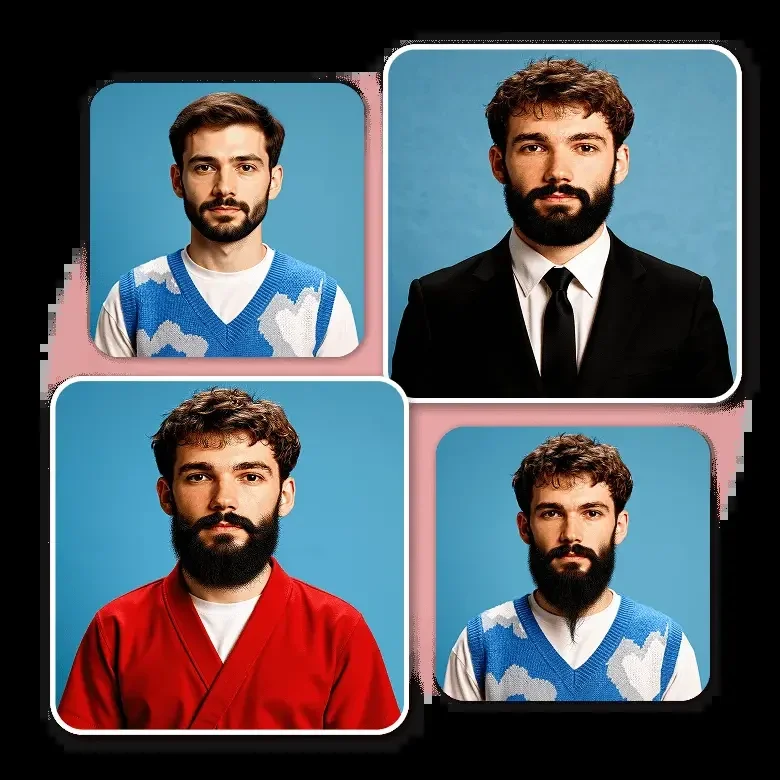
To see what a beard would look like on you, start with a photo that shows the corners of your mouth, both cheeks and the underside of your chin. A selfie cropped at the lower lip can show a mustache, but it gives you little to work with when choosing a neckline.
Make the length comparison first
Open Add Beard to Photo and use one portrait for every version. Choose Match Hair Color. Start with Stubble, then try Full Beard. Keep the density setting fixed while you compare styles. If you change the color and thickness at the same time, you may end up choosing the darker picture when what you actually liked was the shape.
Look at the gap between the bottom lip and the chin. Stubble leaves most of that shape readable. A goatee draws attention to the middle of the chin. A full beard can change the whole outline of the lower face. View the pictures at the size your barber would see on your phone, then zoom in to check the edges.
Match the part you would ask a barber to cut
| If you're deciding about… | Look here in the preview |
|---|---|
| Cheek line | Follow the top edge from the sideburn to the corner of the mouth. Would you want to trim that line regularly? |
| Mustache | Check where the hair ends above the lip. Zoom out again to see whether it still reads as a separate shape. |
| Jaw and neck | Compare each side with the original. A shadow from the chin can turn into a strip of hair when the room is lit from above. |
| Color | Use the hair visible beside the ear as your reference. A dark beard under warm indoor light may read differently from the same choice in daylight. |
If the beard covers your collar or changes the shape of your mouth, go back to the original and try a picture taken in softer light. A visible seam between skin and hair matters more here than the amount of individual hair detail.
What if you already have a beard?
Use Clean Shaven in the Beard Generator to sketch the opposite change. A full beard hides the jaw and part of the neck, so the uncovered face is an estimate. For a haircut appointment, bring your current photo and a past clean-shaven one if you have it.
Save the version with the detail you want to discuss. “This cheek line, but shorter under the chin” gives a barber more to work with than asking for the whole picture. A filter can show a silhouette. Your own growth pattern determines where that silhouette is achievable.
Frequently asked questions
Can I see what I would look like without my beard?
Choose Clean Shaven in Oakgen’s Beard Generator. It estimates the part of your face hidden by facial hair. An older clean-shaven photo is a better reference for your real jawline.
Which beard style should I try first?
Start with stubble to see your chin outline, then compare a goatee or a full beard using the same photo and color. Keep the version whose cheek and neckline you would actually want to maintain.