Social media demands constant video content. TikTok expects 1-3 posts per day for growth. Instagram Reels rewards daily publishing. YouTube Shorts favors creators who post 3-5 times per week. That is 15-25 videos every single week across three platforms -- and each one needs to stop the scroll within the first second.
Traditional video production cannot keep up with that cadence. Filming, editing, color grading, and adding audio for a single short-form video takes 2-4 hours minimum. Multiply that by 20 videos per week and you are looking at a full-time job just on content creation.
AI video generators change the math entirely. With the right models and workflow, you can produce a full week's worth of social content in a single afternoon. No camera, no lighting setup, no editing timeline. Text prompt to finished vertical video in under 2 minutes.
This guide covers exactly how to create AI videos for TikTok, Reels, and Shorts -- from platform specs to model selection to prompt templates to a scalable production workflow.
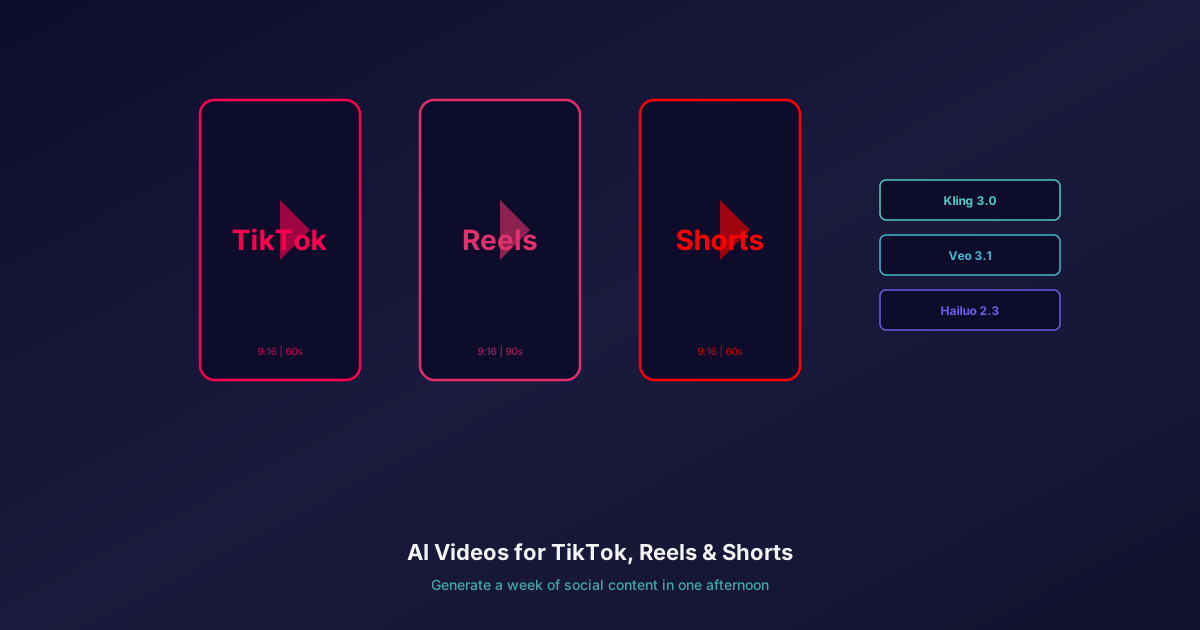
All three platforms use 9:16 vertical aspect ratio. TikTok: up to 10 minutes (60-second sweet spot). Instagram Reels: up to 90 seconds. YouTube Shorts: up to 3 minutes (60-second sweet spot). AI generators on Oakgen support 9:16 output natively.
Platform Specs You Need to Know
Before generating anything, understand what each platform expects. Uploading a landscape video to TikTok is an immediate disadvantage -- it gets cropped, loses visual impact, and signals "not native" to the algorithm.
| Platform | Aspect Ratio | Duration Sweet Spot | Resolution | Audio Required |
|---|---|---|---|---|
| TikTok | 9:16 | 15-60 seconds | 1080x1920 | Yes (strongly preferred) |
| Instagram Reels | 9:16 | 15-60 seconds | 1080x1920 | Yes (strongly preferred) |
| YouTube Shorts | 9:16 | 15-60 seconds | 1080x1920 | Optional (but helps) |
The specifications are nearly identical across platforms, which is good news. A single 9:16 video at 1080x1920 resolution with audio works everywhere. Generate once, publish three times.
Duration matters more than you think. TikTok's algorithm rewards completion rate -- a 15-second video watched to the end outperforms a 60-second video abandoned at 50%. Start with shorter clips (5-15 seconds) and increase duration as you learn what holds attention in your niche.
Best AI Video Models for Social Content
Not every AI video model is well-suited to social media. You need fast generation, vertical output support, and either built-in audio or a clean workflow for adding it. Here are five models worth knowing for short-form social content. Two of them (Veo 3.1 and LTX 2.0 Pro) are not offered on Oakgen and are noted as outside tools.
Kling 3.0 -- Highest Quality
Kling 3.0 produces the most visually impressive AI video available in 2026. Native 4K at 60fps, exceptional detail, and the best motion control system in the industry. If you are creating premium content where every frame needs to look polished -- brand campaigns, product launches, cinematic storytelling -- Kling is the choice.
- Native 4K output (3840x2160) at up to 60fps
- Motion transfer from reference videos for choreographed scenes
- Multi-shot storyboarding with up to 6 camera cuts
- Strong character consistency across frames
- Higher credit cost reflects premium quality
Trade-off: Slower generation time and higher cost per clip. Not ideal for rapid iteration.
Veo 3.1 -- Native Audio (Not on Oakgen)
Veo 3.1 is the only top-tier video model that generates synchronized audio alongside the visual output. Dialogue, sound effects, ambient audio, and even music -- all generated in the same pass as the video. For social content, this eliminates the biggest post-production step. Veo 3.1 is not offered on Oakgen; use it through Google, or generate on Oakgen and add audio with the voiceover and music options below.
- Native audio generation with lip-synced dialogue
- Environmental sound design (wind, traffic, room ambience)
- Multiple speakers with conversation turn-taking
- 10ms lip sync latency -- effectively imperceptible
- No need for separate audio editing
Trade-off: 1080p maximum resolution. Cannot match Kling's 4K visual fidelity.
Hailuo 2.3 -- Best Balance of Speed, Quality, and Cost
Hailuo 2.3 from MiniMax hits the sweet spot for high-volume social content. It produces clean, professional 1080p video at fast generation speeds and budget-friendly credit costs. When you need 15 videos for the week, Hailuo is where you start. On Oakgen, Hailuo 2.3 Pro and 2.3 Fast Pro run as image-to-video, so start from a still frame.
- Fast generation times for batch production
- Clean, professional 1080p output
- Excellent quality-to-cost ratio
- Reliable output with few failed generations
- Good at lifestyle, product, and aesthetic content
Trade-off: No native audio. Image-to-video only on Oakgen. Less cinematic than Kling.
LTX 2.0 Pro -- Fastest for Rapid Iteration (Not on Oakgen)
LTX 2.0 Pro from Lightricks generates video in 2-4 seconds. Not minutes -- seconds. This speed makes it the best model for A/B testing hooks, iterating on concepts, and producing quick variations. Generate 10 versions of an opening shot in under a minute. LTX is not offered on Oakgen; for quick drafts on Oakgen, use Hailuo 2.3 Fast Pro or Vidu Q3.
- 2-4 second generation time
- 4K output with native audio
- Perfect for testing visual hooks before committing to premium models
- Low credit cost enables high-volume experimentation
- Good for concept validation and rapid prototyping
Trade-off: Visual quality below Kling. Best used for iteration, not final output.
Kling v3 Pro -- Brand Consistency from Your Own Images
Kling v3 Pro supports image-to-video generation, which means you can start from a brand image, product photo, or character still and generate video that keeps its look. For brands that need every video to feel on-brand, this is invaluable.
- Image-to-video from your own brand assets
- Multi-shot narrative capability
- Good character consistency across clips
Trade-off: Higher credit cost than Hailuo. Slower than Hailuo for batch work.
For a broader comparison of video models, see our best AI video generators ranking.
5 Social Media Video Types You Can Generate with AI
Knowing which model to use is only half the equation. You also need to know what to create. Here are five proven social media video formats that AI generators handle well, with prompt templates for each.
1. Product Showcases
Rotating products, lifestyle settings, and unboxing-style reveals. These work for e-commerce brands, DTC products, and anyone selling physical goods.
Prompt template:
A [product] slowly rotating on a [surface] in a [setting],
soft natural lighting, shallow depth of field, 9:16 vertical,
[style] aesthetic, premium product photography feel
Example: "A matte black wireless speaker slowly rotating on a marble countertop in a modern kitchen, soft morning light from a window, shallow depth of field, 9:16 vertical, minimalist aesthetic, premium product photography feel"
2. UGC-Style Content
Authentic-looking user testimonial content generated entirely with AI. Combine Oakgen's video generation with talking avatar tools for realistic spokesperson videos without hiring creators. Read our guide on making UGC ads in 10 minutes for the complete workflow.
Prompt template:
A [demographic] person sitting in [casual setting], talking to camera,
natural lighting, smartphone selfie angle, 9:16 vertical,
authentic UGC feel, slightly imperfect framing
3. Trend Format Content
Visual stories, satisfying transformations, and before-after reveals. These formats consistently perform well across all three platforms because they trigger curiosity and completion.
Prompt template:
[Before state] smoothly transforming into [after state],
satisfying transition, continuous shot, 9:16 vertical,
bright lighting, clean background, [speed] motion
Example: "A messy desk cluttered with papers smoothly transforming into a perfectly organized minimalist workspace, satisfying transition, continuous shot, 9:16 vertical, bright natural lighting, clean white background, medium-speed motion"
4. Aesthetic and Mood Content
Nature scenes, abstract visuals, ambient loops, and atmospheric footage. This category dominates on TikTok and Reels for creators who build audiences around visual mood and aesthetic curation.
Prompt template:
[Scene description], [atmosphere/mood], cinematic movement,
9:16 vertical, [color palette], ambient and peaceful,
[camera movement type]
Example: "Sunlight filtering through dense forest canopy onto a mossy forest floor, morning mist, gentle dolly forward, 9:16 vertical, warm golden and green tones, ambient and peaceful, slow push-in camera movement"
5. Educational and Explainer Visuals
Step-by-step demonstrations, visual aids for voiceover content, and conceptual animations. Use these as B-roll for educational TikToks and Shorts where you add your own voiceover in post.
Prompt template:
[Process or concept] shown step by step, clean demonstration,
top-down view or [appropriate angle], 9:16 vertical,
well-lit, instructional feel, [pacing]
Step-by-Step: Your First Social Video
Here is the exact workflow from zero to published social video:
Step 1: Open the video generator. Go to Oakgen's AI Video Generator and select your model. For your first social video, start with Hailuo 2.3 for the best balance of speed, quality, and cost.
Step 2: Set aspect ratio to 9:16. This is non-negotiable for social content. All three platforms penalize landscape video in their algorithms and crop it awkwardly in feeds.
Step 3: Write your prompt. Be specific about the scene, lighting, camera movement, and mood. Include "9:16 vertical" in the prompt to reinforce the aspect ratio. Use the prompt templates above as starting points.
Step 4: Generate and review. Generation takes 30 seconds to 3 minutes depending on the model. Review the output for visual quality, motion coherence, and whether it matches your creative intent.
Step 5: Iterate if needed. If the first generation is not right, adjust your prompt and regenerate. With Hailuo, each generation is fast and affordable enough to try 3-5 variations. If you need to rapidly test hooks, use Hailuo 2.3 Fast Pro for quick drafts.
Step 6: Add audio. You have three options, detailed in the next section.
Step 7: Download and publish. Download the final video, add captions in your preferred editing app (CapCut, InShot, or similar), and publish across platforms.
For a more detailed walkthrough of the video generator interface, see our guide on creating AI video in 5 minutes.
The hook matters most. Generate 3-4 variations of your opening shot and A/B test which one stops the scroll. Quick draft models like Hailuo 2.3 Fast Pro keep iteration cheap. Invest your time and credits in nailing the first 1-2 seconds -- everything else is secondary.
Adding Audio to AI Video
Silent video underperforms on every social platform. TikTok in particular is an audio-first platform -- many users discover content through sounds and trending audio. Here are three approaches to adding audio to your AI-generated video:
Option 1: Generate with Native Audio (Veo 3.1, outside Oakgen)
The simplest approach if you have Google access. Veo 3.1 generates audio alongside the video: dialogue, sound effects, ambient noise, and music. Veo is not offered on Oakgen, so on Oakgen use Option 2 or 3.
When to use: Talking-head content, scenes with dialogue, videos where environmental sound matters.
Option 2: AI Voiceover (ElevenLabs on Oakgen)
Generate your video with any model, then create a voiceover using Oakgen's AI voice generation tools. ElevenLabs on Oakgen supports natural-sounding speech in 29+ languages with voice cloning capability.
When to use: Educational content, narrated product showcases, explainer videos.
Workflow: Generate video (any model) -> Write script -> Generate voiceover (ElevenLabs) -> Combine in editing app -> Add captions -> Publish.
Option 3: AI Music Background Track
Generate background music using Oakgen's music generator, which runs Lyria 3 Pro and Eleven Music. Use a short instrumental for quick background tracks, or a full song as the audio backbone of your video.
When to use: Aesthetic content, mood pieces, product showcases, any video where music is the primary audio.
Workflow: Generate video (any model) -> Generate music (Lyria 3 Pro or Eleven Music) -> Layer in editing app -> Add captions -> Publish.
For most social content, Option 3 is the fastest. An instrumental layered under your AI video works across all platform types.
Scaling Your Content Calendar
Individual video creation is straightforward. The real challenge is maintaining a consistent posting schedule across three platforms. Here is a batch production strategy that works:
The 2-Hour Batch Session
Set aside 2 hours once per week. In that time:
- Plan 10-15 video concepts (15 minutes). Write prompts for each, varying content types across your five categories.
- Generate all videos in batch (45 minutes). Queue generations while reviewing completed ones. Use Hailuo 2.3 for most clips, Kling 3.0 for 2-3 premium pieces.
- Generate audio for all clips (20 minutes). Batch-generate Lyria 3 Pro or Eleven Music instrumentals, or ElevenLabs voiceovers.
- Quick edits and captions (30 minutes). Add text overlays, captions, and CTAs in CapCut or your preferred editor.
- Schedule across platforms (10 minutes). Upload to TikTok, Instagram, and YouTube with platform-optimized captions and hashtags.
That gives you 10-15 videos for approximately 3-5 days of content across all three platforms. Two sessions per week and your entire content calendar is covered.
Reuse Concepts Across Formats
A single creative concept can become multiple videos:
- Generate the same scene with different models and compare visual styles
- Take one product showcase prompt and vary the setting (kitchen, office, outdoor, studio)
- Create a 60-second version for Reels and a 15-second cut for TikTok
- Generate the same aesthetic scene at different times of day (golden hour, night, overcast)
Maintain Brand Consistency
Use Kling v3 Pro image-to-video to keep visual consistency across your content. Start each clip from your own product images or character stills so generations stay close to your brand look.
For product-focused content, see our AI video for e-commerce guide for advanced techniques on maintaining product accuracy across AI-generated videos.
Track What Works
Not every video will perform equally. Track these metrics per video:
- Hook rate -- Percentage of viewers who watch past 3 seconds
- Completion rate -- Percentage who watch to the end
- Engagement rate -- Likes, comments, shares relative to views
- Save rate -- Saves indicate high-value content the algorithm favors
After 2-3 weeks of data, you will see clear patterns. Double down on the content types, visual styles, and prompt structures that drive the highest engagement. Use Hailuo 2.3 Fast Pro to rapidly test new variations of your best-performing formats.
For more on creating AI talking avatar videos for social platforms, or comparing specific models like Runway alternatives, explore our video generation guides.