ChatGPT
 Claude
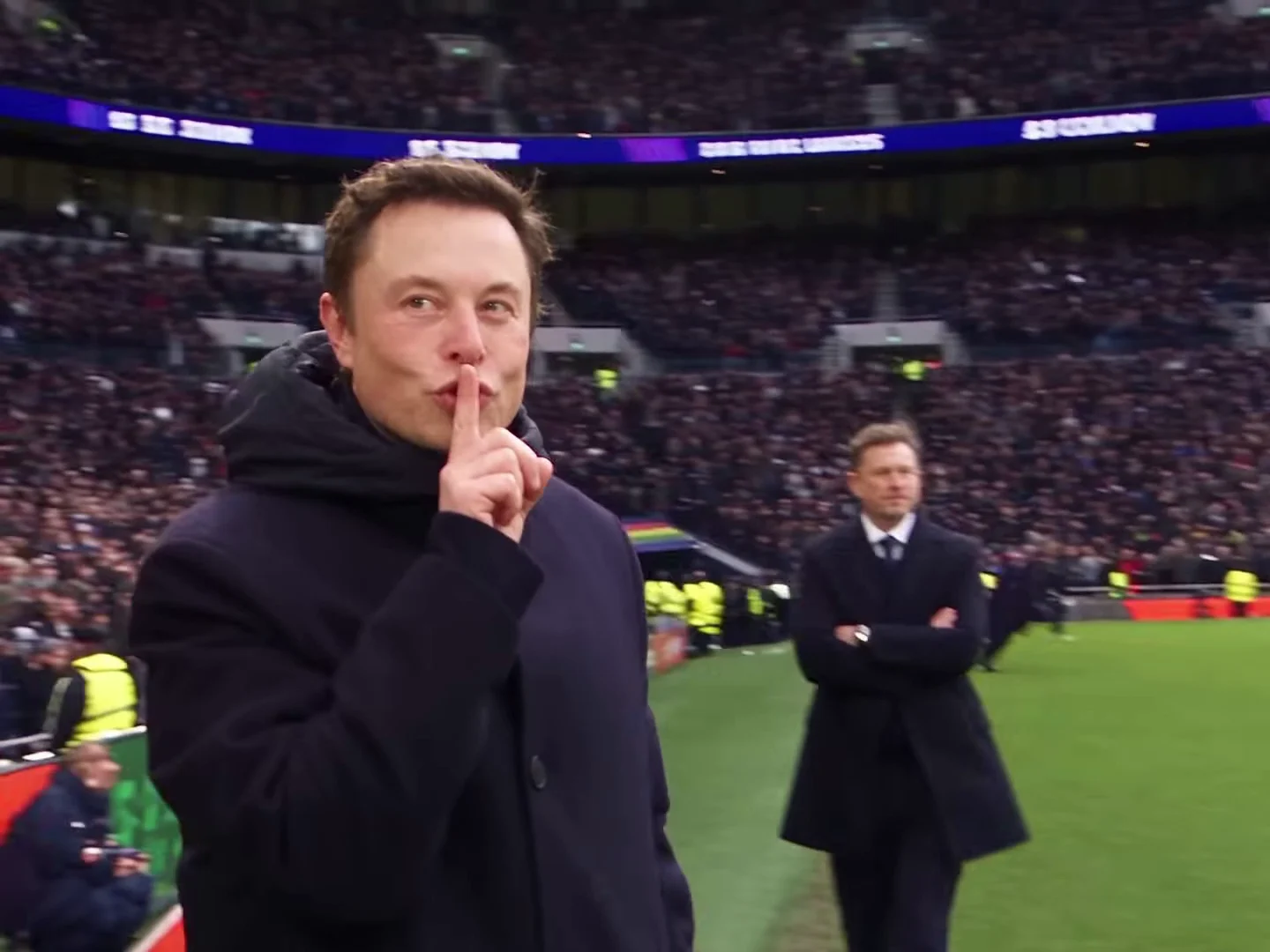
Your Elon Musk Mourinho AI video comes out of Oakgen as a landscape 4:3 file, 21 seconds long, with the original voice track and no on-screen text. That is the right raw material, but on a vertical, mostly muted feed the joke can vanish in the first two seconds. This guide covers the four edits that decide whether it lands: subtitles, the caption, the vertical layout and the cut length. The preview and the template are an AI-made parody, not real footage of Elon Musk or José Mourinho, and not affiliated with or endorsed by either of them or by any club, league or sponsor.
Make the calm manager clip first
Add one photo for the Manager and make the 21-second Elon Musk Mourinho AI parody with the original voice track, then come back to edit it.
Who this is for
You have generated the video, or you are about to, and you want it to work as a post rather than a file. If you have not made it yet, start with how to make the Elon Musk Mourinho AI video.
How we worked this out
The timings below are measured on the reference parody clip: a word-level transcript of its voice track and a frame-by-frame scan for the cuts. They match the template, because the template keeps the reference's timing and soundtrack. We have not measured how any particular platform ranks the post, so nothing here promises reach.
Edit 1: Put the subtitles back
The reference had white subtitles burned into the interview. We removed them from the template on purpose: the video model renders on-screen text as garbled letters, and a half-melted subtitle under your face looks worse than none. The voice still says every line, so add clean subtitles in your editor at these times:
| From (about) | Subtitle | Who says it |
|---|---|---|
| 0.0 s | You sound as though you're feeling the pressure. | Interviewer, off camera |
| 2.8 s | I'm not feeling the pressure. | Manager |
| 4.0 s | You cannot put pressure on me. | Manager |
| 5.1 s | No chance. | Manager |
| 5.6 s | (cut to the touchline, no more speech) |
Keep them at the bottom of the 4:3 frame, two lines at most, and end the last one at the cut. The rest of the video has no dialogue, only the beat.
Edit 2: Write the caption
The parody travelled with "Bro shouldn't be this calm", and the format works best when the caption names a situation where nobody would be calm. Some that fit:
- Me when the group chat finds out I forgot the reservation
- Me at 2% battery, no charger, 40 minutes from home
- Me when the boss says "quick call?"
- Me after my team concedes in the 90th minute
- Me explaining to my landlord that the rent is "in progress"
Put the caption above the video, not over the face. The interview is the hook, so do not cover it.
Edit 3: Fit 4:3 onto a vertical canvas
Do not crop to 9:16. The interview is framed off-centre with the microphone at the right, the bench shot sits you between two coaches and the trophy shot is crowded at the edges, so a centre crop cuts something important in almost every shot. Instead:
- Make a 1080 x 1920 canvas.
- Place the full 4:3 video in the middle at full width (1080 x 810).
- Caption in the top band, subtitles inside or just below the video.
- A plain dark background reads better than a blurred copy of the video, which pulls the eye away from the face.
Edit 4: Pick the cut
Three lengths work, depending on where you post:
| Cut | Length | What it keeps | Best for |
|---|---|---|---|
| Full | 21 s | Everything, ending on the balcony clap | Reels, TikTok, Shorts |
| Interview and shush | about 12.5 s | The answer, the touchline run, the chin flick, the call and the shush | Stories, fast feeds |
| Interview only | 5.6 s | The question and the answer | Replies, group chats, a loop |
If you trim, cut on a shot change so the beat does not jump. The full version has the most payoff; the interview-only cut loops well because it ends on "No chance."
Common mistakes
- Covering the face with the caption. The interview close-up is the whole joke for the first five seconds.
- Adding a louder sound on the platform. If you add music, keep it under the interview so the answer stays audible.
- Implying it is real. Do not tag it as a real interview, a club account or a sponsor, and do not write it as if Elon Musk or José Mourinho said anything to you.
- Using someone's photo without asking. Use your own photo or one of someone who agreed to appear.
Label it
Turn on the platform's AI-generated label or write "AI parody" in the caption. Describe the format in hashtags rather than a club: #aiparody, #calmmanager, #footballmeme and #notfeelingthepressure say what the clip is without implying an official connection.
Related reading
For the background on the line and the real football moments the parody echoes, read the Elon Musk Mourinho AI video explained and You cannot put pressure on me AI meme: the line and the voice. Caption and posting notes in a shorter form are on Bro shouldn't be this calm AI video: captions and posting.
Frequently asked questions
Why does my Elon Musk Mourinho video have no subtitles?
The reference clip had subtitles burned into the interview. They were removed from the template because the video model turns on-screen text into garbled letters. The voice track still carries the lines, and you add clean subtitles in your editor.
When should each subtitle appear?
'You sound as though you're feeling the pressure.' from 0.0 s, 'I'm not feeling the pressure.' from about 2.8 s, 'You cannot put pressure on me.' from about 4.0 s and 'No chance.' from about 5.1 s until the cut at 5.6 s.
Should I crop the video to 9:16?
No. The interview is framed off-centre and the bench and trophy shots put people near the edges. Place the full 4:3 frame on a vertical canvas instead.
Is the voice in my video real?
It is the reference AI parody's own voice track, kept on your download exactly as it was. Oakgen does not clone or generate a voice for this template, and neither Elon Musk nor José Mourinho made or endorsed the parody or the template.
How do I label it?
Say it is an AI parody in the caption or turn on the platform's AI label, and do not suggest a real person, club or sponsor is involved.