ChatGPT
 Claude
HappyHorse-1.0 is a video model from Alibaba that makes 3 to 15 second clips at up to 1080p, with audio and lip sync generated in the same pass. It is closed source and sold through fal's API at $0.14 to $0.28 per second (fal, read 2026-10-25). It is no longer on Oakgen. We removed it on September 27, 2026.
This page replaces seven older HappyHorse posts on this blog. Several of them were written in April 2026, when nobody knew who built the model, and others described it as an Oakgen model. Both are now wrong. Everything below comes from fal's pages, the Artificial Analysis leaderboards and Oakgen's own model and pricing code, all read on October 25, 2026.
Is HappyHorse-1.0 still on Oakgen?
No. Oakgen ran four HappyHorse tools (text to video, image to video, reference to video and video edit) and retired all four on September 27, 2026. If you came here to use it on Oakgen, these live models in the AI video generator cover the same jobs:
| Oakgen model | Clip length | Audio | Credits per second, as of 2026-10-25 | Closest HappyHorse job |
|---|---|---|---|---|
| Seedance 2.0 | 4 to 15 s | Generated with the video | about 103 at 720p, 230 at 1080p, 526 at 4K | Text, image and reference clips with sound |
| Seedance 2.5 | 4 to 30 s | Generated, on by default | about 160 at 720p, 394 at 1080p | Longer single takes |
| Kling v3 Pro | 3 to 15 s | On by default, can be turned off | about 57 with audio, 38 without | General text and image to video |
| MiniMax H3 Max | 5 to 15 s | Generated | about 28 at 768P, 55 at 1080P | Cheaper drafts with a 1080p option |
| Grok Imagine Video | 3 to 15 s | Not listed | about 24 at 720p | The cheapest drafts |
| Kling O3 Pro Video Edit, Gemini Omni Flash Edit, Grok Imagine Video Edit | Depends on the input | Varies | about 57, 34 and 28 (Grok at 720p) | HappyHorse video edit |
Per-second figures are rounded from Oakgen's pricing code. The generator shows the exact credit price before you run, so check it there. For Seedance 2.0, Oakgen's generator has no audio switch, and fal's API docs list audio generation as on by default.
For a model-by-model comparison with clip prices, read HappyHorse alternatives on Oakgen. Plan prices are on the pricing page.
Use a HappyHorse replacement
Seedance 2.0, Seedance 2.5, Kling v3 Pro and MiniMax H3 Max run from one credit balance.
What is HappyHorse-1.0?
HappyHorse-1.0 is a video generation model that produces picture and sound together. fal lists four endpoints for it:
- Text to video at 1080p with native audio, 3 to 15 seconds, in 16:9, 9:16, 1:1, 4:3 or 3:4.
- Image to video at 1080p with native audio and lip sync.
- Reference to video at 1080p, 3 to 15 seconds, in the same aspect ratios.
- Video edit, which changes an existing clip from a text instruction, with up to 5 reference images.
fal's text-to-video page says the audio covers dialogue, ambient sound and Foley. Its overview page lists native lip sync in seven languages: Mandarin, Cantonese, English, Japanese, Korean, German and French. The text-to-video endpoint offers 720p or 1080p output, with 1080p as the default.
The architecture claims come from the team, not from an independent check. fal repeats them as a unified 40-layer self-attention Transformer with about 15 billion parameters, no cross-attention, and video and audio produced in one pass. The team also claims about 38 seconds for a 1080p clip on one NVIDIA H100. fal's page adds: "These specs have not been independently verified."
There is now a successor. fal lists Happy Horse 1.1 as a separate endpoint, and Artificial Analysis dates its release to June 2026. Oakgen never offered 1.1.
Who made HappyHorse-1.0?
Alibaba made it. The model first appeared on the Artificial Analysis Video Arena on April 7, 2026 under a pseudonym, with no team named. fal's overview page says that on April 9, 2026, Alibaba Group revealed it had created the model, and that it is "the product of Alibaba Token Hub's innovation business unit". Artificial Analysis now lists the creator as Alibaba-ATH.
fal's pages go one step further. The text-to-video page says it "is built by the Future Life Lab inside Alibaba's Taotian Group", and the overview page says Zhang Di leads that lab. The overview page also notes that this team-level attribution "has not been independently verified". Alibaba as the owner is settled. The exact team inside Alibaba rests on those materials.
The timeline, from fal's overview page:
- April 7, 2026. The model appears on the Artificial Analysis Video Arena under a pseudonym.
- April 9, 2026. Alibaba says it built the model.
- April 27, 2026. The API goes live on fal, which calls itself an official API partner.
- June 2026. HappyHorse-1.1 appears on Artificial Analysis.
The April speculation that this was a stealth Wan 2.7 release turned out to be wrong in the way it was framed. Artificial Analysis lists Wan 2.7 as a separate Alibaba model.
Is HappyHorse-1.0 open source?
No. fal's overview page says: "we can confirm that HappyHorse-1.0 will be closed source. It will not be licensable or open source." The early HappyHorse sites that promised open weights and linked to "coming soon" GitHub and model hub pages no longer reflect the plan.
Three terms get mixed up in posts about video models, so it helps to separate them:
- Open source. The weights, the code and a license that lets you modify and redistribute them.
- Open weights. You can download the parameters, but training data or code may stay private, and the license may limit use.
- Open access. You can use the model only through someone's API or app.
HappyHorse is open access only. To check any "open" claim yourself, look for four things: downloadable weights, a license file, inference code and a model card. HappyHorse has none of them in public.
Is HappyHorse-1.0 any good?
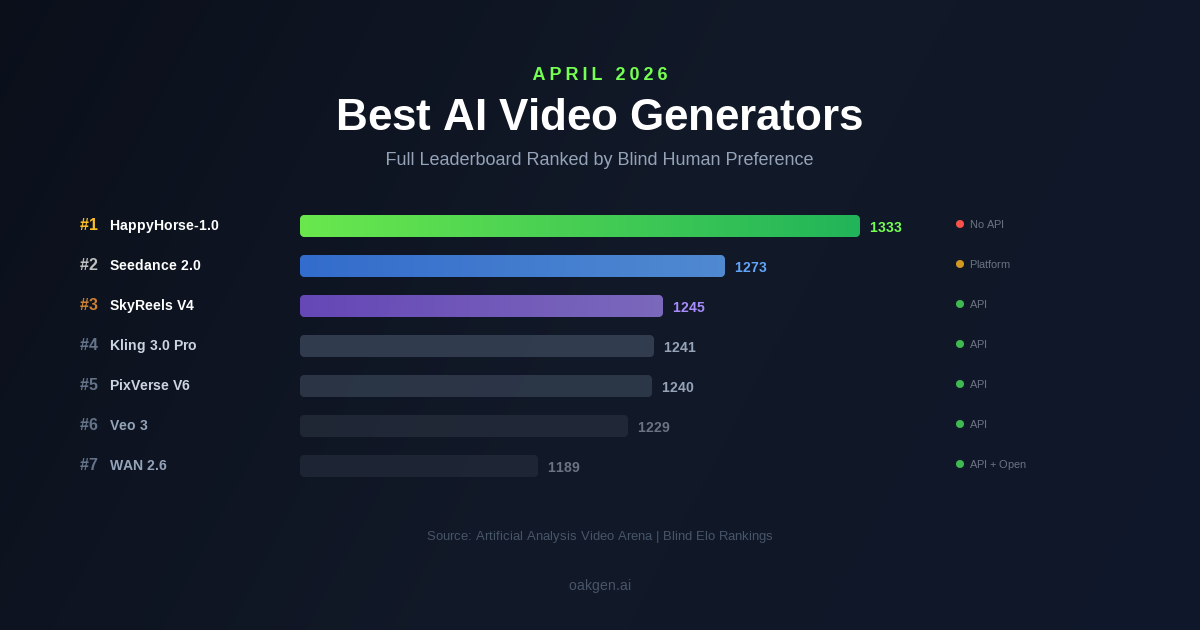
It ranked first in blind votes when it launched, and it has since been overtaken. Artificial Analysis builds its leaderboards from blind comparisons. Its evaluators see two videos made from the same prompt without knowing which model made which, and the votes feed an Elo score.
In April 2026, according to the numbers fal still quotes, HappyHorse-1.0 was first in text to video and image to video without audio (Elo 1333 and 1392) and second in both with audio (1205 and 1161). fal notes those scores came from early votes.
The current leaderboards, read on October 25, 2026, rank models on video with audio:
- Text to video: HappyHorse-1.0 is around 16th with an Elo of 1033. HappyHorse-1.1 is around 13th at 1051.
- Image to video: HappyHorse-1.0 is around 12th at 1042. HappyHorse-1.1 is around 10th at 1061.
- Wan 3.0 led text to video at 1175. Dreamina Seedance 2.5 and MiniMax H3 were near the top of both boards. Both are related to models Oakgen runs today.
Elo scores are relative to the other models on the board at the time, so compare ranks across months, not raw numbers. We did not check the no-audio views for this update.
We have no hands-on review to offer. The earlier review post on this blog reported its own test results and category scores, and there are no records of those tests, so we removed them. The leaderboard is the only quality signal we can point to.
How much does HappyHorse-1.0 cost?
On fal, HappyHorse-1.0 costs $0.14 per second at 720p and $0.28 per second at 1080p, pay as you go with no subscription (fal's text-to-video page, read 2026-10-25). A 10-second 1080p clip is $2.80. fal says enterprise pricing goes through its sales team.
Two details to check before you budget:
- Video edit is billed on output length, not input length. fal's API docs list the same $0.14 and $0.28 rates, but the playground on the same page showed double those rates when we read it. Confirm the rate in your fal account.
- HappyHorse 1.1 is cheaper at 1080p. fal lists it at $0.14 per second at 720p and $0.18 per second at 1080p.
Older posts on this blog listed Oakgen credit prices for HappyHorse. Those prices no longer apply, because Oakgen does not run the model. fal's text-to-video page says it grants "Full commercial rights on all outputs". Read fal's terms and Alibaba's model terms yourself before relying on that for client work.
How do you get API access to HappyHorse-1.0?
Through fal. The API has been live since April 27, 2026. The endpoint IDs are:
alibaba/happy-horse/text-to-videoalibaba/happy-horse/image-to-videoalibaba/happy-horse/reference-to-videoalibaba/happy-horse/video-editalibaba/happy-horse/v1.1/text-to-videofor the newer version
You need a fal account and API key, and you call the endpoint like any other fal model. The video edit endpoint takes an MP4 or MOV of 3 to 60 seconds, up to 100 MB, plus up to 5 reference images that the prompt can cite as @Image1 to @Image5. Its prompt limit is 2,500 characters. Output keeps the source aspect ratio and stops at 15 seconds.
The April 2026 advice on this blog, that there was no API and that you should wait for GitHub or Hugging Face releases, is obsolete. There is an API, and fal says there will be no weights.
How do you use HappyHorse-1.0?
You have two routes. To use HappyHorse itself, open its page in fal's playground or call the API as above. To do the same work on Oakgen, pick a live model from the table at the top:
- Open the AI video generator.
- Choose Seedance 2.0 for reference-driven clips with sound, Seedance 2.5 if you need more than 15 seconds, or Kling v3 Pro for general text and image to video.
- Add a reference image if you have one, set the length and resolution, and check the credit price shown before you run.
- For an edit to an existing clip, choose Kling O3 Pro Video Edit, Gemini Omni Flash Edit or Grok Imagine Video Edit.
Draft at 720p or a short length, then render the take you keep at a higher setting. Seedance 2.0 at 1080p costs more than double its 720p rate. For step-by-step help, see how to use Oakgen's AI video generator and how to use Seedance 2.5.
How should you prompt a HappyHorse-style clip?
Write the prompt as a shot description, then add the sound. The old HappyHorse prompting guide on this blog relied on internal test claims we cannot back up, so what follows is general prompt structure. It applies to any model that generates audio with the video, including Seedance 2.0, Seedance 2.5, Kling v3 Pro and MiniMax H3 Max on Oakgen. We have not compared how each model responds to it.
A six-part structure:
- Subject. Who or what, with the details that matter.
- Motion. An active verb in the present tense. "Leans forward and exhales" beats "is moving".
- Camera. Film terms such as dolly in, low-angle handheld, crane up or whip pan. Use one or two, not five.
- Lighting. Time of day plus the quality of light, and where it comes from.
- Style. One reference and one technical spec, such as a film stock or lens.
- Audio. What we hear, with the loudest sound first.
A worked example:
A woman in her early thirties with cropped dark hair and a charcoal wool
coat, leaning forward and exhaling slowly to fog the cold window, slow
handheld push-in over her shoulder to her reflection, late blue hour,
warm sodium streetlamp through the window from camera-right, cool ambient
fill, anamorphic 35mm with subtle horizontal flares, muted teal-and-amber
grade. Audio: faint distant traffic, her quiet exhale, a phone vibrating
once on the table, no music.
How do you write dialogue and lip-sync prompts?
Write the exact line in quotes, in the target language and script, and name the language. Keep it to one or two short lines per clip. A paraphrase gives the model nothing to sync to.
Close-up of a woman in her thirties in a beige trench coat, standing
under a paper lantern outside a Tokyo izakaya at night, warm orange
glow on her face, light rain on the awning, camera locked off slightly
below eye level, 50mm.

She says, quietly, in Japanese: "また会えてよかった。"

Audio: rain on the awning, muffled chatter from inside, no music.
Medium shot of a barista in his late twenties at a brushed-steel espresso
bar, morning sunlight through tall windows behind him, handheld with very
slight movement, 35mm, warm grade.

He says, in English, with a slight smile: "Same as yesterday?"

Audio: espresso machine hiss in the foreground, ceramic cup on saucer,
low murmur of two customers, no music.
Check the language list for whichever model you use. HappyHorse's seven languages come from fal, and they do not transfer to other models.
What changes when you start from an image?
Stop describing the subject. The image already shows it, and describing clothing or hair again invites the model to redraw it. Describe camera movement, what else moves in the scene, the lens and grade, and the audio:
Locked-off frame, slow 5% zoom-in over 4 seconds, the surface of the
liquid in the glass ripples as if from a passing train, condensation
forms on the outside of the glass, warm afternoon window light from
camera-right, 50mm. Audio: faint low rumble for 2 seconds, room tone,
no music.
Which prompt mistakes are common?
- Stacking several cinematographers, camera moves and style specs in one prompt. Pick one of each.
- Vague motion such as "moves" or "does something". Name the action.
- No camera direction at all. Say whether the camera is locked off, pushing in or handheld, and do not ask for handheld and a fixed tripod in the same prompt. Our post on static camera drift covers this.
- Leaving audio to chance. Say "no music" or "no dialogue" when you mean it, and describe score by instrument and pace ("slow piano, one sustained note every few seconds") rather than genre.
- For long sequences, trying to fit everything into one clip. Generate shots of 15 seconds or less with the same subject, lighting and style lines, then cut them together.
When is another tool a better choice?
Go to fal if you need HappyHorse itself, for example to match footage you already made with it, or to use HappyHorse 1.1, which Oakgen never offered. fal is also the direct route if you want the model in your own app through an API key rather than through a credit balance.
If you are choosing purely by current leaderboard rank, check Artificial Analysis first. On October 25, 2026, Wan 3.0 led text to video with audio, and Oakgen does not run Wan. If your clips need lip-synced dialogue in a particular language, such as Cantonese, HappyHorse's seven-language list is documented by fal. We have not checked the language lists of the Oakgen models for this article, so test a short clip first. Oakgen is the better fit when you want several of these models behind one account and one credit balance, without separate API keys.
How we checked this
On October 25, 2026 we read fal's HappyHorse overview page, the HappyHorse 1.0 text-to-video and video edit pages, the HappyHorse 1.1 text-to-video page, fal's Seedance 2.0 API docs, and the Artificial Analysis text-to-video and image-to-video leaderboards. Oakgen facts come from the repository on the same date: the retired model list for the removal date, the video model configs for clip lengths and audio settings, and the pricing code for credit rates.
We did not run HappyHorse or the Oakgen alternatives side by side for this article, and we have no test records for the claims in the older posts. We removed their review scores, speed timings, "we tested" claims and Oakgen HappyHorse prices. We could not confirm the 15 billion parameter count, the 40-layer design or the H100 speed figures from anyone other than the team, so they are reported as the team's claims.
Frequently asked questions
Can I still use HappyHorse-1.0 on Oakgen?
No. Oakgen removed its four HappyHorse tools (text to video, image to video, reference to video and video edit) on September 27, 2026. Older Oakgen posts that describe it as an Oakgen model are out of date. On Oakgen today, Seedance 2.0 is the closest match and Kling v3 Pro is the cheaper general option.
Is HappyHorse-1.0 free?
No. fal's text-to-video page, read on October 25, 2026, lists $0.14 per second at 720p and $0.28 per second at 1080p, pay as you go, so a 10-second 1080p clip costs $2.80. There are no downloadable weights, so there is no free self-hosted route either.
Is there a HappyHorse 1.1?
Yes. fal lists Happy Horse 1.1 as a separate text-to-video endpoint at $0.14 per second at 720p and $0.18 per second at 1080p, with 3 to 15 second clips. Artificial Analysis shows HappyHorse-1.1 with a June 2026 release and a higher score than 1.0. Oakgen never offered 1.1.
Can HappyHorse-1.0 run locally?
No. fal's HappyHorse page says the model will be closed source and will not be licensable or open source. Without weights there is nothing to run on your own GPU, so hardware requirements do not apply.
How long can a HappyHorse-1.0 clip be?
fal lists 3 to 15 seconds for text to video and reference to video. Video edit accepts a 3 to 60 second input but returns at most the first 15 seconds. For longer sequences, generate several clips with the same prompt structure and cut them together.
Which languages does HappyHorse-1.0 lip-sync?
fal's HappyHorse page lists seven: Mandarin, Cantonese, English, Japanese, Korean, German and French. fal does not document behavior for other languages, so treat anything outside that list as unsupported.
Sources
- fal, HappyHorse 1.0 overview page (read 2026-10-25)
- fal, Happy Horse 1.0 text-to-video model page (read 2026-10-25)
- fal, Happy Horse 1.0 video edit model page (read 2026-10-25)
- fal, Happy Horse 1.1 text-to-video model page (read 2026-10-25)
- Artificial Analysis, text-to-video leaderboard (read 2026-10-25)
- Artificial Analysis, image-to-video leaderboard (read 2026-10-25)
- fal, Seedance 2.0 text-to-video API docs (read 2026-10-25)