ChatGPT
 Claude
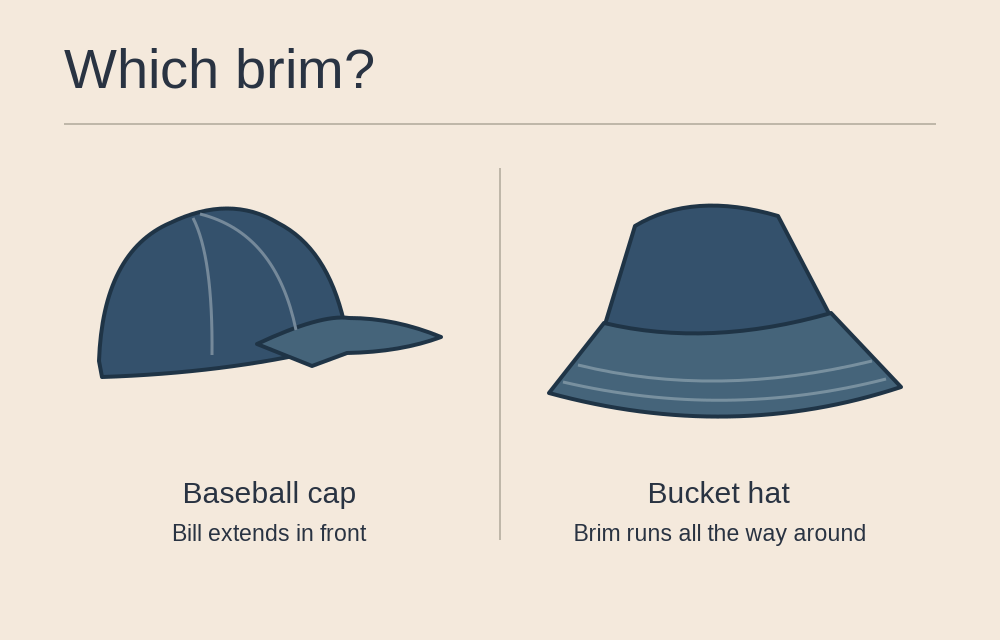
To try a hat on your photo, upload a portrait to Fashion Accessory Adder and choose Hat in the Accessory menu. Leave a little room above your hair so you can see the whole crown. If you're choosing between styles, use the same portrait for both and change just the part of the hat you care about.
Compare brim shapes on one portrait
A brim looks quite different from the front and the side. Start with a three-quarter portrait if you want to see how far a cap projects over your forehead. A straight-on picture is useful for comparing how much of your face a bucket hat frames. Keep your usual glasses on if you want to know how the two shapes look together.
In Studio, use Additional Instructions to describe the hat. Suppose you're choosing something to wear with a navy raincoat. Try each of these from the original portrait:
| Style you want to see | Example instruction |
|---|---|
| A cap with a curved bill | "Add a plain navy baseball cap with a low crown and a short curved bill. Keep my glasses visible." |
| A bucket hat in the same color | "Add a plain navy cotton bucket hat with a narrow, downward brim. Keep my glasses visible." |
If the two shapes look too similar, change the description of the edge. "A flat bill projecting over my forehead" gives a different cue from "a soft brim running around the whole head." There is no need to change the coat, pose, or background for this comparison.
Check where the hat touches your head
Follow the lower edge of the crown from temple to temple. Notice where hair should disappear beneath it and where the arms of your glasses should remain visible. A bill that appears to pass through your glasses can make a short brim look longer than it is. Set that image aside. Use a source photo with your temples visible and include "bill above the glasses" in the next description.
Now look at the shadow across your eyes. If a navy cap seems too heavy on your face, compare the crown outline against the background. You might like the shape and simply prefer a picture with less shade. That gives you something specific to look for when trying on a real cap.
When you need the exact cap
The Hat option takes a style description. It has no second upload for a retailer's product photo. A prompt for a cream baseball cap with green embroidery might give you an idea for a shoot. It can't establish the lettering on the sample that will ship.
If you sell the cap, photograph its front embroidery straight on, then turn the sample slightly so the bill and panel seams are visible together. A rear view will show the closure. If you're the shopper, use the generated portrait to shortlist a brim shape, then check the seller's own photos and sizing instructions for that hat.
Frequently asked questions
How do I add a hat to an existing photo?
Open Fashion Accessory Adder, upload a portrait with space above your hair, and choose Hat from the Accessory menu. In Studio, describe the hat's crown, brim and color in Additional Instructions.
Will the tool copy a hat from a store listing?
The template accepts a person photo and a hat description. It has no separate product-reference upload. If embroidery, panel shape or the exact shade matters, use a photograph of the hat you plan to sell or buy.
Can a virtual hat try-on tell me which size to buy?
A portrait gives you a view of the style. For fit, measure your head according to the seller's directions and compare that measurement with the size chart for the specific hat.