ChatGPT
 Claude

To keep Sheru Bhai the same in every video, fix four things before you make a single clip: one colour (white or golden lion), one portrait image you attach to every generation, one description you paste word for word into every prompt, and one set you describe the same way each time. Then chain long stories from the last frame of each part, or make the whole episode in one clip so there is nothing to drift between.
This is the single biggest quality problem in the trend. Here's what drift looks like and how to stop it.
Make the whole episode in one clip
Seedance 2.5 makes up to 30 seconds, so Sheru and the set stay the same from start to finish.
What drift looks like
We watched the finished video in the most-watched Hindi tutorial frame by frame (Manoj Dey). It is three 10-second clips joined in VN, and it shows every common kind of drift:
| Kind of drift | What happened in the tutorial video |
|---|---|
| Set | Scene 1 is a modern glass office at night, scene 2 a wood-panelled library with green lamps, scene 3 the glass office again |
| Props | A torn, yellowed parchment in scene 2 becomes a clean white certificate in a folder in scene 3 |
| Mouth | Jaws move up and down instead of shaping Hindi words, and keep moving after a line ends |
None of these are the model's "fault". Each prompt described the scene a little differently, and each generation started from nothing.
Step 1: Pick one Sheru and write him down
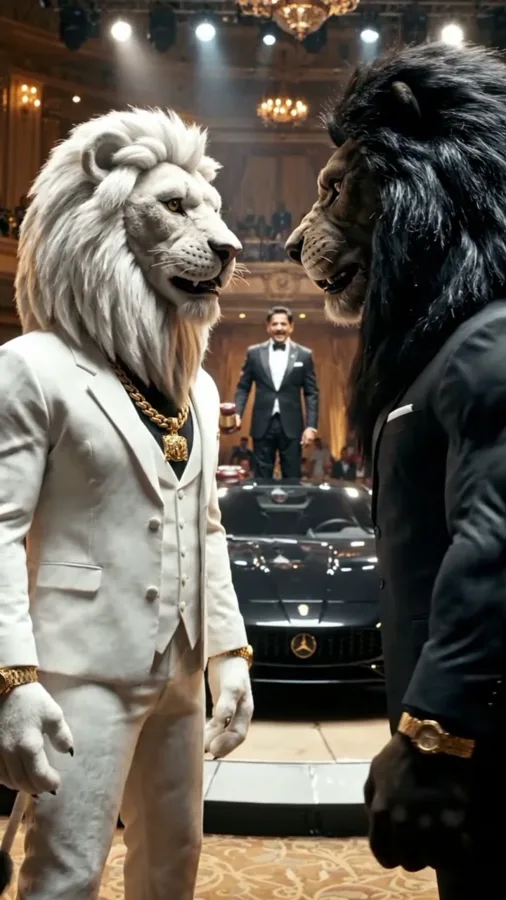
Both a white lion and a golden-maned lion appear in the trend. The earliest named episode found on TikTok used a golden-brown mane, while many of the biggest recent ones use a white lion (CopyThatVideo). Coverage of the trend also notes that designs vary between creators (Atlas Cloud). It doesn't matter which you pick; it matters that you never switch.
Write a description with every visible item named. Here is a white-lion version:
SHERU: an original anthropomorphic white lion boss, realistic cinematic
3D. White lion head with a thick cream-white mane, pale gold eyes, black
nose. Muscular human body, white-furred hands. Always wears: white
three-piece suit, light grey waistcoat, heavy gold chain over the
waistcoat, gold wristwatch on the left wrist, white leather shoes, dark
aviator sunglasses. Deep, calm male Hindi voice.
And the golden version swaps only the first lines: "golden lion head with a thick golden-orange mane, amber eyes". Keep everything else the same. The golden description used across our guides is in Sheru Bhai AI video prompts.
Rules for the description:
- Name every item. Shoes, which wrist the watch is on, the sunglasses. Whatever you leave out changes.
- Paste it whole every time. Don't shorten it to save space; a shorter description is a different description.
- Put it at the top of the prompt, before the action, so it isn't treated as an afterthought.
Step 2: Make one portrait and attach it everywhere
Generate one full-body portrait from the description, 9:16, on a plain or simple background (prompt in Sheru Bhai photo prompts). Check it closely: if the shoes or the chain are wrong, fix them now, because every clip will copy this image.
Then attach it as the reference image in every generation:
| Model on Oakgen | How to use the portrait |
|---|---|
| Gemini Omni Flash, reference mode | Up to 6 reference images: Sheru, the rival, and a set image |
| Seedance 2.5, reference mode | Attach the portrait as a reference image |
| Kling V4 | Use the portrait as a start image or a reference |
Making a reference for the rival and the set too is worth the extra few credits on a series. A set image ("marble auction hall, chandeliers, gold and blue light, empty") stops the room changing between scenes.
Step 3: Describe the set the same way every time
Most "Sheru changed" complaints are actually "the room changed". Write one set block and paste it, like the character block:
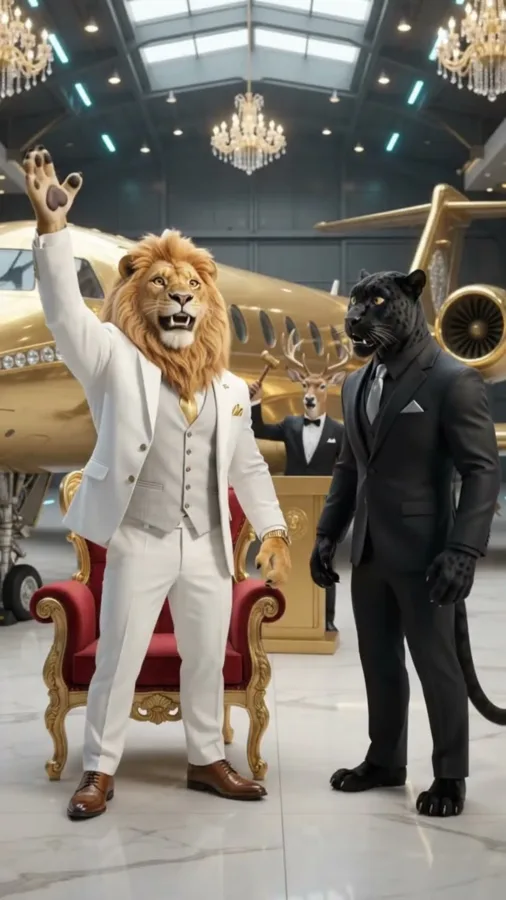
SET: a grand marble auction hall at night, white marble floor, three
crystal chandeliers, gold railings, deep blue velvet curtains, warm gold
light with blue accents. The same hall in every shot.
Also fix the props. If a document matters, describe it once ("an old yellowed paper with a red wax seal") and use the same words in every scene.
Step 4: Chain long stories from the last frame
If your tool makes 10 seconds at a time, start each new part from the last frame of the one before (image to video), and still paste the full character and set blocks into the prompt. This keeps the pose, light and room at the join. It doesn't protect the rest of the clip, which is why the text blocks still matter.
Better still, make the episode in one clip. Seedance 2.5 and Kling V4 on Oakgen go up to 30 seconds, so a 20-second boli or a 30-second story has no join at all.
Step 5: Check before you keep
Before you accept a take, compare it with your portrait:
- Mane colour and length
- Suit, waistcoat and chain
- Sunglasses on or off as written
- Same rival outfit
- Same room and light
Reject takes that fail one of these, even if the acting is great. Fixing drift in the edit is much harder than making one more take. For cuts that hide small differences, see editing a Sheru video.
For the general method across all trends, read character consistency across cuts.
Prices on Oakgen as of 2026-11-26, shown before you generate: Gemini Omni Flash 338 credits for 10 seconds; Seedance 2.5 with audio 1,491 credits for 20 seconds at 480p; Kling V4 from 266 credits.
Frequently asked questions
Why does Sheru look different in every clip?
Each clip is a fresh generation and the model has no memory of the last one. Anything you don't describe, it invents again: mane colour, suit cut, sunglasses, even the room. A fixed portrait and a fixed description stop most of it.
Should my Sheru be a white lion or a golden lion?
Either works; both appear in the trend. Many of the biggest recent episodes use a white lion, and earlier ones a golden-maned lion. Pick one, write it into your description and never switch mid-series.
How many reference images can I use?
It depends on the model. On Oakgen, Gemini Omni Flash's reference mode takes up to 6 images, so you can attach Sheru, his rival and the set together.
Does starting from the last frame really help?
Yes. Using the last frame of Part 1 as the first frame of Part 2 keeps the pose, the light and the room. It doesn't stop drift later in the clip, so still repeat the full description in the prompt.