ChatGPT
 Claude
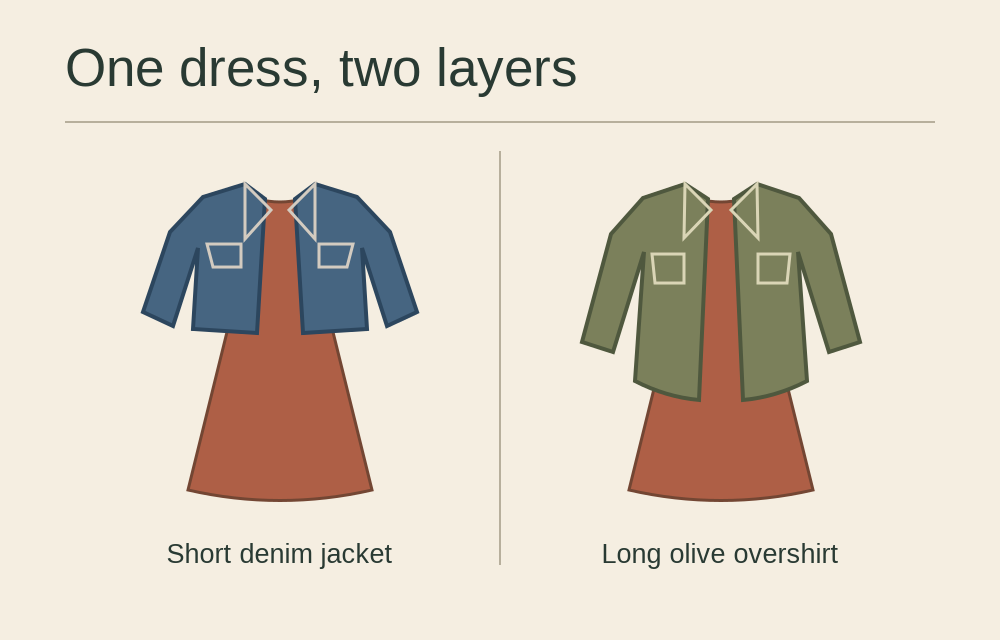
There's room for one more layer in the bag. The denim jacket works with your train outfit, but will you wear it over the dress you packed for dinner? Make the comparison with clothes you own. Take a photo in each base outfit, then use an AI clothes changer to try the same jacket over both. You only need previews for the combinations you're unsure about.
Start with one packing decision
Suppose you're choosing between a short denim jacket and a long olive overshirt. You've already picked a cream tee and black trousers for the train, and a rust dress for dinner. Lay the clothes out. If you already like the denim jacket with the trousers, cross that combination off the list of previews to make.
| Base outfit | Layer to try | Question to answer |
|---|---|---|
| Rust dress and flats | Denim jacket | Where does the jacket hem meet the waist of the dress? |
| Rust dress and flats | Olive overshirt | Can you still see the shape of the dress with the shirt open? |
| Cream tee and black trousers | Olive overshirt | Would you wear these colors together for a full day? |
Photograph the clothes you'll actually pack
Put on the dress and take a full-length photo that includes your shoes. Stand in the same spot for the trousers photo. A jacket can look shorter simply because the second picture was taken from a higher angle. Give each candidate layer its own photo, with the entire hem and sleeves in frame. If the lining matters when you wear it open, show some of the lining.
In Clothes Swapper, choose the dress photo for Person Image and the jacket photo for Outfit Reference. In Studio, a useful instruction would be, "Wear this denim jacket open over the rust dress. Keep the dress, shoes and camera angle." For the overshirt comparison, start again with the original dress photo. Feeding the denim result back into the tool gives it another layer of clothing to interpret.
If you're considering buying a layer and have no garment photo yet, describe the idea in Virtual Clothing Try-On. "Hip-length olive overshirt, open over the existing rust dress" gives you a sketch to take shopping. An actual item may have a different cut.
Decide what goes in the bag
Put the previews next to the original at the same size. Cover the jacket with your hand for a moment. If the two dress hems are at different heights, the edit has changed part of the base outfit. Set that version aside before you draw conclusions about the jacket.
For the remaining choice, try on the real layer. Sit down with it buttoned and put your phone in the pocket you plan to use. A picture can answer a question about color or the outline of an outfit. You'll learn more about a tight shoulder or a pocket that sags in ten seconds with the actual jacket.
Write down the two outfits you'd willingly wear with the winning layer. If you still prefer a different jacket for each, decide which occasion matters more before giving up the space in your bag.
Frequently asked questions
Can I plan outfits from photos of clothes I already own?
Yes. Photograph yourself wearing the base outfit, then photograph each garment you want to compare. Use the same person photo for each swap so you can judge which piece works with the clothes you intend to pack.
Can I compare two jackets in one reference photo?
Give each jacket its own reference and make a separate preview for each. If both appear in the reference, it can be hard to tell which collar, color, or fastening the tool used.
What if I only have an idea for a layer?
Use Virtual Clothing Try-On with one person photo and a written outfit description. Save that version as a shopping idea. Use a photo of the actual garment before adding it to the packing list.