ChatGPT
 Claude
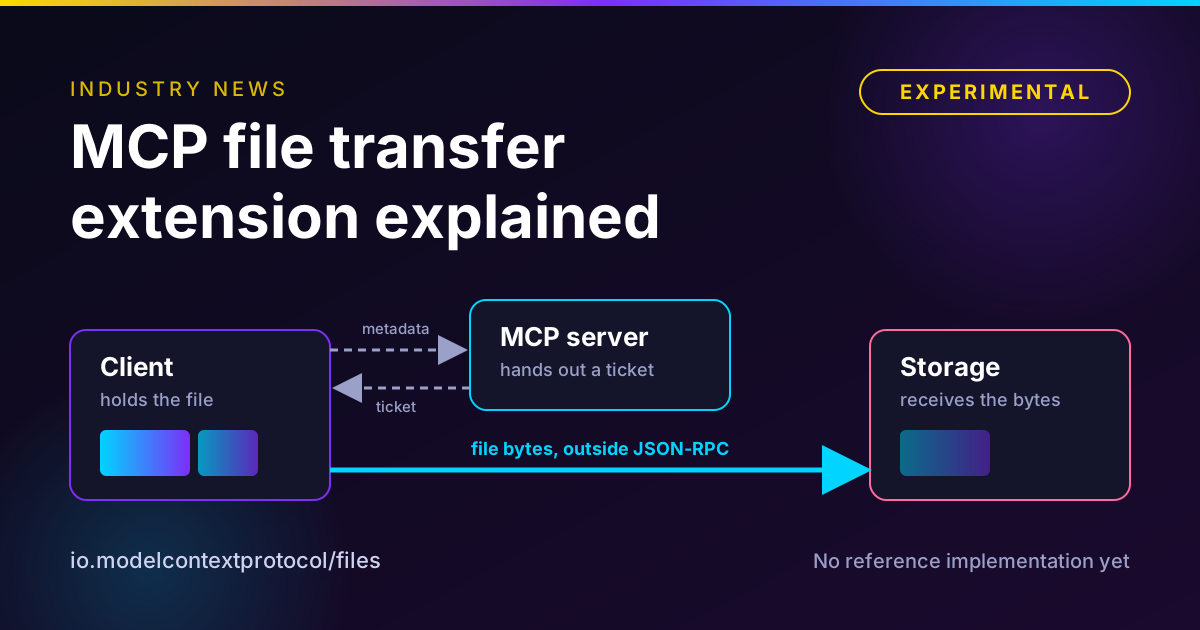
The MCP file transfer extension is an experimental proposal, io.modelcontextprotocol/files, that would let an MCP client send a large file to a tool, or fetch one a tool produced, without pushing the bytes through the model or through JSON-RPC. The MCP blog announced it on November 10, 2026. Instead of the model emitting base64, the server hands the client an upload target, the client sends the bytes straight there, and the model sees one ordinary tool call.
It is a working draft with no reference implementation. The repository says it is not part of the MCP specification and has not been proposed as a SEP. Plan around the idea, not the wire format.
See what an MCP server for creative media exposes today
Oakgen MCP lets an agent find image, video and audio models, check a price, upload a reference file, start a job and track it. Read the tool list before you decide what you need from a standard.
The short version
| Question | Answer as of November 12, 2026 |
|---|---|
| What is it | An optional MCP extension for moving files between a client and a tool, in both directions |
| Identifier | io.modelcontextprotocol/files, for protocol revision 2026-07-28 and later |
| Status | Experimental draft. Not in the specification, not a SEP, no reference implementation, no repository release or tag |
| Upload | Small files inline as base64 up to the server's maxInlineBytes. Larger files go out of band after an upload_required result |
| Download | The tool lists download targets in the result's _meta. The client fetches with HTTPS GET |
| What it protects | File bytes, upload URLs and credentials stay out of model context |
| Biggest open risks | Where a file actually goes, how long-running exports return, and whether the download shape survives review |
| Stated target | "Finalize the extension and have it become stable before the end of the year," per the MCP blog |
Disclosure: Oakgen is our product. This is an infrastructure explainer, Oakgen appears in one short section and the call-to-action boxes, and we do not claim it supports this extension.
Who this is for
You build or buy agent tooling that moves images, video or audio, or you lead a creative team whose agents choke on anything bigger than a screenshot. You want to know whether to wait for a standard or keep your own upload flow. Still choosing between MCP and a plain API? Start with our MCP versus API comparison.
How we checked this
On November 12, 2026 we opened the MCP blog post of November 10, the draft in the experimental-ext-file-uploads repository at its latest commit (November 9, 2026), the README, the MCP extensions overview, the working group charter, the October 2 and October 16 meeting notes, the 2026-07-28 specification pages for tools and Multi Round-Trip Requests, and The New Stack's report of November 11.
We ran no client or server, because no reference implementation exists. Wire behavior comes from reading the draft, which says "Anything here can change before then." We searched for an SDK, client or server announcing support and found none. Worked numbers are our own arithmetic. Every MUST or SHOULD is the draft's wording, not shipped behavior.
What problem it solves
Tools now need files. The blog names the requests that kept coming up, saving a PDF from a conversation to cloud storage and pulling a CSV into a sandbox. There is no interoperable way to do either. The draft repository's first commit message states the gap. "Today the bytes go in a JSON-RPC message as base64. When the model emits arguments as tokens, they also pass through its context window, and large uploads fail." The October 2, 2026 working group notes agree. "Large uploads over remote MCP fail today because the bytes travel through model context."
The 2026-07-28 tool specification does let a result carry an image or audio item as base64 data, so small files already work. The pain starts with size, and base64 makes it worse. It turns every 3 bytes into 4 characters, so a file grows by a third.
| File | Raw size | As base64 (our arithmetic) |
|---|---|---|
| Reference photo | 8 MB | about 10.7 MB, roughly 10.7 million characters |
| Voiceover stem | 50 MB | about 66.7 MB |
| Product video | 250 MB | about 333 MB |
The New Stack, reporting on November 11, 2026, describes today's workarounds, such as a temporary S3 link, a separate web upload page and a drag-and-drop component inside an MCP App. Each works for one client and breaks on another. The blog states the goal in one line. "The model doesn't need to read every byte or even handle it directly. The file should go directly to its destination."
How upload and download are negotiated
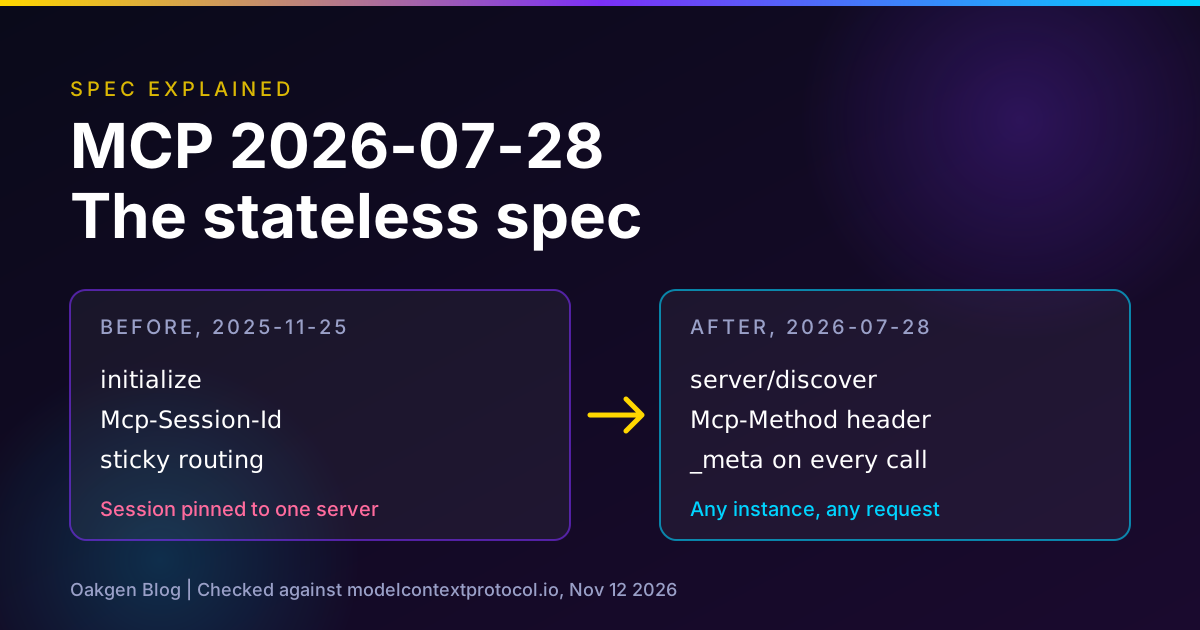
The extension rides on the 2026-07-28 specification. Our explainer of that spec covers the stateless core and Multi Round-Trip Requests, which the upload retry reuses.
Step 1, both sides declare support
A server advertises the extension in its server/discover response, with upload if it accepts files out of band and maxInlineBytes if it accepts them inline. A client declares it in the io.modelcontextprotocol/clientCapabilities metadata of every request that may need it, including tools/list, with upload and download as needed. A client must not use the extension with a server that did not advertise it.
Step 2, the server marks a file argument
In the tool's input schema, the server adds x-mcp-file to the argument, optionally with accept (media types) and maxSize (bytes per file), the same pattern the specification uses for x-mcp-header. The argument is an object with id, mimeType and size required, plus an optional name, SHA-256 digest and base64 data. The draft says hosts should not show these schemas to a model that emits arguments as tokens, so the host fills the argument and the model never sees the bytes.
Step 3, metadata goes first, bytes go second
The host must get the user's approval to send the file to this server and to the storage the server designates, or apply operator policy when no user is present. Then the client calls the tool with metadata only. The server checks what it can without the bytes, such as permission, quota, accept and maxSize. The October 2 notes record the agreed order as "metadata first, upload target back, bytes, then finalize", because uploading first wastes bandwidth on files the server will reject.
Step 4, the server asks for an upload
If the checks pass, the server returns a new upload_required result with one target per file and a requestState value.
{
  "resultType": "upload_required",
  "uploads": [
    {
      "fileId": "file-1",
      "url": "https://upload.example.com/u/01JD3V7K2M?sig=...",
      "headers": { "Content-Type": "application/pdf" },
      "credentials": "omit",
      "expiresAt": "2026-11-04T18:30:00Z"
    }
  ],
  "requestState": "..."
}
This shape is from the MCP blog post. The method defaults to PUT, and a target can specify POST with a form description for storage that only accepts multipart/form-data.
Step 5, the client transfers and retries
The client sends the bytes to the target, outside JSON-RPC. After a 2xx for every file, it calls the tool again with the same arguments and requestState echoed unchanged, under a new JSON-RPC id. The server verifies the state, confirms with storage that the bytes arrived, checks size and type, and only then runs the tool. If a transfer fails, the client does not retry and the tool does not run. In the blog's words, "neither the bytes nor the upload URL entered its context."
The draft's sizing example uses a maxInlineBytes of 1 MiB and a maxSize of 150 MiB. A 200 KiB file goes inline, a 40 MiB file goes out of band, and a 200 MiB file is rejected.
Downloads reverse the flow
A tool lists download targets in the result's _meta under the extension identifier, each with a name, MIME type, size, a url or path, a credentials mode and optionally an expiry and digest. The client fetches with HTTPS GET, checks the byte count and any digest, and discards the file on a mismatch. The result's content still tells the model in words what was produced. Only a client that declared download may receive targets, and the draft tells it to fetch before returning control to the model, because a target cannot be renewed.
Credentials get their own switch
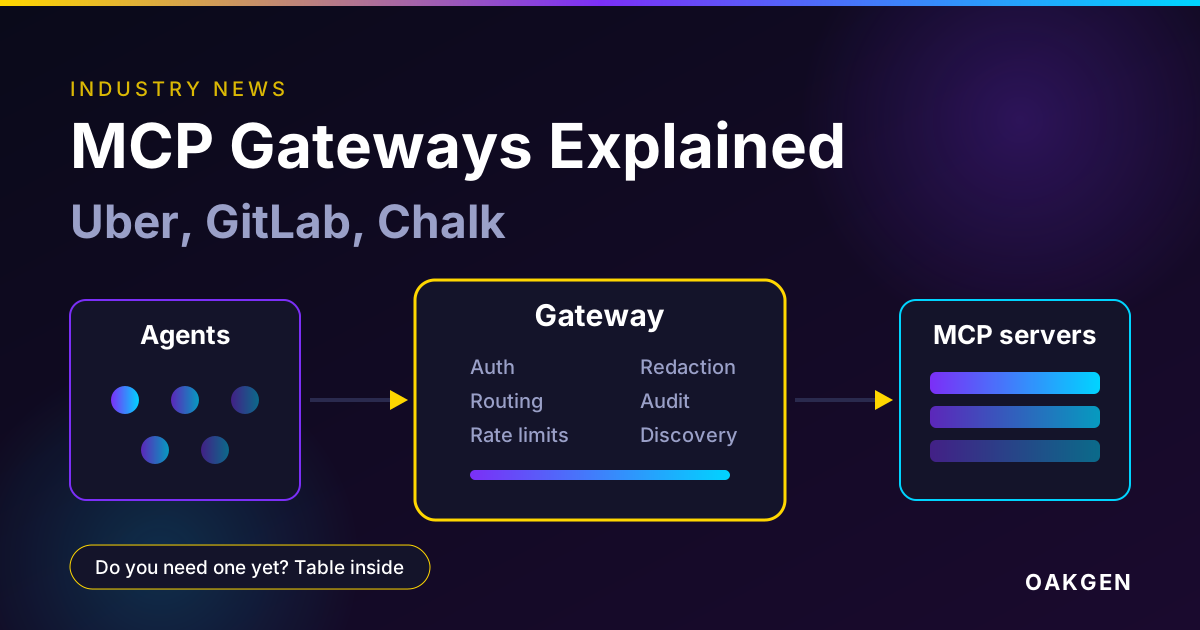
Every target carries credentials, set to omit or include. With omit, the client attaches no MCP token or cookies and the target authorizes itself, as a pre-signed URL does. With include, the client attaches its MCP credential, but only to a path under its MCP address or a URL on the server's own origin. Clients must refuse redirects and reject targets that supply an Authorization header. The include mode helps gateways and sandboxes that can reach the MCP address but not storage, which our explainer on MCP gateways covers.
Plan a creative brief before agents move any files
Oakgen Agent Chat is where you can shape a brief, pick models and see costs before a generation runs. Good file handling matters less if the plan is wrong.
What status really means
Here is every status signal we found, and where they disagree.
| Source | Date | What it says |
|---|---|---|
| MCP blog | Nov 10, 2026 | "Very much an experimental effort", no reference implementation, stable targeted "before the end of the year" |
| Draft specification header | Draft at Nov 9 commit | Status Draft. Plans an Extensions Track SEP "once a reference implementation exists" |
| Repository README | Read Nov 12, 2026 | Not part of the specification, not proposed as a SEP, expect breaking changes. No releases, no tags |
| Extensions overview | Last modified Oct 29, 2026 | Experimental means "any change, at any time, without notice" and "nothing" to expect |
| Working group charter page | Changelog to Oct 21, 2026 | Still anchored on SEP-2356, with May and June targets that have long passed |
| Oct 16 meeting notes | Oct 16, 2026 | "No firm commitment" on reference implementations. Hope to settle the "general shape in the next few weeks" |
Two things stand out.
First, the charter page is stale. It names SEP-2356 as its anchor, but the repository says SEP-2356 and SEP-2631 "both closed without merging" and that the draft builds on them. Trust the repository and the blog over the charter's work table.
Second, "stable before the end of the year" is hard to square with the lifecycle rules. A Beta extension needs an Extensions Track SEP, and at least one reference implementation in an official SDK before review. Stable needs a second SEP, two independent interoperating implementations and a conformance scenario. The blog does not say whether "stable" means the formal stage or a settled design. That is our reading, and we would not bank on the formal path finishing in seven weeks. The extension is not tied to the spec calendar, which our six-month release cycle post covers.
What is still undecided
The draft ends with seven numbered open questions and a note that the download shape has not been reviewed. These are the ones that touch real workflows.
- Finalize. Some backends return a commit handle, such as an ETag, and the retry has no field for it.
- Tools behind an executor. A gateway or code-mode executor that exposes one generic tool hides the inner
x-mcp-file. The draft says the group "needs to answer this before the extension leaves the experimental phase." Our post on code execution with MCP explains why that pattern is spreading. - Resources. Whether a later revision should cover resources. Today it covers tools only.
- Binding
omittargets. Whether to bind them to an origin, make an allowlist mandatory, or allow wildcards. - Failure signal. A server learns a transfer failed only when no retry arrives.
- Download shape. Targets sit in
_meta. Should it useresource_linkinstead? How a tool returns a file that "takes a long time to generate" is also open. - Integrity.
digestis optional. Requiring it would catch same-size replacement, but clients would read each file twice and browsers cannot hash a large file natively.
Future work in the draft includes chunked and resumable uploads, a multipart tools/call mode, more authorization methods and eventual promotion into the specification. The Oct 2 notes set version zero as a single HTTP PUT, "roughly up to 250 MB". That figure is from meeting notes, not the draft, and no numeric limit was agreed on Oct 16.
What it would mean for image, video and audio agents
Nothing in the draft is specific to media. Its examples are a PDF, a CSV and a presentation, so this mapping is our analysis, not announced behavior.
Images. Small outputs already travel as base64 image content, and small references can go inline within maxInlineBytes. Under the draft's example setting of 1 MiB, an 8 MB photo goes out of band. Gains show up with many references or large originals.
Video. This is where it matters most and where the draft is thinnest. A single PUT with no resume is risky for a multi-gigabyte master, and chunked upload is future work. The draft also says a server must not list a download target until the file can be fetched, and "does not define how a tool waits for a file to exist." Video generation takes minutes. The draft points long tools to the Tasks extension, but how a finished task hands over a download target is not spelled out.
Audio. Stems, takes and music beds sit in the same size band as short video. Calls can carry several files with one target each. The draft does not say how approval scales to thirty files, and for unattended batches it defers to an operator policy you must write yourself.
Security. The draft warns that "a downloaded file can contain instructions aimed at the model, or content that harms an application that opens it," and tells hosts to cap storage per result. Our MCP security checklist for creative teams and the upcoming piece on MCP server supply chain risk cover the surrounding controls.
Not covered. The draft does not mention previews, thumbnails, provenance or watermark metadata. We checked the text. If you need signed provenance on generated media, this will not provide it.
The original asset, file handling today versus with the extension
This table compares common patterns today with what the draft would change. "Today" describes patterns reported by The New Stack and our own reading of the spec. "With the extension" is the draft as of November 12, 2026, and may change.
| Job | Today | With the extension (draft) | Catch |
|---|---|---|---|
| Send an 8 MB reference photo | Base64 in an argument, or a bespoke upload tool | Metadata call, then out-of-band PUT, or inline if the server's maxInlineBytes allows | Needs a client and server that both support it |
| Send a 250 MB product video | A separate upload page, temporary link or custom presign flow | Same flow, bytes direct to storage, model never sees them | Single PUT, no resume. Chunked upload is future work |
| Receive a small generated image | Inline base64 image content | Unchanged. Inline stays fine | None |
| Receive a finished 200 MB video | A link in text, a resource_link, or a custom tool | Download target in _meta with size, expiry and optional digest | Shape is unreviewed and _meta may change |
| Receive a result from a long job | Poll a status tool until done | Not defined. Targets must not be listed until the file is fetchable | Pair with Tasks or keep your own polling |
| Approval before data leaves | Whatever the host does | Host must obtain user approval or apply operator policy | Approval comes before the target is known |
| Credentials to storage | Each tool invents its own rule | omit or include, with origin rules and no redirects | omit can still point at a public endpoint |
| Behind a gateway | Gateway cannot tell which URLs are files | File arguments are marked, relay and path rules defined | Executor-style tools still hide the schema |
| Client lacks support | Not applicable | Server should omit the tool or offer a variant, such as accepting a URL | You maintain two paths during the transition |
Adopt now or wait
This is our judgment from the draft, not an MCP recommendation.
Prototype now if most of these are true.
- You run an MCP server whose tools take large files and you already have a presigned-URL flow.
- You can pin to a commit, as the extensions overview advises for Experimental extensions.
- You control both client and server, so third-party interop is not required.
- You can test a failed transfer, a consumed
requestStateand an expired target. - You can report back, since the working group asked what blocks you.
Wait if any of these is true.
- You need a stable wire format for customers or a regulated workflow.
- You need resumable uploads or very large single files.
- Your outputs come from long-running generation and need a defined return path.
- A gateway or code-mode executor in your stack would hide the file argument.
- You cannot enforce an allowlist of upload and download origins at the host.
Do now regardless. Move uploads off base64 in tool arguments, keep upload URLs short-lived and single-write, check size and type on the server after the bytes arrive, and redact transfer URLs in logs.
Common mistakes
- Treating the blog post as a specification. It invites testing of a draft that says anything can change.
- Assuming a stable date. "Before the end of the year" is a hope. The lifecycle needs a reference implementation and a SEP first.
- Trusting a digest. The blog says integrity is not safety. A harmful file can come with a matching hash.
- Pre-approving all destinations. User approval happens before the target is known. Use an origin allowlist.
- Ignoring the fallback path. Clients without the extension still exist, and servers are told to offer a variant.
Decision framework
Choose by who controls both ends.
- You run a server and a client. Prototype in a test environment. Keep production on your current flow.
- You run a server for many unknown clients. Keep your own upload tool and describe it well. Add the extension later as a second path.
- You run a client or host. Build approval, allowlist and download-handling rules first. They matter whatever the final wire format is.
- You run a gateway. Read the draft's gateway section and watch the executor question.
- You only use hosted tools. Do nothing.
What I would do
I would not ship production traffic on it. I would copy its shape into my own flow now, because the shape is sound. That means metadata before bytes, a short-lived single-write target, a state value bound to the tool, arguments and principal, size and type checks after arrival, and an origin allowlist. If the draft survives, migration becomes a rename.
If I ran large-file tools, I would build a test server against a pinned commit this month and send the working group what broke. For media I would raise two issues, how a long video job returns a download target and resumable upload for large masters. Both are open, and both decide whether this is useful for video.
How a creative team would apply this
Oakgen is our product, so weigh this accordingly. Oakgen MCP handles files with its own upload_media tool. You create an upload, PUT the file to the returned URL, then complete it and get an Oakgen URL to pass in a media field. Base64 and data URLs are not accepted. Generation results come back through get_generation_status, and result links are temporary. The Oakgen MCP page lists the tools.
That is a bespoke cousin of the same idea, not the files extension. Nothing in our code references x-mcp-file or the extension identifier, and we have not announced support. The approval habit matters either way, and our post on human approval for creative AI agents covers it, as does our guide to an AI image generation MCP server.
Test image and video models from one place
Compare image and video models, check prices and generate from one workspace while the file-transfer standard settles. Oakgen is our product.
Where to follow it
Watch the experimental-ext-file-uploads repository for a first tag, a reference implementation or a SEP, and the working group's meeting notes. The README says the group meets weekly. Related standards moves are in our post on AGENTS.md, Open Responses and other agent standards. For how agents chain generation steps, read agentic creative pipelines.
Turn an approved brief into finished video
When the plan and the price are agreed, generate the clips in Oakgen's AI video generator instead of wiring file handling yourself.
If you start from stills, try the Oakgen image generator, or take a whole campaign into the AI product creative studio.
Frequently asked questions
What is the MCP file transfer extension?
It is an experimental extension, identified as io.modelcontextprotocol/files, that defines how an MCP client sends a file to a tool and fetches a file a tool produced, without the bytes passing through JSON-RPC or the model's context. The MCP blog announced it on November 10, 2026. It works with protocol revision 2026-07-28 and later, it is optional, and it is still a working draft.
Is the MCP files extension part of the MCP specification?
No. The repository README says it is an experimental extension, not part of the MCP specification, and not yet proposed as a SEP. MCP's extension lifecycle says an Experimental extension can change at any time without notice and that implementers can expect nothing. The MCP blog says the group expects to finalize it before the end of 2026. That is a stated aim, not a commitment.
How does an upload work in the MCP files extension?
A server marks a file argument with x-mcp-file in the tool's input schema. The host asks the user to approve, then the client calls the tool with the file's metadata only. If the checks pass, the server answers with an upload_required result holding an upload target and a requestState value. The client sends the bytes to that target with an HTTPS PUT or POST, then retries the same call with requestState. A small file can instead go inline as base64, within the maxInlineBytes the server advertises.
How does a download work in the MCP files extension?
A tool returns download targets in the result's _meta under io.modelcontextprotocol/files, with a name, MIME type, size, a URL or path, a credentials mode and an optional expiry and SHA-256 digest. The client fetches the file with an HTTPS GET and checks the size and digest. The group has not reviewed this shape yet, and the draft lists whether to use resource_link instead as an open question.
Does the MCP files extension work over stdio?
Partly. The draft says servers on stdio must issue only url targets with credentials set to omit, because stdio has no canonical URI or MCP address. Clients on stdio must reject any other target. That means a stdio server needs a pre-signed or otherwise self-authorizing URL for every transfer.
Is it safe to let an MCP server give my client an upload URL?
Not by default. The draft's own security section says host approval happens before the destination is known, so a malicious server could name any public URL as an omit target and receive the file there. It recommends that hosts restrict omit targets to an allowlist of origins, and lists whether that should be mandatory as an open question. A matching digest only proves the bytes match a hash, not that the file is safe.
Do I need to change my MCP server or client for the files extension?
No. The MCP blog says the extension stays optional and no work is required on either side if you do not plan to support it. The draft also says a client that does not understand x-mcp-file treats the argument as an ordinary object, and that a server should omit such a tool, or offer a variant that takes the file another way, for clients that did not declare the extension.
Does Oakgen support the MCP files extension?
No. Oakgen is our product. Oakgen MCP has its own upload_media tool, where you create an upload, PUT the file to the returned URL and then complete it, and base64 and data URLs are not accepted. Nothing in our code references the files extension, and we have not announced support. Treat this post as an explainer, not a roadmap.
Sources
- MCP blog, Exploring File Uploads and Downloads in MCP, Nov 10 2026 (read 2026-11-12)
- modelcontextprotocol/experimental-ext-file-uploads, File Uploads and Downloads Extension draft, status Draft, main at commit 8a859b8 of Nov 9 2026 (read 2026-11-12)
- modelcontextprotocol/experimental-ext-file-uploads, repository README, no releases, no tags (read 2026-11-12)
- Model Context Protocol, Extensions overview, lifecycle and experimental extensions (read 2026-11-12)
- Model Context Protocol, File Uploads working group charter (read 2026-11-12)
- MCP Files Working Group meeting notes, Oct 2 2026 (read 2026-11-12)
- MCP Files Working Group meeting notes, Oct 16 2026 (read 2026-11-12)
- Model Context Protocol, Multi Round-Trip Requests, specification 2026-07-28 (read 2026-11-12)
- Model Context Protocol, Tools, specification 2026-07-28 (read 2026-11-12)
- The New Stack, Developers have been hacking around MCP's file-upload problem for two years, Nov 11 2026 (read 2026-11-12)
- modelcontextprotocol/modelcontextprotocol, SEP-2631 File Objects and Transfer pull request, closed (read 2026-11-12)