ChatGPT
 Claude
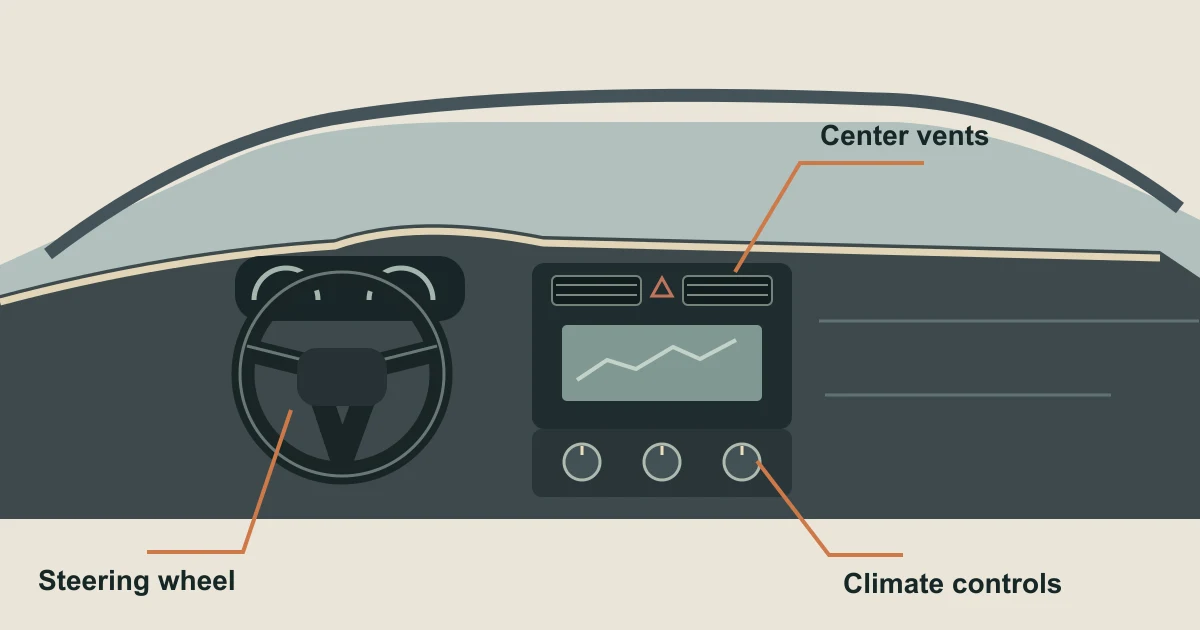
If all you have is a passenger-seat selfie, go back to the uncropped photo. A few inches at the edge might show where the center vents sit beside the screen, or whether the climate controls use knobs or buttons. Those details give you something to check when a car identifier suggests a model. A black leather headrest alone gives you very little.
Choose a crop with two features you can compare
When the whole dashboard is visible, keep the steering wheel and the center controls in the same crop. In the illustration above, two rectangular vents sit above the screen with a triangular hazard switch between them. Three round climate dials sit below. A wheel badge may tell you the make. The arrangement of those controls can help you distinguish cars that share the badge.
From a back-seat photo, look between the front seats for the gear selector, climate dials or lower edge of the radio. In a side-on selfie, try the door handle and window switches. You can leave the person out if their face takes up most of the frame. Keep the original resolution so you can read small labels.
Ask about the details in your picture
Open the Car Identifier and upload one photo. In Anything to add, say where the photo was taken if you know. You could ask, “The center vents are above the radio, and there are three round dials below it. Which models have that layout? What would distinguish them?”
If the only visible detail is a seat or headrest, look through nearby photos before spending credits on an analysis. A second shot that catches the dash through an open door may settle a question that the sharpest crop of the seat still leaves open.
Check the suggested model against a manual
Suppose the report suggests a 2022 Honda Civic sedan. Open the manufacturer’s manual for that year and body style. In the instrument panel and climate control sections, compare where the vents and controls sit. Start with features you can point to in both pictures. A row of knobs below the screen is more informative than a general impression that both dashboards look familiar. Honda’s 2022 Civic Sedan manual
If a switch is missing, check whether the manual shows more than one equipment version. If the whole layout differs, set that candidate aside. When two versions still fit the picture, keep both names and note the detail you’d need next, such as a wider shot of the console. If you find an outside view in the same album, you can also check the grille, lights and body shape.