ChatGPT
 Claude
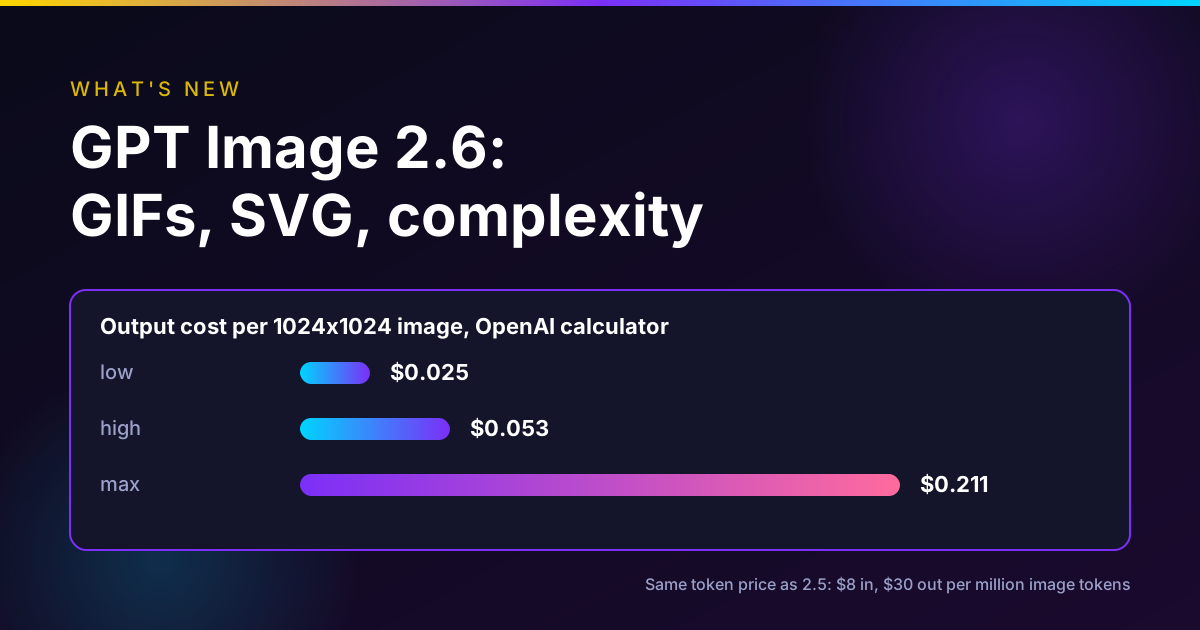
GPT Image 2.6 is OpenAI's November 4, 2026 image update, sold as Images 2.6 in ChatGPT and Codex and as two API models, GPT-Image-2.6 Flare and GPT-Image-2.6 Sunburst. The new parts are animated GIF output, SVG output, a complexity setting, and markup-guided edits in the API. OpenAI says it generates 50% faster than before. As of November 13, 2026 the API token prices are the same as GPT Image 2.5: $8 per million image input tokens and $30 per million image output tokens. At 1024 by 1024, OpenAI's calculator puts one image's output at about $0.025 at low quality and $0.053 at high.
If you already use GPT Image 2.5, the reason to move is GIF and SVG. For plain stills at the same price, test before you switch.
GPT Image 2.5 is in Oakgen today
Flare and Sunburst for generation and editing, with transparent PNG output and the credit price shown first. GPT Image 2.6 is not on Oakgen yet.
What changed from GPT Image 2.5 to 2.6
We already covered Flare vs Sunburst and GPT Image 2.5 vs GPT Image 2, so this table only lists what 2.6 adds or changes. Everything comes from OpenAI's launch post and API docs, read November 13, 2026.
| Feature | GPT Image 2.5 (Flare, Sunburst) | GPT Image 2.6 (Flare, Sunburst) |
|---|---|---|
| Animated GIF output | No | Yes, 2 to 16 frames |
| SVG output | No | Yes, generations endpoint only |
| Complexity setting | Not listed | low, medium, high (default high) |
| Markup-guided edits in the API | Listed in the guide for 2.5 and 2.6 | Yes, announced as new in the API |
| Speed | Baseline | "50% faster" (OpenAI claim) |
| Quality levels | low to max | low to max |
| Transparent background | PNG or WebP | PNG or WebP |
| Image output price | $30 per million tokens | $30 per million tokens |
| Image input price | $8 per million tokens | $8 per million tokens |
| Batch | Half price | Half price |
| On Oakgen | Yes | No |
The model names did not change shape. Flare is still the fast one and Sunburst the careful one. What changed is what comes out of them.
Who this is for
- A social team that wants mascot loops, reaction GIFs or animated product shots without opening a video tool.
- A designer who needs a logo or icon as editable vectors instead of a raster to trace.
- A developer on GPT Image 2.5 deciding whether to change the model string.
- A marketer who saw "Images 2.6" in ChatGPT and wants to know what it means for paid tools.
How we checked
On November 13, 2026 we read OpenAI's launch post (dated November 4, 2026), the API pricing page, and the image generation guide. We ran OpenAI's on-page cost calculator for GPT-Image-2.6 at 1024 by 1024 across all five quality levels and copied the output token counts and prices it showed. We read Higgsfield's changelog for its November 5 entry. We read Oakgen's GPT Image 2.5 schema and model list for what Oakgen supports.
We did not generate any GPT Image 2.6 images. We did not time it, and we did not compare its output with 2.5. Quality and speed statements are OpenAI's, and the partner quotes are quotes from OpenAI's post.
Disclosure: Oakgen is our product. We mention it because it carries GPT Image 2.5, and we say plainly that it does not carry 2.6.
The launch in plain terms
OpenAI's post says Images 2.6 is available "globally today in ChatGPT and Codex across all subscription tiers on desktop, mobile, and web," and that GPT-Image-2.6 Sunburst and Flare are in the API (OpenAI, Nov 4, 2026). It also says people make 4 billion images a week across ChatGPT, Codex and the API.
On speed, the post claims Images 2.6 "generates images 50% faster than before," and that Flare at low quality "can generate images in as little as six seconds." Sunburst "brings higher-quality image generation and even greater image consistency across edits when quality is set to medium or high." Flare "also improves layout quality for posters, product imagery, and other professional visuals." No benchmark is attached to these lines.
Four companies are quoted. OpenArt's CEO calls GIFs "the native language of social media". Figma Weave says it is adding the model. Picsart cites faster generations and character consistency. Town, a startup, used it to animate a typing-indicator character. Treat these as launch partner statements.
GIFs: the headline feature
This is the part that does not exist in 2.5.
In ChatGPT you ask for a GIF in plain words. In the API the guide spells out the controls (OpenAI image generation guide):
| GIF setting | Values | Default |
|---|---|---|
| output_format | gif | png |
| frame_count | 2 to 16 frames | 9 |
| frame_duration_ms | 20 to 2,000 ms per frame, rounded to 10 ms | 200 |
| size | auto, or width by height in multiples of 16 | auto |
Size describes each frame, and the frame count, frame size and number of animations all have to fit the model's pixel budget. If a request is too big, reduce frames or frame size. GIF output works on both the generations and the edits endpoint, and it does not support streaming, partial images or custom compression.
The defaults give you a short loop. Nine frames at 200 ms is 1.8 seconds, which is exactly the length of OpenAI's own lantern example. Sixteen frames at 2,000 ms each would run 32 seconds, but at that frame duration it is a slideshow, not motion.
Reference images for GIFs. The guide says: "To guide the animation with still reference images, send them to the image edit endpoint." That is how you keep a brand mascot on model. Upload the approved character still, ask for one simple motion, and let the edit endpoint do the loop.
How OpenAI prompts it. The two OpenArt examples in the launch post ask for a single animation sprite sheet for a looping GIF, with "exactly 6 sequential frames arranged in a precise 3-column by 2-row grid," a fixed camera, the same character in every panel, and a sixth frame that "transitions smoothly toward the first." They also ban captions, numbers and borders. That structure is worth copying: one character, one action, a locked camera and an explicit loop.
What a GIF is not. It is not video. There is no sound, the frame count is low, and the motion has to stay simple. For a 10-second product shot with camera movement, a video model is still the right tool. Our Seedance 2.5 Flash vs Seedance 2.5 post covers the cheap end of that.
A note on Higgsfield's version. Higgsfield's November 5 changelog says its GPT Image 2.6 GIFs range "from 2 frames at 1024 px to 64 at 288 px" (Higgsfield changelog). OpenAI's API guide caps frame_count at 16. We could not reconcile the two from the pages we read, so test on the platform you use.
SVG output
Set output_format to svg on the generations endpoint and you get a vector document. The guide's rules:
- Generations only. The edits endpoint does not return SVG, and an SVG is not accepted as an edit input.
- n must be 1, and there is no streaming or compression.
- The API first creates a reference image, then an authoring model writes the SVG from it. The quality setting controls that reference image.
- The output is static vector content with no scripts, external resources or embedded rasters.
Billing follows the two steps. You pay the image model's rate for the reference image plus the authoring model's rate for the tokens it uses, so the total varies. OpenAI's example is a bakery logo drawn by both Flare and Sunburst. This is the feature I would test first for icons, simple logos and flat illustrations, where tracing a PNG used to be a manual step. I would not expect it to handle a photo.
The complexity setting
Complexity is separate from quality. The guide says complexity controls "how much the image model plans before rendering," while quality controls rendering detail. Sunburst and Flare accept low, medium and high, and both use high if you leave it out. Changing it has no separate fee.
OpenAI's advice in the launch post: "For most editing tasks, we recommend low complexity for faster edits, paired with the image quality your workflow requires. For scenes with many elements or constraints, try medium or high complexity effort." The guide adds a warning: higher complexity "can increase latency and introduce unwanted changes."
That warning matters. The default is high, which suits a dense poster but works against a small edit like swapping a sign. If you move from 2.5 and your edits start drifting, set complexity to low before you blame the model.
Markup-guided edits in the API
Markup was in ChatGPT already. Images 2.6 brings it to the API. You send the original image plus a separate transparent PNG with your circles or scribbles, same width and height, and describe the change in the prompt. The guide is strict on format: the overlay must keep its transparent pixels and must not be flattened onto the photo. Markup edits use the same token rates as other edits, with no extra fee. The guide lists markup for both GPT-Image-2.5 and 2.6 models on the edits endpoint, so if you are on 2.5 you can try it now.
API pricing, from OpenAI's pricing page
These are the standard rates on OpenAI's pricing page as of November 13, 2026, per million tokens (OpenAI pricing).
| Model | Image input | Cached image input | Image output | Text input | Cached text input |
|---|---|---|---|---|---|
| gpt-image-2.6-flare | $8.00 | $2.00 | $30.00 | $5.00 | $1.25 |
| gpt-image-2.6-sunburst | $8.00 | $2.00 | $30.00 | $5.00 | $1.25 |
| gpt-image-2.5-flare and sunburst | $8.00 | $2.00 | $30.00 | $5.00 | $1.25 |
Batch halves every number: $4 image input, $1 cached, $15 image output, $2.50 text input and $0.625 cached text.
Per image, the guide's calculator gave us these output estimates for GPT-Image-2.6 at 1024 by 1024. They exclude text and image input tokens.
| Quality | Output tokens | Output cost per image |
|---|---|---|
| low | 823 | $0.02469 |
| medium | 1,449 | $0.04347 |
| high | 1,756 | $0.05268 |
| xhigh | 3,122 | $0.09366 |
| max | 7,024 | $0.21072 |
Three things to know before you budget. The calculator covers Flare and Sunburst together, and the guide says the models "can use different token counts for the same quality setting," so read the usage field on real calls. Streaming partial images add 100 output tokens each. And for GPT Image 2 and 2.5, cached input pricing applies only to the image tool in the Responses API, not to direct Images API calls.
The jump from xhigh to max more than doubles the cost per image. For drafts, low or medium is plenty. For our earlier breakdown of quality settings, see GPT Image 2.5 pricing and quality settings.
Compare image models on one prompt
Run the same brief across GPT Image 2.5, Nano Banana and other models side by side before you commit to one.
Should you switch from 2.5?
The mistake is upgrading the model string before you know which job needs the new feature.
| Your job | Recommendation |
|---|---|
| Animated mascot, reaction or product loop | Switch to 2.6, it is the only one with GIF |
| Logo, icon or flat illustration as vectors | Switch to 2.6 for SVG, then clean up in a vector editor |
| Small edits drifting too much | Try 2.6 with complexity low, or markup on 2.5 |
| Dense poster with many text blocks | Test 2.6 at medium or high complexity against your 2.5 baseline |
| Stills that already work on 2.5 | No rush. Same token price, so test 20 of your real prompts first |
| Transparent cutouts | Either version, PNG or WebP |
Here is how I would run the test. Take 10 approved briefs from your 2.5 history. Run each on 2.6 Flare at the same quality with complexity low and again with complexity high. Check what changed that should not have, count the usage tokens, and only then swap the default.
Common mistakes
Leaving complexity on the default for edits. The default is high. For a sign swap, that is more planning than you want.
Asking a GIF to be a video. Keep it to one subject and one motion with a locked camera.
Budgeting from the calculator alone. It shows output only. Reference images and long prompts add input tokens.
Expecting SVG from the edits endpoint. It is generations only.
Treating "50% faster" as a guarantee. It is OpenAI's average claim. The guide still says complex prompts can take up to 2 minutes.
Where Oakgen fits
Oakgen does not carry GPT Image 2.6 as of November 13, 2026, and has not announced it. What it has:
- GPT Image 2.5 Flare and Sunburst, for text-to-image and for editing. Oakgen's model list shows text-to-image from 21 credits and edits from 26 credits.
- Transparent backgrounds on GPT Image 2.5, with PNG or WebP output.
- GPT Image 2, Nano Banana 2.1, Nano Banana Pro and Grok Imagine Image in the same image generator, plus the image editor.
Where OpenAI and others are ahead today: GIF and SVG output only exist in 2.6, so ChatGPT, the OpenAI API and partners such as Higgsfield are the places to get them. If you need a GIF loop this week, use one of those. If you need stills, edits and transparent PNGs next to video and audio in one account, Oakgen covers that with 2.5. For a head-to-head with this week's other image models, read our Seedream 5.5 vs GPT Image 2.6 vs Nano Banana 2.1 comparison and the Seedream 5.5 guide.
Make transparent product images
Use GPT Image 2.5 Flare or Sunburst in Oakgen with a transparent background, then drop the cutout into your ad.
FAQ
What is new in GPT Image 2.6?
OpenAI's November 4, 2026 launch adds animated GIF output, SVG output, a complexity setting that controls how much the model plans before it renders, and markup-guided edits in the API, which were already in ChatGPT. OpenAI also says Images 2.6 generates images 50% faster than before. The speed figure is OpenAI's claim.
How much does the GPT-Image-2.6 API cost?
OpenAI's pricing page, read on November 13, 2026, lists both GPT-Image-2.6 Flare and Sunburst at $8 per million image input tokens, $2 cached, $30 per million image output tokens, $5 per million text input tokens and $1.25 cached. Batch is half. OpenAI's calculator estimates the output of one 1024 by 1024 image at $0.025 at low quality, $0.043 at medium, $0.053 at high, $0.094 at xhigh and $0.211 at max, before input tokens.
Is GPT Image 2.6 more expensive than GPT Image 2.5?
Not per token. OpenAI lists the same standard and batch token rates for the 2.5 and 2.6 Flare and Sunburst models. OpenAI's guide notes that equal token rates do not mean equal cost per image, because token use can differ by model and quality setting, so check the usage field on your own prompts.
How do GIFs work in GPT Image 2.6?
In the API you set output_format to gif on the generations or edits endpoint and describe the subject, motion and loop in the prompt. frame_count runs from 2 to 16 frames, default 9, and frame_duration_ms from 20 to 2,000 milliseconds, default 200. To guide the animation with still reference images, you send them to the edits endpoint. GIF output does not support streaming or partial images.
What is the complexity parameter?
It controls how much the image model plans before rendering. Sunburst and Flare accept low, medium and high, and both default to high when you leave it out. OpenAI recommends low for most edits and medium or high for scenes with many elements or constraints. It has no separate fee, and OpenAI warns that higher complexity can add latency and unwanted changes.
Should I use Flare or Sunburst in 2.6?
OpenAI positions Flare for fast iteration, with images in as little as six seconds at low quality, and Sunburst for detail and consistency across edits at medium or high quality. The choice works the same way it did in 2.5, which our Flare vs Sunburst guide covers in depth.
Can I use GPT Image 2.6 on Oakgen?
Not as of November 13, 2026. Oakgen offers GPT Image 2.5 Flare and Sunburst for generation and editing, GPT Image 2 and other image models. Oakgen's GPT Image 2.5 settings include a transparent background with PNG or WebP output, but not GIF or SVG output. Oakgen has not announced 2.6.
Where else is GPT Image 2.6 available?
OpenAI says Images 2.6 is in ChatGPT and Codex on all subscription tiers and in the API. OpenArt, Figma Weave, Picsart and Town are quoted in OpenAI's launch post. Higgsfield's changelog added GPT Image 2.6 Flare and Sunburst on November 5, 2026.
Sources
- OpenAI, Introducing Images 2.6, Nov 4 2026 (read 2026-11-13)
- OpenAI API docs, Pricing, undated page (read 2026-11-13)
- OpenAI API docs, Image generation guide, undated page (read 2026-11-13)
- OpenAI, Images 2.6 system card, Nov 2026 (read 2026-11-13)
- Higgsfield, What's new changelog, entry of Nov 5 2026 (read 2026-11-13)