ChatGPT
 Claude
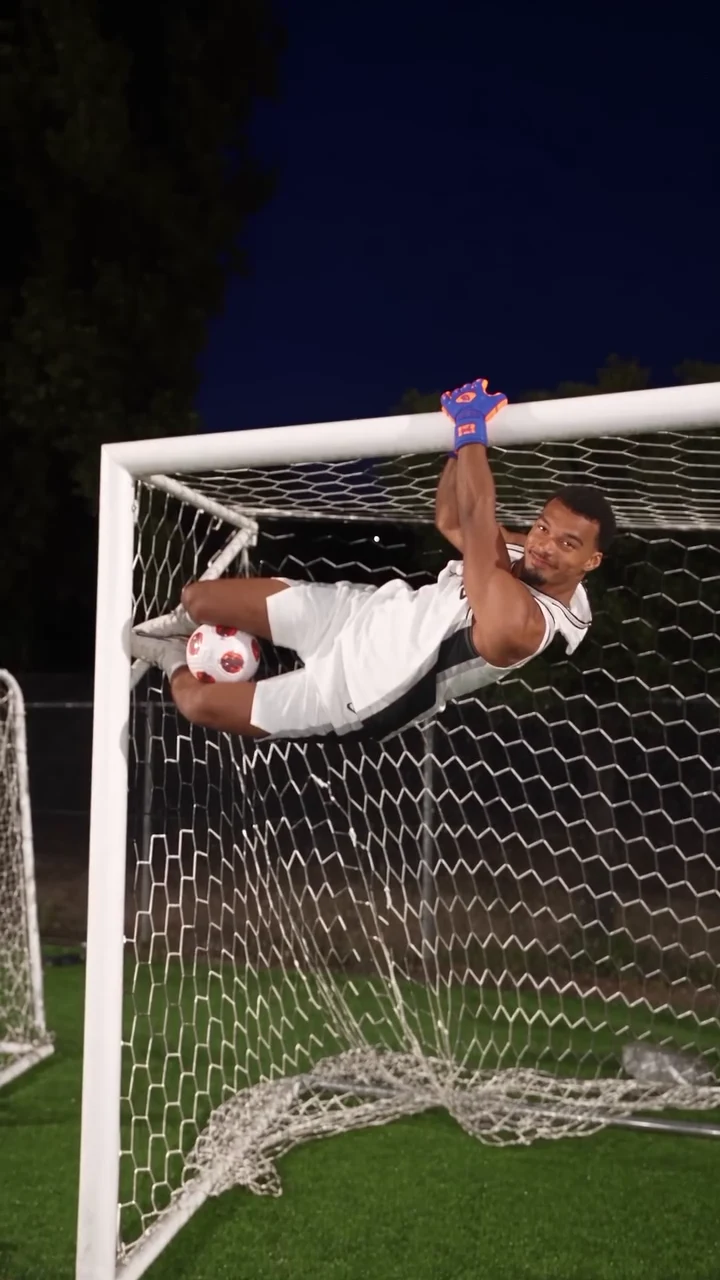
Your Wembanyama Goalkeeper AI video comes out of Oakgen as a vertical 9:16 file, 26 seconds long, with the original instrumental music on it and no on-screen text. That is already the right shape for Reels, TikTok and Shorts, so editing is light. It still decides whether the joke lands: the caption, where text goes, how long you cut it and which frame people see before they tap. The preview and the template are an AI-made parody, not real footage of Victor Wembanyama, Shai Gilgeous-Alexander or anyone else it resembles, and not affiliated with or endorsed by them or by the NBA or any team, league, kit maker or sponsor.
Make the shootout first
Add two photos for the Goalkeeper and the Penalty taker and make the 26-second Wembanyama Goalkeeper AI parody with the original sound, then come back to edit it.
Who this is for
You have generated the video, or you are about to, and you want it to work as a post rather than a file. If you have not made it yet, start with how to make the Wembanyama Goalkeeper AI video.
The caption carries the joke
The parody travelled with the caption "Shai is not enjoying Victor's flexibility". It works because it names the loser of the joke, not the winner. Do the same with your friends: the funniest captions are about the person who keeps missing.
Caption ideas that keep it clearly a parody:
- "[Shooter] has taken six penalties against [keeper]. Score: 0. (AI parody)"
- "Nobody told [shooter] that [keeper] was a goalkeeper as a kid. AI edit"
- "[Keeper] really saved one while having a drink. Made with AI"
- "Penalty practice with [keeper] is not fair. AI parody, obviously"
- "[Shooter] is not enjoying [keeper]'s flexibility"
What I would avoid: anything written as if it were real footage of real players, and anything that tags a team or league account. It invites the wrong kind of attention and it is not true.
Where text fits in the frame
The clip alternates between two kinds of shot, and the safe text zone is the same in both: the dark blue sky.
| Shot | Where the action is | Where text can go |
|---|---|---|
| Run-up, close (0 s, 4.7 s, 12.2 s) | Shooter in the middle, ball large at the bottom | Top fifth, above the floodlights |
| Plea close-up (3.2 to 4.7 s) | Face in the upper middle | Bottom third, over the shirt |
| Saves at the goal | Crossbar and keeper in the upper middle | Very top, or the bottom fifth over the grass |
| Wide shots (8.7 s, 16.3 s, 21.2 s) | Tiny shooter at the horizon line | Anywhere in the sky |
Here is where this breaks: one fixed caption box across the whole video. The plea close-up puts a face exactly where a top-third caption sits in the other shots. Either keep the caption very small at the top, or move it for those two seconds.
Three cut lengths
- Full, 26 seconds: all six saves. Best for Reels and TikTok, where the escalation is the point and the last save is the payoff.
- Mid, about 12 seconds (0 to 12.2 s): the upside-down save, the plea, the drink save and the ball on the head. Good for Stories or a loop that still escalates.
- Short, about 4 seconds (3.2 to 4.7 s, then 23.8 to 26 s): the plea close-up followed by the keeper lying on the crossbar. A quick reaction-style clip.
Cut on the whip pans. They hide the join, and the music often has a hit close to them.
Pick the cover frame
Use the moment that explains the joke without sound. I would pick the sideways crossbar save at about 15 seconds or the keeper lying on top of the bar at the very end. Both show an impossible save and a clear face. Avoid the wide shots: the shooter is too small to recognise in a grid.
Sound
Keep the original track if you can. The edit was cut to its drum hits, and the loud hit at about 1 second marks the first kick. If you swap it in your own editor, keep something with strong hits and check that the saves still line up. The template itself does not take a new song.
Common mistakes
- Text over the crossbar, which hides the saves.
- Cutting out the plea close-up, which is the only clear look at the shooter's face.
- Posting without an AI label.
- Using photos of real athletes. Use your own photos or ones of people who agreed to appear.
- Describing the clip as real footage or tagging teams or leagues as if they were involved.
Related reading
For each save timed to the second, see the Wembanyama Goalkeeper saves shot list. For who suits which role, see the casting guide. For the photo-to-video workflow, read how to make the Wembanyama Goalkeeper AI video.
Frequently asked questions
Where should on-screen text go?
In the dark sky at the top of the frame. Most saves happen at the crossbar in the upper middle of the frame, the plea close-up puts a face there too, and the ball and the run-ups fill the lower half, so keep text small and at the very top.
Which cut is best for Reels?
The full 26 seconds works because each save tops the last. For a shorter loop, cut from the plea at about 3 seconds to the end of the drink save at about 8.7 seconds.
Can I name the real players in my caption?
You can say what the parody is about, but do not suggest Victor Wembanyama or Shai Gilgeous-Alexander made, approved or appear in your video. They do not: the people in it are the ones in your photos.
How do I label it?
Say it is an AI parody in the caption or turn on the platform's AI label, and do not present it as real footage or suggest a real player, team, league or brand is involved.
Can I change the music?
The download keeps the reference clip's original instrumental music bed. You can replace it in your own editor, but the edit was cut to that track, so check the saves still land on the hits.