ChatGPT
 Claude
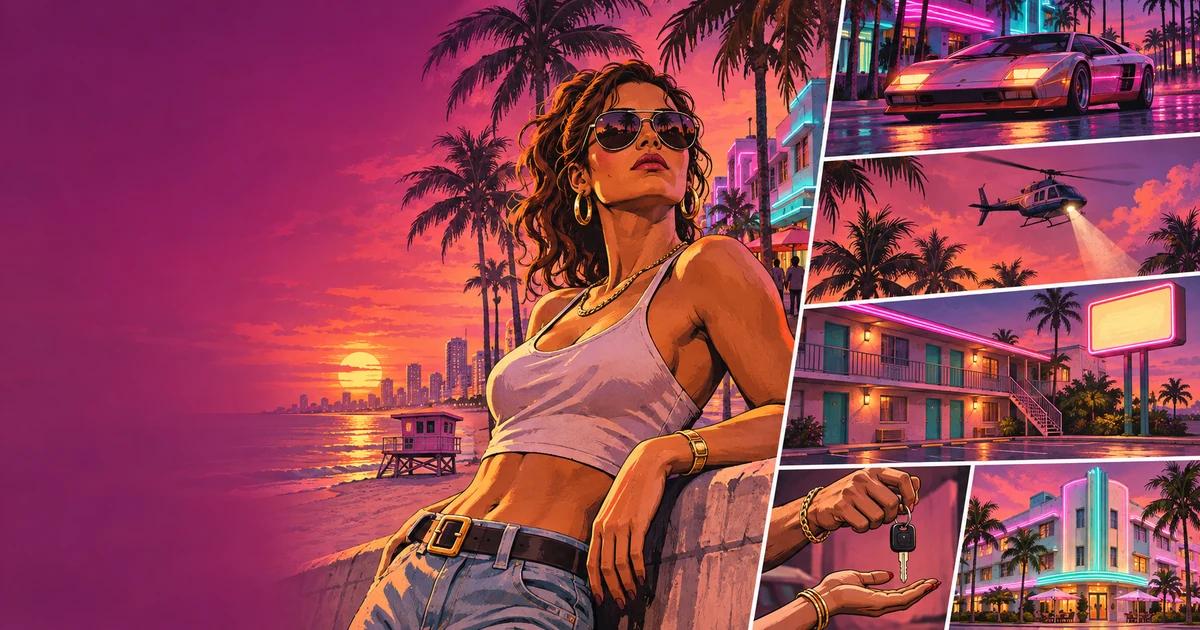
GTA 6 launches on November 19, 2026, and suddenly everyone wants a Vice City sunset on their lock screen. Some want the official art. More want themselves in it: a painted loading-screen portrait with palm trees and neon behind them.
This guide covers both:
- Where to get official GTA 6 wallpapers at full quality.
- What makes the GTA art style recognizable, so you know what to ask an AI for.
- How to make your own GTA-style portrait, poster or phone wallpaper with AI, with prompts you can copy.
Where to get official GTA 6 wallpapers
Rockstar posts official artwork on its Grand Theft Auto VI site, under Media → Artwork & Wallpapers. In November 2026 the gallery has 27 official pieces, including:
- The official cover art (the classic panel grid)
- Jason and Lucia artwork, such as "Jason and Lucia Rooftop"
- Action pieces such as "Lock and Load" and "Robbery"
- Location art such as "Beach", from the state of Leonida, home to Vice City
- The album cover art
Tips for a clean wallpaper:
- Download from Rockstar directly. Wallpaper sites re-compress the images, and you'll see banding in the sunset gradients.
- Phone (9:16): most official pieces are landscape. Crop around one character rather than squeezing in the whole scene.
- Ultrawide or 4K desktop: if a piece is a bit too small, an AI image upscaler can enlarge it with less blur than normal resizing. That's for your own screen only, not for printing and selling.
What makes the GTA art style recognizable
If you want AI art that people see as "GTA" straight away, you need to name the parts of the style. Here's what defines it:
| Element | What it looks like | How to say it in a prompt |
|---|---|---|
| Line | Clean, confident outlines with weight, like an inked comic | "bold clean ink outlines, comic poster illustration" |
| Shading | Flat cel-shaded color with a few hard shadow shapes | "cel-shaded, flat color blocks, hard-edged shadows" |
| Color | Saturated sunset oranges, magentas and teals. Vice City leans neon | "saturated sunset palette, magenta and teal neon, golden hour" |
| Lighting | Strong backlight or rim light, high contrast | "dramatic rim lighting, high contrast" |
| Pose | A confident "hero" pose, often holding a prop, sometimes looking at the viewer | "confident pose, cinematic three-quarter angle" |
| Layout | Panels in a grid with thin borders, like the cover art | "multi-panel grid layout, thin white borders" |
| Setting | Palm trees, beaches, highways, skyscrapers, muscle cars | "palm trees, Miami-style skyline, sports car" |
A little history helps with the details. The panel-grid cover style goes back to GTA III and artist Stephen Bliss. He recently said the GTA 6 cover still uses the grid, but that he didn't work on GTA V or GTA 6 (IGN). GTA V's key art was led by Rockstar's director of illustration, Anthony Macbain (his site). So "GTA style" really means a house style that has changed over 20+ years, not one artist's look.
How to make your own GTA-style portrait with AI
Option A: from your own photo (the "make me a GTA character" version)
- Choose a good photo. Use one face, front or three-quarter angle, even lighting, no sunglasses. A waist-up shot gives the best pose.
- Open the Oakgen image editor and upload the photo.
- Paste the prompt below, then change the details in brackets.
- Make 4 versions. Keep the one where your face still looks like you and the style is strongest.
- Upscale the winner with the image upscaler if you want a 4K wallpaper.
Turn this person into a painted crime-drama video game loading-screen portrait. Keep their face, hairstyle and skin tone clearly recognizable. Bold clean ink outlines, cel-shaded flat color, hard-edged shadows, dramatic rim lighting. Confident pose, three-quarter angle, [wearing a loose floral shirt and gold chain]. Background: [a Miami-style beach boulevard at sunset with palm trees and a neon motel sign]. Saturated sunset palette of orange, magenta and teal. No text, no logos. Vertical 9:16 phone wallpaper composition with the face in the upper third.
Why it works: it describes the style instead of naming a brand. It locks your likeness first ("keep their face… recognizable"), and it says "no text, no logos". That keeps the result original, and you can use it as your profile picture or wallpaper without copying Rockstar's art.
Option B: from text only (original characters and scenes)
Use the Oakgen image generator to create original characters and scenes. Characters you invent are also the safe choice for anything you'll post as a creator.
Painted crime-drama video game key art of two original characters, a woman and a man in their thirties, standing back-to-back on a rooftop at golden hour, overlooking a Miami-style skyline with palm trees. Bold clean ink outlines, cel-shaded flat color, hard shadows, strong rim light. Saturated orange, magenta and teal palette. Cinematic, confident poses. No text, no logos. 16:9 widescreen.
A poster laid out as a grid of six painted panels with thin white borders, crime-drama video game style. The large top-left panel is the main character [describe yourself]. Other panels: a sports car at sunset, a police helicopter over palm trees, a beach at night with neon lights, a close-up of hands holding car keys, a motel sign. Bold ink outlines, cel-shaded, saturated sunset palette. No logos, no readable text. Vertical 2:3 poster.
Vertical 9:16 phone wallpaper of a Miami-style coastal highway at sunset, palm trees silhouetted against a magenta and orange sky, a vintage convertible driving toward a neon-lit skyline, painted comic illustration with bold outlines and cel-shaded color, empty sky in the top third for the clock. No text, no logos.
Tips for getting closer to a real loading screen
- Ask for "painted comic poster", not "cartoon". "Cartoon" gives you a children's TV look.
- Use one strong light source. A single sunset backlight looks like GTA. Flat, even light doesn't.
- Name a prop. Car keys, a phone, sunglasses pushed up or a duffel bag give the pose a story.
- Keep the background simple behind the face, and busy everywhere else.
- Leave room for the clock on a phone wallpaper, so the top third stays empty sky.
Make your own GTA-style portrait
Upload a photo or start from a prompt. Bold outlines, sunset palettes and 9:16 wallpapers in a few clicks.
GTA 6 posters: printing vs selling
Search "GTA 6 poster" and you'll find official retail posters, fan-made posters on Reddit and lots of unofficial prints for sale. What you're allowed to do:
| What you want to do | OK? |
|---|---|
| Print official Rockstar wallpaper for your own wall | Generally fine for personal use |
| Post your AI GTA-style portrait as your profile picture | Fine, as long as it doesn't use Rockstar's logos or official art |
| Share fan art on Reddit or X | Rockstar generally doesn't object to non-commercial fan use |
| Sell prints with the GTA logo, Jason, Lucia or official art | No. Commercial use and merchandise need Take-Two's permission |
| Sell original art in a similar painted, neon style | OK, as long as it has no GTA names, logos, characters or official artwork |
Rockstar's policy on posting its material covers non-commercial fan use, and Rockstar can take material down at any time. When in doubt, make it original.
Use the style for content, too
GTA-style art isn't only for wallpapers. GTA creators use it everywhere around launch:
- YouTube thumbnails: a painted portrait of the creator with a bold 2–3 word hook.
- Stream overlays and "starting soon" screens in a Vice City palette.
- Shorts covers for clips and compilations.
- Memes: "GTA 6 memes" gets about 2,400 searches a month in the US (DataForSEO, November 2026), and a painted "loading screen" of your friend is a reliable format.
If you're making money from GTA 6 content, our guides on making money from GTA 6 and clipping GTA 6 streams cover the rest.
Related reading
- How to make money from GTA 6: 8 real ways
- How to make money clipping GTA 6 streams
- The best way to make money in GTA 5 before GTA 6
Frequently asked questions
Where can I download official GTA 6 wallpapers?
Rockstar posts official Grand Theft Auto VI artwork and wallpapers in the media section of its GTA VI site, rockstargames.com/VI. As of November 2026 the gallery has 27 official pieces, including the cover art and character artwork of Jason and Lucia. Download from there rather than wallpaper sites, which often re-compress the images.
How do I make myself look like a GTA character?
Upload a clear, front-facing photo to an AI image editor and ask for a painted crime-drama poster portrait: thick clean outlines, cel-shaded skin, saturated sunset colors, a bold pose and a city skyline behind you. Ask for a 9:16 frame for a phone wallpaper or 16:9 for a desktop. Use your own photo or one you have permission to use.
What is the GTA art style called?
There is no official name, but it is a painted, comic-influenced poster style: realistic proportions, bold outlines, flat cel-shaded color, high-contrast lighting, and characters posed in a panel grid. The grid cover layout began with GTA III, created by artist Stephen Bliss. GTA V's key art was led by Rockstar illustration director Anthony Macbain.
Can I sell GTA 6 fan art or posters?
Not with Rockstar's names, logos or artwork. Rockstar's policy covers non-commercial fan use only, and commercial use or merchandise needs Take-Two's permission. You can sell original art in a similar painted, neon, crime-drama style if it uses no GTA logos, characters or official artwork.
Is there a GTA filter for photos?
There are filter apps, but most produce a generic cartoon effect. An AI image editor gives better results because you can describe the details: the outline weight, the sunset palette, the pose, the background and the frame. Run a few versions and keep the one closest to a real GTA loading screen.