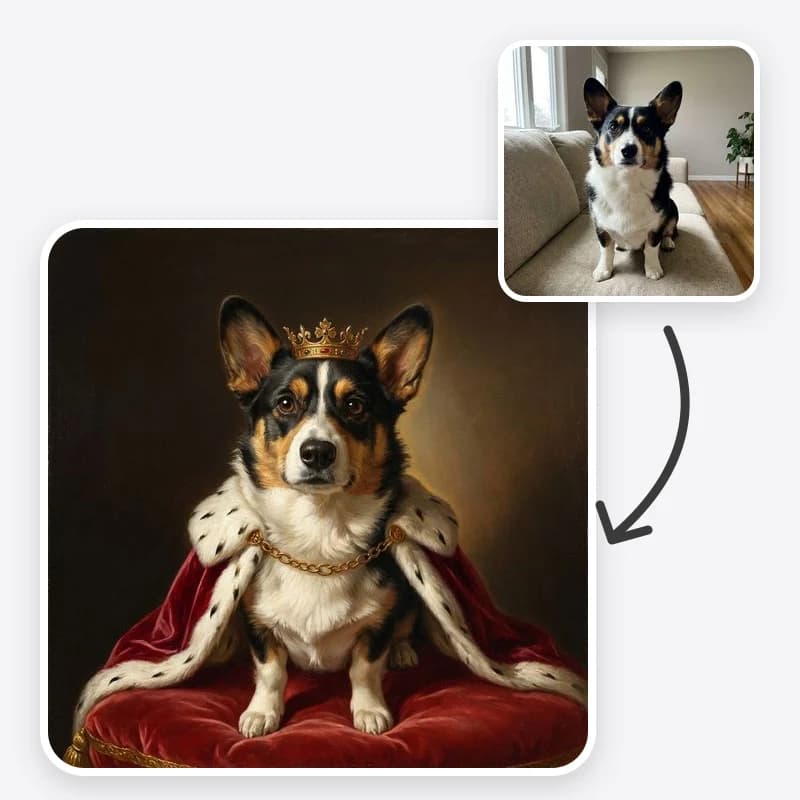
A royal pet portrait is a simple joke done seriously: your dog, who eats socks, painted like a monarch in ermine and gold. The joke only works if the portrait is clearly your dog. A generic spaniel in a crown is a stock image; your spaniel, with the brown patch over one eye, in a crown, is a gift.
This guide shows how to make one with Oakgen's Royal Pet Portrait tool and, more importantly, how to keep your pet recognisable through the repaint. If you are making the portrait as a present and want help choosing a style, printing and framing it, read the companion custom pet portrait gift guide.
What the tool does
You upload one photo of your pet and choose three things:
- Portrait Style: Royal (small jeweled crown, crimson velvet cape with white ermine trim, red velvet throne cushion), Renaissance (white lace ruff, brocade doublet, soft side light), General or Admiral (navy dress jacket, gold epaulettes, sash and medals), or Victorian Aristocrat (high-collared velvet coat, silk cravat, pearl pin, watch chain).
- Background: a dark museum backdrop, a palace hall with marble columns and drapery, or a wood-panelled library.
- Frame: none, for a full canvas you can print and frame, or a painted ornate gold frame against a dark wall.
The prompt then asks the model to repaint the photo as a classical oil portrait while keeping your pet's species, breed features, face and ear shape, eye colour, fur colour, coat pattern and every distinctive marking. It also tells the model to keep the animal's own head and body, fit the costume around the neck and shoulders, and not turn your pet into a person with human hands. That last rule is what separates this from the many images online where a cat's head sits on a painted man's body.
The result is a digital image in an oil-painting style. It is not a hand-painted canvas, and the tool is meant for pets only.
Step 1: Choose the photo carefully
Everything the model knows about your pet comes from one photo. These are the photo qualities that matter most, in order.
Eye level. Crouch down. Photos taken from above make heads look large and bodies small, and the portrait inherits that odd angle. Old master portraits are painted at eye level, so an eye-level photo already looks right.
Face, ears and chest in view. The costume goes on the neck, chest and shoulders. If the chest is hidden behind a sofa arm, the model has to invent where the cape sits.
Markings clearly visible. Turn the pet so its most recognisable side faces the camera. A dog with a white patch on the left side of its face should be photographed from the left.
Sharp and well lit. Soft daylight from a window is ideal. Avoid flash, which flattens fur and turns eyes green or white, and avoid strong backlight.
One pet. Two pets in a photo can work, but the model then has to hold two sets of markings. For a pair, make one portrait each in the same style and hang them side by side.
Calm expression. A relaxed face with closed mouth or a soft pant suits a formal portrait. A mid-yawn photo will be painted mid-yawn, which may be funny, but it will not look regal.
Crown your pet
Upload a clear photo of your dog, cat or other pet and choose Royal, Renaissance, General or Victorian. Keep the markings that make it yours.
Step 2: Pick a style that fits the pet
There is no wrong choice, but some combinations land better than others.
Royal suits pets with presence: large dogs, fluffy cats, anyone who already acts like they own the house. The crown and red cape are the most recognisable look and read clearly even as a small print.
Renaissance suits calm, elegant faces: greyhounds, Siamese cats, older dogs with grey muzzles. The lace ruff frames the head, and the soft one-sided light flatters fine features. It is also a dignified choice for a memorial portrait.
General or Admiral suits bold, alert pets: terriers, shepherds, cats with a stern stare. The medals and epaulettes add humour, and the upright pose makes the most of a proud chest.
Victorian Aristocrat suits small dogs and cats with neat faces, or any pet you think of as slightly fussy. The velvet coat and cravat are quieter than the crown and suit smaller rooms.
Step 3: Pick the background and frame
Dark Museum Backdrop keeps all attention on the face. It is the most forgiving option, because there is less in the image to go wrong, and its plain background is easy to print; check the downloaded image's pixel size and a test print before going large.
Palace Hall adds columns and drapery. Choose it for Royal or General when you want the image to feel grand. It works best with photos where the pet takes up a good share of the frame; otherwise the hall can swallow it.
Wood-Panelled Library pairs naturally with Victorian and Renaissance, and suits an office or study.
For the frame, choose No Frame if you will print and put it in a real frame. A painted gold frame inside a real frame looks odd. Choose Ornate Gold Frame for a digital gift, a phone wallpaper or a social post, where the painted frame finishes the joke.
Step 4: Check it against the original
Put the portrait and the original photo side by side and go through this list:
- Eyes: same colour, same shape, same distance apart?
- Ears: upright, folded, or one of each, as in real life?
- Muzzle: same length and colour? Grey muzzles often turn uniformly brown.
- Markings: every patch, stripe, blaze and sock in the right place?
- Coat colour: has a cream dog turned golden, or a grey cat turned blue?
- Body: four legs, two ears, no human hands, costume sitting on the animal's own body?
If the answers are mostly yes, you have your portrait. If one thing is off, fix that one thing.
Fixing common problems
Markings moved or vanished
This is the most common issue, especially with asymmetric patches, merle coats, tabby stripes and tortoiseshell. Name the markings in plain words in the additional instructions: "white blaze down the centre of the nose", "left ear brown, right ear white", "white socks on both front paws". Then regenerate. If they still drift, use a closer photo where they are larger.
The pet looks like a generic member of its breed
That usually means the photo did not give the model enough detail. Use a sharper, closer photo, and mention what makes your pet different from others of its breed: "slightly crooked ear", "short tail", "grey around the eyes".
The coat colour changed
Warm painted light can shift colours. Say the colour plainly: "pale cream fur, not golden" or "solid dark grey fur". Oil portrait lighting is warm by nature, so expect a slight shift and decide whether it bothers you.
The costume swallows the pet
On small pets, a big ermine cape can cover most of the body. Ask for "a smaller cape around the shoulders" or switch to Victorian, which has a more fitted collar.
The pet has human features
If anything human sneaks in, regenerate rather than trying to fix it with words. The prompt already blocks human hands and bodies, and a repeat usually lands correctly.
Different from a cartoon pet portrait
If you have seen our guide to a Pixar-style AI pet portrait, this is the opposite approach. The cartoon style enlarges the eyes and simplifies the body for a cute, animated character. The royal portrait keeps realistic proportions and puts the pet into a historic costume and painting tradition. Choose cartoon for playful and cute; choose royal for funny and formal. You can try a cartoon look on the same photo with the 3D cartoon style tool, or an uncostumed painting with the oil painting effect.
After the portrait
- For printing, check the image at full size and read the print section of the gift guide. For large canvases, enlarge it with the upscaling tool first.
- For a Christmas card, a crowned pet makes a striking front. The Christmas card photo ideas post covers layout and print sizes.
- For a commission, the portrait works as a clear reference if you want a painter to make a real canvas.
Make your pet's royal portrait
Pick a style, a background and a frame, then compare every marking with your photo before you print.
Frequently asked questions
What kind of photo works for a royal pet portrait?
A sharp photo taken at your pet's eye level, with the face, ears and chest visible and the markings easy to see. Daylight from a window works well. One pet per photo gives the most accurate result.
Why did the portrait change my pet's markings?
The image is repainted, and small or asymmetric markings are the details most likely to move or vanish. Name them in the additional instructions, for example 'white blaze down the nose and one brown ear', and use a closer photo.
Can I make a royal portrait of a person with this tool?
No. The Royal Pet Portrait tool is designed for pets only. Its prompt is written around an animal's head, fur and markings.
Which style should I start with?
Royal, with the dark museum backdrop and no frame, is a good first try because the crown and ermine cape read clearly at any size. Then try Renaissance or General to compare.