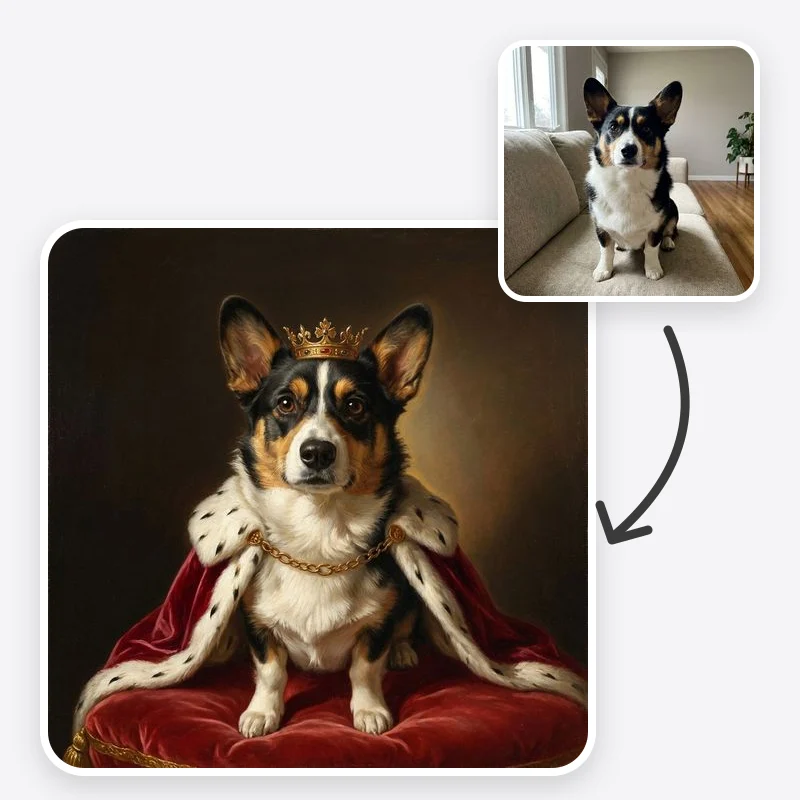
Royal Pet Portrait from Your Photo

Make a royal pet portrait from a photo: your dog or cat as a crowned monarch, Renaissance noble or admiral in oil-paint style, with its markings kept.

Choose the costume and painting tradition for your pet

The setting behind your pet

Leave the frame off if you plan to print and frame it yourself

Open in Oakgen
Royal Pet Portrait example
Example result

Royal Pet Portrait from Your Photo

Upload a photo of your dog, cat or other pet and repaint it as a crowned monarch, a Renaissance noble, a decorated general or a Victorian aristocrat, in an oil-painting style with its own markings kept.

What is Royal Pet Portrait?

The Royal Pet Portrait tool repaints a photo of your pet as a classical oil-style portrait in one of four costumes: a royal with crown and ermine cape, a Renaissance noble with a lace ruff, a general or admiral with epaulettes and medals, or a Victorian aristocrat in velvet and a cravat. The prompt asks the model to keep the animal's own head, breed features, eye color, coat pattern and markings, and to fit the costume around its neck and shoulders rather than giving it a human body. You also choose a dark museum backdrop, a palace hall or a library, and whether to show a painted gold frame. The output is a digital image in a painted style, not a hand-painted canvas, and it is designed for pets only, not people.

Features and options

  • A pet dressed as royalty is funny and affectionate at once, which is why these portraits are popular as gifts and on walls.
  • Four costumes cover the most requested looks: crown and ermine, Renaissance ruff, military uniform and Victorian velvet.
  • The prompt puts the pet's markings and breed features first, because a portrait that looks like a generic dog is no gift at all.
  • You can try several costumes on the same photo in one sitting, before ordering a print or a commission.
  • Eligible outputs can be used commercially under Oakgen's Terms and provider terms, including for a small pet-portrait print shop.

When to use Royal Pet Portrait

  • You want a funny, dignified portrait of your pet for your own wall.
  • You are looking for a personal Christmas, birthday or memorial gift for a pet owner.
  • You want to preview a costume and background before paying for a hand-painted commission.
  • You run a groomer, vet clinic, pet shop or rescue and want playful portraits of resident animals for posts.
  • You want a matching set of portraits for two or three pets in the same household.

How to use Royal Pet Portrait

  1. 1

    Upload a clear pet photo

    Choose a sharp photo taken at your pet's eye level, with its face, ears and chest visible and its markings easy to see. One pet per photo gives the most reliable result.

  2. 2

    Choose the portrait style

    Royal adds a crown, ermine cape and throne cushion. Renaissance adds a lace ruff and soft side light. General or Admiral adds epaulettes and medals. Victorian adds a velvet coat and cravat.

  3. 3

    Pick a background and frame

    A dark museum backdrop keeps attention on the face; a palace hall or library adds story. Leave the frame off if you will print and frame it, or add a painted gold frame for a digital gift.

  4. 4

    Compare it with your photo

    Check the eyes, ear shape, muzzle, coat color and each marking against the original. Regenerate or add a note about a missing marking until the portrait is clearly your pet.

Ways to use the results

A gift for a pet owner

Turn a friend's or relative's favourite pet photo into a royal or Renaissance portrait for a birthday or the holidays, then print and frame it.

For: Gift buyers

A portrait for your own wall

Give your dog or cat the old-master treatment for a hallway or office print, with a costume that suits its personality.

For: Pet owners

Memorial portraits

Make a dignified painted portrait of a pet that has died from a favourite photo. Choose a calm style such as Renaissance with a dark backdrop.

For: Owners remembering a pet

Pet business posts

Create playful portraits of shop cats, clinic mascots or adoptable animals for social posts and shop displays.

For: Groomers, vets, pet shops and rescues

Strengths

  • Four clearly different costumes and three backgrounds
  • Prompt prioritises the pet's real markings and breed features
  • Costume is fitted around the animal instead of a human body with a pet head
  • Frame-free option leaves a clean canvas for printing
  • Eligible outputs can be used commercially under Oakgen's Terms and provider terms

Trade-offs

  • Markings can shift or simplify, especially asymmetric patches, merle coats and tabby stripes; check them closely
  • Photos with the pet far away, blurry or partly hidden give generic-looking results
  • Two or more pets in one photo are harder to keep accurate than one
  • The painted texture is a digital style, not real paint, and fine brushwork can look soft in very large prints
  • Designed for pets only; it is not meant for people's photos

Tips for better results

  • Name the markings that matter: 'white blaze down the nose', 'one brown ear and one white ear', 'grey muzzle'.
  • Mention the breed if the coat is unusual: 'long-haired tabby Maine Coon' or 'brindle greyhound'.
  • Ask for a color accent to match a room: 'emerald green cape instead of crimson'.
  • Keep extra instructions short; the style preset already carries the costume details.
  • If the pet looks generic, try a closer, sharper photo before adding more words.

Royal Pet Portrait vs the alternatives

vs A hand-painted commission
A painter gives you a real canvas, an artist's interpretation and an heirloom. This tool gives you a digital portrait to review and lets you try several costumes first. Many people use it to choose a direction before commissioning a painting.
vs Costume filter apps
Filter apps place a crown or hat over the photo, which keeps the photo look. This tool repaints the whole image as a classical portrait with costume, lighting and background in one style. The trade-off is that a repaint can change small markings, which a filter never does.
vs Editing a template in a photo editor
Placing your pet's head on a ready-made royal body in a photo editor keeps the face pixel-exact, but matching angle, light and painted texture takes skill. This tool does the blending in one step; use manual editing when exact pixels matter more than a painted look.

Frequently asked questions

How do I make a royal portrait of my pet?

Upload a clear photo of your pet, choose a portrait style such as Royal or Renaissance, pick a background and frame option, and generate. Then compare the result with your photo and regenerate if a marking or the eye color has changed.

Will it still look like my pet?

The prompt asks the model to keep species, breed features, eye color, coat pattern and markings, and clear photos usually give a recognisable result. Small or unusual markings can still move or disappear, so name them in the additional instructions and check every portrait before you print it.

Which pets does it work with?

Dogs and cats work well, and rabbits, guinea pigs, birds and other pets can work when the face is clear. It is designed for animals only and is not meant for photos of people.

Can I put two pets in one portrait?

You can upload a photo with two pets, but accuracy drops because the model has to keep two sets of markings. For a matching pair, many owners make one portrait per pet with the same style and background and frame them side by side.

Is it a real oil painting?

No. It is a digital image painted in an oil-portrait style. You can have it printed on canvas or paper; if you want a hand-painted original, the result can serve as a reference for a painter.

Can I print it as a gift?

Yes. Choose No Frame if you will frame the print yourself, and check the image at full size first. For larger prints, upscale it and look again for soft fur or blurred details before ordering.

How is this different from a cartoon pet portrait?

A cartoon or 3D-animation pet portrait exaggerates eyes and proportions for a cute, animated look. This tool keeps realistic proportions and paints the pet in a historic costume and setting, for a formal, gallery-style portrait.

Can I use the portrait commercially?

Eligible outputs can be used commercially under Oakgen's Terms and provider terms. If you sell portraits of other people's pets, make sure you have their permission to use the photos.

Related AI tools
