ChatGPT
 Claude
For a used jacket, put a photograph of the jacket you're selling first. You can use an AI clothes changer to plan how to style it, especially if you have nobody available to model it. Keep your camera photos at the center of the listing. Buyers need to see exactly which cuff is worn and where the previous owner moved a button.
Photograph what makes this jacket different
Lay the jacket flat with the front visible, then turn it over. Open it for a shot of the lining. Include the size label and take any measurements you intend to quote with a tape on the actual garment. If the label is hard to read, this guide to identifying clothing labels explains how to document what you can establish.
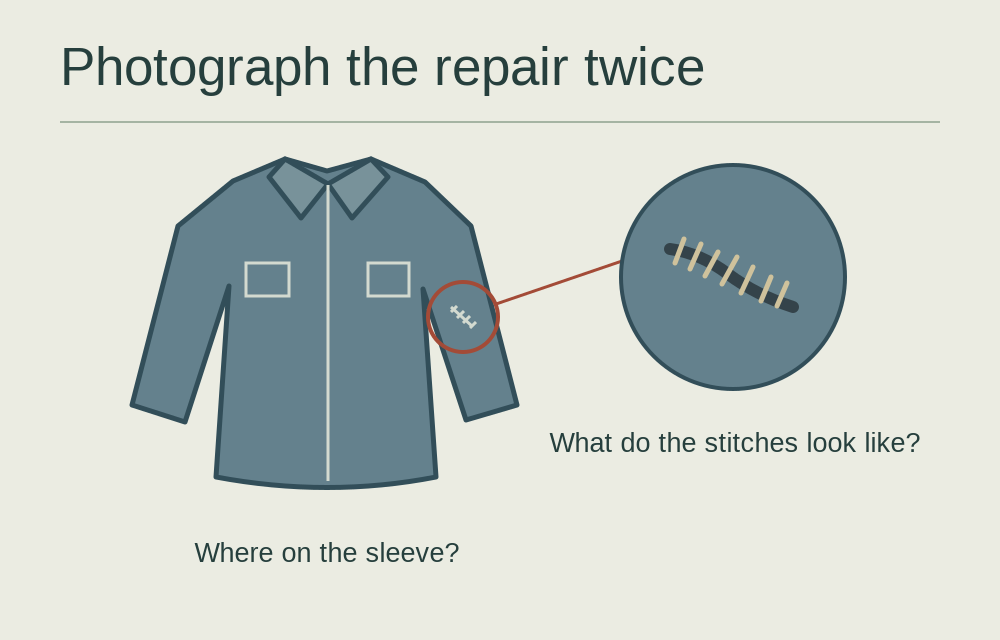
Say there's a small repair near the left elbow. One close-up will show the stitches, but a buyer may struggle to find the repair on a full-length sleeve. Take a second picture with the cuff and elbow together. A caption such as "Repair on the outside of the left sleeve, just above the elbow" gives that picture a job.
On eBay, the main image appears beside the title in search. Its photo guide asks sellers to show imperfections in close-up and rules out catalog or stock pictures for used items. Check the rules for your own selling channel before adding a generated image. eBay listing photo guidance
Use a clothes swap to answer a styling question
Maybe the jacket looks boxy on the hanger, and you're deciding how to photograph it. See how it reads worn open over a plain shirt. Start with a person photo you can use and a separate front view of the jacket. Pair them in Clothes Swapper. A useful instruction is, "Wear the reference jacket open over the plain shirt. Keep the jeans and leave the sleeves down."
Put the result beside the jacket. Look for the features a buyer might ask about. Did the edit turn a three-button jacket into a two-button one? Did it remove the patch, invent a pocket, or replace a faded sleeve with fresh denim? Any of those changes makes the picture a poor description of the item. You can still take the styling idea to a real shoot.
Decide where the picture belongs
If the seller photos already answer the buyer's questions, publish those. For an outfit post on a channel that permits generated imagery, identify the image as an AI styling preview and point readers to the condition photos for the jacket. Make clear which piece is for sale when the look also includes a shirt or trousers.
For a buyer who asks "Will this fit me?", measure the jacket flat and explain where you placed the tape. A mockup can't tell the buyer how much room they'll have across the back. A picture of the tape running from one underarm seam to the other is a more useful reply.
Frequently asked questions
Which photo should lead a secondhand clothing listing?
Use a clear photo of the actual garment for sale. Follow it with the back, label and close-ups of wear. A buyer should be able to identify the exact piece and assess its condition from your own photographs.
Where can a generated on-model image be useful?
Use it privately to plan a styled shoot, or as a clearly identified outfit illustration in a channel that allows it. Check the channel's image rules before posting. Keep all claims about material, condition and measurements tied to the garment you have.
What should I do if the generated image hides a repair?
Leave that preview out of the listing. Photograph the repair in context, then close up, and describe it in the listing. A written disclosure may be easy to miss when the most prominent photo shows an undamaged garment.