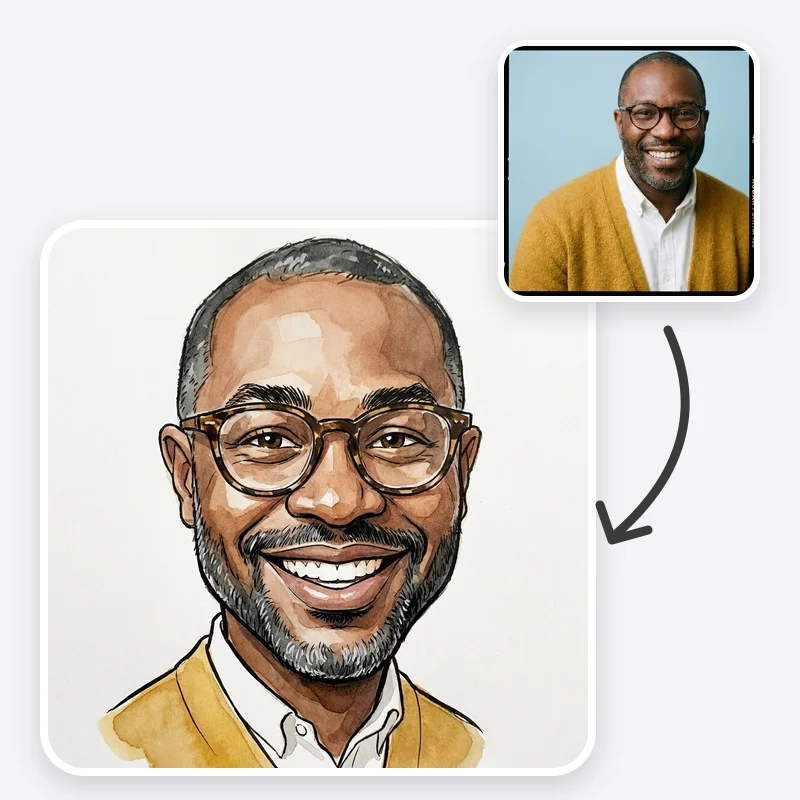
Caricature Maker: Turn Your Photo into a Caricature

Caricature maker that turns your photo into a playful drawing with a bigger head and exaggerated features, in ink, painted, big-head or pencil style.

Choose the drawing style of the caricature

How far the drawing pushes the person's features

For a hobby or job prop, describe it in Additional Instructions

Open in Oakgen
Caricature Maker example
Example result

Caricature Maker: Turn Your Photo into a Caricature

Upload a clear photo, pick a drawing style and how far to exaggerate, and get a playful caricature that keeps the person's hair, glasses, outfit and expression.

What is Caricature Maker?

Caricature Maker turns a photo of a person into a caricature drawing with an enlarged head and a few exaggerated features. You choose one of four styles (classic ink and watercolor, digital painted, big head on a small body, or pencil sketch), one of three exaggeration levels and a background, and the preset asks the model to push only what is already distinctive while keeping the person recognisable. The prompt tells the model not to exaggerate skin colour, ethnicity, disability or body weight, and to keep features such as hairstyle and glasses, plus hair and outfit colours in the colour styles (Pencil Sketch keeps the light and dark tones instead). The output is a single generated still image: it is not a hand-drawn original, a vector file or an exact likeness, and some results will exaggerate the wrong feature, so expect to generate more than one.

Features and options

  • A caricature is a familiar, friendly gift and party format, and a photo is all you need to start one.
  • Four drawing styles cover the looks people usually ask for: a street-fair ink and watercolor sketch, a polished painted portrait, a big-head figure and a plain pencil drawing.
  • Three exaggeration levels let you choose between a gentle, flattering cartoon and a bold classic caricature.
  • The hobby or profession option adds a prop or setting you describe, which is what makes a caricature feel personal.
  • The preset is written to keep humour good-natured: it exaggerates expression and distinctive features, not protected traits.

When to use Caricature Maker

  • You want a caricature of yourself for a profile picture, a social post or just for fun.
  • You are making a farewell, birthday or retirement card and the person has agreed to the idea.
  • You are planning a wedding guest book, place cards or a party backdrop and want to test a caricature style first.
  • You want a quick visual brief before commissioning a caricature artist for a live event or a framed original.
  • You want a light-hearted team or club graphic made from photos people have shared for that purpose.

How to use Caricature Maker

  1. 1

    Upload a clear, front-facing photo

    Use a sharp photo of one person with the face and hairline visible, even light and no sunglasses. Only upload photos of yourself or of people who have agreed to be caricatured.

  2. 2

    Choose style and exaggeration

    Pick ink and watercolor for a classic hand-drawn look, digital painted for a polished portrait, big head for a toy-like figure or pencil for a sketch. Start with medium exaggeration, then move up or down.

  3. 3

    Pick a background and add details

    Leave the background plain, choose party, or choose hobby or profession and describe it in Additional Instructions, for example 'holding a guitar' or 'nurse in blue scrubs with a stethoscope'.

  4. 4

    Generate, compare and download

    Check that the face is still recognisable and that only distinctive features were pushed. If the model exaggerated the wrong thing, name the features to keep normal and generate again.

Ways to use the results

Farewell and birthday cards

Make a caricature of a colleague or friend, with their agreement, holding a prop from their job or hobby, then print it on the card the group signs.

For: Teams, office managers and friends organising a card

Wedding and party stationery

Draw the couple or the host in a matching style for a guest book cover, welcome sign or thank-you card, and try several styles before printing.

For: Couples and event planners

Profile pictures and avatars

Use a subtle or medium caricature as a friendly profile image that still reads as you at small sizes.

For: Creators, streamers and anyone refreshing a profile photo

Brief for a commissioned artist

Generate a few versions to show a caricature artist which style and exaggeration level you like before booking them for an original piece or a live event.

For: People commissioning artwork or live event entertainment

Strengths

  • Four clearly different drawing styles from one upload
  • Exaggeration level is a simple choice instead of prompt guesswork
  • Hobby and profession props are driven by your own description
  • Prompt protects likeness details such as glasses and hairstyle, and colours in the colour styles
  • Explicitly avoids mocking protected traits such as skin colour, ethnicity, disability and weight

Trade-offs

  • Likeness varies between runs; you may need several generations to get one that clearly looks like the person
  • The model chooses which features to exaggerate, and sometimes picks one the person would not want pushed
  • One person per photo works best; group photos tend to lose likeness on some faces
  • Hands, small props and any text on signs can come out distorted
  • The output is a raster image, not a vector or a hand-drawn original

Tips for better results

  • Name the features you want pushed: 'exaggerate the big smile and curly hair'. Naming one to three features gives more control than the preset alone.
  • Name features to leave alone if a result touched them: 'keep the nose and jaw natural size'.
  • With the hobby or profession background, describe the prop concretely: 'holding a road bike', 'chef's hat and a frying pan', 'laptop with coffee mug'.
  • Avoid asking for jokes about weight, age, skin, accent or disability. Exaggerate expression, hair, style and personality instead.
  • If the result looks too unlike the person, drop to subtle exaggeration before changing anything else.

Caricature Maker vs the alternatives

vs Hiring a caricature artist
A caricature artist draws an original, often live, and judges likeness and humour in person, which is the better choice for an event booking or a framed gift. This tool gives you several digital versions to compare and is useful for cards, invitations or as a brief before you commission an artist.
vs Mobile big-head filter apps
Face-warp filters stretch the original photo, so it still looks like a distorted photo. This tool redraws the person as an illustration in a chosen style, with a background and props, which reads as a caricature rather than a warped selfie.
vs Writing your own caricature prompt in an image generator
A general image generator gives you full control but you have to write and test the prompt yourself. This tool packages style, exaggeration level and a likeness-and-respect brief into three choices; use the general generator when you need a scene the presets do not cover.

Frequently asked questions

How do I turn a photo into a caricature?

Upload a clear, front-facing photo of one person, choose a style, an exaggeration level and a background, and generate. Add Additional Instructions if you want to name the features to exaggerate or a hobby prop. Review the result for likeness and generate again if needed.

Will the caricature still look like the person?

The preset asks the model to keep hairstyle, glasses and facial hair (and hair, skin and outfit colours in the colour styles; Pencil Sketch keeps the tones instead) and to exaggerate only distinctive features. Likeness is usually clear at subtle and medium exaggeration, but it is not guaranteed on every run. Strong exaggeration and low-quality photos make it harder to recognise the person.

Which style should I choose?

Classic ink and watercolor looks like a caricature drawn at a fair or event. Digital painted gives a polished, colourful portrait. Big head, small body is the most cartoon-like and shows the outfit. Pencil sketch is monochrome and works well for printed cards and guest books.

Can I add a job or hobby to the caricature?

Yes. Choose the Hobby or Profession Prop background and describe it in Additional Instructions, for example 'firefighter with helmet' or 'golfer on a putting green'. One or two props work better than a long list.

Can I make a caricature of someone else?

Only upload photos of people who have agreed, or of yourself. A caricature can embarrass people even when meant kindly, so check with the person before sharing it, especially at work.

Will it make fun of someone's weight, skin or disability?

It should not. The prompt tells the model not to exaggerate or mock skin colour, ethnicity, disability, body weight or other protected traits, and the negative prompt blocks stereotyped and grotesque results. If a result still crosses that line, discard it and add an instruction to keep that feature natural.

Can I make a group or couple caricature?

The preset is written for one person. A photo with two people can work, especially with the big head style, but likeness on each face is less reliable. For couples, you can also make one caricature per person in the same style and place them side by side.

Can I print the caricature or use it commercially?

You can download the image and print it on cards or posters; check the print size against the downloaded resolution first. Eligible outputs can be used commercially under Oakgen's Terms and provider terms, and you still need the right to use the person's likeness.

Related AI tools
