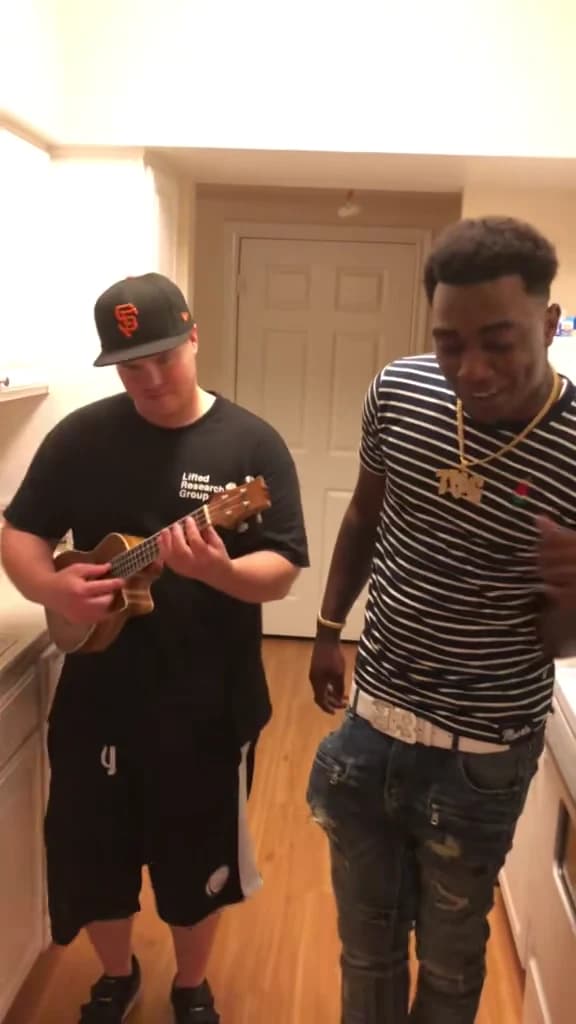
To make the Oouuh ukulele AI duet, add two photos to Oakgen's Oouuh Ukulele Duet tool: the ukulele player goes on the left, and the singer goes on the right. Choose a quality, review the displayed quote and generate. The recognizable part is the contrast between steady strumming and an expressive vocal performance in the same small kitchen.
The supplied @ausar.ai Reel is a Tony Montana and Elvira AI remake, not a Scarface scene. Oakgen's reference uses a 15-second excerpt of the Fredo Bang and Einer Bankz performance. The cover is an original-performance reference frame, not a verified Oakgen generation.
What the Oouuh ukulele trend recreates
The audio in the supplied Reel was identified as Oouuh (Acoustic Bang) by Fredo Bang. The format points back to Fredo Bang performing with ukulele player Einer Bankz. An Einer Bankz TikTok repost provides a creator-posted version of that performance; its posting date should not be confused with the original filming date.
For this template, the roles are defined by what the performers do, not by their gender or which fictional character appeared in a remake. Put whichever person you want on the instrument into the left slot. Put your chosen vocalist into the right slot.
| Part of the duet | What the reference shows | Your input |
|---|---|---|
| Left player | Looking toward the instrument and maintaining the strum | A separate photo of the player |
| Right singer | Facing the camera, gesturing and lifting the head during the vocal | A separate photo of the singer |
| Setting | Both performers remain together in a narrow kitchen | Supplied by the fixed trend |
| Soundtrack | Ukulele and vocal timing from the reference | Included by the template |
Both photos are required. A tutorial for another generator that accepts a single image or produces replacement music is describing a different workflow.
Gather two useful photos
Choose one image per person with visible eyes, a complete face and enough upper-body detail to establish clothing. A small, heavily filtered avatar leaves less trustworthy detail to guide the character. A clean image from a phone camera is usually a more useful starting point than a screenshot of a social profile.
The two people do not need to stand together or be photographed in matching rooms. Oakgen uses the scene's kitchen reference. You can choose portraits taken on different days, provided each clearly shows the appearance you want.
For the player, look for a relaxed portrait with a readable shoulder line and visible shirt or dress. You do not need a photograph of that person already playing music. The ukulele and strumming come from the scene, not from an object-recognition instruction you must supply.
For the singer, prioritize a clear mouth and jawline. Avoid hands across the lips or a microphone covering the face. The reference contains an expressive performance; a clean identity reference gives you a better basis for evaluating whether the generated singer still looks like the person you chose.
If you are deciding between two portraits, use the Oouuh duet photo selection guide. It separates identity problems from instrument-hand and mouth-timing problems, which need different responses.
Create the duet in Oakgen
1. Check the scene and assign the roles
Start with the Oouuh Ukulele Duet preview. Notice that both performers share the frame throughout the kitchen performance. This is a useful reference for deciding who should provide the calm instrumental part and who should take the expressive vocal role.
Open the specific duet generator. Add the player to the left role and the singer to the right role, then inspect the selected thumbnails. Filling both slots with the intended photos is a more useful final check than remembering which file you clicked first.
2. Review quality and credits
The tool offers 480p, 720p and 1080p, with 720p selected by default. The credit quote updates with the quality choice and includes character preparation. Use that current quote instead of an amount copied from a social tutorial or another service.
Resolution describes output size. It does not certify realistic finger contact on the ukulele, perfect lip-sync or consistent clothing. If you generate another version later, change quality because you need a different output size, not because a larger number automatically fixes performance errors.
3. Generate and watch at normal speed
When the video is ready, play the complete 15-second performance before pausing on individual frames. First decide whether it reads as a duet: one person accompanies, the other sings, and their reactions belong to the same moment.
Then inspect the faces and hands more closely. Keep the original download while reviewing, especially if you plan to add captions or crop the clip for a particular post.
Cast your own Oouuh ukulele duo
Add the left player and right singer, then review the current quote before generation.
Check the performance in three passes
This review sheet is based on the supplied reference. It is a practical way to inspect a result, not a claim that paid Oakgen outputs have passed these checks.
| Pass | Focus | What a distracting result might do |
|---|---|---|
| Listen and watch | Singer's mouth, head and gestures | Mouth activity drifts away from the vocal or continues through a pause |
| Watch without sound | Both identities and the relationship between them | Player and singer swap appearances or one performer disappears |
| Pause on contact | Instrument, fretting hand and strumming hand | Fingers merge with the body of the instrument or the ukulele changes shape |
In the supplied remake, the singer changes expression, gestures near the chest and looks upward; the player keeps attention on the small instrument. Preserve that contrast when judging your version. A duet in which both characters appear to sing continuously can lose the original visual joke even if each portrait looks attractive.
Check the ending too. A strong first frame is not enough if the singer's face changes when the head tilts back or the player's clothing shifts in the closing moments.
Share the right excerpt with the right description
The template includes the reference soundtrack, so replacing it with another recording can move the vocal timing away from the generated performance. If you make an edit, replay the final exported version with sound. Do not assume that a music track with the same song title starts at the same phrase.
Keep captions away from the ukulele and the singer's mouth. A short caption above or below the main action can explain your casting without covering the hands that make the scene recognizable.
Describe your post as an AI recreation. The fictional-character remake is a reference to the format, not proof that those actors recorded this duet. Likewise, your finished video is a generated performance of the people in your photos, not evidence that they sang or played the instrument.
For another performance built around contrasting roles, try the DDG Bills restaurant tutorial. If you prefer an action scene instead of singing, the Hover Chase guide uses a lead character and pursuing pilot.
Frequently asked questions
How do I make the Oouuh ukulele AI duet?
Open Oakgen's Oouuh Ukulele Duet tool, upload one photo for the left ukulele player and one for the right singer, choose a quality and check the quote. Generate, then review both identities and the full performance before downloading.
What song is used in the supplied ukulele Reel?
The supplied reference audio was identified as Oouuh (Acoustic Bang) by Fredo Bang. The kitchen duet format is associated with his ukulele performance with Einer Bankz.
Is the Tony Montana and Elvira clip a Scarface scene?
No. The supplied @ausar.ai Reel is an AI remake using those character likenesses. It is not an original scene from Scarface or a verified Oakgen output.
Do I need a photo holding a ukulele?
No. The scene provides the ukulele and performance. Use a clear photo of the player with visible face, hair and outfit; you do not need to pose with an instrument.
Does Oakgen use my voice for the singing?
No. The fixed trend retains its reference soundtrack. Your photo guides the character's appearance, and generated lip-sync still needs review.
Sources and further reading
- Supplied @ausar.ai ukulele remake: the requested AI character variant of the kitchen performance.
- Einer Bankz's creator-posted Oouuh performance: original-performer footage shared as a later repost.
- Fredo Bang interview in Flaunt: the artist discusses his earlier ukulele collaboration.
- Oouuh (Acoustic Bang) song identification: title and artist associated with the supplied audio.
We reviewed the source clip, audio identification and shared tool inputs on October 18, 2026. We have not run a paid end-to-end generation for this guide. Make your Oouuh Ukulele Duet after checking both role assignments.