The most useful Oouuh ukulele duet photo tip is to assign two clear identities before worrying about the performance: left photo for the ukulele player, right photo for the singer. In Oakgen's Oouuh Ukulele Duet tool, both are required. Evaluate face continuity, instrument contact and singing timing separately; changing a portrait cannot be promised to repair all three.
This is a diagnostic guide for people choosing photos or reviewing a result. The Oouuh creation walkthrough covers the complete generation process.
Give each role an unambiguous identity
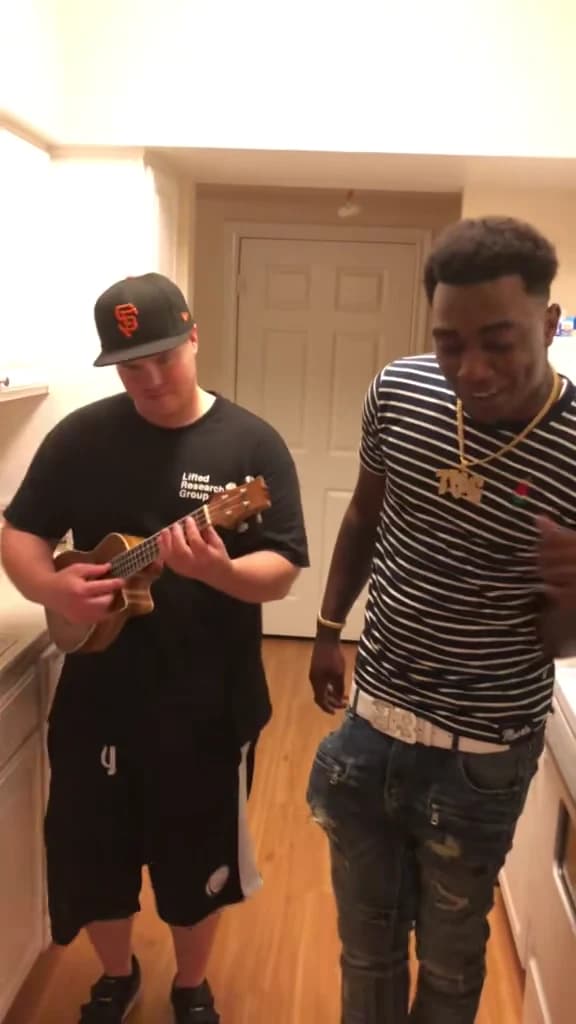
The Oouuh duet preview has two performers sharing a kitchen frame. The person on the left supplies the accompaniment; the person on the right supplies the vocal performance. The roles remain different even when both move or react.
Start with a separate portrait for each person. Check that a second face does not remain visible over a shoulder or in a mirror. If you crop a group image, keep the intended person's entire head and enough body detail to show clothing.
Use the same definition of left and right that the preview uses: the positions on screen. Do not reverse them because you imagine standing inside the kitchen or facing the performers in person.
| Photo decision | Player on the left | Singer on the right |
|---|---|---|
| Face detail | Eyes, hair and head shape remain readable | Mouth, jawline, eyes and hair remain readable |
| Body detail | Upper-body clothing is visible | Outfit and neckline are visible |
| Pose | Ordinary relaxed portrait is enough | No need to imitate a dramatic singing expression |
| Unhelpful ambiguity | Another person or large prop dominates the photo | A hand, microphone or filter obscures the mouth |
The scene supplies the instrument and movement. Your starting task is to choose who should occupy each part, not to photograph a live duet.
Compare source photos by what they actually show
Two portraits can both be attractive while providing different information. A tightly cropped headshot may show the eyes clearly but say almost nothing about the outfit. A full-length holiday image may show the clothes while leaving the face too small to inspect.
For this scene, an upper-body image with a readable face is a useful compromise. Do not crop so tightly that hair disappears outside the frame. Do not include so much background that the person becomes a tiny feature of the image.
Check the original file rather than a thumbnail. If facial detail disappears when you open it at a normal viewing size, a larger upload preview will not create trustworthy information. Choose a clearer source when one is available.
The two photos do not need identical lighting. However, strong colored light or a heavy face filter can make it harder to tell which features describe the person and which belong to the photograph's treatment. For an initial version, use images where you can judge both people without interpreting an effect.
Keep appearance problems separate from hand problems
The left character has an additional visual job: maintaining contact with a small instrument. Review the hand near the strings and the hand near the neck. Then review the instrument's shape over time.
If a finger intersects the instrument while the face stays recognizable, the result has a contact problem. Replacing the face photo with another smiling portrait is not an assured solution. The instrument and strumming are part of the generated performance.
Likewise, a good-looking ukulele does not establish accurate identity. You can have clean hands and a drifting face, or a convincing face with distracting hand contact. Keep separate notes so that one strength does not hide the other weakness.
Check the player and singer photos together
Use the role thumbnails to verify left player and right singer before reviewing the quote.
Use a three-column review log
Instead of writing “looks wrong,” note what changes, when it changes and whether the source input is ambiguous. This table is a starting point for reviewing your own result, not a report of observed paid-generation failures.
| Observation | Compare against | Possible next check |
|---|---|---|
| Faces appear on the wrong sides | Selected player and singer thumbnails | Correct the slot assignment before changing settings |
| Singer's face changes during the head lift | Their source portrait and earlier frame | Check identity continuity through that movement |
| Player's clothing changes while strumming | Outfit visible in their input photo | Decide whether the input actually established that garment |
| Fingers merge with the ukulele | Frames before and after contact | Treat as motion/contact quality, not only a portrait problem |
| Player seems to sing the main vocal | Reference role and soundtrack | Check whether the wrong person is articulating |
| Both faces are clear but the performance feels late | Singer's mouth against the same audio phrase | Separate soundtrack placement from generated lip-sync |
If an edited version is out of sync, compare it with the untouched download. A soundtrack moved in an external editor is a different problem from generated mouth movement that already differs in the original file.
Listen to the retained audio without assuming perfect lip-sync
The supplied music was identified as Fredo Bang's Oouuh (Acoustic Bang). The kitchen performance and the dramatic character remake belong to that reference chain; uploading your portrait does not record your singing voice.
When reviewing, listen for a phrase and watch the singer's mouth over the same stretch. Then check a pause. A mouth that moves continuously can be distracting even if it appears active during the vocal.
Do not judge sync from a still frame. A wide-open mouth can look plausible on its own while arriving at the wrong time in motion. Normal-speed playback is the first useful check; pausing helps diagnose the specific moment after you hear the problem.
Resolution is another separate choice. 480p, 720p and 1080p change the output size and quote. None guarantees correct mouth timing or instrument contact. Read the current price in the tool rather than assuming a more expensive choice resolves a particular issue.
Decide whether to change the input, assignment or edit
If the wrong person is in a role from the opening, revisit the thumbnails. If the person is right but the source photo hides their mouth or hair, choose a clearer input. If the source is clear and the identity changes only during movement, record it as a continuity issue in the result.
If both people remain recognizable but a large caption covers the instrument, fix the edit. If the exported soundtrack starts later than the original download, fix that placement before paying for another generation.
You can apply a related approach to the DDG Bills role checklist, where three people share a conversation, or the Stop Sign face-photo guide, where one driver alternates between speaking and listening.
Frequently asked questions
Which photo goes on the left in the Oouuh duet?
The left photo is the ukulele player. The right photo is the singer. Check both role thumbnails in Oakgen before generating; both photos are required.
Should the singer's mouth be open in the photo?
A clear neutral or mild expression is a useful identity reference. You do not need to imitate the singing pose; keep the lips and jaw visible so the intended face is easy to judge.
Can a photo holding a ukulele guarantee correct fingers?
No. The template supplies the instrument and strumming motion, and generated finger contact can vary. Judge the hands and instrument in the finished sequence separately from facial identity.
Why can the singer look different when tilting their head?
A clear opening frame does not prove identity continuity through movement. Compare the face before, during and after the head tilt, and check whether the source photo clearly shows the person's face and hair.
Will 1080p fix Oouuh lip-sync?
A higher resolution changes output size, not the guarantee of mouth timing. Review the singer against the retained soundtrack and distinguish timing errors from unclear source-photo detail.
Sources and further reading
The photo-selection and diagnosis tables are original editorial review aids. We inspected the source footage and shared tool inputs on October 18, 2026; no paid end-to-end Oakgen output was generated for this guide.
- Einer Bankz's Oouuh performance repost: the ukulele player and singer in the underlying kitchen format.
- Supplied @ausar.ai character remake: an AI variant, not a Scarface scene or verified Oakgen output.
- Oouuh song identification: title and artist for the supplied recording.
- Complete Oouuh recreation guide: the creation and sharing workflow.
The cover is a frame from the original Fredo Bang and Einer Bankz performance reference. Open the Oouuh duet photo slots when both portraits clearly describe the people and outfits you want.