To do the Stop Sign AI meme, open Oakgen's Stop Sign generator, upload one clear photo for the driver, choose a quality and review the quote before generating. Watch the finished exchange with sound: the scene works when the driver asks, listens and responds at the right moments, not just when the first frame resembles your photo.
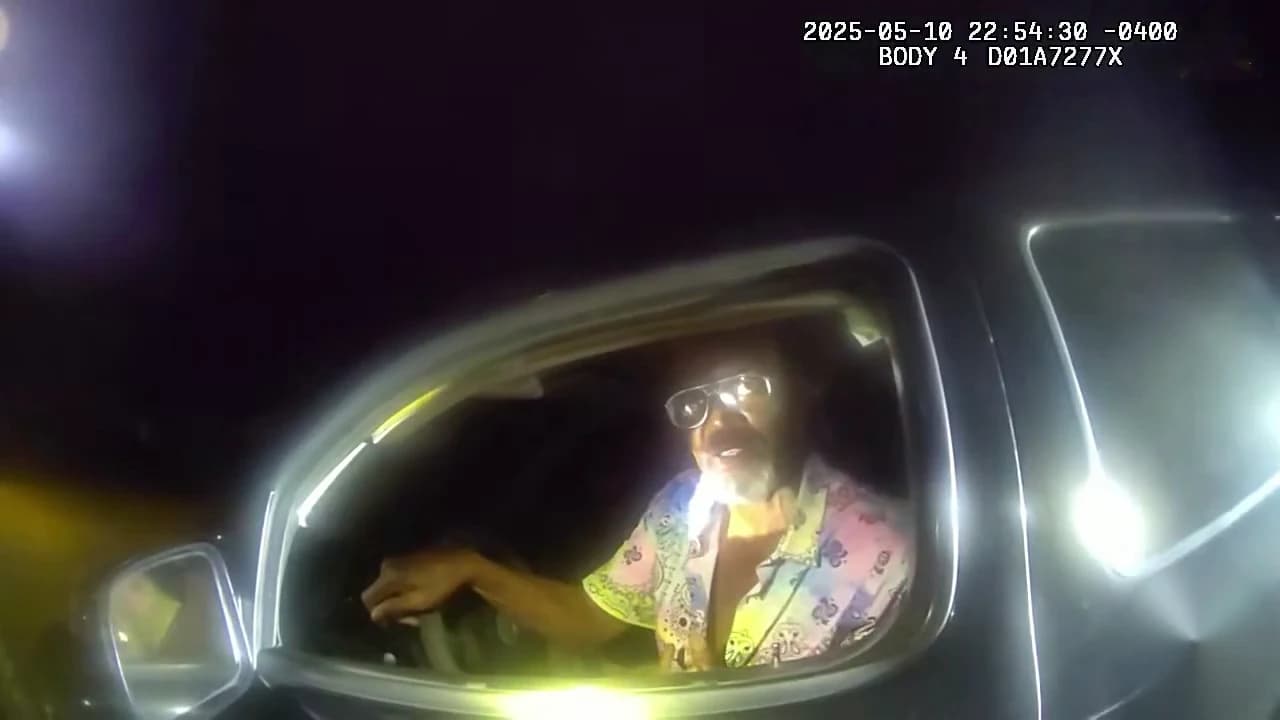
The supplied Walter White version by @ausar.ai is an AI remake. It is not Breaking Bad footage. Oakgen's preview and this cover use a reference excerpt from the Daytona Beach Police Department's original bodycam footage, not a verified Oakgen output.
Know which Stop Sign meme you are recreating
“Stop Sign? What Stop Sign?” refers to a conversation between a driver and an officer outside the vehicle. The driver asks why they have been stopped, mishears the officer and keeps the exchange going. The recognizable structure is the interruption and misunderstanding, framed through an open car window.
The underlying footage was published by the Daytona Beach Police Department. It was also shared in an ONLY in DADE repost. Those sources are distinct from later character remakes. You do not need to copy a fictional character's face or outfit to make the joke readable.
The Oakgen Stop Sign overview shows the particular reference used by the tool. Start there if a social tutorial shows a different crop or a longer conversation.
| Part of the scene | What you control in this tool | What to inspect |
|---|---|---|
| Visible driver | One character photo | Face, hair, clothing and reactions |
| Officer's voice | Fixed reference soundtrack | Driver pauses while the offscreen person speaks |
| Car-window framing | Supplied by the trend | The face remains readable within the window |
| Output quality | 480p, 720p or 1080p | Current quote and the output size you need |
Choose one photo for the driver
A clear, evenly lit portrait is the useful starting point. Show the complete face, leave room around the hair and keep the mouth unobstructed. The photo can be taken indoors in ordinary light. A dark selfie from an actual car adds little if the eyes and mouth are difficult to read.
The character photo guides appearance, while the scene supplies the conversation and lighting. If your outfit matters, include enough of the upper body to show it. A face cropped at the chin gives less clothing information than a relaxed portrait with the shoulders visible.
Choose a neutral or mild expression rather than a photograph in the middle of a shout. That gives you a clearer identity reference for both talking and listening moments. This is input advice, not a promise that one expression will eliminate all generation errors.
You do not need to hold a steering wheel, lean out of a real car or act out a stop. The scene is already provided. For a closer comparison of usable and ambiguous inputs, see the Stop Sign face-photo troubleshooting guide.
Make your version in Oakgen
1. Open the correct generator
Go directly to the Stop Sign trend tool. A general video prompt can create a traffic-stop scene without reproducing this particular exchange. The fixed template already supplies the dialogue and motion structure you are looking for.
Watch its preview and identify the visible driver. There is only one photo role. The offscreen officer is not another upload slot, even though the soundtrack contains more than one voice.
2. Add your driver photo
Select a photo you are comfortable using and inspect the thumbnail in the driver slot. If you started with a group photograph, choose a clearer single-person image before proceeding. A selection that leaves two faces in view makes the intended identity harder to establish.
Make the decision based on the face and outfit you want in the output. Do not try to match every shadow in the reference by choosing an underexposed image. The car-window lighting belongs to the generated scene.
3. Check the quality and credit quote
720p is selected by default; 480p and 1080p are also available. Read the current credit quote for your selection before making the video. The displayed price includes the trend's character preparation.
No fixed price or completion-time guarantee is needed to follow this guide. The useful decision is whether the current quote and output size suit the clip you want to make. A larger output will not automatically fix mouth timing or a face that changes during a head turn.
4. Generate and review the complete exchange
Once processing completes, watch the video with its own sound before making an edit. Keep the full downloaded version so that a later crop or caption treatment can be compared against it.
Make your Stop Sign reaction video
Add one driver photo and inspect the current quality and credit quote before generating.
Review speaking and listening separately
For a conversation meme, a silent character is sometimes doing exactly the right thing. Review the turn-taking instead of expecting constant mouth movement.
| Review moment | Expected relationship | What would distract from the joke |
|---|---|---|
| Driver's opening question | Visible mouth activity belongs to the driver | The face remains frozen throughout the phrase |
| Officer's reply | Driver listens or reacts | Driver appears to speak the officer's line |
| Confused response | The same driver resumes speaking | Identity changes as the expression becomes stronger |
| Gesture near the window | Face and hand remain visually separate | Fingers merge with cheeks, chin or the window frame |
| Closing exchange | The reaction finishes without an abrupt cutoff | The final phrase or expression is lost in an edit |
Play once for the joke, once for the face and once for the speaking turns. These are separate questions. An amusing result can still have an identity issue; a recognizable face can still articulate the wrong voice.
The reference soundtrack remains in the output, but that does not guarantee perfect generated lip-sync. This guide is based on source review and current tool behavior, not a paid end-to-end output trial. Judge the result you actually receive.
Keep the framing useful when you post
The driver's face sits inside a car window, with bright reflections and dark surroundings. Check that an added caption does not cover the eyes or mouth. If you need a large caption, place it where it will not compete with the main reaction.
A crop can also change what the audience understands. Removing the window frame may make the video read as a generic close-up rather than a driver responding to someone outside. Preserve enough context for the exchange to make sense.
If you replace or offset the soundtrack in another editor, replay the complete export. Even a small mismatch can make a short back-and-forth difficult to follow. This tool's photo upload does not record your voice or provide a way to rewrite the exchange.
Describe the result as an AI recreation when sharing it. Keep the source reference and your generated version distinct, particularly when using a familiar fictional character. That description is more accurate than presenting a remake as an original show scene or actual footage of the person in your photo.
For a three-person misunderstanding, read the DDG Bills recreation guide. For a musical exchange with two visible performers, use the Oouuh ukulele duet guide.
Frequently asked questions
How do I make the Stop Sign AI meme?
Open Oakgen's Stop Sign tool, add one clear photo for the driver, choose an available quality and review the credit quote. Generate, then watch the full exchange with sound before downloading.
How many photos does the Stop Sign trend require?
One photo fills the visible driver role. The officer's voice belongs to the reference soundtrack; there is no second character upload for the officer.
Is the Walter White traffic-stop Reel original bodycam footage?
No. The supplied @ausar.ai Walter White version is an AI remake. The underlying meme uses an exchange from police bodycam footage, not a Breaking Bad scene.
Do I need to take my photo inside a car at night?
No. Use a clear identity photo with readable eyes, mouth, hair and clothing. The fixed trend supplies the car-window scene and its lighting.
Will every spoken word match my generated mouth?
That is not guaranteed. The source audio remains in the video, but the generated driver may need another review for speaking turns, listening pauses and facial consistency.
Sources and further reading
- Daytona Beach Police Department's published bodycam footage: primary source for the underlying exchange.
- ONLY in DADE repost: another version of the underlying footage.
- Supplied @ausar.ai Walter White remake: the requested AI variant.
- Stop Sign photo and dialogue review guide: diagnose input, identity and timing problems separately.
Make your Stop Sign video in Oakgen after selecting a clear driver photo.