For Stop Sign AI video photo tips, choose a clear portrait with visible eyes and mouth, then review the generated driver in two states: talking and listening. Oakgen's Stop Sign tool needs one driver photo. A face that looks good in a still can still change during a reaction, while a quiet mouth can be correct when the offscreen officer speaks.
This guide separates source-photo problems from window framing, identity continuity and dialogue timing. For the creation steps, use the Stop Sign AI meme walkthrough.
Start with a readable face, not a matching night scene
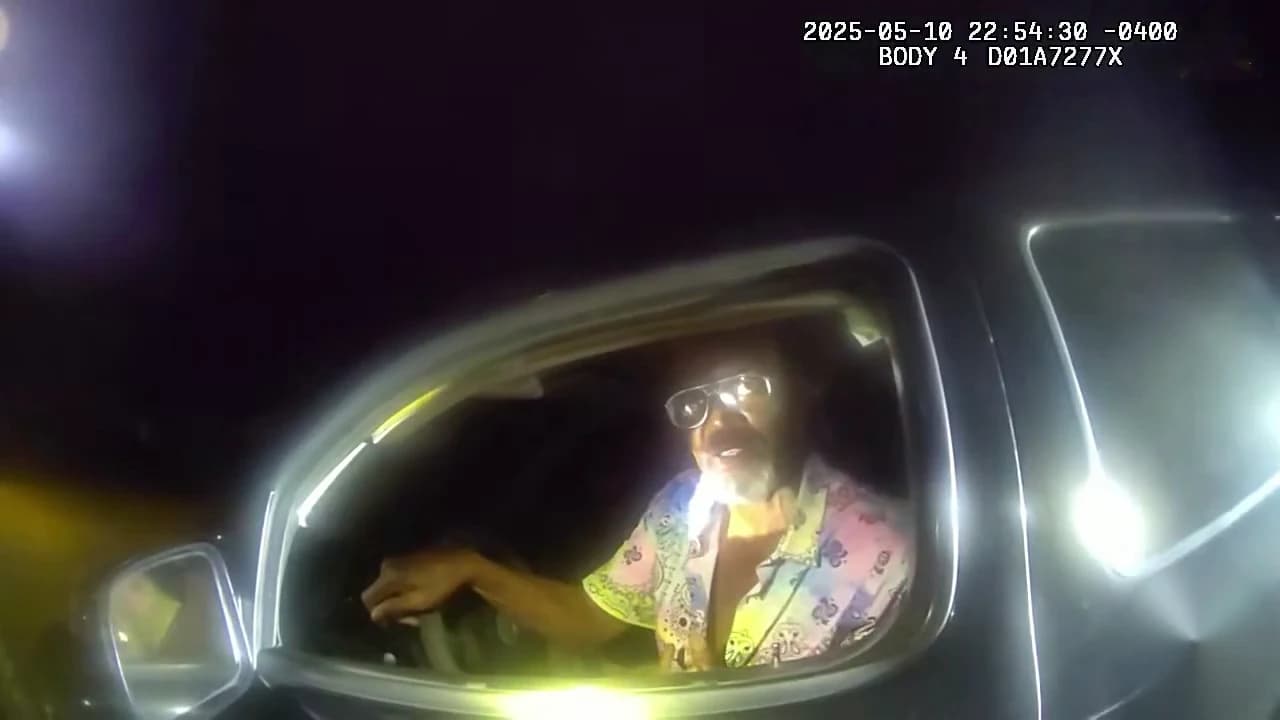
The Stop Sign reference places the driver inside a vehicle, viewed from outside an open window. Bright reflections and dark surroundings are part of the scene. They are not conditions you need to reproduce when taking your portrait.
A dark car selfie can hide the details you need the character reference to establish. Use a normal photograph where the eyes, jawline and mouth are easy to read. If a hat or glasses are part of the look you want, understand that they can also obscure parts of the face you later need to judge.
Choose one person per photo. A cropped group image may be usable only if it leaves one clear subject without a second face at the edge. An individual upper-body portrait is easier to evaluate because the intended character is unambiguous.
| Candidate photo | What to inspect | Better starting choice |
|---|---|---|
| Dark car selfie | Eyes and mouth disappear into shadow | A brighter portrait with visible facial detail |
| Tight face crop | Hair or chin is cut off | A little space around the complete head |
| Group photograph | Another face remains in the crop | An individual photo or a clean single-person crop |
| Strong reaction selfie | Open mouth or a hand hides identity details | Neutral or mild expression with a clear jawline |
| Tiny profile image | Detail breaks down when opened | The original photograph at a useful viewing size |
These comparisons help select an input. They do not establish a tested success rate, and none guarantees a perfect generated face.
Decide what the photo needs to establish
The reference image should describe the person you want in the driver's seat. It can also show hair and clothing. The scene supplies the body position, camera relationship and exchange.
If you care about a specific shirt or jacket, include enough upper body to show it. Do not expect a chin-cropped portrait to communicate an entire outfit. Conversely, a full-body image with a tiny face may provide plenty of clothing information but weak identity detail.
Keep the mouth unobstructed. The meme asks the character to alternate between questions, confusion and listening. A hand over the lips in the input makes that part of the face harder to inspect before you even reach generation.
Do not assume an exaggerated confused pose will make the timing funnier. The reaction belongs to the scene's performance. First choose a photo in which you can recognize the intended person clearly, then evaluate the resulting expression in motion.
Check the offscreen voice before diagnosing a silent mouth
This conversation has more than one voice and only one uploaded character. That is a common source of mistaken reviews: the soundtrack continues, so the viewer assumes the driver's lips should keep moving.
Watch one exchange at a time. Identify whether the driver or officer is speaking, then inspect the visible mouth. During the officer's reply, listening, blinking or holding a confused expression may be appropriate. A closed mouth there is not evidence that the generation stopped working.
The opposite issue matters too. If the driver appears to articulate the officer's line, the scene can become confusing even when the soundtrack itself is unchanged. Retaining audio and generating the right speaking turn are separate parts of the result.
Start with a clear Stop Sign driver photo
Choose the identity you want, then check the current quote before generating the fixed dialogue scene.
Use this face-and-dialogue diagnosis sheet
Name the visible issue before choosing a response. These are suggested checks for your own output, not defects observed in a paid test.
| Symptom | Compare these things | What to avoid assuming |
|---|---|---|
| Face is unclear from the beginning | Source portrait and opening frame | That a larger resolution will recover hidden source detail |
| Face changes during a stronger reaction | Same character before and after the expression | That a good thumbnail proves full-scene continuity |
| Mouth is quiet during audio | Driver's turn versus officer's turn | That every voice should animate the visible driver |
| Hand appears to blend into the cheek | Frames before, during and after the gesture | That this is only an identity-photo problem |
| Window edge covers important facial detail | Original output versus your crop | That the upload itself is the only source of obstruction |
| Sound feels late after editing | Downloaded original versus edited export | That another generation is needed before checking audio placement |
If an issue appears only after a crop or caption edit, revisit that edit first. If the source photo is clear and the issue already exists in the untouched output, it may be a generation limitation rather than something you can fix by moving text.
Review the window as part of the composition
The car window is a frame inside the frame. Check whether the driver's face remains inside a readable opening and whether the reflections change the apparent facial features. A bright patch on a cheek is different from a change in face shape, but both can affect recognition.
Inspect the driver's strongest head movement, not just the most flattering moment. Does the face remain the same when turning toward the officer? Does the hair remain consistent? Does a hand near the window stay separate from the face?
Watch at normal speed before pausing. A small distortion in one frame can be less distracting than a sustained identity change, while an attractive still may conceal awkward motion. The practical question is whether the complete exchange is understandable and comfortable to watch.
Keep a copy of the full download. If you need a portrait crop for a social post, compare the crop with the wide composition through the whole scene. A crop that works for the opening can exclude a later hand gesture or reduce the face to the edge of the image.
Choose the next step based on the diagnosis
If the input is visibly unclear, replace it with a clearer portrait. If the intended face is already present but a crop hides it, adjust the crop. If the soundtrack moved during editing, restore its alignment with the original download.
If the output changes identity despite a clear photo, note the point where it happens before deciding on another attempt. Increasing quality changes size and the displayed quote; it is not a guaranteed repair for identity or speaking-turn problems.
The same reasoning applies to the DDG Bills role guide, where multiple visible characters make dialogue attribution harder. For a vocal performance rather than conversation, the Oouuh duet photo guide separates mouth timing from instrument contact.
Frequently asked questions
What photo works best for the Stop Sign AI video?
Start with a clear single-person portrait showing the complete face, visible eyes and mouth, hair and some upper-body clothing. Ordinary even lighting is useful; you do not need a dark car selfie.
Why is the driver quiet while the soundtrack continues?
The soundtrack includes an offscreen officer. The driver should listen during that person's replies, so a closed mouth is not automatically an error. Check which voice is speaking at that moment.
Can window glare hide an otherwise recognizable face?
Yes. Judge whether the generated face remains readable inside the car-window scene, then compare it with the source photo. Reflections and framing can obscure an identity even when the input itself is clear.
Should I use a photo already making the confused expression?
You do not need to act out the meme in the photo. A readable neutral or mild expression is a useful identity reference, while the template supplies the reaction and movement.
Does a higher quality fix speaking-turn errors?
No correction is guaranteed by changing resolution. Check whether the driver is articulating their own lines, listening to the officer and staying recognizable through each reaction.
Sources and further reading
This is an original input and review checklist based on footage and tool inspection on October 18, 2026. No paid end-to-end generation was run for the article, and a described symptom is a diagnostic possibility rather than a measured defect rate.
- Daytona Beach Police Department's source footage: the underlying driver-and-officer exchange.
- Supplied @ausar.ai Walter White remake: an AI reference variant, not a Breaking Bad scene or verified Oakgen result.
- Stop Sign trend overview: preview and the one-photo requirement.
- Complete Stop Sign creation guide: generation and sharing steps.
The cover is a reference frame from the Daytona Beach Police Department's original bodycam excerpt. Open the Stop Sign photo slot when you have a clear driver portrait to use.