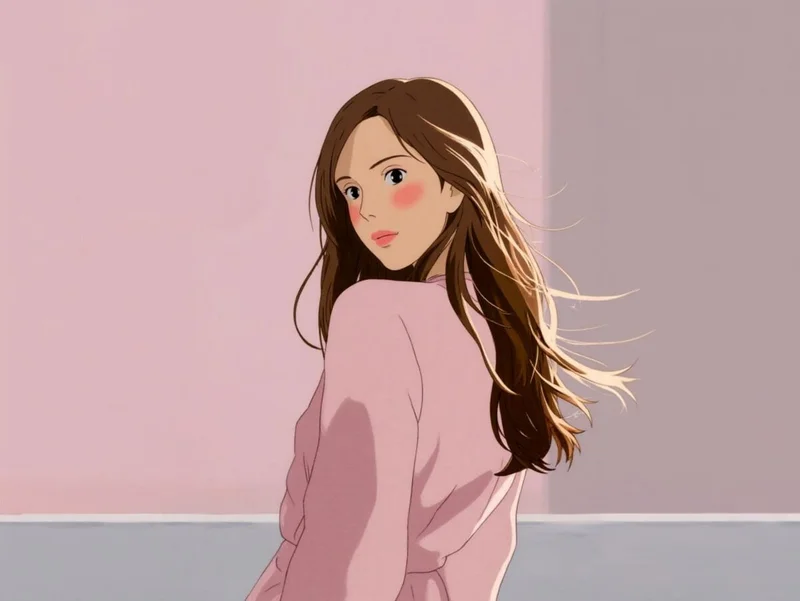
Ghibli Style Generator

Convert any photo into a Ghibli-inspired storybook frame in seconds — soft watercolor washes, warm light, painted skies, and that hand-animated feel. Upload, generate, download, and ship to socials, prints, or client decks.

Open in Oakgen
Ghibli Style Generator example
Example result

Ghibli Style Generator

Drop in a photo and get back a hand-painted, storybook-anime version of it — with soft watercolor light, warm color, painted skies, and the dreamy atmosphere that makes Ghibli frames feel like memories. Composition is preserved; only the medium changes.

What is Ghibli Style Generator?

The Ghibli Style Generator is Oakgen.ai's image-to-image template tuned to render a photo as a storybook-anime frame in the Studio Ghibli tradition. It keeps the layout, subject, and pose of the input image and repaints the scene with hand-animated lighting, watercolor textures, warm color palettes, soft edges, and the kind of painted depth that distinguishes a Ghibli still from a generic anime filter. Upload a portrait, a landscape, a city street, or a pet, and the model translates it into a wide-screen storybook moment without changing what's actually in the shot. It's the right tool when you want the feel of a hand-painted animated film — not a glossy modern anime, not a flat cartoon — applied to your own reference photo.

Features and options

  • Composition is preserved frame for frame — the people, props, and layout in your photo stay where they are, only the medium shifts to painted anime.
  • The output looks painted rather than filtered: warm light, brush-rendered skies, soft skin shading, and that signature pastoral atmosphere instead of an Instagram-style overlay.
  • It works across subjects — portraits, landscapes, interiors, pets, food, even cityscapes all render in-style without needing a different preset for each.
  • No prompt engineering required — the base prompt and negative prompt are tuned to push away from photoreal, 3D, and gritty results so you land in storybook territory by default.
  • Eligible outputs can be used commercially under Oakgen's Terms and provider terms, so frames can ship into prints, merch, book covers, and client work.

When to use Ghibli Style Generator

  • You want a hand-painted version of a personal photo — a portrait, a couple shot, a family moment — to print, frame, or gift.
  • You're producing a storybook, children's book, or zine and need consistent painted illustrations from photo references.
  • You're a content creator building a soft-anime aesthetic for social posts, thumbnails, or a recurring visual identity.
  • You're designing merch — phone cases, prints, posters, stickers — and need original painted artwork derived from your own photography.
  • You're mocking up animation references or pitch decks and want pre-vis frames that already read as storybook anime.

How to use Ghibli Style Generator

  1. 1

    Upload your reference photo

    Drop in the photo you want repainted. Clean, well-lit shots with a clear subject convert most cleanly, but the template handles landscapes and busier scenes just as well.

  2. 2

    Add an optional prompt nudge

    Leave the prompt empty for a pure Ghibli pass, or type a short line — 'sunset light', 'snowy village', 'soft pink sky' — to steer mood, season, or color without rewriting the scene.

  3. 3

    Generate the painted frame

    The model renders the image with painted lighting, warm color, watercolor edges, and storybook depth while keeping the original composition recognizable.

  4. 4

    Download and ship

    Pick the strongest take, download the full-resolution frame, and use it for prints, posts, merch, gifts, or client decks.

Ways to use the results

Painted portraits of loved ones

Turn a family photo, a couple shot, or a portrait of a pet into a storybook-anime version worth framing or gifting — something more personal than a print and more handmade than a filter.

For: Hobbyists, gift buyers, and personal-photo enthusiasts

Children's book and zine illustration

Generate consistent painted illustrations from photo references for self-published children's books, indie zines, and storybook projects — faster than commissioning every spread by hand.

For: Indie authors, illustrators, and self-publishers

Soft-anime social content

Build a recurring visual identity for a content channel by repainting your own photography in a storybook style — distinct, ownable, and on-brand across feeds and thumbnails.

For: Content creators and social media managers

Merch and print-on-demand artwork

Convert photography you already own into painted artwork ready for posters, phone cases, stickers, and print-on-demand storefronts, with commercial use of eligible outputs under Oakgen's Terms and provider terms.

For: Print-on-demand sellers and small merch brands

Strengths

  • Preserves the composition of the original photo while fully changing the medium
  • Painted light and watercolor texture instead of a flat anime filter
  • Works across portraits, landscapes, interiors, and pets without extra setup
  • Fast renders (8–12s) make it easy to iterate on color and mood
  • Eligible outputs can be used commercially under Oakgen's Terms and provider terms

Trade-offs

  • Not designed to invent new scenes — it repaints the photo you upload rather than generating from scratch
  • Very low-light or heavily compressed source photos can muddy the painted result
  • Tight close-ups of small text or logos won't be readable in the painted output
  • Style is opinionated — if you want a sharper modern-anime look, a different style template is a better fit

Tips for better results

  • Leave the prompt empty first to see the default painted pass; you'll often keep that take.
  • Add a single concrete mood word — 'golden hour', 'snowy', 'rainy evening' — to steer atmosphere without overriding the scene.
  • Mention sky or weather when the photo is outdoors: 'cotton-candy clouds', 'warm sunset sky', 'overcast morning'. Skies are where the Ghibli feel lives.
  • If you want a brighter or more saturated pass, say 'warmer color palette' rather than naming a specific color cast.
  • Avoid stacking many adjectives — short, concrete nudges out-perform multi-line briefs in image-to-image style transfer.

Ghibli Style Generator vs the alternatives

vs Generic anime filter app
A filter-based mobile app overlays line art and color shifts on top of your photo — it's fast, but the result still reads as a photo with effects, not a painting. This template re-renders the scene as a hand-painted frame with painted light, soft watercolor edges, and storybook depth. Pick a filter for a quick mobile post; pick this template when you want artwork that holds up at print resolution.
vs Freeform AI image generator
A freeform generator can produce storybook anime from a text prompt, but you lose control over composition — the people, layout, and details from your reference don't come along. This template is image-to-image: it preserves what's in your photo and only changes the medium. Use the freeform generator when you're inventing a scene from nothing; use this one when you have a specific photo you want repainted.
vs Commissioning a human illustrator
A commissioned painter delivers a fully bespoke, signed piece — the right call for a wedding gift, a book cover, or any one-of-a-kind artwork. But commissions are expensive and take weeks. This template gives you painted output in seconds, which is the right fit for content, merch, social, and quick personal projects where the budget and timeline of a commission don't make sense. Eligible outputs can be used commercially under Oakgen's Terms and provider terms.

Frequently asked questions

What is the Ghibli Style Generator?

It's an image-to-image template that takes a photo you upload and repaints it in a storybook-anime style inspired by classic hand-animated films. Composition stays the same; the medium shifts to watercolor light, painted skies, and soft anime shading.

Can I use the outputs commercially?

Yes. Oakgen does not claim ownership of eligible outputs, and commercial use is subject to Oakgen's Terms, the model provider's terms and your rights in the inputs — you can print the art on merch, sell it on print-on-demand storefronts, use it in books, and publish it in monetized content.

What kind of photo works best as a reference?

Clear, well-lit shots with a recognizable subject convert most cleanly — portraits, couple shots, pets, landscapes, and interiors all work. Heavily compressed phone photos and very low-light shots can muddy the painted result, so a clean source image is the biggest single quality lever.

Will my face still look like me?

The template preserves likeness loosely — the framing, pose, and overall features stay aligned with the input — but it's not a face-cloning tool. Expect a painted interpretation of you, not a pixel-perfect portrait. That's intentional: the goal is a storybook frame, not a photo with a filter.

How is this different from a generic anime filter?

A filter overlays edges and color shifts on top of your photo; this template re-renders the scene as a painting. You get hand-rendered lighting, painted skies, soft watercolor edges, and storybook depth — closer to a frame from an animated film than a photo with stickers on it.

Do I need to write a prompt?

No. The base prompt is tuned for storybook anime and most photos render well with the prompt field empty. Add a one-line nudge ('snowy village', 'sunset sky', 'warmer palette') only when you want to steer mood or season.

What format are the images delivered in?

Outputs are high-quality images at the resolution of the selected aspect ratio, ready to download. They drop straight into social schedulers, print workflows, and design tools without conversion.

Who is this template for?

Hobbyists turning personal photos into framed art, content creators building a soft-anime aesthetic, indie authors illustrating storybooks, and print-on-demand sellers producing original merch artwork. If you want hand-painted feel from a reference photo, this is the right preset.

Related AI tools
