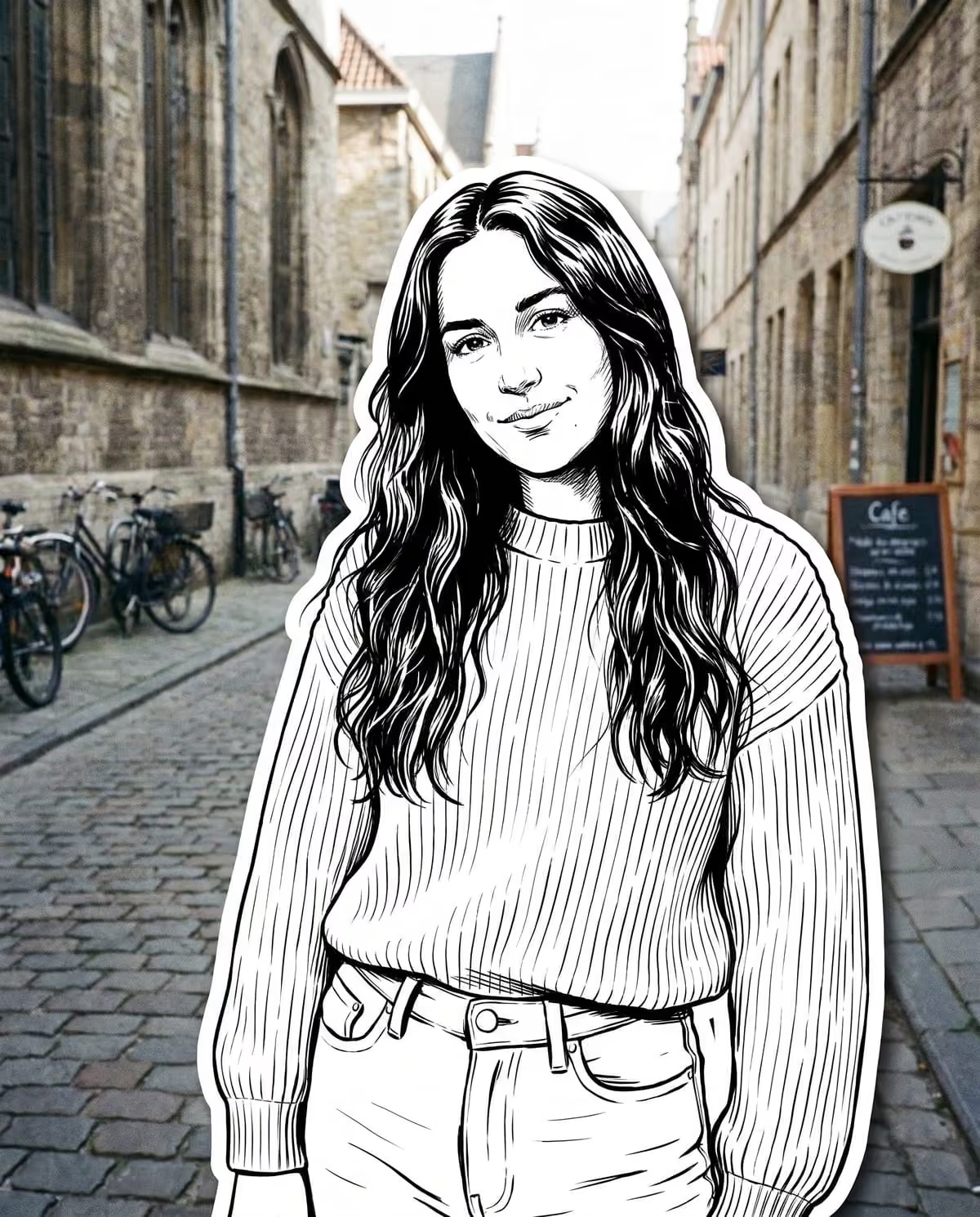
A street character collage looks like someone cut you out of a comic book and pasted you onto your own photo. You become a bold black-and-white ink character with confident outlines, hatching and solid blacks, edged with a thick white die-cut border and a faint shadow. The street behind you stays a real colour photograph, untouched.
That contrast is the whole design. Colour lives in the background; detail lives in you. Oakgen's Street Character Collage trend makes the image from one outdoor photo, keeping your pose and position, so your project is about picking the outfit and the street that make that contrast pop.
Ink yourself onto your street photo
Upload one outdoor photo and become a black-and-white comic character with a white cut-out border.
Dress for ink, not for colour
Your outfit loses its colour in the drawing, so what remains is line, pattern and contrast. The trend's tips say plain or simple outfits can look flat and patterns help.
| Outfit choice | How it tends to read in ink |
|---|---|
| Stripes, checks, prints | Plenty for the hatching and line work to describe |
| Denim, leather, layered jackets | Seams, folds and texture give the drawing structure |
| A plain mid-tone T-shirt | Can look flat with little to draw |
| Glasses, caps, hats, jewellery | Kept in the drawing and add detail |
| Visible tattoos | Kept and shown clearly |
If your best street photo has you in a plain top, look for one where an accessory does the work: a cap, chunky frames, a chain or a tattoo.
Street character collage ideas
The colour-pop street
Stand in front of something loud: a painted wall, a fruit stall, a row of bright doors. Because the street keeps its colour and you are black and white, a vivid backdrop makes the cut-out stand out.
The tattoo or accessory showcase
If your style is in your details, this trend shows them off. Tattoos, jewellery and caps are kept in the ink character, so a photo where they are clearly visible gives the drawing its personality.
The sticker series
Make one per city, café or neighbourhood you visit. The white die-cut border gives every result the same sticker-like edge, so a set of them looks like a collection.
The favourite-spot portrait
Pick the terrace or street corner you are always at. The tips remind you to choose a background you like, since it stays exactly as it is.
Choosing the photo
The upload hint asks for a clear photo of you outdoors, like a street or terrace. To make the most of it:
- Show your full or half body, so the outfit has room to be drawn.
- Stand a little apart from the background so the cut-out edge has a clean outline to follow.
- Avoid group shots; the border should go around one person.
- Choose a sharp image, since the background is not redrawn and any blur stays.
The photo choice guide has more detail on inputs.
Carousel and posting plans
The result is a 4:5 portrait. Two layouts that work:
- Before and after. Result first, original second. Your pose and position match, so the swipe shows only the change from photo to ink.
- The sticker grid. Three or more collages from different streets, posted together to show the series.
Caption ideas
The trend does not add text, so captions go in your post. Say the image is AI-made:
- "AI inked me and left the street alone."
- "Comic-sticker me, courtesy of AI. Same corner as always."
- "Collecting AI street stickers, one city at a time."
Collage or doodle?
If you want soft, colourful and cosy, the doodle street portrait ideas cover the coloured-pencil version, which keeps your outfit colours. If you want graphic, high-contrast and sticker-like, stay with the collage.
Review checklist before posting
- The white border runs evenly all the way around you.
- Glasses, caps, jewellery and tattoos are still there.
- Your face is recognisable as you.
- The background is your original photo, unchanged.
- No added text or logos.
The die-cut white border checklist covers each check in detail, the how-to guide and black-and-white sticker source page cover setup, the AI sticker OOTD caption plan has outfit-led posting lines, street character collage vs sticker trends compares it with sticker OOTD and ink sticker edits, and the AI photo trend playbook compares this with the other image trends.
Frequently asked questions
Will my outfit colours show in the ink character?
No. You become a black-and-white ink illustration, so colour is lost on you. Patterns, accessories and outfit detail carry the look instead, while the street behind you keeps its real colour.
Is the background changed in a street character collage?
No. Only you become the ink character with a white die-cut border. The street or terrace in your photo stays as it was.
How is this different from the doodle street portrait?
Both keep your real street. The doodle redraws you in soft coloured pencil; the collage redraws you in bold black-and-white ink and adds a thick white cut-out border, like a sticker pasted onto the photo.
Continue your project
Street collage vs sticker trends · Doodle street portrait ideas · Bobblehead photo ideas · AI photo trend playbook