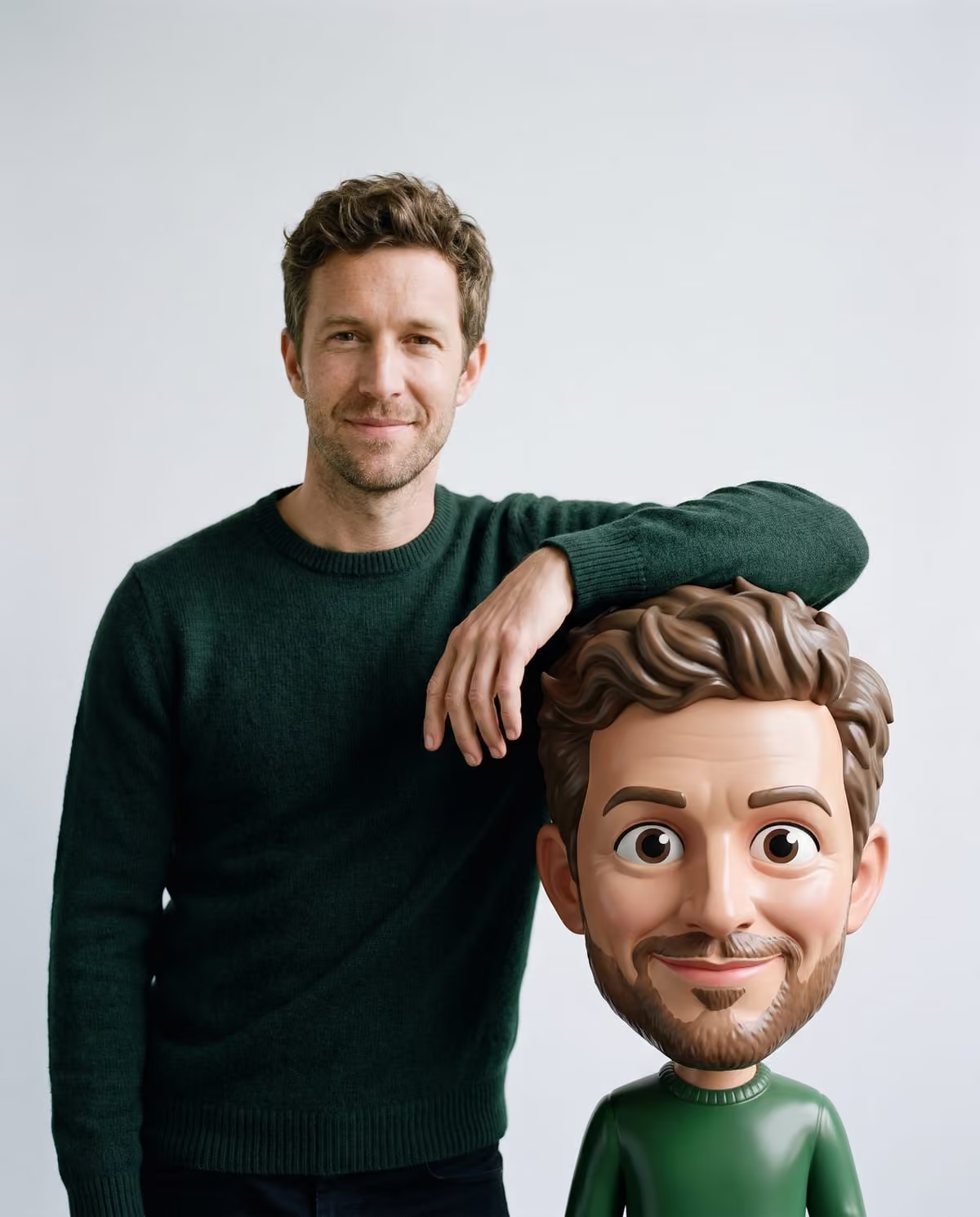
A bobblehead portrait has two of you in it. The real you stays photographic and keeps your own expression. Next to you, and taking your weight as you lean on it, is an oversized, glossy, toy-like caricature with a big head, expressive eyes, your hair and your facial hair. The fun is in how much the two resemble each other, so the project starts with deciding which version of you is worth exaggerating.
Oakgen's 3D Bobblehead-Style trend builds that studio shot from one photo. You don't pick a pose or a set; the pale grey backdrop and soft light are the same every time. That makes the photo you upload, and the idea behind it, the whole project.
Make your bobblehead portrait
Upload one clear upper-body photo and lean on a giant 3D bobblehead-style caricature of yourself.
What the caricature copies from your photo
| From your photo | Where it shows up |
|---|---|
| Hair | On both you and the caricature |
| Facial hair | On both, so a beard or moustache is a strong link |
| Glasses and accessories | Added to the caricature if you wear them |
| Expression | You keep yours; the caricature gets one from the same family |
| Face, skin tone, clothing | Kept on the real, photographic you |
| Your original background | Replaced by the grey studio backdrop |
Hair matters more than usual here. The landing page asks for hair that is visible and not hidden under a hat, because it is one of the main ways the caricature reads as you.
Bobblehead photo ideas with a reason to post
"Meet my mini-me" (who is not mini)
The simplest premise: introduce your caricature like a new colleague. It works best with a natural smile, since the caricature's matching expression gets exaggerated by its big head and eyes.
The new haircut post
Just changed your hair or grew a beard? The caricature copies hair and facial hair, so this is a playful way to announce the change. Use a photo taken after the cut, with your hair fully in frame.
The glasses as a signature
If people know you by your frames, wear them. Glasses are added to the caricature, which gives both versions of you the same strongest identifier.
The deadpan pairing
Upload a neutral, straight-faced photo. A serious real person next to a cheerful-looking toy version is a different joke from two matching grins. Since the caricature's expression is from the same family rather than a copy, results can vary; treat this as an experiment rather than a guarantee.
The matching set
A team, a couple or a group of friends can each make one, with each person's agreement. Because every result shares the same grey studio and lighting, the images sit together neatly in a grid or carousel.
Pick the photo that gives the caricature enough to work with
The upload hint is a clear upper-body photo facing the camera. In practice:
- Chest-up framing, so your face is large and sharp.
- Even light on your face; a strong shadow across one side hides detail.
- Hair uncovered and in frame, top included.
- A plain background, which the tips say gives a cleaner result even though the studio backdrop replaces it.
More examples are in the photo choice guide.
Posting and caption ideas
The image is a 4:5 portrait, which fits a feed post without heavy cropping. For a profile picture, a square or circle crop will likely cut the caricature's head or your own, so check both faces before saving.
The trend does not add any text, so write captions in the post and make it clear the picture is AI-generated:
- "Me and my AI bobblehead. One of us has a bigger head."
- "New haircut, now available in AI caricature form."
- "Asked AI for a mini-me. It did not go mini."
A two-slide carousel works well: the result first, then your original photo, so people can compare hair and expression.
Review checklist before you share
- Your real face is unchanged and still looks like you.
- The caricature has your hair, any facial hair, and your glasses if you wear them.
- Where you lean on the caricature, the contact looks believable: no hand sinking into it or floating above it.
- Hands and fingers look natural at full size.
- There is no stray text or logo.
If the caricature does not resemble you, the usual fix is a sharper, better-lit photo with your hair fully visible. The big head caricature checklist goes through each check, the step-by-step guide and the AI bobblehead trend origin page cover the basics, the 3D caricature caption page has more posting lines, AI bobblehead vs 3D caricature explains how this differs from other big-head trends, and the AI photo trend playbook compares this trend with the other image trends.
Frequently asked questions
Can I choose the pose or the background?
No. Every result is the same studio set-up: you on a pale grey backdrop, leaning on an oversized caricature of yourself. Your choices are the photo you upload and the expression, hair and accessories in it.
Do I get a 3D model or a physical bobblehead?
No. You get a still image. The 3D look describes how the caricature appears in the picture, not a downloadable file or a toy.
Why does my bobblehead's expression differ from my photo?
The caricature is meant to have an expression from the same family as yours, not an exact copy, and its exaggerated eyes and head change how that expression reads.
Continue your project
AI bobblehead vs 3D caricature · South Park-style cartoon ideas · Street character collage ideas · AI photo trend playbook