Black Forest Labs now offers over a dozen Flux variants -- Pro, Pro Max, Turbo, Klein, Flex, Kontext, Kontext Max, Redux, and more. For most users, the choice comes down to two models: Flux 2 Pro and Flux 2 Pro Max.
Both produce excellent images. Both are among the best AI image generators available in 2026. But they are built for different use cases, and picking the wrong one means either overpaying or leaving quality on the table.
This guide breaks down exactly what each model does, where they differ, and which one you should use.
Flux 2 Pro: The Workhorse
Flux 2 Pro is the standard production model in the Flux 2 family. It balances quality, speed, and cost in a way that makes it the right choice for the majority of image generation tasks.
Key Characteristics
- Speed: 8-12 seconds per generation at standard resolution
- Resolution: Up to 2048x2048 natively, with aspect ratio flexibility
- Quality: Excellent photorealism with strong material rendering, accurate lighting, and natural color grading
- Prompt adherence: Among the best in the industry -- reliably follows complex multi-element prompts
- Consistency: Low variance between generations. What you see on the first try is representative of what the model can do with that prompt
What Flux 2 Pro Does Best
Photorealistic content. Flux 2 Pro produces images that genuinely look like photographs. Skin textures, fabric drape, metal reflections, glass transparency, wood grain -- materials render with physically accurate properties. The "AI sheen" that plagues many models is minimal.
Product photography. Clean, professional product shots with accurate material rendering. E-commerce teams use Flux 2 Pro as a cost-effective alternative to traditional product photography for catalog images and marketing assets.
Architectural visualization. Interior and exterior scenes with proper perspective, realistic materials, and natural lighting. Real estate marketing, design mockups, and presentation renders.
Batch generation. When you need many images quickly -- content calendars, social media assets, A/B testing variations -- Flux 2 Pro's speed and consistency make it efficient for volume work.
Flux 2 Pro Max: The Perfectionist
Flux 2 Pro Max is the flagship quality tier. It takes everything Flux 2 Pro does well and pushes it further -- more detail, richer textures, more nuanced lighting, and better handling of complex scenes.
Key Characteristics
- Speed: 15-25 seconds per generation (roughly 2x slower than Pro)
- Resolution: Up to 4096x4096 natively -- true 4K output
- Quality: The highest quality in the Flux family. Noticeably more detailed than Pro in side-by-side comparisons
- Complex scenes: Better handling of multi-subject compositions, crowded environments, and scenes with many interacting elements
- Fine detail: Resolves micro-textures that Pro approximates -- individual fabric threads, wood grain direction, paper texture, metal brushing patterns
What Flux 2 Pro Max Does Best
Hero images. When a single image needs to be the best it can possibly be -- website hero banners, print advertisements, key visuals for campaigns -- Max delivers the extra quality that justifies the extra time and cost.
Large-format output. Print materials, posters, billboards, and any application where the image will be viewed at large scale. Max's native 4K resolution means you are not upscaling -- the detail is generated natively.
Portraits. The quality difference between Pro and Max is most visible in human subjects. Max renders skin with more nuanced texture, hair with finer strand detail, and eyes with more accurate reflections. For headshots, editorial portraits, and character visuals, Max is worth the premium.
Complex compositions. Scenes with many elements -- a busy market, a crowded room, a landscape with foreground, midground, and background detail -- benefit from Max's higher capacity. Pro can struggle with maintaining quality across all elements in dense scenes; Max holds up better.
Side-by-Side Differences
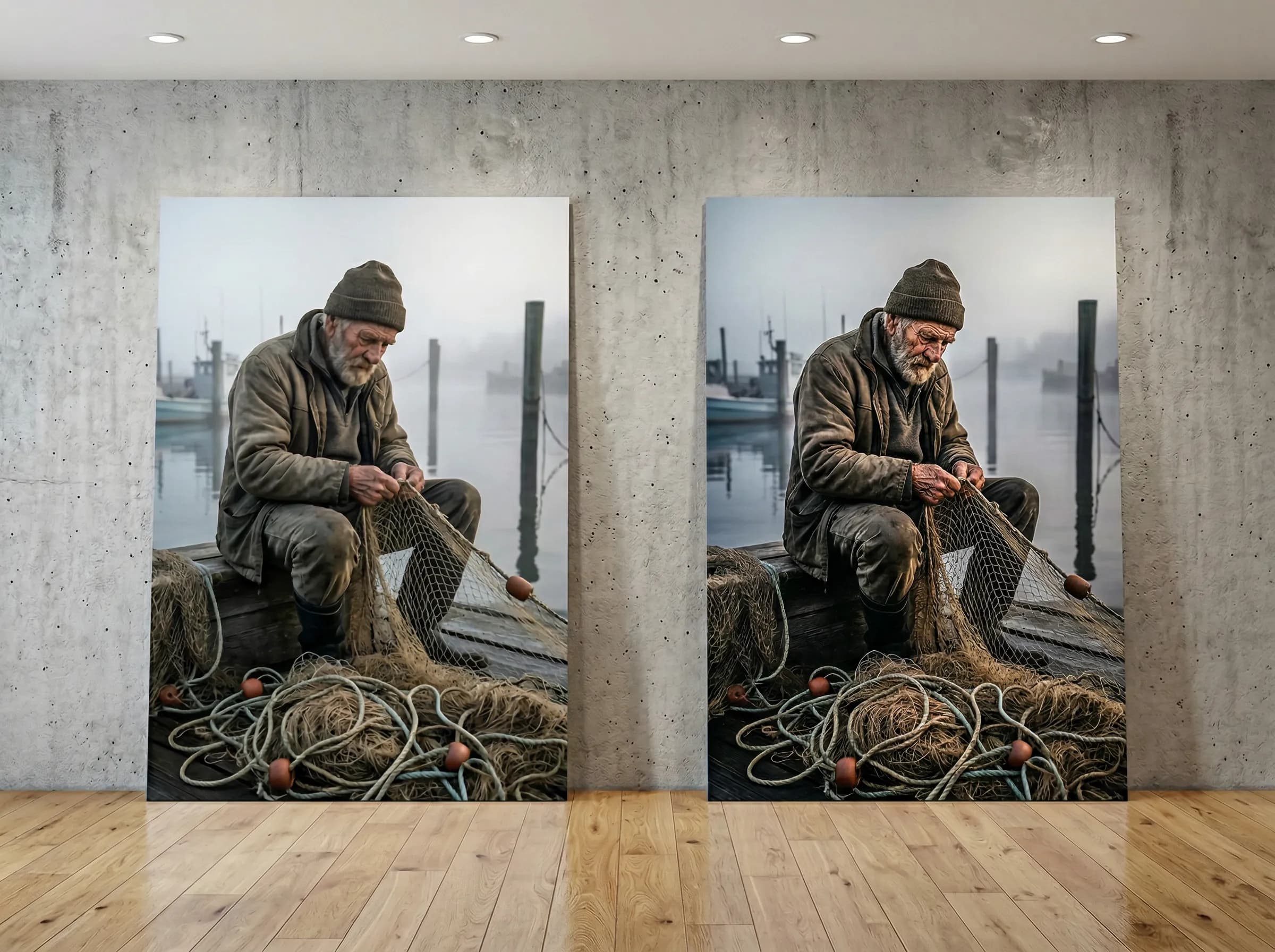
The quality gap between Pro and Max is real but subtle. In many cases, you will not notice it at web resolution. The differences become apparent when:
- Zooming in. Max images hold up under magnification. Pro images show softness and approximation at 200%+ zoom.
- Viewing at large scale. On a phone screen, both look excellent. On a 27-inch monitor at full resolution, Max's advantage is visible.
- Examining fine details. The threads in a knitted sweater. The wood grain on a tabletop. The text on a distant sign. Max resolves these; Pro smooths them.
- Complex scenes with many subjects. Max maintains quality across the entire frame. Pro sometimes degrades quality in peripheral elements.
| Feature | Flux 2 Pro | Flux 2 Pro Max |
|---|---|---|
| Generation Speed | 8-12 seconds | 15-25 seconds |
| Max Native Resolution | 2048x2048 | 4096x4096 |
| Photorealism | Excellent | Best-in-class |
| Fine Detail (zoomed) | Very Good | Excellent |
| Complex Scenes | Good | Excellent |
| Portrait Quality | Very Good | Excellent |
| Consistency | Very Consistent | Consistent |
| Cost per Image | Lower | ~2x Higher |
| Best For | Production, volume, web | Hero images, print, premium |
The Full Flux 2 Family on Oakgen
Beyond Pro and Max, Oakgen provides access to the complete Flux model ecosystem:
| Model | Purpose | Speed |
|---|---|---|
| Flux 2 Pro | Standard production quality | Fast |
| Flux 2 Pro Max | Maximum quality | Medium |
| Flux 2 Turbo | Fastest generation, good quality | Very Fast |
| Flux 2 Flex | Flexible aspect ratios and styles | Fast |
| Flux 1.1 Pro | Previous generation, still excellent | Fast |
| Flux 1.1 Pro Ultra | High-res previous generation | Medium |
| Flux Pro Kontext | Context-aware editing and character consistency | Fast |
| Flux Pro Kontext Max | Maximum quality context-aware editing | Medium |
When to Use Other Variants
Flux 2 Turbo -- When speed is the priority and you are iterating rapidly. Quality is lower than Pro but generation takes 3-5 seconds.
Flux Pro Kontext -- When you need character consistency across multiple images. Upload a reference image and generate new scenes with the same character. Essential for comics, storyboards, and brand characters.
Flux Pro Kontext Max -- Same as Kontext but with Max-level quality. For premium character consistency work.
Decision Framework
Use Flux 2 Pro when:
- You are generating images for web, social media, or screen display
- Volume matters -- you need many images and budget is a factor
- Speed of iteration is important (exploring prompts, A/B testing concepts)
- The final image will be viewed at standard screen resolution
- You are building a content pipeline that needs consistency and predictability
Use Flux 2 Pro Max when:
- The image is a hero asset -- it represents your brand, product, or campaign
- The output will be printed or displayed at large physical size
- The subject is a person and facial/skin quality matters
- The scene is complex with many elements that all need to be high quality
- You are willing to wait 2x longer and pay 2x more for a visible quality upgrade
A Practical Workflow
Many professional users combine both models:
- Draft with Pro -- Generate 5-10 variations of your concept using Flux 2 Pro. Fast and cost-efficient for exploration.
- Select the best -- Choose the composition, angle, and mood that works best.
- Finalize with Max -- Regenerate your chosen concept with Flux 2 Pro Max for the highest quality final output.
This approach gives you the speed of Pro for iteration and the quality of Max for delivery -- without spending Max-level credits on every draft.
For 80% of use cases, Flux 2 Pro is the right choice. The extra quality of Max is only visible in specific scenarios -- large format, zoom-in detail, portraits, and complex scenes. If you are unsure, start with Pro. You will know when you need Max.
How They Compare to Non-Flux Models
Flux 2 Pro and Max sit at or near the top of the image generation landscape, but they have specific competitors:
- Reve Image 1.0 matches or slightly exceeds Flux 2 Pro Max on photorealism, but lacks Flux's ecosystem (Kontext, Redux, editing variants)
- GPT Image 1.5 beats both on text rendering and instruction following, but trails on photorealism
- Imagen 4 Preview is faster (especially the Fast tier) and better at text, but Flux leads on the "camera-captured" quality
- Midjourney V8 produces more artistic and emotionally resonant outputs, but Flux leads on realistic photography
The Bottom Line
Flux 2 Pro is the best general-purpose AI image model for most workflows. Fast, consistent, photorealistic, and cost-effective.
Flux 2 Pro Max is for when good enough is not good enough. When the image is the thing -- not a supporting asset, but the main deliverable -- Max's extra quality is worth the extra cost.
Both are excellent. The choice is about matching the tool to the task.