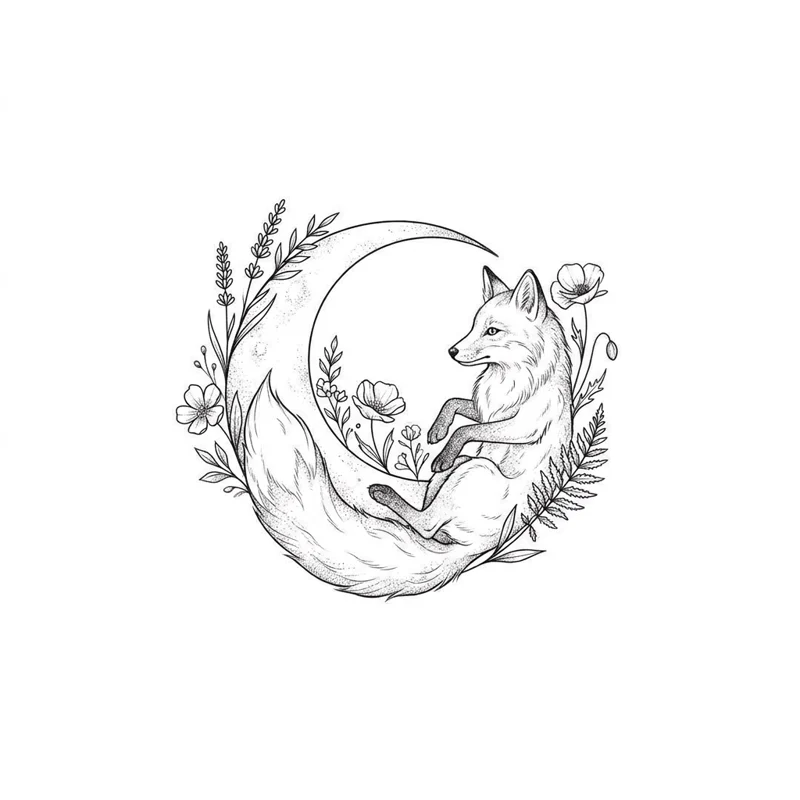
AI Tattoo Generator: Turn Your Idea into a Tattoo Design

AI tattoo generator that turns your idea into tattoo design art on white: fine line, traditional, Japanese, blackwork or script, as one design or a flash sheet.

0 / 1000

Describe the subject and elements. For lettering, put the exact words in quotes.

The tattoo tradition the design should follow

One finished design, or a sheet of linework variations to compare

Open in Oakgen
AI Tattoo Generator example
Example result

AI Tattoo Generator: Turn Your Idea into a Tattoo Design

Describe what you want, choose a tattoo style, and get flat design artwork on white: one finished design or a flash sheet of linework variations to take to your artist.

What is AI Tattoo Generator?

The AI Tattoo Generator turns a written tattoo idea into flat design artwork on a white background. You describe the subject and elements, choose one of nine styles (fine line, traditional, neo-traditional, blackwork, Japanese, watercolor, geometric, minimalist or script lettering), and pick either a single design or a flash sheet of three or four linework variations. The output is a design image, not a preview on your body: to see a design placed on your arm or shoulder, use the Virtual Tattoo Try-On. It is also not a finished stencil; a tattoo artist still adjusts line weight, size and flow for your skin and placement before tattooing.

Features and options

  • Most people know what they want a tattoo to mean but cannot draw it, and a picture explains an idea to an artist much faster than words.
  • Nine style presets keep each design inside one tattoo tradition instead of a mix that would be hard to tattoo.
  • The flash sheet option gives several variations side by side, which makes it easier to say which direction you like.
  • Designs come out flat on white, so they are easy to print, mark up or send to a studio.
  • Eligible outputs can be used commercially under Oakgen's Terms and provider terms, which matters for artists making flash for their own books.

When to use AI Tattoo Generator

  • You have a tattoo idea and want to see a few visual directions before a consultation.
  • You are deciding between styles, such as fine line or neo-traditional, for the same subject.
  • You want script lettering ideas for a name, date or short phrase.
  • You are a tattoo artist sketching quick flash ideas or showing a client options.
  • You want a clean design image to pair with a placement preview from the try-on tool.

How to use AI Tattoo Generator

  1. 1

    Describe your idea

    Write the subject, any elements to combine and the mood, for example 'a fox curled around a crescent moon with small pine branches'. Put any lettering in quotes, exactly as it should be spelled.

  2. 2

    Choose a style

    Pick the tattoo tradition the design should follow. Fine line and minimalist suit small pieces; traditional, neo-traditional and Japanese suit bold, larger work; script is for words.

  3. 3

    Pick single design or flash sheet

    Single Design gives one finished piece. Flash Sheet gives three or four outline variations of the same idea, useful for comparing directions or tracing.

  4. 4

    Review, then take it to an artist

    Check spelling letter by letter, look for lines too close to survive healing, and save the designs you like. Try a design on your body with the try-on tool, then bring both to your artist.

Ways to use the results

First tattoo planning

Turn a vague idea into a few concrete designs so you can tell an artist what you like and what you do not.

For: People planning a first tattoo

Style comparison

Generate the same subject in fine line, blackwork and neo-traditional to see which tradition suits it before committing.

For: People choosing a tattoo style

Lettering and names

Explore script layouts for a name, date or short phrase, then check spelling and ask an artist to refine the letterforms.

For: Anyone planning a script tattoo

Flash and client sketches

Generate quick flash-sheet ideas or show a client several directions during a consultation, then redraw the chosen one by hand.

For: Tattoo artists and apprentices

Strengths

  • No drawing skill or reference photo needed
  • Nine distinct tattoo styles keep designs consistent within one tradition
  • Flash sheet option shows several variations at once
  • Flat white-background artwork is easy to print and share
  • Eligible outputs can be used commercially under Oakgen's Terms and provider terms

Trade-offs

  • Lettering can be misspelled or have malformed letters; check every word
  • Generated detail can be too fine or too dense to hold up in skin over time; an artist should simplify it
  • It does not show the design on your body; use the try-on tool for placement
  • The same description can produce quite different designs each time
  • Outputs are not stencils; an artist still prepares the final linework and size

Tips for better results

  • Lead with the main subject, then add one or two supporting elements; more than three makes a cluttered tattoo.
  • Say the intended size and placement shape: 'small, fits inside a wrist', 'long vertical piece for the forearm'.
  • Put lettering in quotes and keep it short: "Amor fati" is more reliable than a full sentence.
  • Describe the mood with concrete details, such as 'calm, sleeping fox', instead of abstract words like 'meaningful'.
  • If designs come out too busy, choose Minimalist or Fine Line and add 'simple, few lines'.

AI Tattoo Generator vs the alternatives

vs Browsing photos of other people's tattoos
Saved photos show real healed tattoos, but they are someone else's design and rarely combine exactly the elements you want. This tool creates a new design from your own description, which is a better starting point for an original piece.
vs A custom drawing from a tattoo artist
An artist's custom drawing is the design you should actually get tattooed: it is made for your skin, size and placement. This tool helps you arrive at that consultation with clear visual references, so the artist spends less time guessing.
vs A general AI image generator
A general image generator can draw a tattoo idea, but often shows it on skin, adds backgrounds or mixes styles. This tool sets the tattoo style, a flat white background and a single-design or flash-sheet layout for you.

Frequently asked questions

How do I design a tattoo with AI?

Describe your idea in the Tattoo Idea box, choose a style and an output, and generate. Use the Make this better helper if your idea is only a few words. Review several results, keep the ones closest to what you want, and bring them to your tattoo artist as references.

Can I get this design tattooed exactly as it is?

Treat it as a reference, not a final stencil. Generated linework can be too fine, too dense or uneven for skin. A tattoo artist will redraw and resize it for your placement so it heals and ages well.

Does it show the tattoo on my body?

No. This tool makes flat design artwork on white. To preview a tattoo idea on your own photo, use the Virtual Tattoo Try-On, which places a style of tattoo on the body area you choose.

What is a flash sheet?

In tattoo shops, a flash sheet is a page of ready-drawn designs. Here the Flash Sheet option draws three or four variations of your idea as clean black outlines on white, so you can compare directions and an artist can trace the one you choose.

Can it make script or name tattoos?

Yes. Choose Script / Lettering and put the exact words in quotes. Generated letters can be misspelled or malformed, so check every character and have an artist refine the lettering before you book.

Which style should I choose?

Fine line and minimalist suit small, delicate pieces. Traditional and neo-traditional suit bold, colourful designs that read from a distance. Blackwork and geometric suit graphic black-ink pieces. Japanese suits larger flowing work. Watercolor gives soft color, which an artist may need to anchor with stronger lines.

Can I upload a photo or a sketch to turn into a tattoo?

No. This is a text-to-image tool, so it works only from your description. Describe the subject in words, including any details from your sketch that matter.

Can I use the designs commercially?

Eligible outputs can be used commercially under Oakgen's Terms and provider terms. Avoid describing other artists' signature designs or trademarked characters.

Related AI tools
