A good design is only part of a good tattoo. Size, position and fine detail matter too, and a detail that looks good on a screen does not always work on a body. The fix is boring and effective: test the idea in stages before anyone picks up a needle.
This post walks through a four-stage test: design options, placement preview, living with it at real size, and an artist brief. Each stage uses a different tool, and each one answers a different question. For the design stage in depth, including how to describe your idea and choose a style, read the AI tattoo generator design guide.
Stage 1: Get design options, not one design
Question it answers: what does my idea actually look like?
Use the AI Tattoo Generator to turn your idea into flat artwork on white. Two settings matter at this stage:
- Flash Sheet gives three or four outline variations of your idea on one page. Use it first. Seeing several compositions side by side tells you what you like faster than judging one image.
- Style: if you are unsure, run the same idea in two styles, for example fine line and neo-traditional. The difference in feel is often bigger than you expect.
By the end of this stage you want a short list:
- two or three designs you like;
- one you clearly do not like, which is a useful reference too;
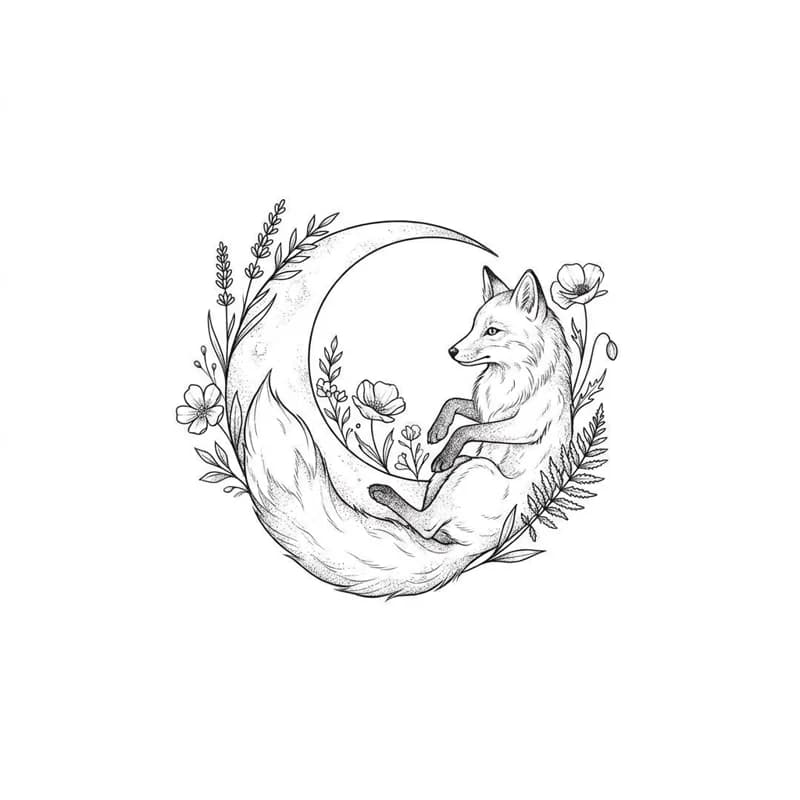
- a sentence about what you like in each: "the curve of the fox's tail", "the moon is the right size", "I like the empty space".
If the idea includes words, check every letter now. Generated lettering is often misspelled, and you will look at it many more times later.
Start with design options
Generate a flash sheet of variations from your idea, in the tattoo style you are considering.
Stage 2: Preview the placement on your own photo
Question it answers: does this kind of tattoo suit this part of my body?
Oakgen's Virtual Tattoo Try-On adds a tattoo to a photo of you. It is useful here, but be clear about what it does:
- You choose a style (such as minimalist line art, traditional, geometric or Japanese) and a placement (forearm, upper arm, shoulder, wrist, chest or back).
- You describe the motif in the additional instructions.
- There is no upload for your finished design, so it does not reproduce your exact artwork. It shows an interpretation of your description on your body.
That is still useful. Size, position and how a design follows the body's curves are the things you most need to see, and an interpretation answers them well. To get the most from it:
Photograph the actual area. For a forearm tattoo, a clear photo of your bare forearm in even light. The tool cannot preview skin it cannot see.
Describe your chosen design in plain words. Use the sentence from Stage 1, plus size and direction: "a small sleeping fox curled around a crescent moon, about palm-sized, on the inner forearm, moon facing the wrist".
Match the style. Choose the try-on style closest to the one you used in the generator, such as minimalist line art for fine line designs, or traditional for traditional.
Try two placements. Generate the same description on two body areas you are considering. Comparing them is usually more decisive than looking at one.
Ignore the exact lines. Judge the size, position and flow. The linework in the preview is not your final design.
Stage 3: Live with it at real size
Question it answers: will I still like this next month, at the size it will really be?
Screens hide scale. A design that fills your phone can be smaller than a coin on your wrist. Two cheap tests fix that:
Print it at real size. Measure the area with a ruler and decide the height you want. Print the design so it matches that height, cut it out and hold it against your skin in a mirror. Most people discover the design needs to be bigger than they thought, or that fine detail is unreadable at the size they wanted.
Draw it on. Trace the outline onto your skin with a skin-safe marker, or ask a friend to. Look at it in different light, with different clothes, while you move. Notice whether it disappears under a watch strap or a sleeve line.
Then put the printed design somewhere you see daily: the fridge, a mirror, your phone lock screen. Many people give it a couple of weeks. If you keep wanting to change one detail, write that down; it goes in your brief.
Stage 4: Write the artist brief
Question it answers: how do I explain this so the artist can make it better?
Artists design for skin. Your references help them understand your taste quickly; the brief tells them what is fixed and what is open. A good brief fits on one page:
The idea in one sentence. "A calm, sleeping fox curled around a crescent moon, with a little pine."
References. Two or three generated designs, and one you do not want. Next to each, write what you like or dislike.
Placement. The try-on preview and a plain photo of the area, with the exact spot marked.
Size. The height and width you tested in Stage 3, in centimetres or inches.
Colour. Black only, black and grey, or colour, and any colours you want or want to avoid.
Style. The tradition you settled on, and whether you are open to the artist's own take on it.
Text. Exact spelling, written out by hand, and the font feel you liked.
What is flexible. This is the part people forget. "The fox must be sleeping; the pine is optional; I trust you on line weight and composition." Artists do their best work with clear fixed points and room to design.
Also be ready to hear changes. An artist may tell you the design needs to be bigger, simpler or placed differently to age well. That advice is the reason you are booking a professional.
Choosing an artist
Look at healed work, not just fresh photos, and pick someone whose portfolio already shows the style you chose. An artist who specialises in fine line will handle a fine line fox better than one who mainly does Japanese work, and the reverse.
What these tests cannot tell you
Be honest with yourself about the limits:
- Healing and ageing. No preview shows how ink settles in your skin over years. Fine lines can soften and spread; colour can fade. Ask your artist.
- Your skin tone. Generated previews may not show how a colour will look on your skin. Ask to see healed examples on similar skin.
- Pain and sessions. Placement affects both. That is a conversation for the consultation.
- Exactness. The generator and the try-on give references and interpretations, not stencils. The final drawing is your artist's.
The short version
- Generate a flash sheet in one or two styles and choose two or three favourites.
- Preview placement with the Virtual Tattoo Try-On, describing your design in words.
- Print it at real size, hold it against your skin and live with it for a while.
- Bring a one-page brief: idea, references, placement, size, colour, text and what is flexible.
For more on styles and briefing etiquette, our older post on AI tattoo design concepts covers how artists tend to see AI references.
Test your tattoo idea properly
Generate design options first, then preview placement and bring a clear brief to your artist.
Frequently asked questions
Can I see a tattoo on my body before getting it?
You can get a close idea. A virtual try-on can show a tattoo style on your own photo of the area, and printing the design at real size and holding it against your skin shows the scale. Neither shows exactly how ink will heal on your skin.
Can the try-on tool place my exact AI design on my arm?
No. Oakgen's Virtual Tattoo Try-On has no upload for finished artwork. You choose a style and placement and describe the motif in words, so it shows an interpretation of your design, which is still useful for judging size and position.
What should I bring to a tattoo consultation?
Two or three design references, a photo of the placement area, the rough size you want, colour or black only, what you like about each reference, and which parts the artist is free to change.
How long should I live with a design before booking?
There is no rule, but many people keep a printed design somewhere they see every day for a couple of weeks. If you still like it after that, it is a good sign.