Choose Oakgen if you are paying several platforms for overlapping model access or if one campaign crosses image, video, voice, and music. Higgsfield is worth adding for its identity and campaign-production layer. Krea is worth adding for its live canvas, training, Nodes, or upscaling. If those specialist features are not part of the repeated job, start with Oakgen.
That answer matters more than a model-count contest. All three services can expose popular third-party models. The bigger difference is the work each product puts around those models.
Oakgen is our product. This comparison is based on public product pages, official pricing pages, and documentation checked on August 10, 2026. We did not run a controlled output benchmark for this update. Features, promotions, and model costs can change, so verify the checkout page before paying.
Start with Oakgen Before Adding a Specialist Subscription
Use one account for image, video, voice, and music, then add Higgsfield or Krea only when a specialist feature pays for itself.
Quick recommendation
| Platform | Best for | Main strength | Main tradeoff | Public starting price checked |
|---|---|---|---|---|
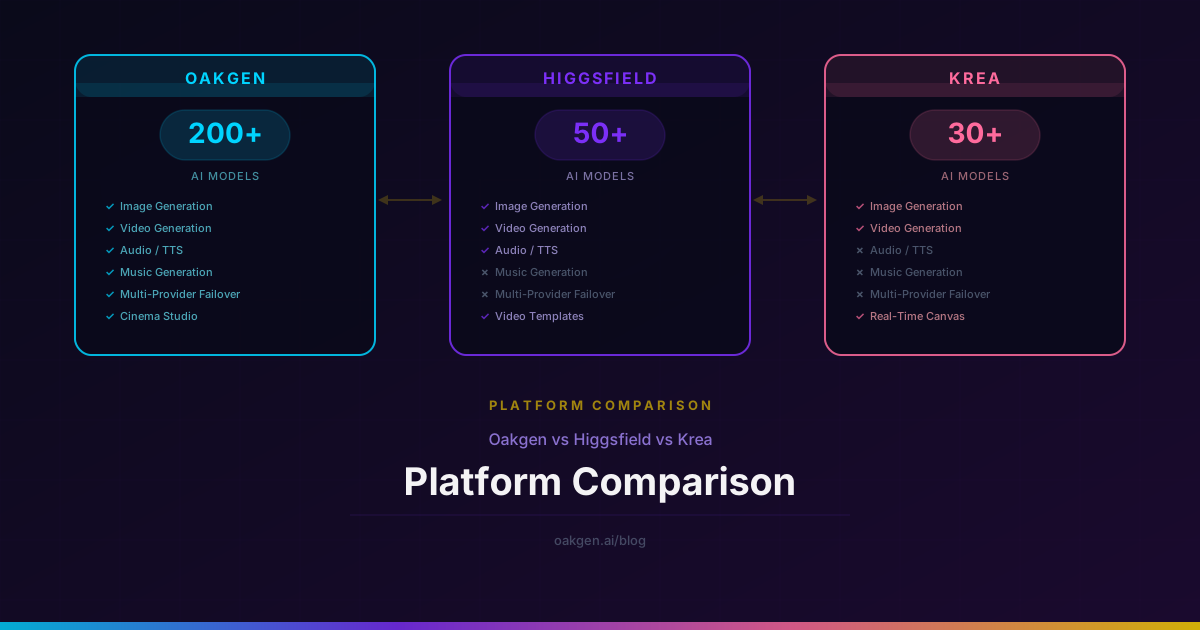
| Oakgen | Mixed image, video, voice, and music production | Several creative formats and model families in one account | No Krea-style live canvas; some specialist tools remain better at one job | $9/month |
| Higgsfield | Character-led campaigns and cinematic short-form production | Soul ID, Cinema Studio, Marketing Studio, camera direction, and guided production | Credit math varies by model and promotions change often | $9/month in Higgsfield's July comparison |
| Krea | Visual ideation, design exploration, enhancement, and training | Real-time generation, Krea 2, style references, Nodes, LoRA training, and upscaling | Video can consume a compute-unit allowance far faster than image work | $9/month |
The starting price does not tell you which plan is cheaper for your workload. A designer making hundreds of still-image drafts has different economics from a marketer generating ten-second video clips.
Who this comparison is for
This guide is useful if one of these sentences sounds familiar:
- “I need a single paid tool for image and video, and I do not want overlapping subscriptions.”
- “My team makes recurring characters and product ads, but the handoffs between tools are slow.”
- “I need to explore visual directions quickly, then move the chosen direction into production.”
- “The same model appears on several platforms. I want to know what I am paying for beyond API access.”
- “I need to estimate a real monthly workload before I pick a credit plan.”
Methodology: compare the production job, not the home page
We checked the public product and pricing information for all three platforms on August 10, 2026. We evaluated them across six jobs:
- Finding a visual direction.
- Generating final images.
- Producing short video clips.
- Keeping a person or character consistent.
- Editing, improving, and delivering the asset.
- Moving between image, video, voice, and music without buying another subscription.
We did not award points for a large model catalog by itself. A shared third-party model can produce similar raw output on different hosts. Interface, controls, queue behavior, asset management, pricing, and the steps before and after generation can matter more.
The job-to-platform matrix
| Production job | Best starting point | Why | What to check before paying |
|---|---|---|---|
| Live mood exploration while typing or drawing | Krea | Real-time tools shorten the idea loop | Whether the paid image and training limits match your volume |
| Style references and moodboard-driven art direction | Krea | Krea 2 is built around aesthetic exploration and steerable style | Whether you need final editing features that sit outside Krea |
| Recurring spokesperson or character across campaign assets | Higgsfield | Soul ID and its production tools are designed around continuity | Training inputs, supported models, and per-output credit cost |
| Camera-led short-form ad or cinematic clip | Higgsfield | Cinema Studio and guided camera controls reduce setup work | Whether you also need a full editing timeline after generation |
| Compare different image models on one brief | Oakgen | The Image Arena is built for model comparison | The exact models and plan access your work requires |
| Move between stills, video, voice, and music | Oakgen | One account covers several creative formats | Whether a specialist tool is still needed for the final polish |
| Timeline editing and frame-level post-production | Neither is automatically best | A dedicated editor or a platform such as Runway may fit better | Export format, timeline controls, and revision workflow |
This matrix is the cluster's central recommendation. The rest of the article explains why.
Where Higgsfield wins
Higgsfield has grown well beyond the old description of a narrow camera-preset tool. Its current navigation includes image, video, audio, Cinema Studio, Marketing Studio, Canvas, Soul ID, lip sync, MCP/CLI access, and an agent-style Supercomputer product.
The strongest reason to pay for Higgsfield is production context that persists around a campaign. A creator can train or define a recurring identity, direct camera behavior, generate campaign assets, and work through a guided production system. That can remove setup work that a raw model host leaves to the user.
Choose Higgsfield when:
- the same face or character must survive across several shots;
- camera direction is part of the brief, not a lucky result;
- the team makes short ads, influencer-style assets, or cinematic campaign clips repeatedly;
- a guided production surface is worth more than the lowest possible model cost.
Do not choose it only because it carries a model you recognize. Check whether that model is available elsewhere and compare the whole cost per approved clip. The Higgsfield AI pricing guide explains how to do that without pretending every credit buys the same amount of work.
Where Krea wins
Krea is the clearest specialist here. Its product centers on the visual idea loop: real-time generation, image creation, enhancement, editing, 3D, lip sync, motion transfer, LoRA training, Nodes, and its own Krea 2 image model.
Krea's official pricing page lists 100 compute units per day on Free, 5,000 per month on Basic, 20,000 on Pro, and 60,000 on the displayed Max configuration. Pro adds all video models, Nodes automation, and the Nodes Agent. Basic includes commercial use, image and 3D access, selected video models, LoRA training, and upscaling to 22K.
Choose Krea when:
- you want to see a visual direction change while you work;
- style references, moodboards, and model training are routine parts of art direction;
- image enhancement and large exports matter;
- you want a design surface first and a model catalog second.
Krea is not a weak video product. Its site lists Seedance, Veo, Kling, Hailuo, and other current models. The buying question is whether a compute-unit subscription matches how often you use the costly models. Use the Krea AI pricing guide to budget by workload.
Where Oakgen wins
Oakgen fits a different buyer: the person who keeps paying for access to overlapping models and still needs another service for voice, music, or the next format.
The advantage is not that every Oakgen surface beats a specialist. It does not. Krea's live canvas is a better place for continuous visual exploration. Higgsfield's character and campaign tooling can be the faster route for a recurring spokesperson project.
Oakgen makes more sense when:
- the same campaign needs product stills, video clips, voiceover, music, and alternate formats;
- you want to pick a model after defining the shot;
- several clients or campaigns need different model families;
- buying a separate specialist subscription for every format creates waste.
Try the AI video generator if the deliverable is motion, or the AI image generator if the job starts with stills. The useful test is a real brief, not a generic prompt.
Build the Campaign in One Workspace
Create the stills, test video models, add voice, and generate music without splitting the budget across three subscriptions.
Pricing: model a month of approved work
Plan prices create false confidence because each platform uses a different unit.
- Krea sells monthly compute units. The amount spent depends on the chosen model and operation.
- Higgsfield sells credits, with plan prices and promotions that can change by billing cadence and region.
- Oakgen sells plans and credits that work across its creative tools.
Before subscribing, list one month of expected work:
| Work item | Monthly attempts | Expected approval rate | Extra tools needed |
|---|---|---|---|
| Product stills | |||
| Short video clips | |||
| Character or avatar shots | |||
| Upscales or edits | |||
| Voice and music assets |
Then price attempts, not final assets. If one approved clip usually needs four tries, a plan that appears to cover 20 clips may cover five approved clips for your team.
Take one real campaign brief and reproduce its first five deliverables on each shortlisted platform. Record attempts, setup time, rejected outputs, export steps, and any second subscription you needed. That small test tells you more than a model list.
When a specialist still beats Oakgen
Pick Higgsfield if the center of the project is a person, a character, a camera move, or a finished ad sequence. Pick Krea if the center of the project is a visual direction that needs to be explored, trained, enhanced, and adapted.
The overlap is larger than it used to be. Both now span image and video, and both surface current third-party models. Their product opinions remain different: Higgsfield organizes work around production and campaigns; Krea organizes work around visual creation and control.
For adjacent buying decisions, compare Oakgen vs Higgsfield vs Runway and Oakgen vs Krea vs Midjourney.
A decision framework you can reuse
Choose Higgsfield if the campaign is character-led
The cost can be justified when Soul ID, camera direction, and campaign tooling replace manual setup. Confirm the current plan and the credits needed by your preferred model.
Choose Krea if exploration is the bottleneck
Krea earns its place when a designer spends hours searching for a look, training a style, or moving between rough direction and high-resolution output.
Choose Oakgen if subscription overlap is the bottleneck
Oakgen is the practical choice when the team needs several model families and creative formats, but does not need every specialist feature from each vendor.
Keep a specialist editor if post-production is the bottleneck
Generation and editing are different jobs. If timeline edits, masks, compositing, or frame-level revisions decide whether an asset ships, include the editor in the purchase decision.
Common buying mistakes
Comparing the cheapest plan instead of the required plan
A low entry price is irrelevant if it excludes the video models, automation, concurrency, privacy, or commercial terms you need.
Counting final assets instead of attempts
Generation is iterative. Budget for rejected takes, alternate ratios, client revisions, and safety variants.
Assuming the same model means the same workflow
Hosts can add different reference controls, editing tools, queues, presets, asset libraries, and pricing around a shared model.
Paying for two catalogs with heavy overlap
Audit the ten models you actually used last month. If two subscriptions mainly expose the same list, keep the one with the better surrounding workflow.
Calling a platform “all in one” when delivery still happens elsewhere
Write down the full path from brief to exported asset. Voice, music, captions, resizing, approvals, and edits all count.
Sources and further reading
- Krea product and current pricing
- Krea 2 technical report
- Higgsfield pricing page
- Higgsfield's July 2026 comparison with Runway
- Runway current pricing
- Midjourney plan comparison
Price one real workflow before choosing
The best platform is the one that removes the most expensive repeated step in your work. Krea removes friction from visual exploration. Higgsfield removes setup from character-led cinematic production. Oakgen removes friction from switching across models and creative formats.
Map one month of attempts, revisions, and handoffs. Then compare Oakgen pricing against the specialist plan that solves your biggest bottleneck.
Replace Subscription Overlap with Oakgen
Plans start at $9 with credits shared across image, video, voice, music, and other creative tools.