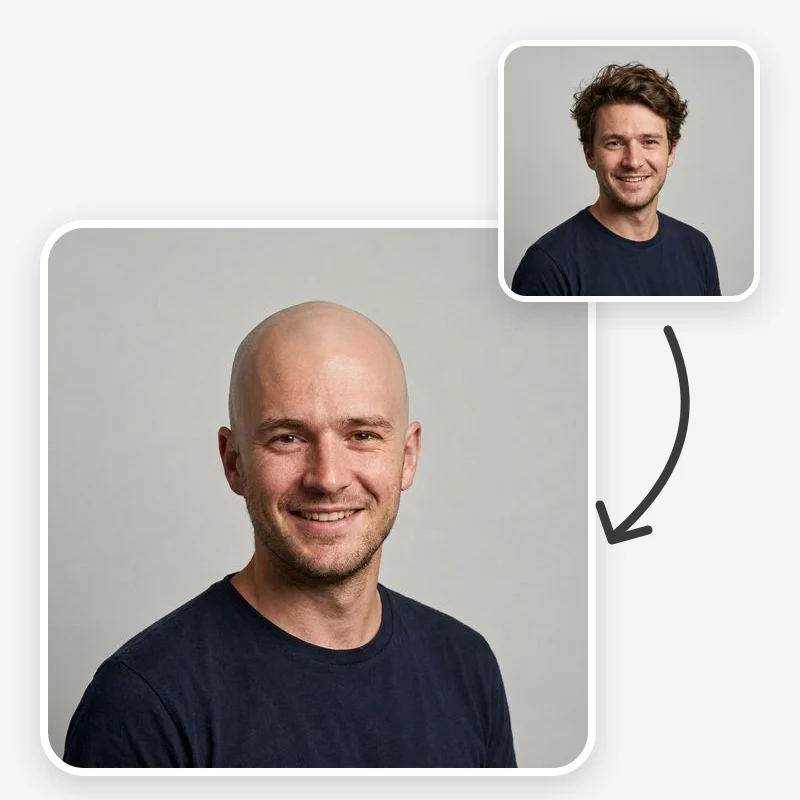
Bald Filter: See Yourself Bald Before You Shave

Use a bald filter on your photo to preview a clean shave, a short buzz, a receding hairline or a shaved head with a beard, keeping your face unchanged.

Choose how much hair to remove from the head

Keep or remove the beard and mustache. The Shaved Head with Beard look always adds a beard.

Open in Oakgen
Bald Filter example
Example result

Bald Filter: See Yourself Bald Before You Shave

Upload a portrait and compare a clean shave, a very short buzz, a natural balding pattern or a shaved head with a beard. Your face, clothes and background are meant to stay the same.

What is Bald Filter?

The bald filter edits a portrait so you can see yourself bald, buzzed or with a receding hairline while the rest of the photo is meant to stay as it is. The prompt asks the model to remove hair from the head, change facial hair only if you choose to, rebuild a plausible head shape, and match the scalp skin to the tone and lighting of your face. It is a visual preview, not a scan: the real shape of a skull under hair, scars, birthmarks and the way scalp skin reacts to sun can all differ from the image. It also does not predict whether or how hair loss will progress.

Features and options

  • Shaving a head is quick to do and slow to undo, so people want a look first.
  • Four distinct looks answer different questions: full shave, very short buzz, a balding preview, or a shaved head balanced by a beard.
  • The facial hair option lets you see how much a beard changes the overall proportions of a bald look.
  • The prompt asks for unchanged identity, expression, clothes and background, which keeps the comparison about the hair alone.
  • It works from an ordinary front-facing photo; you do not need a studio shot.

When to use Bald Filter

  • You are thinking about shaving your head and want to see the result first.
  • You are deciding between a full shave and a very short buzz cut.
  • Your hairline is changing and you want to picture a short, low-maintenance style before talking to a barber.
  • You are planning a charity head shave or a role that needs a shaved head and want a reference picture.
  • You are a writer, designer or actor building a character reference with a bald or balding look.

How to use Bald Filter

  1. 1

    Upload a clear front-facing photo

    Pick a sharp portrait with the whole head and both ears in frame, no hat, and even light. Leave some space above the head so the model is not forced to crop the crown.

  2. 2

    Choose a bald look

    Clean Shaved removes all hair. Very Short Buzz leaves a fine, even layer. Natural Balding shows a receding hairline and thinner crown. Shaved Head with Beard adds a full beard to a bald head.

  3. 3

    Decide on facial hair

    Keep As Is leaves the beard and mustache untouched. Remove Facial Hair gives a clean-shaven face as well. The Shaved Head with Beard look always shows a beard, whichever you pick here. Eyebrows are kept either way.

  4. 4

    Compare with the original

    Check the head outline, ears, hairline area and skin tone against the source photo. Generate a second version if the head looks too large, too round or a different color from the forehead.

Ways to use the results

Deciding before a home shave

See a clean shave and a very short buzz on the same photo, side by side, before picking up the clippers.

For: People considering shaving their head

Talking to a barber

Bring two previews to a barber to explain whether you want skin showing or a uniform short length, and how the beard should connect.

For: Barbershop clients

Planning a charity shave

Show supporters or teammates a preview of the look ahead of a sponsored head shave.

For: Fundraisers and event organisers

Character and costume reference

Create a bald or balding reference of an actor or model, with their consent, for costume, makeup or casting discussions.

For: Writers, costume designers and casting teams

Strengths

  • Four looks that answer different questions, not one generic bald effect
  • Facial hair can be kept or removed (the Shaved Head with Beard look always keeps a beard)
  • Scalp color is asked to match the face, which avoids the pasted-on look
  • The rest of the photo is meant to stay unchanged, so comparisons are fair
  • Eligible outputs can be used commercially under Oakgen's Terms and provider terms

Trade-offs

  • The head shape under hair is a reconstruction; your real skull shape, bumps or scars can look different
  • Very thick or tall hairstyles leave the model more to guess, which can make the head look too large or too small
  • It does not show a tan line or sunburn on newly exposed scalp skin unless you ask for it
  • Natural Balding is a generic pattern, not a prediction of how your own hair will change
  • Hats, hoods and hands near the head can be partly kept or oddly edited

Tips for better results

  • Leave Additional Instructions empty first; the look you choose drives most of the change.
  • If the scalp looks too shiny, add “matte scalp skin, no shine”.
  • If the head looks too big, add “keep the head size in proportion to the original, no enlargement”.
  • To see a freshly shaved scalp, add “slightly paler scalp skin than the face” instead of a perfectly matched tone.
  • Use the same photo for every look so the comparison is about hair, not lighting.

Bald Filter vs the alternatives

vs Mobile bald filter apps
Many phone filters lay a bald overlay on a live camera feed, which is fun but often slides around and leaves an obvious edge. This template edits a still photo, rebuilds the head outline and asks for scalp skin matched to your face, and it offers four separate looks plus a facial hair choice.
vs Manual editing in a photo editor
Painting out hair by hand gives full control but takes skill: you have to invent the head outline, scalp texture and lighting yourself. This template does that reconstruction in one pass; a manual edit is still the better choice when you need pixel-level control over one final image.
vs Trying a bald cap
A latex bald cap shows your real head size in real light but adds bulk and a visible edge, and it takes time to fit. The filter is quicker for comparing several looks; a cap or a real buzz is the only way to see your actual head shape.

Frequently asked questions

How do I see myself bald from a photo?

Upload a clear, front-facing portrait with your head and ears in frame, choose a look such as Clean Shaved or Very Short Buzz, choose whether to keep facial hair, and generate. Compare the result with your original photo.

Will the preview show my real head shape?

No. Hair hides the true outline of the head, so the model reconstructs a plausible shape in proportion to your face and ears. Bumps, flat areas, scars and birthmarks under the hair cannot be seen in the photo and may look different in real life.

What is the difference between Clean Shaved and Very Short Buzz?

Clean Shaved shows bare scalp skin with no stubble. Very Short Buzz keeps a fine, even layer of hair, roughly a very short clipper length, so the hairline and some color remain. Many people find the buzz less of a change.

Can I keep my beard?

Yes. Keep As Is leaves your beard and mustache as they are. Remove Facial Hair shaves them as well. If you choose Shaved Head with Beard, a full beard is added regardless.

Can it predict my hair loss?

No. Natural Balding shows a common receding and thinning pattern as a visual idea only. It is not a medical assessment. If you are worried about hair loss, a dermatologist can look at the cause and the options.

Why does my scalp look a different color from my face?

The prompt asks for a matched tone, but strong colored light or heavy shadows can confuse the model. Try a photo in even daylight, or add “scalp color matches the forehead” in Additional Instructions.

Can I use the bald filter on someone else?

Only upload photos of yourself or of people who have agreed to the edit. Do not use it to mock or embarrass anyone.

Can I use the result commercially?

Eligible outputs can be used commercially under Oakgen's Terms and provider terms, provided you have the rights to the photo you uploaded.

Related AI tools
