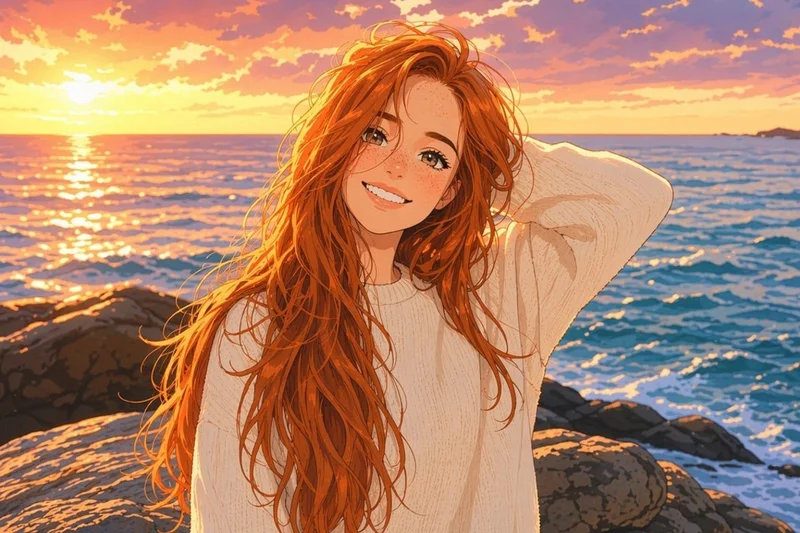
Anime & Manga Style Converter

Turn any photo into modern anime, classic 90s anime, manga, shonen, or shoujo artwork in one click. Composition is preserved, line work and shading are rebuilt, and eligible outputs can be used commercially.

Choose the anime/manga style

Open in Oakgen
Anime/Manga Style example
Example result

Anime & Manga Style Converter

Upload a photo, pick the anime era you want — modern, 90s classic, manga, shonen, or shoujo — and get back a clean, illustrated version with proper line art, anime proportions, and era-accurate color. Your subject and composition stay; the style swaps out.

What is Anime/Manga Style?

The Anime/Manga Style template is Oakgen.ai's image-to-image converter for turning a real photo into a styled anime or manga illustration. You upload a reference image, choose one of five style presets — modern anime, classic 90s anime, black-and-white manga, shonen action, or shoujo romance — and the model rebuilds the frame with clean line art, anime proportions, large expressive eyes, and era-appropriate shading and color. Unlike a filter, it isn't laying outlines on top of your photo; it's redrawing the scene. The negative prompt blocks photoreal, 3D-render, and western-cartoon drift, so what comes back actually reads as anime rather than a stylized photo.

Features and options

  • Five style presets cover the looks people actually want — modern, 90s, manga, shonen, shoujo — instead of one generic anime catch-all that doesn't match any specific aesthetic.
  • It redraws the scene with clean line art and anime proportions instead of just overlaying line edges on the original photo, which is what makes most filter apps look cheap.
  • Composition is preserved, so the framing, props, and overall layout from your reference photo come along — you don't have to re-describe a scene that already exists.
  • The negative prompt explicitly pushes away from western-cartoon and 3D-render territory, so outputs land in anime/manga style without drifting into 'Pixar with big eyes'.
  • Eligible outputs can be used commercially under Oakgen's Terms and provider terms, which lets the artwork ship into merch, books, profile art commissions, social, and ad creative.

When to use Anime/Manga Style

  • You want an anime version of a personal portrait, couple shot, or pet for a profile picture, gift, or print.
  • You're producing webcomic or manga reference pages and want to convert photo references into consistent line art quickly.
  • You're a content creator building an anime-style brand identity for YouTube, Twitch, or TikTok and need character art derived from your own photos.
  • You're designing merch — stickers, prints, posters, charms — and need anime-style artwork you actually own the rights to use.
  • You're mocking up an anime music video, short, or animation pitch and want pre-vis frames in the target style.

How to use Anime/Manga Style

  1. 1

    Upload your photo

    Drop in the photo you want stylized — a portrait, group shot, pet, or scene. Well-lit, sharp source photos give the cleanest line art.

  2. 2

    Pick an anime style

    Choose modern anime for a clean current look, classic 90s for cel-shaded retro, manga for black-and-white line art, shonen for high-energy action, or shoujo for soft sparkle-heavy romance.

  3. 3

    Add an optional prompt nudge

    Leave the prompt empty for a pure style pass, or add a short line — 'sunset light', 'school uniform', 'red hoodie' — to steer specific details without rewriting the scene.

  4. 4

    Generate and download

    Run the conversion, review the output, and download at full resolution. Drop it straight into social, prints, merch templates, or design files.

Ways to use the results

Anime profile pictures and avatars

Turn a portrait into a clean anime avatar for Discord, Twitter, Twitch, or gaming profiles — distinct, recognizable, and on-style instead of a generic preset.

For: Streamers, gamers, and online communities

Webcomic and manga production

Convert photo references into anime-style frames to speed up panel layout, character blocking, and rough draft pages for indie webcomics and manga.

For: Indie webcomic creators and manga artists

Anime-style merch and prints

Produce original anime artwork from your own photography for stickers, posters, phone cases, charms, and print-on-demand storefronts, with commercial use of eligible outputs under Oakgen's Terms and provider terms.

For: Print-on-demand sellers and convention artists

Creator brand and channel art

Build a consistent anime-style visual identity for a YouTube, Twitch, or TikTok channel — banners, thumbnails, intro art — from photos you already shot.

For: Content creators and streamers

Strengths

  • Five distinct anime presets instead of one generic style
  • Redraws the scene as illustration rather than filtering the photo
  • Negative prompt holds the line against western-cartoon and 3D drift
  • Composition from the reference photo carries through cleanly
  • Eligible outputs can be used commercially under Oakgen's Terms and provider terms

Trade-offs

  • Likeness is approximate — outputs look like an anime version of the subject, not a pixel-perfect portrait
  • Very busy backgrounds can simplify in the line-art version, which is sometimes intended and sometimes not
  • Shoujo and shonen presets push hard in their aesthetics — pick modern anime if you want a neutral baseline
  • Black-and-white manga preset removes color entirely; choose it only when you want pure line art

Tips for better results

  • Start with the prompt empty and just choose a style preset — you'll get a clean baseline before tweaking.
  • When you do prompt, name concrete nouns rather than adjectives: 'red hoodie', 'glasses', 'school uniform' beats 'cool outfit'.
  • Add a one-word lighting cue when needed — 'sunset', 'rain', 'night' — to steer the palette without overriding the style.
  • For shoujo, lean into soft colors and atmosphere ('pink light', 'cherry blossoms'); for shonen, lean into energy ('dramatic pose', 'wind blowing').
  • If you want a more painterly feel, switch to the Ghibli template instead — this one is tuned for line-art-driven anime, not watercolor.

Anime/Manga Style vs the alternatives

vs Mobile anime filter app
A filter app overlays line edges and color shifts on the photo — fast and shareable, but the result still reads as a stylized photo, not an illustration. This template redraws the frame as anime art with proper line work and proportions, and offers five distinct style presets instead of one generic look. Pick a filter for a casual mobile share; pick this template when the output has to hold up as artwork.
vs Freeform AI image generator
A freeform generator can produce anime art from a text description, but you lose the framing, pose, and details from your reference photo. This template is image-to-image: composition carries through. Use the freeform generator when you're inventing a character from scratch; use this one when you have a specific photo you want translated into anime.
vs Commissioning an anime artist
A commissioned artist gives you a one-of-a-kind, signed piece — the right call for a hero album cover, character sheet, or wedding-style gift. But commissions cost hundreds of dollars and take days to weeks. This template renders in 8–12 seconds, which is the right fit for high-volume work: webcomic pages, social content, merch designs, and channel art that don't need an artist's signature. Eligible outputs can be used commercially under Oakgen's Terms and provider terms.

Frequently asked questions

What is the Anime/Manga Style template?

It's an image-to-image template on Oakgen.ai that converts a photo into anime or manga illustration. You upload your reference, choose one of five style presets (modern anime, 90s classic, manga, shonen, shoujo), and the model redraws the frame with proper anime line art, proportions, and shading.

Which preset should I pick?

Modern anime is the neutral default — pick it when you're not sure. Classic 90s anime gives a cel-shaded retro look with chunkier line work. Manga is black-and-white line art for comic panels. Shonen is high-energy and action-leaning. Shoujo is softer with sparkles and pastel romance vibes. The presets are distinct enough that switching between them gives genuinely different art, not just minor color shifts.

Can I use the outputs commercially?

Yes. Oakgen does not claim ownership of eligible outputs, and commercial use is subject to Oakgen's Terms, the model provider's terms and your rights in the inputs — you can ship the art in monetized content, on merch, in webcomics you sell, on prints, and across ecommerce storefronts.

Will the output still look like me?

Loosely. The template preserves framing, pose, and overall features but is not a face-cloning workflow. Expect an anime interpretation of the subject — close enough that friends recognize you, stylized enough that it reads as anime art rather than a photo with a filter.

How is this different from an anime filter app?

A filter app overlays line edges and color shifts on top of your photo. This template actually redraws the scene as illustration, with clean line art, anime proportions, and era-appropriate shading. The negative prompt also keeps the output from drifting into 3D-render or western-cartoon territory, which most filters do not control for.

Do I need to write a prompt?

No. The base prompt and style preset are tuned to produce good output with the prompt field empty. Add a short text nudge only when you want to specify wardrobe, lighting, or mood beyond what the photo already shows.

What kind of source photo works best?

A clear, well-lit photo with a recognizable subject and uncluttered background gives the cleanest line art. Sharp focus, decent resolution, and good lighting matter more than fancy gear — a clean phone photo outperforms a noisy low-light DSLR shot here.

Can I use this for webcomic or manga pages?

Yes. The manga (B&W) preset is specifically tuned for comic-panel line art. Many indie creators use it to convert photo references into rough pages quickly, then polish or letter on top in their layout tool of choice.

Related AI tools
