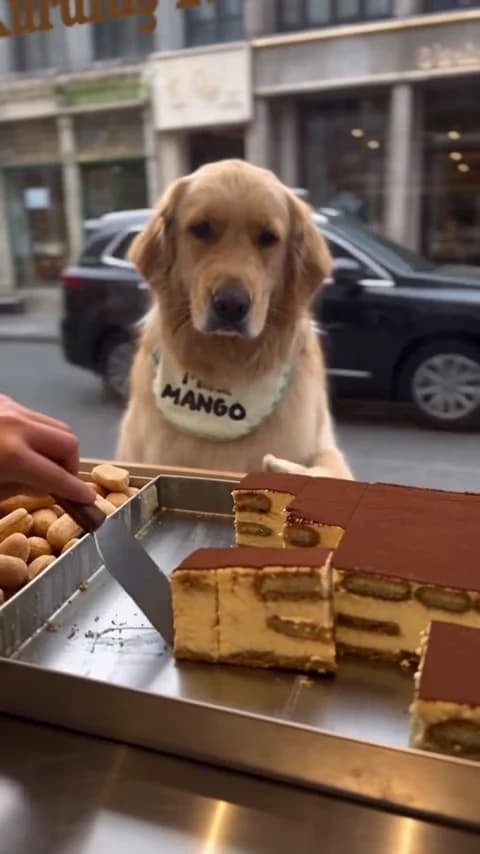
An 18-second Tiramisu Dog result is a complete little story: guide the cut, size the slice, approve it, despair at the box, stare. This plan covers what to put where in a post, what to do with the sound and how to label the clips so viewers know which one you made.
Make your Tiramisu Dog first
Upload one photo of your pet or yourself, get the full order, then come back to plan the post.
Know what each clip is
The reference is an AI reel from the Instagram account @m.a.n.g.o__o, captioned “Dead Serious Tiramisu” and published on October 21, 2026. The creator tagged it #ai. The cover of this article is a frame from that reel, not from an Oakgen result. The source guide has the details.
That matters for labels. “Original reel” and “My version” describe the two accurately. Putting the source reel under a “Made with Oakgen” label would claim something it does not show. If you post only your version, “AI video” or “Made with an AI trend template” keeps viewers from thinking your pet really visited a bakery. A credit identifies the source; it does not by itself give permission to repost someone else's reel.
Map captions onto the beats
The clip is one continuous shot. These are approximate landmarks from the source; find them again in your own downloaded result before you place text.
| Time | What happens | What to do in your edit |
|---|---|---|
| 0 to ~4.5 s | Seller holds the server at the tray; the customer guides it with a thumbs-up | Setup caption, above the tray |
| ~4.5 to 5.5 s | The slice is cut | Keep the setup caption |
| ~6.5 to 9.25 s | A paw to the chest, then both paws reach out to size the slice, twice | Second line, or nothing |
| ~9.5 to 10.5 s | The slice moves forward; thumbs-up at about 10.25 s | Clear the frame for the approval |
| ~10.5 to 14 s | The slice goes into a paper-lined box; paw on head at about 12.5 to 14 s | Punchline caption on the facepalm |
| ~14.5 s to end | One paw raised, then a deadpan stare to the end | Leave the stare clean |
The paw gesture breakdown describes each beat in more detail and what to check in your result.
Three caption sets
Original lines to adapt. Pair each with the premise you cast for, as described in Who Should Order the Slice?.
The critic
- Setup: “He's been reviewing this bakery for three years.”
- Sizing gesture: “Not that thin.”
- Facepalm: “A BOX? For one slice?”
The regular
- Setup: “Same order every morning.”
- Sizing gesture: “Exactly this wide. Every time.”
- Facepalm: “New guy.”
The impatient one
- Setup: “POV: you asked for one slice.”
- Approval thumbs-up: “Finally.”
- Facepalm: “Why is it taking so long.”
Keep each caption to one line. Place text in the upper part of the frame, over the street and building facades, away from the customer's face and from the tray, and clear of the right edge and the bottom, where app buttons sit. The handheld camera moves closer to the counter during the boxing, so check the caption against the frame around 11 seconds too. These lines are for your editor; the template does not add text.
Sound
Your result keeps the reference's original sound: street ambience, the scrape of the cake server and the rustle of the box paper. There is no speech, barking or song in it, and we could not identify any music. That quiet is part of the deadpan, so the simplest choice is to leave it alone.
If you do add music, keep it low under the original handling sounds rather than replacing them, and only use music you have the rights to. Do not tag a song on the source reel; none is verified.
Trim for shorter posts
The full 18 seconds work as they are. If you need something shorter, these cuts keep the story intact:
- About 14 seconds. Start at the cut, around 4.5 seconds, and run to the end. You lose the guiding thumbs-up but keep sizing, approval, facepalm and stare.
- About 9 seconds. Run from about 9 seconds to the end: approval, box, facepalm, stare. The joke still lands, but the setup has to come from your caption.
Avoid cutting the final stare. The long, unblinking hold is what makes the face read as dead serious, and it gives the platform a calm frame to loop from.
Structures that fit the format
| Part | Your version only | Original, then yours |
|---|---|---|
| Opening | Your customer at the window with the setup caption | Label “Original reel” and play the source cut beat |
| Middle | Sizing gesture and approval, no new text | Cut to “My version” on the approval thumbs-up at about 10.25 s |
| End | Facepalm with the punchline, then the stare | Your customer's facepalm and stare play out |
| Replay | The platform loops from the stare back to the guiding thumbs-up | End on your stare so the replay restarts the comparison |
For a comparison, cut on a matching gesture rather than an arbitrary timestamp. Both versions follow the same timing, so the thumbs-up lines up. Keep each clip's sound attached to its own picture. If you made a person version as well, the person version guide has a pet-and-person pairing.
Check before posting
Watch the finished edit at phone size with sound on and off. Is it clear which clip is yours? Do the captions stay off the face and the tray? Does the face stay serious all the way through the stare? When you are ready, open the Tiramisu Dog studio and review the current price for your chosen quality. No generated results or performance figures are claimed in this plan.