A giant coffee cup is a visual joke. A giant coffee cup with the caption "Monday, accurately" is a story. The Big Thing Effect works best when the object you blow up already means something to you or your audience.
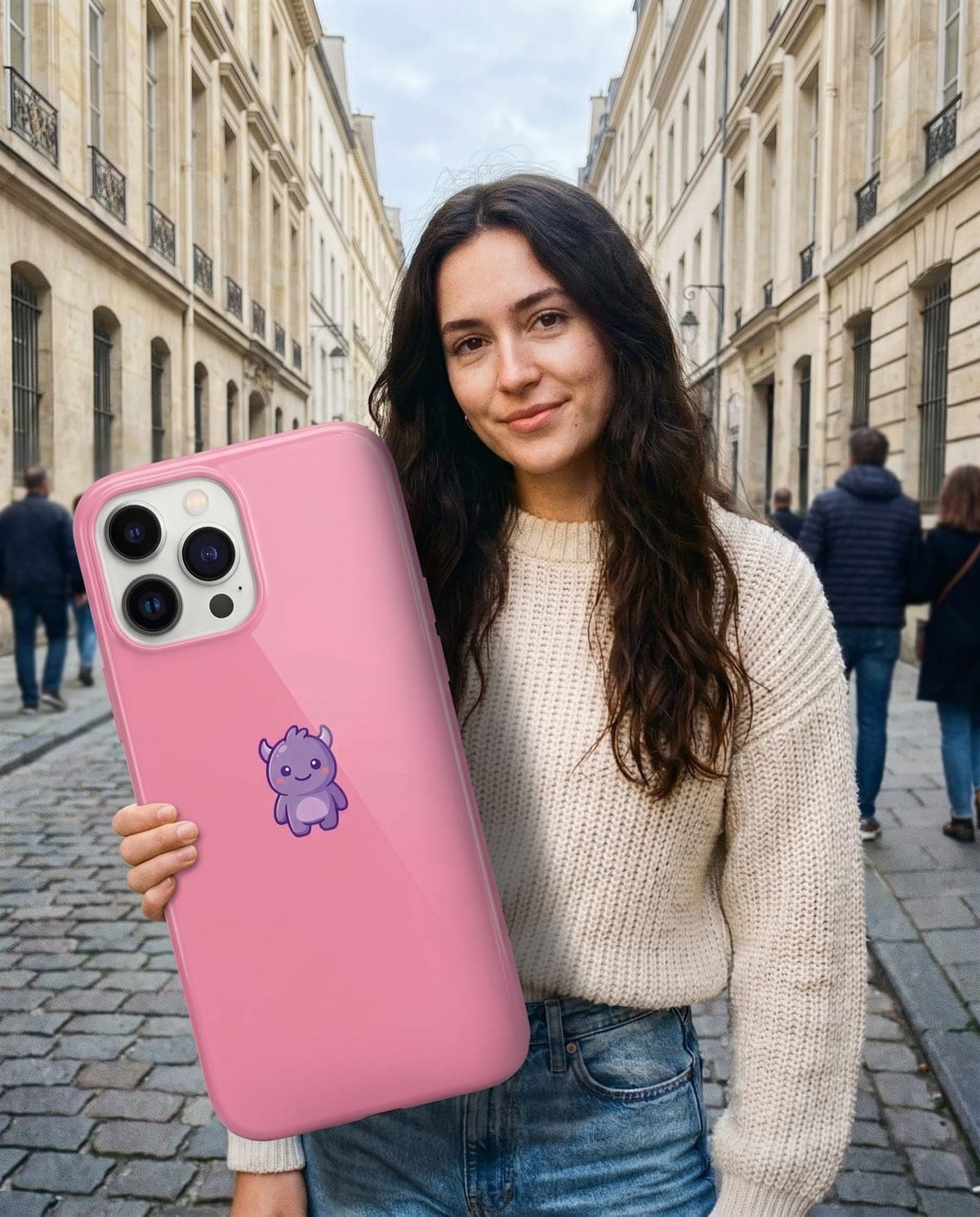
Big Thing Effect takes two photos, one of you and one of an object you own, and returns a street snapshot of you holding that object at an absurd size. This guide is about the part before and after the upload: choosing the object, preparing the photo and building a post around it.
Hold your favourite thing, giant
Upload a photo of you and a photo of your object. The trend builds a daylight street shot in about a minute.
Giant object photo ideas with a built-in story
The object carries the punchline, so start with the joke, then pick the item. Each idea below pairs an object with a premise you can caption in one line.
| Object | Premise | Caption idea |
|---|---|---|
| Your phone | Screen time report just arrived | "My screen time, to scale." |
| Coffee cup | First week of a new job | "Day three. Ordered the appropriate size." |
| Ice-cream cone | First warm weekend of the year | "Summer starts at this size." |
| New sneakers | You saved up for them | "I'm not saying they're a big deal, but." |
| Tote or handbag | You carry everything for everyone | "Yes, I have a plaster. And snacks. And a charger." |
| A book | You finally finished it | "It felt this long." |
Pick one premise per image. The scale gag already asks the viewer to do some work; a single clear reason is easier to read than a caption trying to cover three jokes.
Ideas for small businesses and makers
If you sell a product with a clear silhouette, such as a mug, a candle jar or a pair of earrings, the effect can announce a launch: "Our new mug, emotionally." Use your own product photo, and label the post as an AI-made image so nobody mistakes it for a real oversized version.
How to photograph the object so the giant version still looks like yours
The trend builds the giant version from your object photo, keeping its colours, case and shape. That means your photo decides how recognisable the result is.
- Shoot it alone. Put the object on a plain table, sheet or wall. Other items in the frame give the trend more than one thing to choose from.
- Show its best side. A phone shows its case from the back; a cup reads better side-on with the logo or pattern facing you.
- Use even light. Daylight from a window beats a single overhead bulb that throws a harsh shadow across the item.
- Fill most of the frame. Small, distant objects lose the details that make them yours.
For a deeper walk-through of object photos, see the object photo guide. Not sure this is the scale gag you saw? The giant object AI photo trends comparison sorts it from miniature-you and giant-phone formats.
Your own photo: what to aim for
The person photo should show your face and upper body clearly, because the finished shot shows you from the upper body up. A plain selfie at arm's length can work, but a photo with your shoulders and arms visible gives the trend more to keep. Your face, hair and outfit carry over, so wear what you'd want to be seen in. The step-by-step guide covers the upload order.
Carousel and posting ideas
A single image works, but the effect also suits a short carousel:
- The reveal pair. Slide one is your plain object photo on the table. Slide two is the giant version. The contrast explains the joke with no caption.
- The collection. Three images, three objects, same outfit: your phone, your cup, your keys. Caption: "Things I can't leave the house without, sized by importance."
- The friend round. Each friend makes their own image with their signature object, using their own photo. Post them together with a tag for each person.
Whatever the format, say the image is AI-made, for example by adding "AI photo" to the caption or using your platform's AI label. The giant phone caption guide has more caption patterns.
Review checklist before you post
The look aims for a real, unedited phone snapshot, so small errors stand out. Check these at full size:
- Hands and grip. Fingers should meet the object, not pass through it.
- Object identity. The case colour, logo placement and shape should match your photo.
- Shadow. A giant object in daylight should cast a shadow on you or the pavement.
- Your face. Compare it with your original photo; it should still read clearly as you.
The forced perspective check goes through each of these in more detail. If the object comes out wrong, the usual cause is a busy object photo. Reshoot it alone on a plain background and try again. The giant object trend overview explains what stays and what changes, and the AI photo trend playbook compares this effect with the other image trends.
Frequently asked questions
Which object should I use for the Big Thing Effect?
Pick something with a clear shape and a reason to exist in your life: the phone you never put down, your daily coffee cup, the sneakers you just bought. Photograph it alone on a plain background so its design carries over.
Does the Big Thing Effect make me bigger too?
No. Only the object becomes oversized. You stay at normal size, holding it in a daylight street snapshot.
Can I put two objects in one image?
The trend takes one photo of you and one object photo. Use a single object per photo; for two objects, make two images and post them as a carousel.