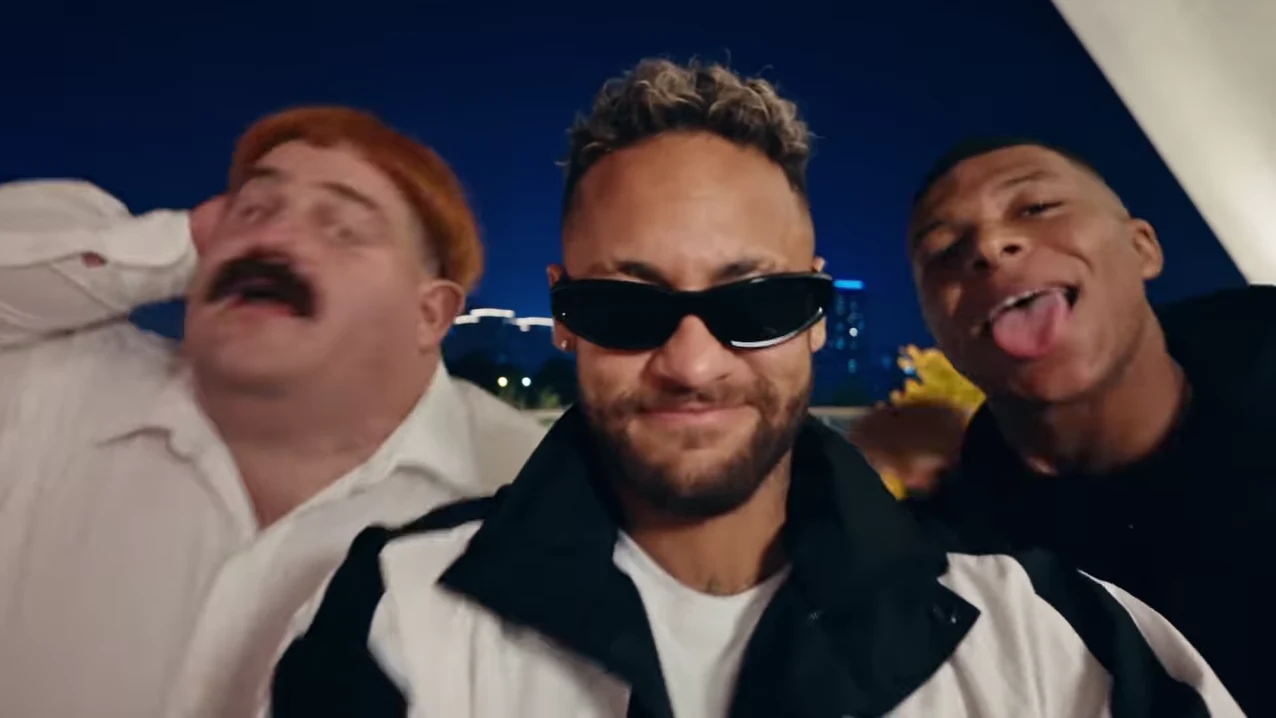
The Gangnam Style Trio reference is landscape. Its opening and ending put three people across a wide frame, so one permanent vertical center crop can remove the friends on either side. Start by preserving the whole group, then decide whether the solo shots benefit from closer framing.
This is an editing guide for the download from Oakgen's Gangnam Style Trio. Reframing happens in an external video editor; it is not an additional aspect-ratio option promised by the fixed template.
Understand how much a center crop removes
A 16:9 picture cropped to 9:16 at the same height retains about 32 percent of its original width. The calculation is the new width divided by the old width: (9/16) divided by (16/9), or 81/256. The supplied 1276-by-718 source is approximately 16:9, so this is a useful illustration rather than an exact export specification.
That narrow slice may suit a centered face, but it cannot be assumed to contain three people. Watch the opening frame and locate both side faces before committing to a fill-canvas crop. Also check hands moving into frame; keeping a face visible does not preserve every important gesture.
Choose a fit-first version
For the simplest vertical edit, place the entire landscape video inside a portrait canvas. Use the remaining space for a short title and, if needed, one closing line. A plain background avoids competing with the detailed nighttime scene.
This keeps all three performers visible throughout. The tradeoff is smaller faces on a phone. Preview at actual mobile size and decide whether recognition remains adequate. Do not enlarge until the side people disappear just to make the center face bigger.
If you use a blurred copy of the footage as a background, keep it subdued enough that it does not look like extra people are performing above and below the main image. The clear foreground rectangle should remain the obvious place to watch.
Reframe only where the shot supports it
The reference alternates between group and solo views. That structure allows a more deliberate edit: fit the wide moments, then use a closer crop for a solo when the face and gesture remain inside the portrait canvas.
| Source section | Starting framing choice | What to check |
|---|---|---|
| Opening trio | Fit the entire wide image | All three faces and the shared interaction |
| First center close-up | Optional closer crop | Hands extending toward the camera |
| Left solo | Reposition around the active performer | Head and upper-body movement |
| Transition to right solo | Inspect the camera move before changing crop | Abrupt framing jumps and motion blur |
| Returning center solo | Match the earlier center framing | Visual continuity across appearances |
| Final trio | Return to the full-width image | Both side performers and the ending reaction |
Use the visible transitions in your actual result rather than copying a timestamp blindly. The casting guide's shot map helps identify who should be on screen, but it is not a substitute for watching the export.
Keep captions away from the performers
In a fit-first layout, the space outside the landscape picture is useful for text. A single line such as “Our group chat after booking the trip” can explain the scene without covering a face. Keep the caption short enough to read before the first solo begins.
If you fill the portrait canvas during a solo, reconsider that same caption's position. A label that sits safely above the wide picture may cover the forehead after a crop change. Preview each framing state with the overlays visible.
Avoid permanent left and right name labels. The camera switches between performers, and a stationary label can become attached to the wrong friend. Introduce names briefly when the relevant person is clearly visible, then remove them before the next transition.
Check audio and the final group return
Play the exported edit from beginning to end. Listen for doubled music if the editor imported both the original audio and a separate music layer. Compare against the untouched download if timing feels different.
Pay particular attention to the final return to the group. If you stay zoomed into the center, the ending loses its sense of all three friends being together. A deliberate return to the wide frame can complete the story even when the middle uses closer crops.
The framing plan comes from the supplied @gusgrumble recreation, reviewed October 18, 2026. The cover is a source-reel frame and the recommendations are editing proposals, not a tested claim about paid output. Read the song and source evidence, or open the trio tool to review the original wide composition.
Frequently asked questions
Does Gangnam Style Trio generate a vertical video?
The fixed trend follows its landscape reference. This guide describes placing or reframing the downloaded video in a vertical canvas using an external editor.
Why not keep a vertical crop centered throughout?
The side performers matter in the group opening and ending. A narrow center crop can remove them, even when it looks good during the center solo.