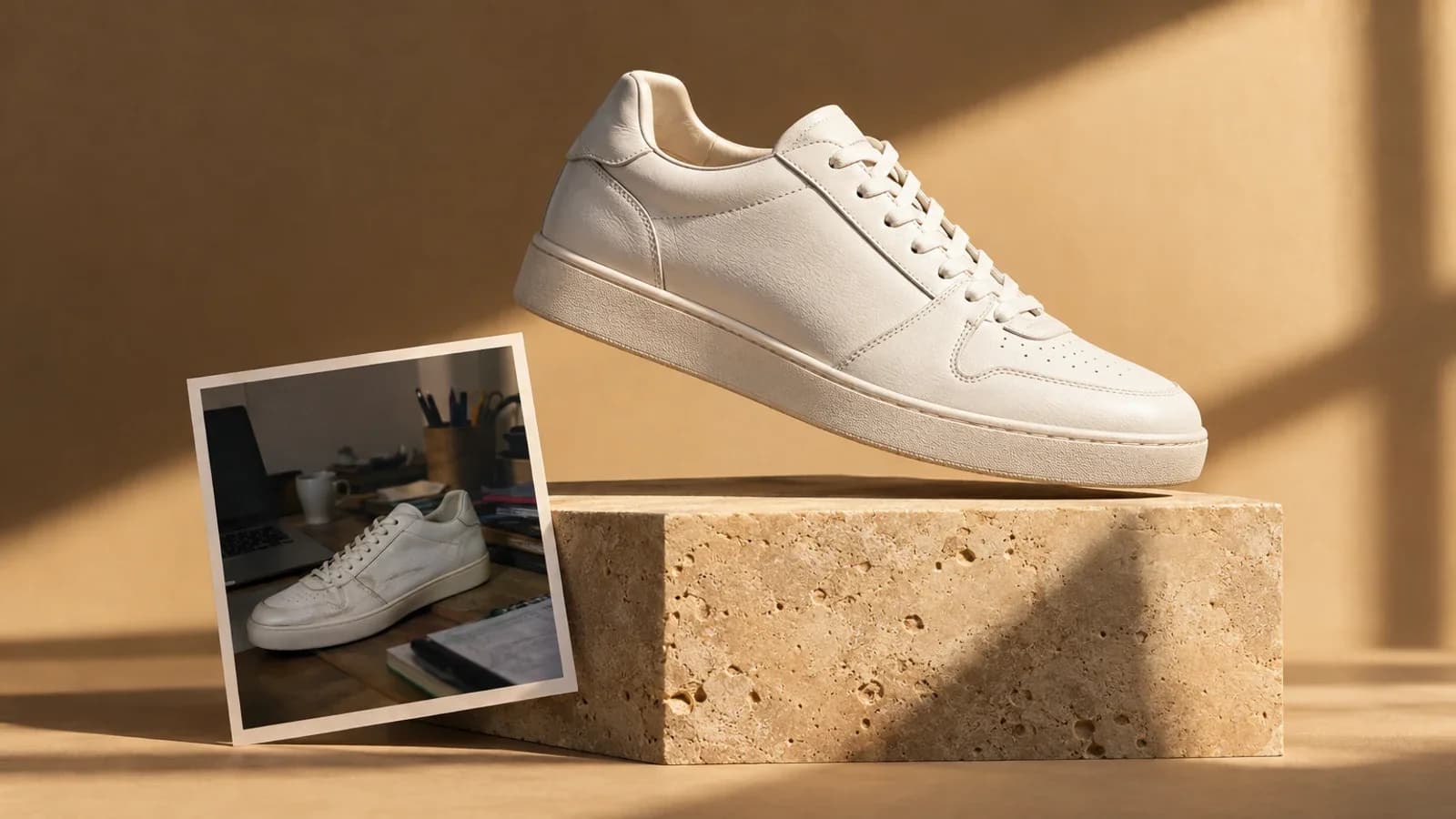
Product photography is the single biggest lever in e-commerce conversion. Shopify's internal data from 2025 shows that listings with professional product photos on custom backgrounds convert 2.4x higher than listings with plain white backgrounds. Amazon's own A/B testing data tells a similar story: lifestyle product images in the secondary image slots increase purchase probability by 22%.
The problem? Traditional product photography with custom backgrounds requires a studio, a photographer, props, and post-production compositing. A single product shoot with 3-4 background variations costs $500 to $2,000. For a catalog of 50 products, the math gets painful fast.
AI product photography changes everything. In this tutorial, you will learn how to generate professional e-commerce product photos with any custom background you can imagine -- using nothing more than a product image from your phone and Oakgen's AI tools.
Before opening the source-image workflow, use the product photo prompt builder to choose a catalog angle and inspect the composed positive and negative prompts.
- A clean product photo (even a smartphone shot on a white surface works)
- 15-20 minutes for your first product; 5 minutes per product after that
Why Custom Backgrounds Drive More Sales
A white background is clean, professional, and required for Amazon's main product image. But it is also invisible. Every product on the platform sits on white. Custom backgrounds give your product context, emotion, and a reason for the shopper to pause scrolling.
The Psychology Behind It
When a shopper sees a water bottle on a white background, they see a product. When they see the same water bottle on a granite countertop next to fresh lemons with morning light streaming through a kitchen window, they see a lifestyle. The background tells the story that the product alone cannot.
Custom backgrounds serve three conversion functions:
- Context: Show the product in its intended environment (a candle on a bedside table, a protein bar in a gym bag)
- Scale: Give visual reference for the product's actual size
- Emotion: Evoke the feeling associated with using the product (relaxation, energy, luxury, adventure)
Traditional Product Photography vs AI Generation
Here is an honest side-by-side comparison to help you decide when each approach makes sense.
| Factor | Traditional Studio Shoot | AI Product Photography (Oakgen) |
|---|---|---|
| Cost per product | $100 - $500 | $0.10 - $2.00 |
| Time per product | 1-3 hours (shoot + edit) | 5-10 minutes |
| Background variations | Limited by physical props | Unlimited (any scene you describe) |
| Seasonal updates | Reshoot required ($$$) | Change the prompt (pennies) |
| Physical accuracy | Perfect (real photograph) | Very high with reference image |
| Consistency across catalog | Varies by session | Identical style from same prompt template |
| A/B testing backgrounds | Cost-prohibitive for most | Trivial to generate variants |
| Turnaround time | 3-10 business days | Under 10 minutes |
Where traditional photography still wins: If your product has complex reflective surfaces (jewelry, chrome hardware, glass bottles), a skilled photographer with proper lighting equipment can capture reflections and refractions that AI still struggles to replicate perfectly. High-end luxury brands where every pixel matters may still want the control of a real studio.
Where AI wins decisively: Speed, cost, variation, and seasonal flexibility. When you need to test 10 different backgrounds for one product, or update your entire catalog for a holiday campaign in a single afternoon, AI is the only practical option.
Step 1: Prepare Your Product Photo
The quality of your AI-generated product image depends heavily on the source photo. You do not need a $5,000 camera setup, but you do need a clean starting point.
The Ideal Product Photo
- White or solid background: The simpler the background, the easier it is for the AI to isolate the product and place it in a new scene.
- Even lighting: Avoid harsh shadows. Natural diffused light or two softbox lights positioned at 45-degree angles on either side of the product.
- Multiple angles: Shoot front, three-quarter, side, and top-down views. Each angle works with different background compositions.
- High resolution: At least 1000x1000 pixels. Modern smartphones deliver this easily.
- No clutter: Remove any objects, tags, or stickers that should not appear in the final image.
Quick Smartphone Setup
If you do not have studio equipment, here is a 60-second setup that works:
- Place the product on a sheet of white poster board or a clean white table
- Position near a large window for natural diffused light
- Use a second white poster board opposite the window as a bounce reflector
- Shoot with your phone's main camera (not ultrawide), at eye level with the product
- Tap the product on screen to lock focus and exposure
This produces a clean, well-lit product photo that gives the AI an excellent starting point.
Step 2: Choose Your AI Model
For product photography with custom backgrounds, these models on Oakgen produce the best results:
Nano Banana Pro Edit -- Best for Reference-Based Background Replacement
Open Oakgen's Image Editor, upload your existing product photo, and describe the new background scene. Nano Banana Pro Edit keeps the product's appearance -- shape, color, texture, label details -- while generating a new environment around it. This is the recommended model for most e-commerce product photography.
Flux 2 Pro -- Best for Generating Products from Scratch
In the Image Generator, if you want to generate a photorealistic product scene entirely from a text description (no reference photo), Flux 2 Pro produces the most consistently photorealistic results. Best for concept shots, mood boards, or when your physical product does not photograph well.
GPT Image 1.5 -- Best for Complex Scene Composition
When you need a product placed in a detailed, multi-element scene (a coffee mug on a desk surrounded by notebooks, pencils, a laptop, and a potted plant with morning light), GPT Image 1.5 handles complex compositions with more coherence than other models.
Step 3: Write Your Product Background Prompt
This is where your product goes from a white-background listing photo to a scroll-stopping lifestyle image. The prompt controls every element of the scene.
Prompt Structure for Product Photography
Product photography of a [PRODUCT DESCRIPTION] placed on [SURFACE].
Background: [ENVIRONMENT DESCRIPTION]. Lighting: [LIGHTING STYLE].
[PROPS AND DETAILS]. Shot with a [CAMERA/LENS DESCRIPTION].
[PHOTOGRAPHY STYLE]. [MOOD/ATMOSPHERE].
Example Prompts by Product Category
Skincare Product -- Spa Bathroom Setting:
Luxury product photography of an amber glass serum bottle with gold dropper
cap placed on a polished white marble countertop. Background: modern spa
bathroom with soft beige tiles and a eucalyptus sprig in a slim ceramic vase.
Warm directional lighting from the left, soft shadows. A folded white linen
towel beside the bottle. Shot with a 90mm macro lens at f/4, shallow depth
of field with creamy bokeh. Clean, editorial beauty photography. Calm,
luxurious atmosphere.
Coffee Product -- Kitchen Morning Scene:
Product photography of a matte black coffee bag with kraft paper label on a
rustic wooden cutting board. Background: bright modern kitchen with white
subway tile backsplash, morning sunlight streaming through a window on the
left. A ceramic pour-over dripper and two stacked espresso cups nearby.
Warm golden hour lighting, natural and inviting. Shot with a 50mm f/2.8
lens. Lifestyle editorial photography style. Cozy, energizing morning mood.
Fitness Supplement -- Gym Setting:
Product photography of a black protein powder container with neon green
label placed on a brushed steel gym bench. Background: modern gym interior
with dumbbells on a rack slightly out of focus. Hard directional lighting
from above creating defined shadows. A shaker bottle and resistance band
beside the product. Shot with a 35mm f/2 lens, dramatic depth of field.
Bold, high-contrast sports photography. Energetic, powerful atmosphere.
Candle -- Living Room Evening Scene:
Product photography of a minimalist soy candle in a frosted glass jar with
a cotton wick lit and glowing. Placed on a round oak side table. Background:
cozy living room with a linen sofa arm visible, a stack of hardcover books,
and soft throw blanket draped over the couch. Warm ambient lighting from
the candle flame and a soft lamp glow in the background. Shot with a
85mm f/1.8 lens, dreamy shallow depth of field. Hygge lifestyle photography.
Warm, intimate, relaxing mood.
The two elements that make the biggest difference in product photo realism are the surface the product sits on and the lighting direction. Always specify both. "Placed on white marble" versus "placed on a surface" is the difference between a photo that sells and one that looks AI-generated.
Step 4: Generate and Evaluate
Generate 4 variations with your prompt. Evaluate each against these criteria:
Product Accuracy Checklist
- Does the product shape match the real item?
- Are label text and logos legible and correct?
- Is the product's color accurate?
- Are proportions realistic (not stretched or distorted)?
Scene Quality Checklist
- Does the lighting on the product match the lighting in the scene?
- Are shadows consistent (same direction, appropriate softness)?
- Does the surface interaction look natural (contact shadows, reflections)?
- Is the depth of field believable?
Common Issues and Solutions
| Issue | Solution |
|---|---|
| Product looks "pasted in" | Add "natural contact shadows" and "consistent lighting direction" to the prompt |
| Background overwhelms the product | Specify "shallow depth of field, background slightly out of focus, product is the clear focal point" |
| Colors look off | Add "accurate product colors, true-to-life color rendering" |
| Scale feels wrong | Include a real-world reference object: "beside a standard coffee mug for scale" |
| Label text is garbled | This is a common AI limitation; use the image editor to overlay the real label if needed |
Step 5: Create Background Variations for A/B Testing
This is where AI product photography delivers its most powerful advantage. Once you have a working prompt structure, generating variations takes seconds.
Seasonal Backgrounds
Create a prompt template and swap the seasonal elements:
- Spring: "...fresh green leaves, soft morning light, pastel accents, dewdrops on nearby petals"
- Summer: "...bright natural sunlight, tropical leaves, vibrant colors, outdoor patio setting"
- Fall: "...warm amber tones, dried leaves, cinnamon sticks, soft golden hour light"
- Winter: "...cool blue tones, frosted window in background, evergreen sprigs, candlelight"
Platform-Specific Backgrounds
Different platforms respond to different visual styles:
- Amazon (secondary images): Lifestyle shots with clear context. Show the product being used or in its intended environment.
- Shopify/DTC store: Editorial, brand-aligned backgrounds that match your site's aesthetic.
- Instagram/social: Bold, eye-catching scenes optimized for scroll-stopping impact.
- Pinterest: Aspirational lifestyle settings with warm, inviting lighting.
Generate 3-5 variations per platform, then let your performance data tell you which converts best.
Step 6: Batch Process Your Entire Catalog
Once you have proven prompt templates that work for your product category, scaling to your full catalog is straightforward.
The Batch Workflow
- Create a prompt template with placeholders:
[PRODUCT],[COLOR],[SURFACE] - Prepare a list of all products with their specific descriptions
- Generate systematically: Fill in the template for each product, generate 4 variations, pick the best
- Download and organize by SKU or product name
- Upload to your platform with consistent naming conventions
A 50-product catalog that would take a photographer 2-3 weeks and cost $5,000-$25,000 can be completed in a single afternoon for under $100 on Oakgen.
The visual consistency of AI-generated product photos across your catalog is actually superior to traditional photography. The same prompt template produces the same lighting, same color grading, same composition feel across every product. This visual coherence makes your store look intentionally designed rather than pieced together from different photo shoots on different days.
Advanced Techniques
Flat Lay Compositions
Flat lay photography (shot from directly above) is popular for products in categories like beauty, stationery, food, and accessories. Add these instructions to your prompt:
Overhead flat lay product photography, shot from directly above. [PRODUCT]
centered on [SURFACE]. Surrounded by [COMPLEMENTARY ITEMS arranged in an
aesthetically pleasing layout]. Even, diffused lighting with no harsh shadows.
Clean, organized composition with negative space. Instagram-worthy flat lay style.
Lifestyle "In Use" Shots
Show the product being used by a person for maximum emotional impact:
Lifestyle product photography of a person holding [PRODUCT] in [SETTING].
Focus on the product with the person's hands and partial body visible.
Natural, candid moment. [LIGHTING]. Shot with a 50mm f/2 lens, shallow
depth of field keeping the product sharp and the background softly blurred.
Holiday and Campaign Themes
Create campaign-specific imagery without a reshoot:
Holiday product photography of [PRODUCT] on a [FESTIVE SURFACE].
[HOLIDAY-SPECIFIC ELEMENTS: gift wrapping, ribbon, ornaments, confetti].
Warm, celebratory lighting. Festive but not cluttered. Product remains
the hero of the composition.
What This Costs on Oakgen
Product photography on Oakgen is dramatically more affordable than traditional methods:
| Scenario | Traditional Cost | Oakgen Cost |
|---|---|---|
| 1 product, 5 backgrounds | $500 - $1,500 | $0.50 - $5 |
| 10 products, 3 backgrounds each | $3,000 - $10,000 | $5 - $50 |
| 50 products, full catalog | $15,000 - $50,000 | $25 - $250 |
| Seasonal refresh (entire catalog) | Reshoot everything | Re-run prompts with seasonal tweaks |
On the Pro plan at $19/month, you receive enough credits to photograph an entire product catalog multiple times over. The economics make it possible to A/B test backgrounds for every product -- something that was financially impossible with traditional photography.
| Use Case | Best Model | Credits per Image | Why |
|---|---|---|---|
| Background swap (existing photo) | Nano Banana Pro Edit | Shown in editor | Keeps product appearance |
| Full scene from description | Flux 2 Pro | ~5 | Best photorealism for generated scenes |
| Complex multi-element scenes | GPT Image 1.5 | ~8 | Handles detailed compositions |
| Quick catalog batch | Flux 2 Pro | ~5 | Fast, consistent, cost-effective |
Frequently Asked Questions
Can I use AI-generated product photos on Amazon?
Amazon requires the main product image (image 1) to be a real photograph on a pure white background. However, secondary images (images 2-7) can include lifestyle and environment shots, and Amazon does not currently prohibit AI-generated images in these slots. Many top sellers use AI-generated lifestyle images in their secondary image positions. Always ensure the product is accurately represented -- misleading imagery violates Amazon's policies regardless of how it was created.
How do I maintain accurate product colors in AI-generated images?
Specify exact colors in your prompt ("Pantone 2728 C blue" or "deep forest green, hex #228B22") and include "accurate color representation, true-to-life product colors" in every prompt. Using a reference image of your actual product (with Nano Banana Pro Edit) produces the most accurate color matching because the AI is working from real color data rather than interpreting a text description.
Will the AI change my product's label or packaging design?
When using reference-based models like Nano Banana Pro Edit, the AI preserves the product's visual appearance including labels and packaging. However, small text on labels may be slightly altered or blurred. For products where label legibility is critical (food products, supplements with regulatory text), generate the background scene and then use Oakgen's Image Editor to composite a sharp, accurate label overlay.
What resolution should I generate product photos at?
Generate at the highest resolution the model supports. For e-commerce, you need at least 1000x1000 pixels (Amazon's minimum is 1000px on the longest side, with 2000px recommended). Most models on Oakgen generate at 1024x1024 or higher natively, and you can use the upscaler for images that need to be larger. Always generate at square (1:1) aspect ratio for marketplace listings, or 4:5 for Instagram and social ads.
Can AI replace a professional product photographer entirely?
For most small to mid-size e-commerce businesses, AI handles 80-90% of product photography needs at a fraction of the cost. The remaining 10-20% -- hero images for flagship products, close-up texture shots for luxury goods, or images with complex reflections -- may still benefit from professional photography. The practical approach is to use AI for your catalog's volume and reserve traditional photography for your highest-impact hero images.