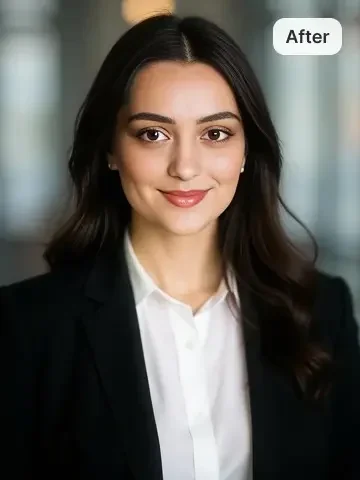
AI Professional Headshot Generator

Turn a casual selfie into a polished professional headshot in seconds. Studio lighting, corporate-grade background, sharp focus on the face — ready for LinkedIn, speaker bios, team pages, and press kits.

Choose the background style

Open in Oakgen
Professional Headshot example
Example result

AI Professional Headshot Generator

Upload a selfie, pick a background, and walk away with a studio-grade business portrait — sharp focus, polished lighting, and a corporate aesthetic that holds up on LinkedIn, in a press kit, or on a speaker bio. No photographer required.

What is Professional Headshot?

The AI Professional Headshot Generator is an image-to-image preset on Oakgen.ai that takes a casual selfie or candid portrait and re-renders it as a studio-style business headshot. You pick a background — neutral grey, light beige, blurred office, solid white, or a blue gradient — and the model applies professional lighting, sharpens focus on the face, smooths distracting elements, and produces a polished, corporate-grade portrait. It's designed for the kind of headshot you'd otherwise book a photographer to shoot: clean, on-brand, and consistent across a team or a personal-brand suite.

Features and options

  • It skips the photographer booking, studio rental, and wardrobe-and-makeup logistics that a real headshot session normally requires.
  • Backgrounds are pre-styled to match common corporate aesthetics — no manual masking or background swap step is needed.
  • The face stays sharp and the lighting reads as a real studio key-and-fill, not a phone selfie under office fluorescents.
  • It's repeatable across a team: everyone uploads a selfie, picks the same background, and the result is a consistent set of headshots in the same visual language.
  • Eligible outputs can be used commercially under Oakgen's Terms and provider terms, including for websites, press kits, and paid placements.

When to use Professional Headshot

  • You need a LinkedIn or social profile photo and the only photos you have are casual selfies.
  • You're updating a team or about page and want every headshot to share the same background and styling.
  • You're preparing a press kit, speaker bio, or media bio and need a clean portrait on short notice.
  • You're starting a new role and want a professional photo before formal headshots are scheduled.
  • You're a freelancer or founder building a personal brand and need a portrait that signals 'professional' without booking a shoot.

How to use Professional Headshot

  1. 1

    Upload a selfie or casual portrait

    Pick a clear photo where the face is well-lit and the eyes are visible. A phone selfie is fine — the model will handle the lighting upgrade.

  2. 2

    Choose a background

    Pick from neutral grey, light beige, blurred office, solid white, or a blue gradient depending on the look you want — agency-clean, corporate-classic, or modern-tech.

  3. 3

    Generate the headshot

    The model applies studio lighting, swaps in the chosen background, sharpens focus on the face, and renders a polished business-grade portrait.

  4. 4

    Download and use everywhere

    Save the final image and drop it into LinkedIn, your team page, a press kit, conference materials, or anywhere a professional headshot is expected.

Ways to use the results

LinkedIn and social profile updates

Replace an outdated or casual profile photo with a clean, professional portrait that signals authority on first glance — without scheduling a studio session.

For: Professionals, jobseekers, and personal brands

Team page refresh

Generate consistent, on-brand headshots for an entire team in a single afternoon — same background, same lighting style, fully aligned visually.

For: Startups, agencies, and remote teams

Speaker, author, and press bios

Produce a high-quality bio photo for a conference talk, book jacket, podcast appearance, or press feature without booking a photoshoot.

For: Speakers, authors, founders, and executives

Personal-brand starter kit

Spin up the first round of professional photos for a new venture or freelance practice — enough polish to launch a site, pitch deck, and proposal templates.

For: Freelancers, consultants, and new founders

Strengths

  • Studio-quality output without studio booking, lighting setup, or retouching
  • Pre-styled backgrounds remove the need for manual background swaps
  • Identity stays intact while lighting and polish are upgraded
  • Consistent visual language across a team or a personal-brand suite
  • Eligible outputs can be used commercially under Oakgen's Terms and provider terms

Trade-offs

  • Very low-light or low-resolution selfies limit how much the model can polish
  • Wardrobe is preserved from the input photo — a casual t-shirt in the source stays a casual t-shirt in the output
  • Extreme angle selfies (looking sharply up or down) are harder to render as a traditional headshot
  • Pre-set backgrounds may not match every brand palette — they're chosen for broad professional contexts

Tips for better results

  • Upload a selfie where the face is roughly centred and the eyes are clearly visible — that becomes the anchor for the studio re-lighting.
  • Wear what you'd actually wear in a real headshot if you have the choice: clean collar, no busy patterns, neutral colours hold up best.
  • Pick the background that matches the context: neutral grey reads classic-corporate, blurred office reads modern-tech, solid white reads agency-clean.
  • If the first render feels too 'studio' for your brand, try the blurred office background — it keeps a corporate feel with a softer, more candid energy.
  • For team consistency, have every team member use the same background option so the final set reads as a single visual system.

Professional Headshot vs the alternatives

vs Booking a professional photographer
A real photoshoot is still the gold standard for executive portraits or campaign photography — there's a person on set making creative calls in real time. But it costs hundreds to thousands per person and takes days to schedule and deliver. The AI Professional Headshot Generator hits the bar for LinkedIn, team pages, press kits, and most business use cases in seconds, at a fraction of the cost. Book a photographer for hero campaign work; use the AI preset for everything that doesn't justify the studio overhead.
vs Filter-based selfie apps
Selfie-enhancement apps apply skin smoothing, teeth whitening, and a softening pass — useful for casual posting, but the result still reads as a selfie, not a headshot. The AI Professional Headshot Generator re-renders the portrait with studio lighting and a pre-styled corporate background, so the output reads as a real business photo. Use a filter app for social posts; use the AI preset when the photo needs to signal 'professional' on first glance.
vs Manual background swap in photo-editing software
Cutting out a face in photo-editing software, masking the hair, and dropping in a new background is a common DIY headshot trick — but the result usually looks pasted because the lighting on the face doesn't match the new background. The AI preset re-lights the face along with the background swap, which is the step manual edits almost always miss. Pick manual editing if you want pixel-level control; pick the AI preset for a unified look out of the box.

Frequently asked questions

What is the AI Professional Headshot Generator?

It's an image-to-image preset on Oakgen.ai that converts a casual selfie or candid portrait into a polished, studio-style business headshot. You pick a professional background and the model applies studio lighting, sharpens the face, and produces a corporate-grade portrait ready for LinkedIn, team pages, and press use.

Can I use the headshots commercially?

Yes. Oakgen does not claim ownership of eligible outputs, and commercial use is subject to Oakgen's Terms, the model provider's terms and your rights in the inputs. You can publish the headshots on company websites, in press kits, on paid social, on conference materials, in client decks, and on team and about pages.

Will the output still look like me?

Yes. The preset is tuned to preserve identity while upgrading lighting, background, and polish. The face shape, features, and overall recognisability stay intact — what changes is the lighting quality, the background, and the corporate finish.

Which background should I pick?

Neutral grey is the safest classic-corporate choice. Light beige reads warm and editorial. Blurred office signals modern-tech and remote-work brands. Solid white is the cleanest agency look. Blue gradient adds a touch of modern polish without going overboard. Pick the one that best matches the context the photo will live in.

What kind of selfie works best as the input?

A clear, well-lit photo with the face roughly centred, the eyes visible, and the head not tilted to an extreme angle. Phone selfies are fine — the model upgrades the lighting and styling automatically. Avoid heavy shadows, sunglasses, or low-resolution screenshots.

Can a team get a consistent set of headshots from this?

Yes. Have each team member upload their own selfie and select the same background option. The result is a set of headshots in a consistent visual language — useful for team pages, leadership sections, and pitch decks.

Related AI tools
