WAN 2.7: Complete Guide to Alibaba's Controllable AI Video Model (2026)
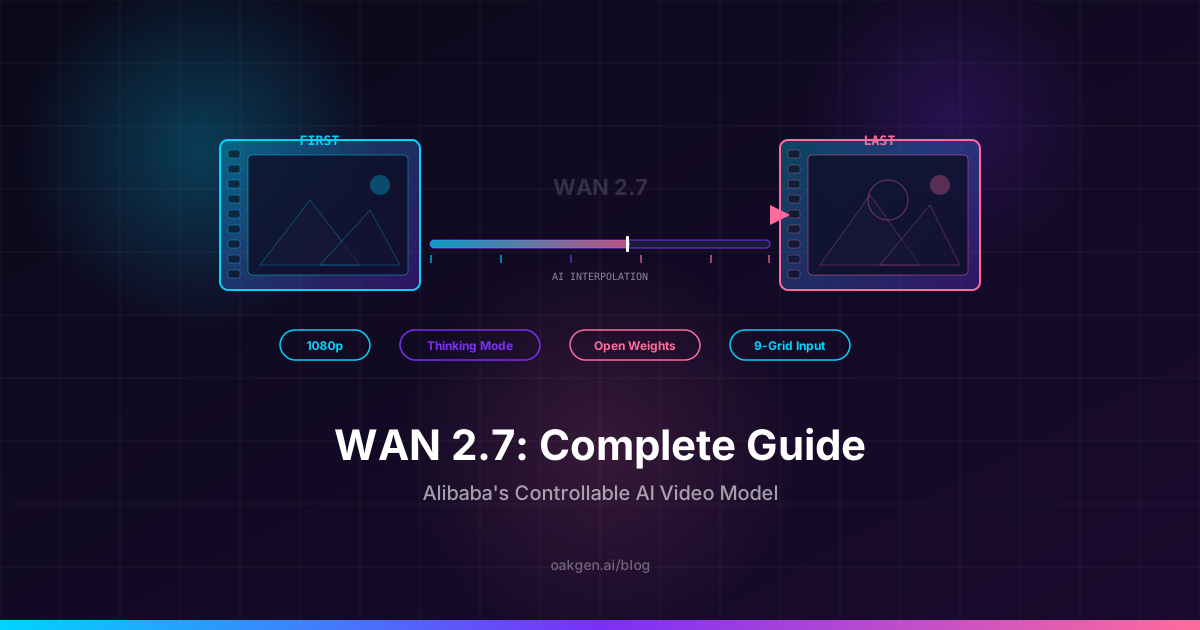
WAN 2.7 is Alibaba's latest open-weights video generation model, and it introduces something most AI video tools still lack: real control over what happens between the first frame and the last. With first/last frame conditioning, a new thinking mode for complex prompts, 9-grid image-to-video, and reference video support, WAN 2.7 is the most controllable open-source video model available in May 2026.
We have been testing WAN 2.7 since its release, running it through dozens of generation scenarios and comparing it against WAN 2.6, Seedance 2.0, Kling 3.0, and Veo 3.1. This guide covers the full picture -- what changed from 2.6, how each new feature actually works, practical prompts, honest limitations, and when to pick WAN 2.7 over the competition.
Oakgen does not offer any WAN model. This guide covers WAN 2.7 as a standalone model. If you want a controllable video model inside Oakgen, Seedance 2.0 and Kling 3.0 are both available there.
What Changed from WAN 2.6 to WAN 2.7
WAN 2.6 (also not offered on Oakgen) earned its reputation as the budget king of AI video. At roughly $0.035 per generation, it was one of the cheapest ways to produce usable 1080p AI video with decent motion quality. But it had clear gaps: no frame-level control, no way to guide how a clip ends, and inconsistent results on complex multi-action prompts.
WAN 2.7 keeps the open-weights philosophy and competitive pricing while adding five major capabilities that directly address those gaps.
Here is how the two versions compare:
| Spec | WAN 2.7 | WAN 2.6 |
|---|---|---|
| Max Resolution | 1080p (1920x1080) | 1080p (1920x1080) |
| Max Duration | 5-10 seconds | 5 seconds |
| First/Last Frame Control | Yes | No |
| Thinking Mode | Yes | No |
| 9-Grid Image-to-Video | Yes | No |
| Reference Video | Yes (motion + style) | Basic reference only |
| Multi-Shot Narratives | Yes (improved) | Yes |
| Open Weights | Yes (Apache 2.0) | Yes (Apache 2.0) |
| Text-to-Video | Yes | Yes |
| Image-to-Video | Yes (enhanced) | Yes |
| Character Consistency | Improved via 9-grid | Reference system |
| Motion Quality | Very Good | Good |
| Prompt Adherence | Strong (thinking mode) | Moderate |
The short version: WAN 2.7 costs slightly more per generation but gives you dramatically more control over the output. It is a better fit when you need predictable motion, stronger prompt adherence, and cleaner shot-to-shot continuity.
Key Features
First/Last Frame Conditioning
This is the headline feature and the one that matters most for practical video work.
With first/last frame control, you provide two images -- one for the opening frame and one for the closing frame -- and WAN 2.7 generates the motion in between. The model interpolates movement, camera changes, and scene transitions to connect your start point to your end point.
Why this matters: most AI video models give you a starting image (image-to-video) and then the motion goes wherever the model decides. You get surprises, some good, most frustrating. First/last frame conditioning eliminates that randomness. You define the destination. The model fills in the journey.
Use cases we found most effective:
- Product reveals -- Start with a closed box, end with the product displayed. The model generates the unboxing motion.
- Before/after transformations -- Provide a "before" room photo and an "after" renovation photo. WAN 2.7 creates the transformation sequence.
- Character movement -- Set a starting pose and ending pose. The model interpolates natural body movement between them.
- Scene transitions -- Start in one environment, end in another. The model generates a cinematic transition connecting them.
Thinking Mode
WAN 2.7 introduces a "thinking mode" that spends additional compute time analyzing your prompt before generating. When enabled, the model breaks down complex prompts into sequential actions, spatial relationships, and temporal ordering before starting the diffusion process.
In our testing, thinking mode produced noticeably better results on prompts with three or more actions. A prompt like "a woman picks up a coffee cup, takes a sip, then sets it back down and smiles" would often get garbled or truncated by WAN 2.6. With WAN 2.7's thinking mode, all four actions appear in the correct sequence.
The tradeoff: thinking mode adds roughly 30-50% to generation time. For simple single-action prompts ("a cat sleeping on a windowsill"), it adds latency without improving quality. We recommend enabling it selectively for complex, multi-step prompts.
9-Grid Image-to-Video
This feature is unusual and genuinely clever. Instead of providing a single reference image, you provide a 3x3 grid of nine images of the same subject from different angles, expressions, or poses. WAN 2.7 uses this grid to build a much richer understanding of the subject before generating video.
The result is significantly better character consistency and 3D understanding. When the camera rotates around a subject, features that were hidden in a single reference image are now informed by the additional angles in the grid.
Creating the 9-grid is the main barrier. You need nine coherent images of the same subject. For product shots, this is straightforward -- photograph your product from nine angles. For characters, you can generate the grid using an image model such as FLUX 2 Pro on Oakgen's AI Image Generator, then feed the grid into WAN 2.7.
Reference Video
WAN 2.7 accepts a reference video clip to guide motion style and pacing. Upload a clip showing the type of movement you want -- a smooth tracking shot, a handheld walk, a slow zoom -- and the model will replicate that motion behavior while generating your new content.
This is similar in concept to Seedance 2.0's @ reference system, though less granular. Seedance lets you separately tag @camera, @action, @effect, and @style. WAN 2.7's reference video applies holistically -- it influences the overall motion character of the output rather than letting you isolate specific attributes.
For creators who want a simpler workflow and do not need per-attribute reference control, WAN 2.7's approach is faster and more intuitive. For those who need surgical precision, Seedance 2.0 remains the reference-control champion.
Improved Multi-Shot Narratives
WAN 2.6 introduced basic multi-shot capability. WAN 2.7 refines it with better temporal coherence across shots and more consistent character appearance when generating connected scenes. Combined with first/last frame conditioning, you can now chain shots where the last frame of shot one becomes the first frame of shot two -- creating continuous narrative sequences.
How to Use WAN 2.7
WAN 2.7 is not available on Oakgen. You can run it through Alibaba's own platform, through third-party API providers, or by self-hosting the open weights.
Step 1: Pick where to run it. Choose a host that exposes the WAN 2.7 modes you need: text-to-video, image-to-video, and first/last frame.
Step 2: Choose Your Mode.
- Text-to-video: Type your prompt and generate. Best for exploration and rapid iteration.
- Image-to-video: Upload a starting image plus your prompt. Best for animating existing visuals.
- First/last frame: Upload two images (start and end) plus your prompt. Best for controlled transitions and transformations.
Step 3: Configure Settings. Set your aspect ratio (16:9, 9:16, or 1:1), duration, and whether to enable thinking mode. For complex prompts with multiple actions, toggle thinking mode on.
Step 4: Generate. Hit generate and wait. Standard mode takes about 30-60 seconds. Thinking mode adds 15-30 seconds.
Step 5: Iterate. Regenerate with tweaked prompts, try different reference images, or switch to another model entirely. If you want to compare against other models, Oakgen lets you test the same prompt on Kling 3.0, Seedance 2.0, and other models in one place.
Compare Seedance 2.0 and Kling 3.0 on Oakgen
Best Prompts for WAN 2.7
We tested dozens of prompts across different categories. These three consistently produced strong results. Copy them directly or modify for your needs.
Cinematic Scene with Thinking Mode
A detective in a long coat walks through a foggy alley at night.
Street lamps cast amber pools of light on wet cobblestones. She
pauses at the end of the alley, looks over her shoulder, then
pushes through a heavy wooden door into a warmly lit bar interior.
Slow tracking shot following from behind, transitioning to a
frontal medium shot as she enters the bar.
Enable thinking mode for this one. The multi-step action sequence (walk, pause, look, push door, enter) benefits from the model's planning phase. Without thinking mode, WAN 2.7 tends to compress or skip the middle actions.
Product Reveal with First/Last Frame
A luxury watch emerges from shadow into warm studio spotlight.
Slow clockwise rotation revealing the dial, crown, and bracelet
details. Shallow depth of field with soft reflections on the
polished metal surface. Studio product photography lighting.
Provide a dark silhouette of the watch as the first frame and a fully lit, detailed product shot as the last frame. WAN 2.7 generates the reveal motion between them -- a smooth lighting transition that feels like a professional product video.
Character Animation with 9-Grid Reference
A young woman in a red jacket walks through a busy Tokyo street
crossing at dusk. She looks up at the neon signs, smiles slightly,
and continues walking. Camera follows at eye level, handheld style
with subtle movement. City lights reflect on her jacket.
Pair this with a 9-grid reference of the character showing front, side, and back angles with different expressions. The 9-grid gives WAN 2.7 enough information to maintain consistent facial features as the camera angle shifts during the walk.
Honest Limitations
No point pretending WAN 2.7 does everything perfectly. Here is where it falls short.
Resolution caps at 1080p. While 1080p is fine for social media and web content, it is behind Kling 3.0 and Veo 3.1, both of which output native 4K. If your final deliverable is a 4K broadcast or large-screen display, WAN 2.7 will need upscaling.
Hands and fine details are still inconsistent. This is an industry-wide problem, not unique to WAN, but worth noting. Close-ups of hands manipulating objects produce artifacts in about 30% of generations. Wide and medium shots handle hands much better.
Audio is not native. Unlike Seedance 2.0 and Veo 3.1, WAN 2.7 generates silent video only. You will need to add audio in post or use Oakgen's music and audio tools separately.
9-grid setup requires effort. The 9-grid image-to-video feature produces excellent results but creating a coherent 9-image grid is a manual step that adds friction. We expect tooling to simplify this over time.
Complex camera movements can drift. For shots requiring precise, sustained camera paths (long tracking shots, orbital moves), WAN 2.7 sometimes drifts from the intended trajectory after 4-5 seconds. Reference video helps, but does not fully eliminate this.
Thinking mode is not always worth the wait. On simple prompts, thinking mode adds 30-50% latency with no visible quality gain. It is only worth enabling for prompts with three or more sequential actions.
When to Choose WAN 2.7 vs Other Models
Here is our opinionated take on which model to reach for in different scenarios.
Choose WAN 2.7 for controlled transitions. First/last frame conditioning is WAN 2.7's strongest differentiator. No other model at this price point gives you explicit control over how a clip starts and ends. For product reveals, before/after transformations, and scene transitions, WAN 2.7 is the best value in May 2026.
Choose WAN 2.7 for budget-friendly iteration. At a low per-generation cost, WAN 2.7 is still one of the cheapest models available. Run 50 iterations for the cost of 5 generations on a premium model. When you are exploring ideas and need volume, this matters.
Choose WAN 2.7 if open weights matter. WAN 2.7 ships under Apache 2.0. You can self-host, fine-tune, and modify it. For teams building custom video pipelines or needing on-premise deployment, WAN 2.7 is one of the few serious options.
Choose Seedance 2.0 for multi-modal reference control. If you need to separately control camera movement, action choreography, effects, and style from different reference sources, Seedance 2.0 does this better than anything else. Its @ reference system is more granular than WAN 2.7's holistic reference approach.
Choose Kling 3.0 or Veo 3.1 for maximum quality. For hero shots where resolution and visual fidelity are non-negotiable -- campaign videos, broadcast content, portfolio pieces -- Kling's native 4K/60fps or Veo 3.1's 4K output with native audio are worth the premium. See our Seedance vs Kling 3 comparison for a detailed breakdown.
Choose WAN 2.7 + a premium model together. The smartest workflow we have seen is using WAN 2.7 for iteration and exploration (cheap, fast, controllable), then switching to Kling or Veo for the final hero renders once you have locked in the prompt, framing, and motion. WAN 2.7 and Veo are not on Oakgen, but Kling 3.0 and Seedance 2.0 are, sharing one interface and credit balance.
For filmmakers and content creators working on multi-shot projects, WAN 2.7's first/last frame chaining makes it an excellent storyboarding and pre-visualization tool before committing premium credits to final renders.
WAN 2.7 for Different Workflows
Social Media Teams
At WAN 2.7's low per-generation cost, you can produce a week's worth of short-form video content for a few dollars. Use first/last frame control to create consistent branded transitions. Batch-generate variations and pick the strongest performers.
E-Commerce Product Videos
Upload product photos as first and last frames to create smooth reveal sequences. The 9-grid feature is tailor-made for products -- photograph your item from nine angles and WAN 2.7 generates rotation videos with accurate 3D form.
Storyboard Pre-Visualization
For filmmakers planning shots, WAN 2.7's first/last frame mode lets you block out scene transitions at low cost. Set your establishing shot as frame one and your close-up as the last frame, then let WAN 2.7 generate the camera movement between them.
AI Art and Experimentation
The open-weights architecture means researchers and artists can fine-tune WAN 2.7 for specific aesthetic styles. Pair it with custom LoRAs (once community fine-tunes emerge) for style-specific video generation that closed models cannot match.
Pricing
WAN 2.7 pricing depends on where you run it: API providers charge per generation, and self-hosting costs whatever your GPU time costs. It is not offered on Oakgen.
If you want one credit balance across several video models, Oakgen's plans cover models like Seedance 2.0 for reference-controlled work and Kling 3.0 for 4K hero shots.
Earn 25% recurring on every referral.
Share Oakgen, get paid every month they stay.
Frequently Asked Questions
Is WAN 2.7 free to use?
The weights are free to download under Apache 2.0, so self-hosting costs only your GPU time. Hosted API providers charge per generation. WAN 2.7 is not available on Oakgen.
What is the difference between WAN 2.7 and WAN 2.6?
WAN 2.7 adds five major features over WAN 2.6: first/last frame conditioning, thinking mode for complex prompts, 9-grid image-to-video for better character consistency, reference video support, and improved multi-shot narratives. Resolution remains at 1080p. See the comparison table above for the full breakdown.
Can WAN 2.7 generate 4K video?
No. WAN 2.7's maximum native resolution is 1080p. For native 4K output, use Kling 3.0 (available on Oakgen) or Veo 3.1. You can upscale WAN 2.7 output to 4K using external tools, but native 4K is not supported.
Is WAN 2.7 open source?
Yes. WAN 2.7 is released under the Apache 2.0 license, making it fully open weights. You can download, self-host, fine-tune, and modify the model. If you do not want to manage GPU servers, hosted API providers run it for you.
How does first/last frame control work?
Upload two images: one for the first frame of your video and one for the last frame. Add a text prompt describing the motion and scene. WAN 2.7 generates video that starts at your first image, transitions through the described action, and arrives at your last image. The model handles all interpolation, motion, and camera movement between the two endpoints.
Should I always use thinking mode?
No. Thinking mode is most useful for prompts with three or more sequential actions or complex spatial relationships. For simple, single-action prompts, standard mode produces equivalent results 15-30 seconds faster. We recommend trying your prompt in standard mode first and switching to thinking mode only if the output misses actions or gets the sequence wrong.
What to Read Next
- Seedance 2.0: Complete Guide to ByteDance's Multi-Modal AI Video Model -- The other major contender for controllable AI video in 2026, with its unique @ reference system and native audio.
- Veo vs Kling vs Wan: AI Video Model Comparison 2026 -- Side-by-side comparison of the top models across resolution, quality, speed, and cost.
- AI Video Prompts That Work: Real Examples and Techniques -- Tested prompts and prompting strategies that produce better results across all video models.