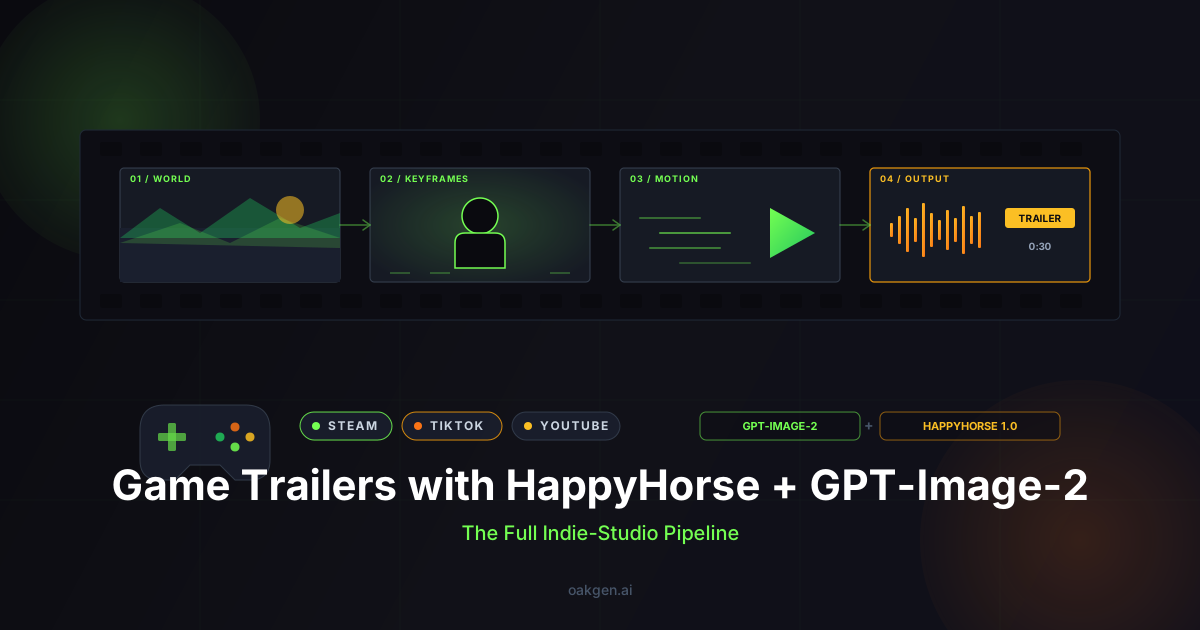
A finished game trailer is three jobs stacked: a coherent visual world, a sequence of beats that sells the hook in 30 seconds, and motion that makes still frames believable. Until 2026, indie devs without a cinematics budget either cobbled together engine renders or paid an agency four figures for thirty seconds. With HappyHorse 1.0 -- the top-ranked video model on the Artificial Analysis Video Arena at 1381 Elo, purpose-built for image-to-video with baked-in ambient audio -- and GPT-Image-2 (the typography- and character-consistency king for keyframes) on Oakgen's shared credit pool, the same pipeline is an afternoon's work. This post is the workflow -- prompts, aspect ratios, common mistakes, and a full boss-reveal example.
Why Two Models, Not One
Most "make a trailer with AI" guides hand you a single text-to-video model and tell you to pray. That fails because text-to-video models drift. Ask HappyHorse to generate "the silver-armored knight protagonist" twice in a row and you get two different knights -- different helmet, different cape, different sword. Across a 30-second cut, that drift is a wardrobe change every three seconds.
The fix is to separate the two problems. Identity and style are an image problem -- solve them once with a model that has strong character and prop consistency, save the outputs as a reusable Visual Bible, and you've locked the look of every shot. Motion and audio are a video problem -- feed each Bible frame into an image-to-video model with native audio, and the motion pass inherits the locked identity from the source frame.
GPT-Image-2 is the right tool for layer 1: its typography rendering is the best in the current image-model lineup (logos, engravings, and UI text actually stay legible), and its character consistency across prompts is noticeably tighter than FLUX Pro 1.1 or Imagen 4 Ultra for stylized subjects. You can also explore other keyframe options on Oakgen's text-to-image page. HappyHorse 1.0 is the right tool for layer 2 because it accepts an image input, generates 1080p at ~10 seconds per clip, and -- most importantly -- bakes in ambient SFX in a single pass so you don't have to source footstep, wind, and impact sounds separately. Both bill against the same credit balance on Oakgen.
The 3-Layer Pipeline
Layer 1: VISUAL BIBLE (GPT-Image-2)
   Lock character, environment, prop/UI, title plate
   -> 8-15 consistent keyframes

Layer 2: STORYBOARD COMPOSITION
   Map keyframes to beats; pick aspect per platform;
   tag camera intent for each shot

Layer 3: MOTION PASS (HappyHorse 1.0)
   Image-to-video on each keyframe; specify camera move
   + ambient audio in the prompt; 5-15s clips, audio baked in

EDITORIAL ASSEMBLY
   Cut in any NLE; optional bespoke score; add title plate
Aspect Ratio Decisions Up Front
The single highest-leverage decision. Re-running the entire pipeline because you generated at 16:9 and now need 9:16 for TikTok costs you the day. Pick before the first keyframe.
| Platform | Aspect | Keyframe target | Length sweet spot |
|---|---|---|---|
| Steam capsule trailer | 16:9 | 1920x1080 | 30-60s, cuts of 4-8s |
| YouTube reveal | 16:9 | 1920x1080 | 60-90s |
| TikTok / Reels / Shorts | 9:16 | 1080x1920 | 15-30s, cuts of 2-4s |
| Instagram feed | 1:1 | 1080x1080 | 15-30s |
| Twitter/X embed | 16:9 or 1:1 | 1920x1080 | Under 30s |
Generate the Visual Bible at 16:9 because it carries the most environmental detail, then re-frame via crop or out-paint for 9:16 or 1:1 social cuts. GPT-Image-2 handles tasteful crops well; HappyHorse inherits whichever aspect you feed it.
Layer 1: Building the Visual Bible with GPT-Image-2
The Visual Bible is the contract every later shot must respect. For a typical 30-second trailer, you want roughly: 2-3 hero portraits of the protagonist, 1-2 master shots of each major location, 1 prop sheet with the signature weapon or HUD element, and 1 logo / title plate (where GPT-Image-2's typography earns its keep).
Lead every keyframe prompt with the same style anchor sentence. The anchor is the single biggest tool against style drift: paste it into every prompt verbatim. Treat it like a system prompt for your entire trailer.
If you prefer to iterate on your style anchor conversationally before committing, Oakgen's Agent Chat lets you brainstorm prompt phrasing with an AI assistant and then send the final prompt directly to the image generator -- useful when you're still locking the art direction.
Real prompt: hero portrait
Style anchor: high-fantasy painterly cinematic, desaturated steel-blue
and ember-orange palette, dramatic chiaroscuro, soft volumetric fog,
35mm anamorphic lens look, no text, 16:9.

Subject: full-body portrait of Sirien Vale, silver-armored knight
protagonist of "Ashveil". Three-quarter pose, helmet held under left
arm. Ash-blonde hair tied back. Etched plate armor with copper inlay
on pauldrons and gauntlets. Crimson cloak frayed at the edge. Pale
grey eyes, steady expression. Greatsword "Ember-Tongue" rests point-
down in right hand, faint embers along the fuller. Stone pillar
behind catches one shaft of golden light from upper-left.
Run 3-4 times, pick the best, and Sirien is locked. The next prompt re-uses the same name, descriptors, and anchor.
Real prompt: environment master shot
[same style anchor as above]

Wide establishing shot of the Ashveil throne hall. Vast gothic
interior of black stone, ribbed vaults rising into darkness. Two
rows of broken statues line the central aisle, faces eroded. Cracked
obsidian throne at the far end on a raised dais, empty. Cold blue
light shafts cut diagonally through tall narrow windows on the right
wall, embers floating in the air. Camera: low and centered on the
aisle, throne in the deep distance. No characters in frame.
Notice the camera position line. Telling GPT-Image-2 the camera now means the still is pre-composed for the motion pass -- the throne is the focal anchor, the aisle gives HappyHorse a clean dolly path.
Real prompt: title plate / logo
[style anchor, no fog, clean negative space, 16:9]

Title plate. The word "ASHVEIL" in a custom serif inspired by hand-
engraved blackletter, slightly weathered, deep ember-orange fill
with thin steel-blue inner glow. Wide letter spacing. Centered on
deep charcoal with faint ash particles drifting upward. Below the
title, a small tagline in a clean modern serif: "the throne
remembers". Crisp letterforms, no smudging, no duplicated glyphs.
"No smudging, no duplicated glyphs" is a real risk with most image models, but typography is GPT-Image-2's sharpest skill in the current lineup.
Layer 2: Storyboard Composition
Once the Bible is locked, map keyframes to beats. A 30-second trailer has four beats: Hook (0-5s) -- one strong image, audio sting, no exposition. World build (5-15s) -- 2-3 shots establishing tone and stakes. Reveal (15-25s) -- the hero moment, boss, or gameplay tease. CTA (25-30s) -- title plate and wishlist line.
For each beat, write down which Bible frame is the source, what camera move HappyHorse should perform, what ambient audio to bake in, and how long the clip should be. A 30-second cut burns 5-7 HappyHorse generations -- under a minute of wall-clock generation time on Oakgen.
Layer 3: Motion Pass with HappyHorse 1.0
HappyHorse takes text + image. You feed it a Bible keyframe as the image input, and the text prompt describes only what should change -- the camera move, the subject's micro-action, and the ambient audio. Do not re-describe the entire scene. The image already has the scene; you're directing the change.
Real motion prompt: dolly through throne hall
Image input: ashveil_throne_hall_master.png

Slow continuous dolly forward down the central aisle toward the
empty obsidian throne. Shafts of cold blue light shift subtly as
the camera moves through them. Embers drift upward. No characters.
Camera height stays low, aisle-level. 12 seconds, 16:9, 1080p.

Audio: cavernous reverberant ambience, distant low rumble, soft
ember crackle, faint dripping water. No music, no voice.
The audio line is what HappyHorse's single-pass architecture is for. It bakes the ambience into the same forward pass as the visual -- not silent video plus post-hoc ambience, but a clip that already sounds like a throne hall.
Real motion prompt: hero turn
Image input: sirien_vale_hero_portrait.png

Sirien turns her head slowly to face camera over three seconds, then
lifts her helmet and slides it on, visor dropping with a metallic
clink. Camera holds static with slight push-in. Embers along the
greatsword blade pulse once. 8 seconds, 16:9, 1080p.

Audio: soft armor-plate creak on the turn, sharp metallic clank as
the visor closes, low ember crackle, distant wind. No music.
Two things. The action is small -- turn head, put on helmet. HappyHorse handles small focused actions far better than "fights three enemies in a duel." And the audio cue ("metallic clank as the visor closes") tells the model exactly when the SFX should hit -- temporal alignment between visual and audio events is what the single-pass architecture is good at.
Real motion prompt: boss reveal
Image input: ashveil_boss_silhouette.png

The figure on the throne slowly raises its head. Two ember-orange
eyes ignite brighter, then narrow. Smoke rolls forward off the
throne's base toward camera. Camera pushes in steadily. No body
movement below the head. 10 seconds, 16:9, 1080p.

Audio: deep low sub-bass swell rising across the clip, single sharp
ember-crackle on eye-ignition, faint distant wind. No music, no
dialogue.
The hero shot of the whole trailer. Generate this one 4-5 times and pick the best -- the small extra credit cost is worth it for the frame people will actually screenshot.
Generate HappyHorse 1.0 Videos Now
A Full Boss-Reveal Pipeline (Worked Example)
The brief: a 30-second Steam trailer for a fictional dark-fantasy game called Ashveil, ending on a boss reveal.
Visual Bible (Layer 1): 9 GPT-Image-2 generations -- Sirien three-quarter portrait, Sirien close-up with helmet, Sirien walking-away wide, throne hall master, close on the empty obsidian throne, boss silhouette on the throne, greatsword prop sheet, side-lit corridor B-roll, and the "ASHVEIL" title plate.
Storyboard (Layer 2):
| Beat | Time | Source frame | Motion intent | Aspect |
|---|---|---|---|---|
| Hook | 0-4s | #4 throne hall master | Slow dolly forward | 16:9 |
| Build 1 | 4-9s | #3 Sirien walking away | Tracking shot following | 16:9 |
| Build 2 | 9-14s | #8 corridor | Slow pan, embers drifting | 16:9 |
| Build 3 | 14-19s | #2 Sirien close-up | Static, helmet visor light flicker | 16:9 |
| Reveal | 19-26s | #6 boss silhouette | Push-in, eyes ignite | 16:9 |
| CTA | 26-30s | #9 title plate | Static with ash particles drifting | 16:9 |
Motion pass (Layer 3): 6 HappyHorse generations, ~10 seconds each. Re-roll 2-3 for better motion, so figure 9-12 generations of credit cost.
Editorial assembly: Drop the six clips into any NLE, cut to a percussive audio bed (or generate a bespoke score with Suno on Oakgen -- HappyHorse's baked audio is ambient/SFX-quality, not orchestral), add the wishlist CTA over the title plate, export. For TikTok versions, re-frame the same 6 keyframes to 9:16 through GPT-Image-2 and re-run the motion pass. Same prompts, same Bible, different aspect.
Common Mistakes (And How to Avoid Them)
1. Style drift across the Visual Bible. Symptom: the hero looks like three different people across the trailer. Fix: every GPT-Image-2 prompt starts with the same style anchor sentence and the same character block. Copy-paste, do not paraphrase.
2. Missing camera direction in the motion pass. Symptom: HappyHorse decides to do a random handheld shake, or zooms when you wanted a static hold. Fix: name the camera move explicitly in every prompt ("slow continuous dolly forward", "static hold", "tracking at waist height"). HappyHorse takes text + image only -- it has no @camera reference like Seedance 2.0, so the words have to do the job.
3. Over-promising the audio. Symptom: you wrote "epic orchestral score with choir" and got something thin and ambient. Fix: HappyHorse's native audio is single-pass ambient and SFX. It is genuinely good at footsteps, wind, ember crackle, metallic impacts, low rumble. It is not a music model. Score separately with Suno or Lyria 2 on Oakgen.
4. Too much action in one clip. Symptom: "Sirien fights three enemies, dodges, parries, finishes with a backflip" produces a confused mess. Fix: one clear action per clip. Multi-beat choreography is multiple clips, cut together.
5. Ignoring aspect ratio until editorial. Symptom: 16:9 footage, crushed framing on the TikTok cut. Fix: decide aspect per platform up front, generate the Bible at 16:9 for max detail, re-frame via GPT-Image-2 before the motion pass.
6. Long sequences amplify drift. Even with a locked Bible, a 60s trailer has more drift than a 30s one. Keep it short. If you must go longer, re-use Bible frames with different camera moves rather than generating fresh frames.
Honest Limitations
The pipeline above is the strongest indie-trailer workflow available in April 2026, but it has real edges.
- HappyHorse takes text + image only. Seedance 2.0's @camera and @action reference system lets you upload a video clip and tell the model "match this exact camera move." HappyHorse cannot. If you have a reference film clip whose camera language you want to copy, you'll get closer with Seedance 2.0 -- at the cost of slightly weaker text-to-video quality and slower generation.
- Style drift can still occur on long sequences. Locking the Visual Bible cuts the worst of it, but HappyHorse still has shot-to-shot variance in lighting and minor detail. Trailers under 30 seconds handle this fine; longer cinematics need a manual color-grade pass.
- Native audio is ambient and SFX, not bespoke score. HappyHorse's single-pass audio is excellent for environmental and event sounds. It is not a music model. Bring your own score.
- HappyHorse caps at 1080p and 15s clips (paid tier). For native 4K, Kling 3.0 is on Oakgen. For single clips over 15s, Sora 2 supports up to 20s. Most trailer use cases fit within HappyHorse's envelope.
- GPT-Image-2 does not have perfect character consistency. It is the best in the current image-model lineup, but on prompt 7 of a session you will still see drift. Re-state the full character block every prompt.
For most indie devs none of these are dealbreakers -- but knowing where the cliffs are matters.
Editorial Assembly Notes
Cut on motion -- join clips at peak motion of the outgoing into starting motion of the incoming; hides micro-discontinuities. Audio crossfades, not hard cuts (50-200ms) -- HappyHorse bakes ambience per clip, so hard cuts create audible room-tone switches. Color match in the NLE -- one grade across the timeline compensates for per-clip lighting drift. Reinforce SFX -- HappyHorse's baked audio gets you 80%; layer library SFX for sword clangs or footsteps that need more impact. Title card designed, not generated -- overlay wishlist URL as NLE text for pixel-sharp typography.
For multi-shot work beyond a single trailer -- full vertical-slice cinematics, 90-second YouTube reveals -- the same pipeline holds, but you'll want deeper continuity discipline. The companion piece on multi-shot sequences covers that.
Earn 25% recurring on every referral.
Share Oakgen, get paid every month they stay.
Frequently Asked Questions
Can I use AI-generated game trailers commercially on Steam or console storefronts?
Yes. Both GPT-Image-2 and HappyHorse 1.0 grant commercial-use rights on outputs generated through their APIs. Steam, Epic, and console storefronts do not currently prohibit AI-generated marketing assets. That said, platform policies evolve -- check the current terms of service for your target storefront before publishing, and always disclose AI use if the platform requests it.
How many credits does a full 30-second trailer cost on Oakgen?
A typical 30-second trailer using this pipeline runs 9 GPT-Image-2 keyframes plus 9-12 HappyHorse motion generations (including re-rolls for the hero shot). That lands in the range of a few hundred credits -- well under $10 at current pricing. If you also generate a Suno score and re-frame for TikTok, budget roughly double.
Do I need game footage or engine renders to start?
No. The entire pipeline starts from text prompts -- GPT-Image-2 generates every visual asset from scratch. If you already have engine renders or concept art, you can use those as reference to write tighter prompts, but they are not required as inputs. This makes the workflow especially useful for pre-production trailers, crowdfunding pitches, or games still in the prototype phase. Oakgen's game developer tools cover the full asset pipeline from concept art through trailer.
How do I keep character consistency across 10+ keyframes?
Three techniques compound: (1) use the exact same style anchor sentence in every prompt, (2) copy-paste the full character description block verbatim rather than paraphrasing, and (3) generate multiple variants of the first hero portrait, pick the best, then reference specific visual details from the chosen output in all subsequent prompts. If drift still appears by keyframe 7-8, start a fresh session with the same prompts -- GPT-Image-2 sometimes accumulates subtle shifts within a long session.
Can HappyHorse generate gameplay footage, or only cinematics?
HappyHorse generates cinematic-style video, not interactive gameplay captures. It excels at atmospheric shots, character reveals, environment fly-throughs, and boss encounters -- the kinds of cuts that open and close a trailer. For actual gameplay footage, you still need screen recordings from your engine. The strongest indie trailers interleave both: AI cinematic beats for spectacle, engine captures for "this is real gameplay" credibility.
Conclusion
A 30-second indie game trailer with original art direction, locked character consistency, baked ambient audio, and a hero boss-reveal used to mean a four-figure agency invoice and a two-week turnaround. With GPT-Image-2 for the Visual Bible and HappyHorse 1.0 for the motion pass on Oakgen's shared credit pool, it's an afternoon's work and a sub-$10 credit spend.
The pipeline rewards directorial discipline -- locked style anchor, explicit camera moves, one action per clip, honest scoping of what each model can and can't do. Done well, the result holds up against agency work for the platforms indie devs actually ship to. Run the boss-reveal example end-to-end first.
What to read next
- AI Concept Art for Game Developers -- generate character sheets, environment paintings, and prop designs before a single line of engine code.
- AI-Generated Background Music for Indie Games -- license-free soundtracks and ambient loops to pair with your trailer or ship in-game.
- HappyHorse 1.0 Prompting Guide -- deeper on the motion-pass prompt structure, with cinematic-prompting patterns specific to HappyHorse.
- How to Build a Full AI Content Pipeline: Script to Published Video -- when trailers are just the start and you need a repeatable production workflow.
- AI in Game Development: From Asset Creation to NPC Dialogue -- the broader picture of how AI tools fit across the entire game dev pipeline in 2026.